|
|
RemoteTTSoft Co., Ltd.
|
|||||
| AnyDesk | RemoteT | |||||
|---|---|---|---|---|---|---|
Related Products
|
||||||
AnyDesk:
About
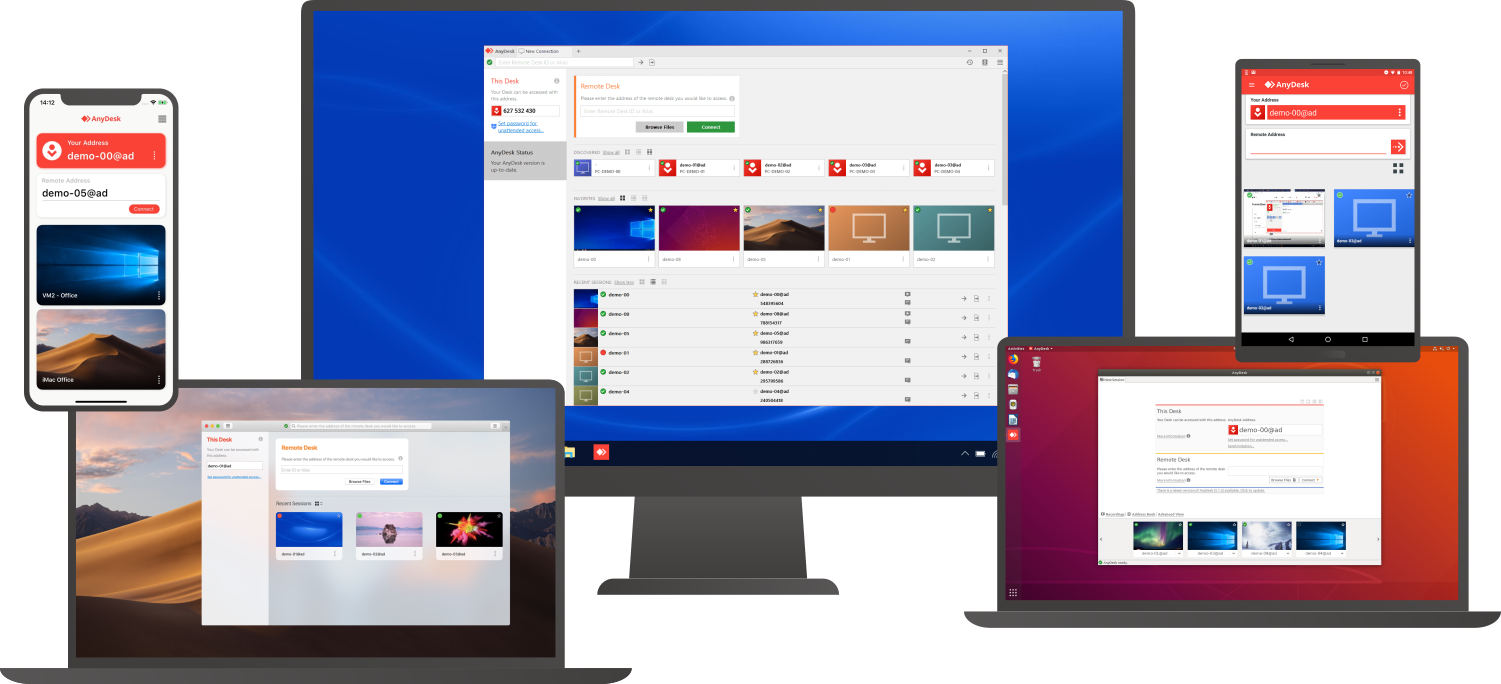
Connect to a computer remotely, be it from the other end of the office or halfway around the world. AnyDesk ensures secure and reliable remote desktop connections for IT professionals and on-the-go individuals alike. AnyDesk works across all your devices and operating systems: Windows, macOS, iOS, Android, Linux, FreeBSD and even your Raspberry Pi! Collaborate and communicate with ease, whether you’re holding online meetings and presentations or working on the same document from the other side of the world. Simply copy and paste or use the new transfer tab to transfer files between computers. No administrative privileges or installation needed. Simply download the 3MB file and you’re off. Require unattended access to your computer when you’re on the road? No problem, you’ll just need to install and set a password. Customize the AnyDesk user interface to give customers a remote desktop experience consistent with your brand.
|
RemoteT:
About
RemoteT is a multi-PC remote monitoring and control platform for managing groups of Windows computers. Its Manager software displays connected Client PCs in a unified view, lets operators open individual remote sessions, organize PCs into groups, transfer files to one or more PCs, and control multiple systems. Users install Manager on the controlling PC and Client software on each target PC, then sign in; access is also available through a web browser and Android and iOS apps. RemoteT monitors client status and system information and supports remote control, group management, and simultaneous manager access. The service is free for up to five Client PCs, with paid usage tiers for larger deployments. It is intended for IT operators and other teams responsible for shared computer environments, including schools, training centers, small offices, customer-service centers, internet cafés, and dormitories.
|
|||||
AnyDesk:
Platforms Supported
Windows
Supported
Mac
Supported
Linux
Supported
Cloud
Supported
On-Premises
Not Supported
iPhone
Supported
iPad
Supported
Android
Supported
Chromebook
Not Supported
|
RemoteT:
Platforms Supported
Windows
Supported
Mac
Not Supported
Linux
Not Supported
Cloud
Supported
On-Premises
Not Supported
iPhone
Supported
iPad
Supported
Android
Supported
Chromebook
Not Supported
|
|||||
AnyDesk:
Audience
Companies that need a remote support, remote desktop, screen sharing, and presentation tool
|
RemoteT:
Audience
IT administrators and operators managing shared or clustered Windows PCs in schools, training centers, offices, customer-service operations, internet cafés, dormitories, and similar environments.
|
|||||
AnyDesk:
Support
Phone Support
Supported
24/7 Live Support
Not Supported
Online
Supported
|
RemoteT:
Support
Phone Support
Supported
24/7 Live Support
Not Supported
Online
Supported
|
|||||
AnyDesk:
API
Offers API
Not Supported
|
RemoteT:
API
Offers API
Not Supported
|
|||||
AnyDesk:
Screenshots and Videos |
RemoteT:
Screenshots and Videos |
|||||
AnyDesk:
Pricing
$10.99 per month
Free Version
Supported
Free Trial
Supported
|
RemoteT:
Pricing
$0
Free for up to 5 Client PCs. Paid usage is charged per PC for each 30-day period, excluding the 5 free PCs; rates vary by PC-count tier and the number of concurrent Managers. Published 1-Manager rates range from ₩3,300 per PC (6–25 PCs) to ₩1,320 per PC (301–500 PCs). Longer prepayments offer discounts of 10% for 90 days, 20% for 180 days, and 30% for 360 days. VAT included.
Free Version
Supported
Free Trial
Not Supported
|
|||||
AnyDesk:
Reviews/
|
RemoteT:
Reviews/
|
|||||
AnyDesk:
Pros & Cons from Real UsersPros
Cons
|
||||||
AnyDesk:
Training
Documentation
Supported
Webinars
Not Supported
Live Online
Not Supported
In Person
Not Supported
|
RemoteT:
Training
Documentation
Supported
Webinars
Not Supported
Live Online
Not Supported
In Person
Not Supported
|
|||||
AnyDesk:
Company InformationAnyDesk Software
Founded: 2013
Germany
anydesk.com
|
RemoteT:
Company InformationTSoft Co., Ltd.
Founded: 2024
South Korea
remotet.co.kr/eng/
|
|||||
AnyDesk:
Alternatives |
RemoteT:
Alternatives |
|||||
|
AnyDesk:
|
RemoteT:
|
|||||
|
AnyDesk:
|
RemoteT: | |||||
|
AnyDesk:
|
RemoteT:
|
|||||
|
AnyDesk:
|
RemoteT:
|
|||||
AnyDesk:
Categories |
RemoteT:
Categories |
|||||
AnyDesk:
Remote Desktop Features
Chat
Not Supported
Cross-Platform Access
Supported
File Transfer
Supported
Group View
Not Supported
Mobile Device Access
Not Supported
Multi Monitor Support
Not Supported
Record Remote Sessions
Supported
Remote Print
Not Supported
Remote Wake
Not Supported
User Management
Supported
Remote Support Features
Diagnostic Tools
Not Supported
File Transfer
Supported
Live Chat
Not Supported
Real-time Chat
Not Supported
Remote Control
Supported
Screen Sharing
Supported
Session Recording
Supported
Session Transfer
Supported
Surveys & Feedback
Not Supported
Screen Sharing Features
Annotations / Drawing Tools
Not Supported
Desktop / Browser Sharing
Supported
Mobile Screen Sharing
Not Supported
Presenter Control Management
Supported
Remote Control
Supported
Screen Capture
Not Supported
Screen Mirroring
Not Supported
Screen Recording
Supported
|
||||||
AnyDesk:
Integrations
AnyDesk
Not Supported
Atera
Supported
Coronium
Supported
Devolutions Remote Desktop Manager
Supported
Halo Service Desk
Supported
HaloCSM
Supported
HaloITSM
Supported
HaloPSA
Supported
Parsec
Not Supported
RemoteT
Supported
|
RemoteT:
Integrations
AnyDesk
Supported
Atera
Not Supported
Coronium
Not Supported
Devolutions Remote Desktop Manager
Not Supported
Halo Service Desk
Not Supported
HaloCSM
Not Supported
HaloITSM
Not Supported
HaloPSA
Not Supported
Parsec
Supported
RemoteT
Not Supported
|
|||||
|
AnyDesk:
|
RemoteT:
|