|
|
JustMac.APPJustMac.app
|
|||||
| AnyDesk | JustMac.APP | |||||
|---|---|---|---|---|---|---|
Related Products
|
||||||
AnyDesk:
About
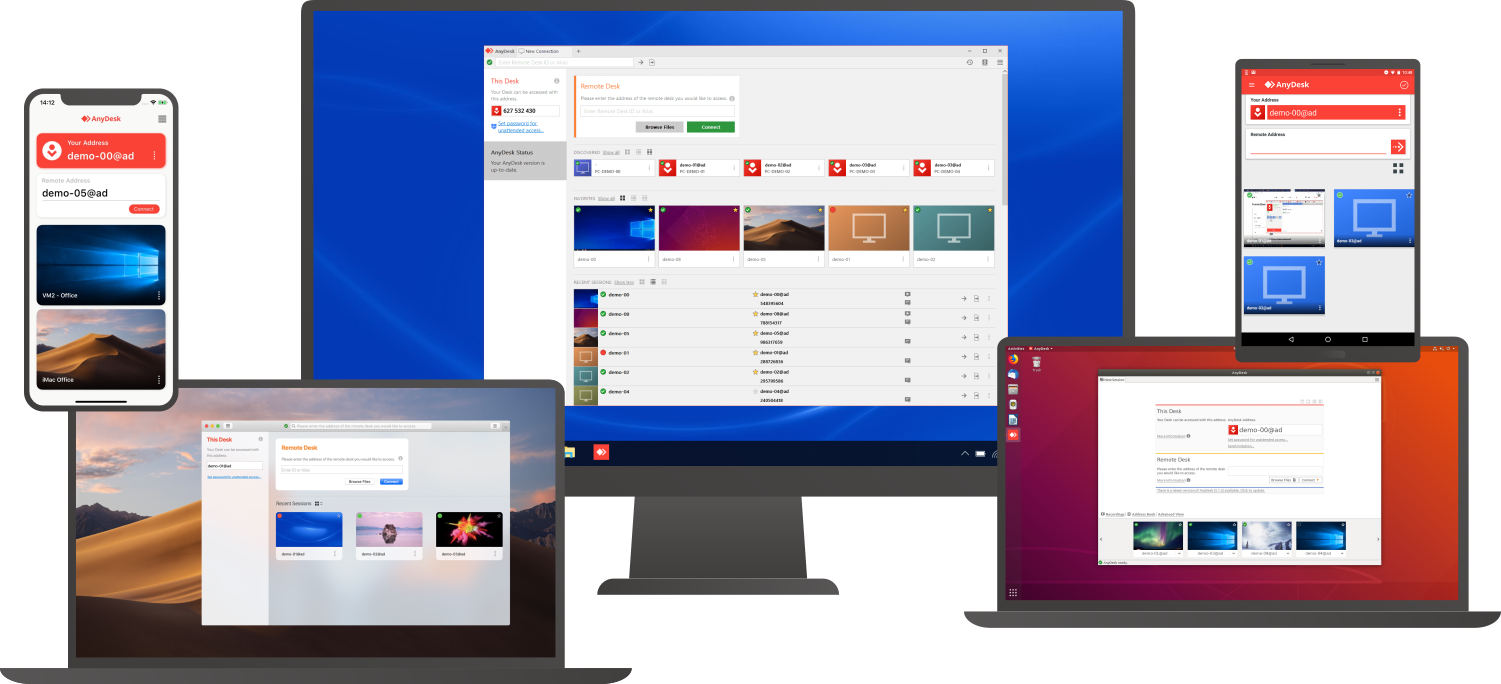
Connect to a computer remotely, be it from the other end of the office or halfway around the world. AnyDesk ensures secure and reliable remote desktop connections for IT professionals and on-the-go individuals alike. AnyDesk works across all your devices and operating systems: Windows, macOS, iOS, Android, Linux, FreeBSD and even your Raspberry Pi! Collaborate and communicate with ease, whether you’re holding online meetings and presentations or working on the same document from the other side of the world. Simply copy and paste or use the new transfer tab to transfer files between computers. No administrative privileges or installation needed. Simply download the 3MB file and you’re off. Require unattended access to your computer when you’re on the road? No problem, you’ll just need to install and set a password. Customize the AnyDesk user interface to give customers a remote desktop experience consistent with your brand.
|
JustMac.APP:
About
JustMac.APP provides short-term access to dedicated physical Macs through a browser-based remote desktop. Customers can rent a Mac by the day, week, or month, then open its macOS desktop in Chrome, Safari, Edge, or Firefox without installing a remote desktop client. The service is aimed at developers and testers who need macOS from a Windows or Linux computer, including building and signing iOS apps with Xcode, running the iOS Simulator, publishing through TestFlight or the App Store, and checking websites in Safari with Web Inspector. Users have administrator access to install development tools and can run coding agents such as Claude Code, Codex, or Cursor on the Mac. Files can be transferred through the browser in uploads of up to 8 GB, and rental data is permanently deleted one hour after a rental ends.
|
|||||
AnyDesk:
Platforms Supported
Windows
Supported
Mac
Supported
Linux
Supported
Cloud
Supported
On-Premises
Not Supported
iPhone
Supported
iPad
Supported
Android
Supported
Chromebook
Not Supported
|
JustMac.APP:
Platforms Supported
Windows
Not Supported
Mac
Not Supported
Linux
Not Supported
Cloud
Supported
On-Premises
Not Supported
iPhone
Not Supported
iPad
Not Supported
Android
Not Supported
Chromebook
Not Supported
|
|||||
AnyDesk:
Audience
Companies that need a remote support, remote desktop, screen sharing, and presentation tool
|
JustMac.APP:
Audience
Developers on Windows or Linux who need macOS and Xcode, including iOS, Flutter, React Native, and Unity developers; web developers testing in Safari; and teams running AI coding agents.
|
|||||
AnyDesk:
Support
Phone Support
Supported
24/7 Live Support
Not Supported
Online
Supported
|
JustMac.APP:
Support
Phone Support
Not Supported
24/7 Live Support
Not Supported
Online
Supported
|
|||||
AnyDesk:
API
Offers API
Not Supported
|
JustMac.APP:
API
Offers API
Not Supported
|
|||||
AnyDesk:
Screenshots and Videos |
JustMac.APP:
Screenshots and Videos |
|||||
AnyDesk:
Pricing
$10.99 per month
Free Version
Supported
Free Trial
Supported
|
JustMac.APP:
Pricing
$10/day
MacBook Air M1 rentals start at $10 USD per 24-hour day; weekly pricing starts at $35 and monthly pricing at $79. Rates vary by Mac model. Rentals are paid in advance, with optional auto-renewal. Sales tax is calculated at checkout.
Free Version
Not Supported
Free Trial
Not Supported
|
|||||
AnyDesk:
Reviews/
|
JustMac.APP:
Reviews/
|
|||||
AnyDesk:
Pros & Cons from Real UsersPros
Cons
|
||||||
AnyDesk:
Training
Documentation
Supported
Webinars
Not Supported
Live Online
Not Supported
In Person
Not Supported
|
JustMac.APP:
Training
Documentation
Supported
Webinars
Not Supported
Live Online
Not Supported
In Person
Not Supported
|
|||||
AnyDesk:
Company InformationAnyDesk Software
Founded: 2013
Germany
anydesk.com
|
JustMac.APP:
Company InformationJustMac.app
Founded: 2026
Australia
justmac.app/en/
|
|||||
AnyDesk:
Alternatives |
JustMac.APP:
Alternatives |
|||||
|
AnyDesk:
|
JustMac.APP: | |||||
|
AnyDesk:
|
JustMac.APP: | |||||
|
AnyDesk:
|
JustMac.APP:
|
|||||
|
AnyDesk:
|
JustMac.APP:
|
|||||
AnyDesk:
Categories |
JustMac.APP:
Categories |
|||||
AnyDesk:
Remote Desktop Features
Chat
Not Supported
Cross-Platform Access
Supported
File Transfer
Supported
Group View
Not Supported
Mobile Device Access
Not Supported
Multi Monitor Support
Not Supported
Record Remote Sessions
Supported
Remote Print
Not Supported
Remote Wake
Not Supported
User Management
Supported
Remote Support Features
Diagnostic Tools
Not Supported
File Transfer
Supported
Live Chat
Not Supported
Real-time Chat
Not Supported
Remote Control
Supported
Screen Sharing
Supported
Session Recording
Supported
Session Transfer
Supported
Surveys & Feedback
Not Supported
Screen Sharing Features
Annotations / Drawing Tools
Not Supported
Desktop / Browser Sharing
Supported
Mobile Screen Sharing
Not Supported
Presenter Control Management
Supported
Remote Control
Supported
Screen Capture
Not Supported
Screen Mirroring
Not Supported
Screen Recording
Supported
|
||||||
AnyDesk:
Integrations
Atera
Supported
Coronium
Supported
Devolutions Remote Desktop Manager
Supported
Halo Service Desk
Supported
HaloCSM
Supported
HaloITSM
Supported
HaloPSA
Supported
RemoteT
Supported
StoreApp
Supported
Truto
Supported
|
JustMac.APP:
Integrations
Atera
Not Supported
Coronium
Not Supported
Devolutions Remote Desktop Manager
Not Supported
Halo Service Desk
Not Supported
HaloCSM
Not Supported
HaloITSM
Not Supported
HaloPSA
Not Supported
RemoteT
Not Supported
StoreApp
Not Supported
Truto
Not Supported
|
|||||
|
AnyDesk:
|
JustMac.APP:
|