AnyDeskAnyDesk Software
|
Digital File ManagerEnlighten.Net
|
|||||
Related Products
|
||||||
About
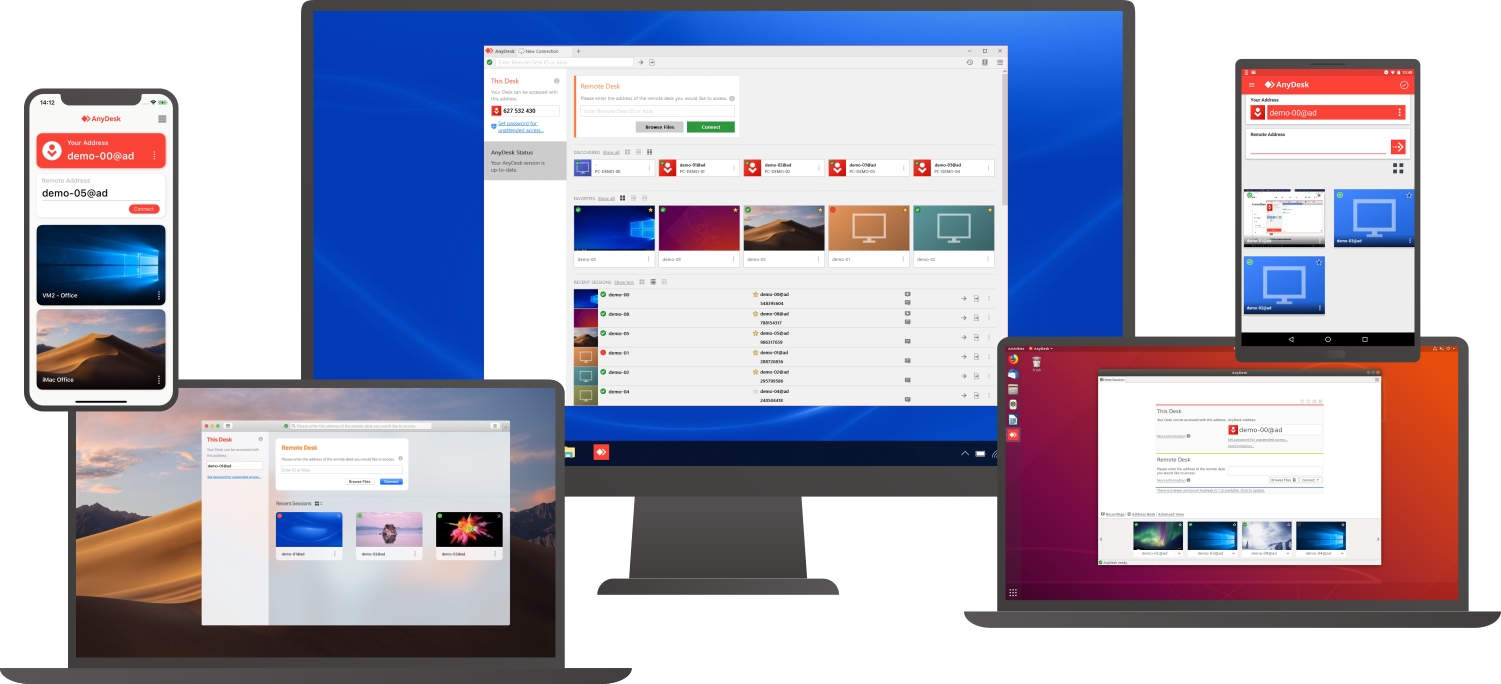
Connect to a computer remotely, be it from the other end of the office or halfway around the world. AnyDesk ensures secure and reliable remote desktop connections for IT professionals and on-the-go individuals alike. AnyDesk works across all your devices and operating systems: Windows, macOS, iOS, Android, Linux, FreeBSD and even your Raspberry Pi! Collaborate and communicate with ease, whether you’re holding online meetings and presentations or working on the same document from the other side of the world. Simply copy and paste or use the new transfer tab to transfer files between computers. No administrative privileges or installation needed. Simply download the 3MB file and you’re off. Require unattended access to your computer when you’re on the road? No problem, you’ll just need to install and set a password. Customize the AnyDesk user interface to give customers a remote desktop experience consistent with your brand.
|
About
Resourceful companies constantly look for ways to reduce operational costs. Businesses waste time, money, and resources storing and moving paperwork. Paper documents are hard to share, costly to file, take up a lot of storage space, and are difficult to retrieve. Switching to web-based ENet Docs improves efficiency in daily operations, increases profit margins, and allows secure remote access to your critical documents. With ENet Docs you can quickly find the documents you need no matter where you are located. Implement more efficient processes, improve control of business documents, automate workflows and eliminate the reliance on paper records with ENet Docs. All documents, no matter how they are received are automatically indexed, converted to a fully searchable PDF and routed to their correct destination. With ENet Docs, there is no labor to name, move, or link documents of any type.
|
|||||
Platforms Supported
Windows
Supported
Mac
Supported
Linux
Supported
Cloud
Supported
On-Premises
Not Supported
iPhone
Supported
iPad
Supported
Android
Supported
Chromebook
Not Supported
|
Platforms Supported
Windows
Supported
Mac
Supported
Linux
Not Supported
Cloud
Supported
On-Premises
Not Supported
iPhone
Supported
iPad
Supported
Android
Supported
Chromebook
Not Supported
|
|||||
Audience
Companies that need a remote support, remote desktop, screen sharing, and presentation tool
|
Audience
Companies in search of a solution to manage and organize all their files
|
|||||
Support
Phone Support
Supported
24/7 Live Support
Not Supported
Online
Supported
|
Support
Phone Support
Supported
24/7 Live Support
Not Supported
Online
Supported
|
|||||
API
Offers API
Not Supported
|
API
Offers API
Not Supported
|
|||||
Screenshots and Videos |
Screenshots and Videos |
|||||
Pricing
$10.99 per month
Free Version
Supported
Free Trial
Supported
|
Pricing
No information available.
Free Version
Not Supported
Free Trial
Not Supported
|
|||||
Reviews/
|
Reviews/
|
|||||
Pros & Cons from Real UsersPros
Cons
|
||||||
Training
Documentation
Supported
Webinars
Not Supported
Live Online
Not Supported
In Person
Not Supported
|
Training
Documentation
Supported
Webinars
Supported
Live Online
Supported
In Person
Supported
|
|||||
Company InformationAnyDesk Software
Founded: 2013
Germany
anydesk.com
|
Company InformationEnlighten.Net
Founded: 2004
United States
www.enlighten.net
|
|||||
Alternatives |
Alternatives |
|||||
|
|
|
|||||
|
|
|
|||||
|
|
||||||
|
|
|
|||||
Categories |
Categories |
|||||
Remote Desktop Features
Chat
Not Supported
Cross-Platform Access
Supported
File Transfer
Supported
Group View
Not Supported
Mobile Device Access
Not Supported
Multi Monitor Support
Not Supported
Record Remote Sessions
Supported
Remote Print
Not Supported
Remote Wake
Not Supported
User Management
Supported
Remote Support Features
Diagnostic Tools
Not Supported
File Transfer
Supported
Live Chat
Not Supported
Real-time Chat
Not Supported
Remote Control
Supported
Screen Sharing
Supported
Session Recording
Supported
Session Transfer
Supported
Surveys & Feedback
Not Supported
Screen Sharing Features
Annotations / Drawing Tools
Not Supported
Desktop / Browser Sharing
Supported
Mobile Screen Sharing
Not Supported
Presenter Control Management
Supported
Remote Control
Supported
Screen Capture
Not Supported
Screen Mirroring
Not Supported
Screen Recording
Supported
|
Document Management Features
Access Controls
Not Supported
Archiving & Retention
Not Supported
Collaboration Tools
Supported
Compliance Tracking
Supported
Document Archiving
Supported
Document Assembly
Supported
Document Capture
Not Supported
Document Conversion
Not Supported
Document Delivery
Not Supported
Document Indexing
Supported
Document Retention
Supported
Electronic Signature
Supported
Email Management
Not Supported
File Recovery
Not Supported
File Type Conversion
Supported
Forms Management
Not Supported
Full Text Search
Not Supported
Offline Access
Supported
Optical Character Recognition
Supported
Print Management
Not Supported
Version Control
Not Supported
|
|||||
Integrations
Atera
Supported
Coronium
Supported
Devolutions Remote Desktop Manager
Supported
Halo Service Desk
Supported
HaloCSM
Supported
HaloITSM
Supported
HaloPSA
Supported
StoreApp
Supported
Truto
Supported
XEOX
Supported
|
Integrations
Atera
Not Supported
Coronium
Not Supported
Devolutions Remote Desktop Manager
Not Supported
Halo Service Desk
Not Supported
HaloCSM
Not Supported
HaloITSM
Not Supported
HaloPSA
Not Supported
StoreApp
Not Supported
Truto
Not Supported
XEOX
Not Supported
|
|||||
|
|
|