Paessler PRTGPaessler GmbH
|
||||||
Related Products
|
||||||
About
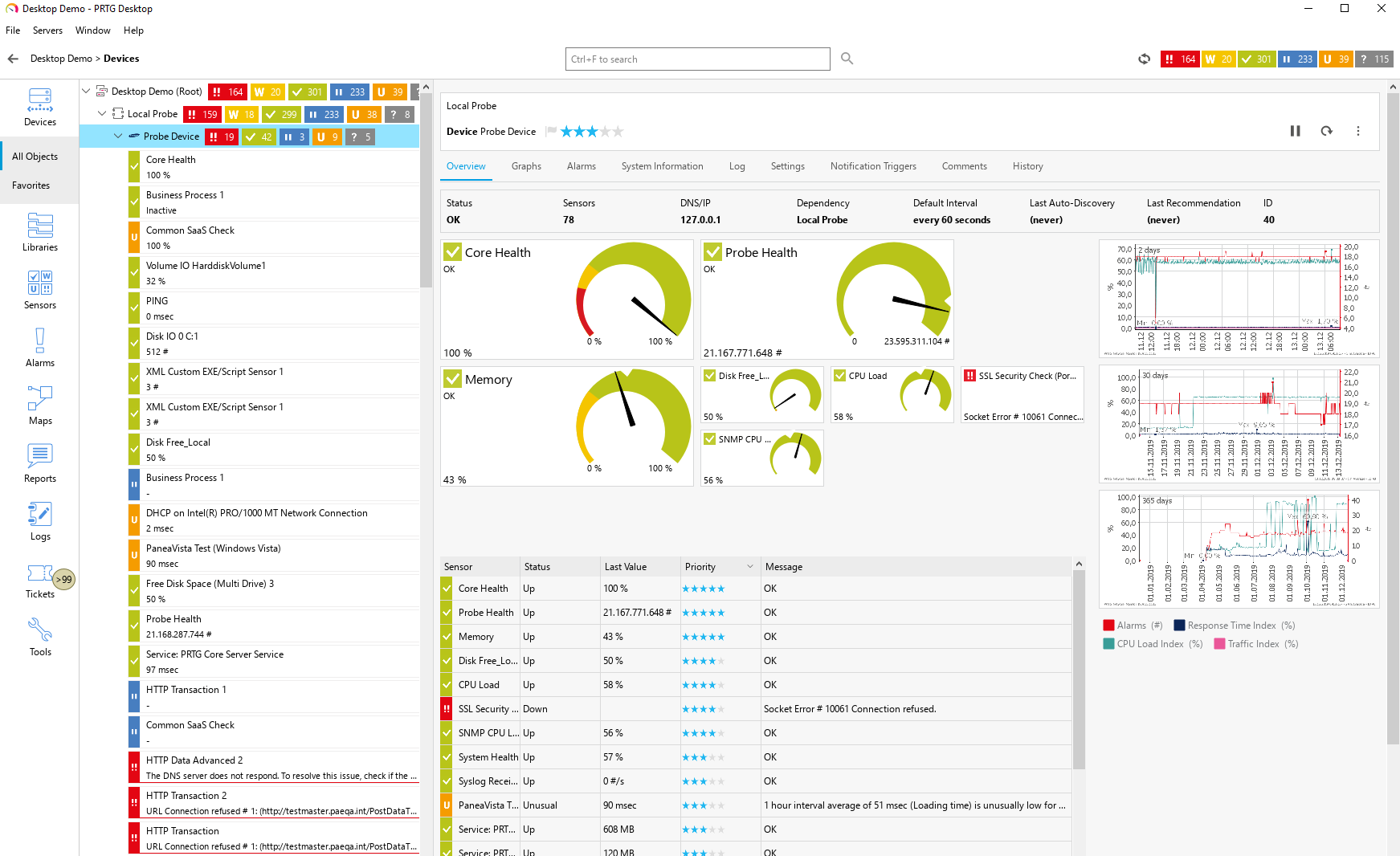
Paessler PRTG is an all-inclusive monitoring software solution developed by Paessler. Equipped with an easy-to-use, intuitive interface with a cutting-edge monitoring engine, PRTG optimizes connections and workloads as well as reduces operational costs by avoiding outages while saving time and controlling service level agreements (SLAs). The solution is packed with specialized monitoring features that include flexible alerting, cluster failover solution, distributed monitoring, in-depth reporting, maps and dashboards, and more.
PRTG monitors your entire IT infrastructure. All important technologies are supported:
• SNMP: ready-to-use and custom options
• WMI and Windows Performance Counters
• SSH: for Linux/Unix and macOS systems
• Traffic analysis using flow protocols or packet sniffing
• HTTP requests
• REST APIs returning XML or JSON
• Ping, SQL, and many more
|
About
Xitoring is an all-in-one monitoring platform for servers, websites, and status pages. One command installs the Xitogent agent (curl on Linux, MSI on Windows), auto-discovering 30+ services: Nginx, Apache, IIS, MySQL, PostgreSQL, MongoDB, Redis, Docker, RabbitMQ, Kafka, and more.
Monitor CPU, memory, disk I/O, network, and processes, plus uptime checks (HTTP(S), Ping, DNS, TCP, UDP, API, Mail, Heartbeat, Cron) at 1-minute intervals from 15+ global probing nodes. SSL monitoring included.
Alerts via 20+ channels: email, SMS, phone call, WhatsApp, Telegram, Slack, Teams, PagerDuty, Opsgenie, webhooks, and more.
Built-in AIOps answers plain-English questions about your metrics and incidents. The Xitoring MCP server lets Claude, Cursor, or any AI agent read metrics, ack alerts, and manage monitors.
Plus white-label status pages, incident management, REST API, and iOS/Android apps.
Free forever: 2 servers + 8 uptime checks. Paid from $4.99/mo, flat pricing, 30-day trial.
|
|||||
Platforms Supported
Windows
Supported
Mac
Not Supported
Linux
Not Supported
Cloud
Supported
On-Premises
Supported
iPhone
Supported
iPad
Supported
Android
Supported
Chromebook
Not Supported
|
Platforms Supported
Windows
Supported
Mac
Supported
Linux
Supported
Cloud
Supported
On-Premises
Supported
iPhone
Supported
iPad
Supported
Android
Supported
Chromebook
Supported
|
|||||
Audience
Caters to tech staff, system administrators, and companies of any size, from small office/home office (SOHO) to enterprises that need their IT network to be reliable and easy to monitor on a real-time basis.
|
Audience
DevOps teams, sysadmins, MSPs, and SMBs that need server monitoring, uptime monitoring, and status pages without enterprise complexity
|
|||||
Support
Phone Support
Supported
24/7 Live Support
Not Supported
Online
Supported
|
Support
Phone Support
Supported
24/7 Live Support
Supported
Online
Supported
|
|||||
API
Offers API
Supported
|
API
Offers API
Supported
|
|||||
Screenshots and Videos |
Screenshots and Videos |
|||||
Pricing
$2149 for PRTG 500
PRTG 100
Free of charge • 100 free sensors PRTG 500- Start Small & Upgrade Later From $2,149 500 Sensors PRTG 1000- Small & Medium Sized Environments From $3,899 1000 Sensors PRTG 2500- Medium Sized Environments From $8,099 2,500 Sensors Best Value: PRTG 5000- Large Environments From $14,999 5,000 Sensors PRTG 10000- Very Large Environments From $17,899 10.000 Sensors PRTG Enterprise Custom Pricing • Unlimited sensors • Unlimited server installations All pricing is based on a subscription basis.
Free Version
Supported
Free Trial
Supported
|
Pricing
$4.99 OR Lifetime free
$5.00 for each Linux or Windows Server
$0.50 for each Uptime Check (HTTP, PING, API, Heartbeat, etc) Special packages available on website.
Free Version
Supported
Free Trial
Supported
|
|||||
Reviews/
|
Reviews/
|
|||||
Pros & Cons from Real UsersPros
Cons
|
Pros & Cons from Real UsersPros
Cons
|
|||||
Training
Documentation
Supported
Webinars
Supported
Live Online
Supported
In Person
Supported
|
Training
Documentation
Supported
Webinars
Supported
Live Online
Supported
In Person
Supported
|
|||||
Company InformationPaessler GmbH
Founded: 1997
Germany
www.paessler.com
|
Company InformationXitoring
Founded: 2021
United States
xitoring.com
|
|||||
Alternatives |
Alternatives |
|||||
|
|
||||||
|
|
|
|||||
|
|
||||||
Categories |
Categories |
|||||
Database Monitoring Features
Anomaly Detection
Supported
Autodiscovery
Supported
Capacity Planning
Not Supported
Dashboard
Supported
Dependency Tracking
Not Supported
Historical Trend Analysis
Supported
Multitenancy
Not Supported
Notifications / Alerts
Supported
Performance Monitoring
Supported
Permissions / Access Controls
Not Supported
Predictive Analytics
Not Supported
Prioritization
Not Supported
Query Analysis
Not Supported
Resource Optimization
Supported
Troubleshooting
Supported
IT Infrastructure Monitoring Features
Alerts / Notifications
Supported
Application Monitoring
Supported
Bandwidth Monitoring
Supported
Capacity Planning
Not Supported
Configuration Change Management
Not Supported
Data Movement Monitoring
Supported
Health Monitoring
Supported
Multi-Platform Support
Supported
Performance Monitoring
Supported
Point-in-Time Visibility
Supported
Reporting / Analytics
Supported
Virtual Machine Monitoring
Supported
System Monitoring Features
Alerts / Notifications
Supported
Antivirus Management
Not Supported
Data Backup / Recovery
Not Supported
Device Monitoring
Supported
Inventory Management
Supported
Patch Management
Supported
Policy-based Automation
Not Supported
Remote Monitoring
Supported
Reporting / Analytics
Supported
Risk Analysis
Supported
Server Monitoring
Supported
Service Configuration Management
Not Supported
Website Monitoring Features
Availability Testing
Supported
Event Logs
Not Supported
Event-Based Notifications
Supported
FTP Monitoring
Supported
Mail Server Monitoring
Supported
Maintenance Scheduling
Not Supported
Performance Metrics
Supported
Real Time Monitoring
Supported
Transaction Monitoring
Supported
Uptime Reporting
Supported
Network Monitoring Features
Bandwidth Monitoring
Supported
Baseline Manager
Supported
Diagnostic Tools
Supported
Internet Usage Monitoring
Supported
IP Address Monitoring
Supported
Real Time Analytics
Supported
Resource Management
Not Supported
Server Monitoring
Supported
SLA Monitoring
Supported
Uptime Monitoring
Supported
Web Traffic Reporting
Supported
VoIP Monitoring Features
Alerts / Notifications
Supported
Call Detail Record (CDR) Analysis
Supported
Call Quality Monitoring
Supported
IP SLA Monitoring
Supported
Jitter Testing
Supported
Latency Monitoring
Supported
MOS Monitoring
Supported
Packet Loss Monitoring
Supported
QoS Monitoring
Supported
Reporting / Analytics
Supported
Troubleshooting
Supported
|
Database Monitoring Features
Anomaly Detection
Supported
Autodiscovery
Supported
Capacity Planning
Not Supported
Dashboard
Supported
Dependency Tracking
Not Supported
Historical Trend Analysis
Not Supported
Multitenancy
Supported
Notifications / Alerts
Supported
Performance Monitoring
Supported
Permissions / Access Controls
Not Supported
Predictive Analytics
Supported
Prioritization
Not Supported
Query Analysis
Supported
Resource Optimization
Not Supported
Troubleshooting
Supported
IT Infrastructure Monitoring Features
Alerts / Notifications
Supported
Application Monitoring
Supported
Bandwidth Monitoring
Supported
Capacity Planning
Supported
Configuration Change Management
Not Supported
Data Movement Monitoring
Not Supported
Health Monitoring
Supported
Multi-Platform Support
Supported
Performance Monitoring
Supported
Point-in-Time Visibility
Supported
Reporting / Analytics
Supported
Virtual Machine Monitoring
Supported
System Monitoring Features
Alerts / Notifications
Supported
Antivirus Management
Not Supported
Data Backup / Recovery
Not Supported
Device Monitoring
Supported
Inventory Management
Supported
Patch Management
Supported
Policy-based Automation
Not Supported
Remote Monitoring
Supported
Reporting / Analytics
Supported
Risk Analysis
Not Supported
Server Monitoring
Supported
Service Configuration Management
Supported
Website Monitoring Features
Availability Testing
Supported
Event Logs
Supported
Event-Based Notifications
Supported
FTP Monitoring
Supported
Mail Server Monitoring
Supported
Maintenance Scheduling
Supported
Performance Metrics
Supported
Real Time Monitoring
Supported
Transaction Monitoring
Supported
Uptime Reporting
Supported
Incident Management Features
Audit Trail
Not Supported
Corrective Actions (CAPA)
Not Supported
Disaster Recovery
Not Supported
Incident Reporting
Supported
IT Incident Management
Supported
OSHA Compliance
Not Supported
Root-Cause Diagnosis
Supported
Safety Management
Not Supported
Task Management
Not Supported
Ticket Management
Supported
|
|||||
Integrations
AlertOps
Supported
BrightGauge
Supported
Dovecot
Not Supported
Exim
Not Supported
GitLab
Supported
Google Drive
Supported
HPE Consumption Analytics
Supported
InfluxDB
Not Supported
MIDAS
Supported
Microsoft IIS
Not Supported
|
Integrations
AlertOps
Supported
BrightGauge
Not Supported
Dovecot
Supported
Exim
Supported
GitLab
Not Supported
Google Drive
Not Supported
HPE Consumption Analytics
Not Supported
InfluxDB
Supported
MIDAS
Not Supported
Microsoft IIS
Supported
|
|||||
|
|
|