Related Products
|
||||||
About
Addigy is the the only Apple Device Management platform that lets IT admins manage Apple devices in real-time, including macOS, iOS, iPadOS and tvOS devices. Our cloud-based multi-tenant platform combines MDM with live agent capabilities to manage and secure your Apple ecosystem — whether you’re managing 100 devices or 10,000.
Addigy Guarantees Your Apple Success! How? Let us show you:
• Real-time monitoring and management of all your Apple devices.
• Secure user onboarding, fully automated. Deploy a new Mac in less than 5 minutes.
• Custom compliance support to enforce policies for both groups and individual devices.
• Easy software updates. Report, configure, and deploy all OS and third-party software updates.
• Instant remote access to macOS devices for fast troubleshooting and issue resolution.
Everything your team needs for optimal Apple management—and nothing you don’t.
|
About
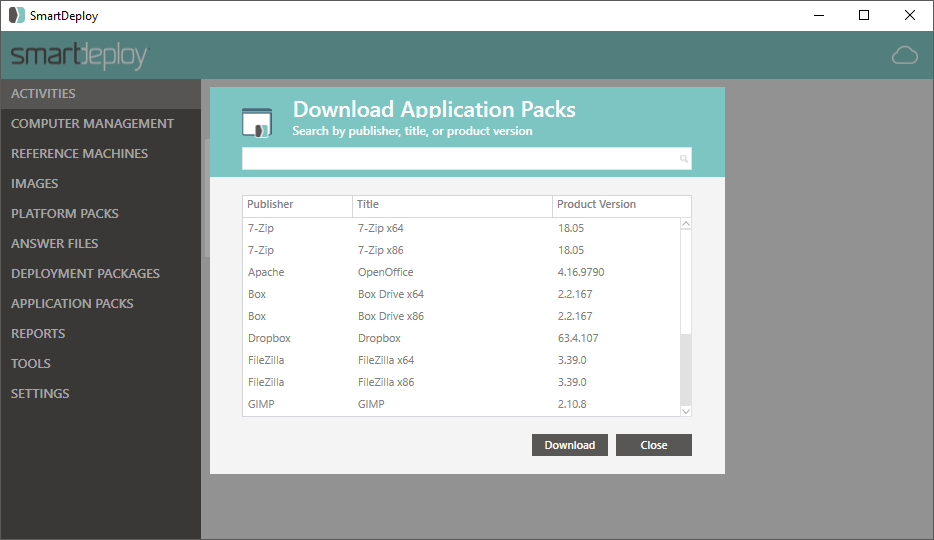
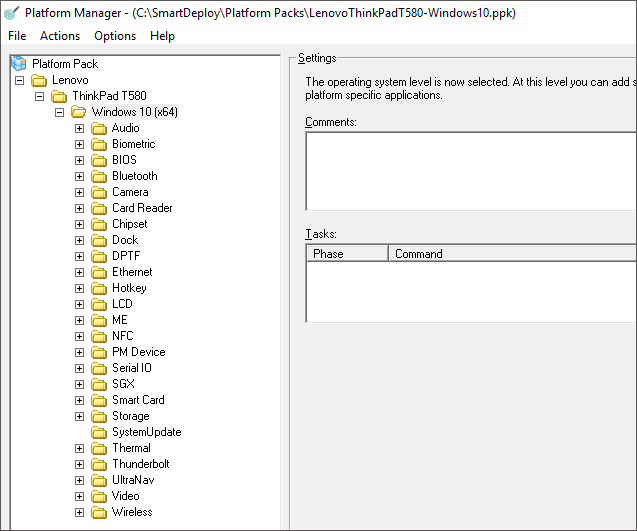
SmartDeploy is a leading provider of modern endpoint management solutions. With a flexible layered architecture, IT can achieve centralized, single-image management to support 50 - 50,000 endpoints. SmartDeploys award-winning technology combines the best of progressive solutions like SCCM, centralized solutions like VDI and legacy imaging solutions like Ghost, without the common drawbacks. More than 3,000 organizations trust SmartDeploy to deploy and manage their end user devices. With over 1500 ready-to-use driver packs from top manufacturers, SmartDeploy helps streamline your disk cloning for remote and in-house employees.
|
|||||
Platforms Supported
Windows
Not Supported
Mac
Supported
Linux
Not Supported
Cloud
Supported
On-Premises
Not Supported
iPhone
Supported
iPad
Supported
Android
Not Supported
Chromebook
Not Supported
|
Platforms Supported
Windows
Supported
Mac
Not Supported
Linux
Not Supported
Cloud
Supported
On-Premises
Not Supported
iPhone
Not Supported
iPad
Not Supported
Android
Not Supported
Chromebook
Not Supported
|
|||||
Audience
MSPs and corporate IT teams looking for a SaaS solution to manage and secure Apple devices.
|
Audience
IT teams that manage 50 to 50,000 Windows machines
|
|||||
Support
Phone Support
Supported
24/7 Live Support
Not Supported
Online
Supported
|
Support
Phone Support
Supported
24/7 Live Support
Not Supported
Online
Supported
|
|||||
API
Offers API
Supported
|
API
Offers API
Not Supported
|
|||||
Screenshots and Videos |
Screenshots and Videos |
|||||
Pricing
$5 to $6 per device
Contact us for a custom quote.
Free Version
Not Supported
Free Trial
Supported
|
Pricing
$1020/50 machines
Free, fully-functioning trial is available at the download on our website.
Free Version
Not Supported
Free Trial
Supported
|
|||||
Reviews/
|
Reviews/
|
|||||
Pros & Cons from Real UsersPros
Cons
|
Pros & Cons from Real UsersPros
Cons
|
|||||
Training
Documentation
Supported
Webinars
Supported
Live Online
Supported
In Person
Supported
|
Training
Documentation
Supported
Webinars
Supported
Live Online
Supported
In Person
Not Supported
|
|||||
Company InformationAddigy
Founded: 2014
United States
addigy.com
|
Company InformationSmartDeploy
Founded: 2008
United States
www.smartdeploy.com
|
|||||
Alternatives |
Alternatives |
|||||
|
|
|
|||||
|
|
||||||
|
|
|
|||||
|
|
||||||
Categories |
Categories |
|||||
IT Asset Management Features
Asset Tracking
Supported
Audit Management
Supported
Compliance Management
Supported
Configuration Management
Supported
Contract/License Management
Supported
Cost Tracking
Not Supported
Depreciation Management
Not Supported
Inventory Management
Supported
IT Service Management
Supported
Maintenance Management
Supported
Procurement Management
Supported
Requisition Management
Not Supported
Supplier Management
Not Supported
IT Management Features
Capacity Monitoring
Not Supported
Compliance Management
Supported
Event Logs
Supported
Hardware Inventory
Supported
IT Budgeting
Not Supported
License Management
Supported
Patch Management
Supported
Remote Access
Supported
Scheduling
Not Supported
Software Inventory
Supported
User Activity Monitoring
Supported
MSP Features
Backup Management
Not Supported
Billing & Invoicing
Not Supported
CRM
Not Supported
Dashboard
Supported
Help Desk
Supported
Issue Management
Supported
Live Chat
Supported
Patch Management
Supported
Privileged Access Management (PAM)
Not Supported
Project Management
Not Supported
Remote Access
Supported
Remote Systems Monitoring
Supported
Scheduling
Supported
Mobile Device Management (MDM) Features
Automatic Device Recognition
Supported
Data Management
Not Supported
Deployment Management
Supported
Inventory Management
Supported
Maintenance Utilities
Supported
Procurement Management
Supported
Remote Update / Installation
Supported
Software Management
Supported
Synchronization Management
Not Supported
Wireless Network Support
Supported
|
IT Asset Management Features
Asset Tracking
Supported
Audit Management
Not Supported
Compliance Management
Not Supported
Configuration Management
Supported
Contract/License Management
Not Supported
Cost Tracking
Not Supported
Depreciation Management
Not Supported
Inventory Management
Not Supported
IT Service Management
Supported
Maintenance Management
Supported
Procurement Management
Not Supported
Requisition Management
Not Supported
Supplier Management
Not Supported
IT Management Features
Capacity Monitoring
Not Supported
Compliance Management
Not Supported
Event Logs
Not Supported
Hardware Inventory
Supported
IT Budgeting
Not Supported
License Management
Not Supported
Patch Management
Supported
Remote Access
Not Supported
Scheduling
Supported
Software Inventory
Not Supported
User Activity Monitoring
Not Supported
Disk Imaging Features
Backup Scheduling
Not Supported
Bare-Metal Restore
Not Supported
Compression
Not Supported
Differential Backup
Not Supported
Disk Cloning
Supported
Encryption
Not Supported
Image Deployment
Supported
Incremental Backup
Not Supported
Web Access / Restoration
Not Supported
|
|||||
Integrations
Acronis Cyber Protect Cloud
Supported
Augmentt
Supported
Box
Not Supported
CloudRadial
Supported
Dropbox
Not Supported
Freshdesk
Supported
Google
Supported
IT Glue
Supported
Josys
Supported
JupiterOne
Supported
|
Integrations
Acronis Cyber Protect Cloud
Not Supported
Augmentt
Not Supported
Box
Supported
CloudRadial
Not Supported
Dropbox
Supported
Freshdesk
Not Supported
Google
Not Supported
IT Glue
Not Supported
Josys
Not Supported
JupiterOne
Not Supported
|
|||||
|
|
|