Sometimes after several hours of using APO, or after sleep/resume cycle the audio starts crackling. I have to temporarily change the audio device or disable/enable audio enhancements to fix it. Is this a known bug? I have a Focusrite Scarlet Solo USB audio interface
As main supporter of Equalizer APO I can't remember if someone had the same issue. What Equalizer APO version are you using? And what commands (graphic EQ, etc.) in the Configuration Editor are you using?
If you would like to refer to this comment somewhere else in this project, copy and paste the following link:
Ok. That's the most recent version which doesn't have the graphic EQ distortion bug according to the developer's readme (scroll down). And since you're using peak filters it can't be a graphic EQ bug anyway. Btw. These filters are very reliable and fast.
It could be a combination fault between the APO (read sound enhancement) of the Scarlet Solo and Equalizer APO. Does this USB interface came with some FocusRite software having sound enhancements?
It seems that some have resolved similar issues by using another APO technique. Are you familiar how to try these?
If you would like to refer to this comment somewhere else in this project, copy and paste the following link:
In your case I would first uncheck bothUse original APO checkboxes. These are so-called troubleshooting options of an audio device which are available in the Device Selector app of Equalizer APO. After selecting the target device and checking the Troubleshooting checkbox those options appear (see screenshot of those options for a mic). It could be that these checkboxes are already unchecked and that's fine.
Note that after setting such options you must click the "Ok" button.
After the above also try another APO technique in the Install as dropdown list and click "Ok" to invoke it. The Auto checkbox must be unchecked when manually selecting an APO technique.
That's alright. We now know that there aren't any other APO's interfering with Equalizer APO.
So now try SFX/MFX and after it (if available) SFX/EFX. It's long shot but worth to try. If one of them work (your Equalizer APO commands work) then try if the distortion is lessened or gone.
If you would like to refer to this comment somewhere else in this project, copy and paste the following link:


As main supporter of Equalizer APO I can't remember if someone had the same issue. What Equalizer APO version are you using? And what commands (graphic EQ, etc.) in the Configuration Editor are you using?
Version 1.4.2

Ok. That's the most recent version which doesn't have the graphic EQ distortion bug according to the developer's readme (scroll down). And since you're using peak filters it can't be a graphic EQ bug anyway. Btw. These filters are very reliable and fast.
It could be a combination fault between the APO (read sound enhancement) of the Scarlet Solo and Equalizer APO. Does this USB interface came with some FocusRite software having sound enhancements?
It seems that some have resolved similar issues by using another APO technique. Are you familiar how to try these?
No enhancements, just raw driver. No I'm not, could you share a link please?
In your case I would first uncheck bothUse original APO checkboxes. These are so-called troubleshooting options of an audio device which are available in the Device Selector app of Equalizer APO. After selecting the target device and checking the Troubleshooting checkbox those options appear (see screenshot of those options for a mic). It could be that these checkboxes are already unchecked and that's fine.
Note that after setting such options you must click the "Ok" button.
After the above also try another APO technique in the Install as dropdown list and click "Ok" to invoke it. The Auto checkbox must be unchecked when manually selecting an APO technique.
Hmm, these Use original APO checkboxes are grayed out on my machine
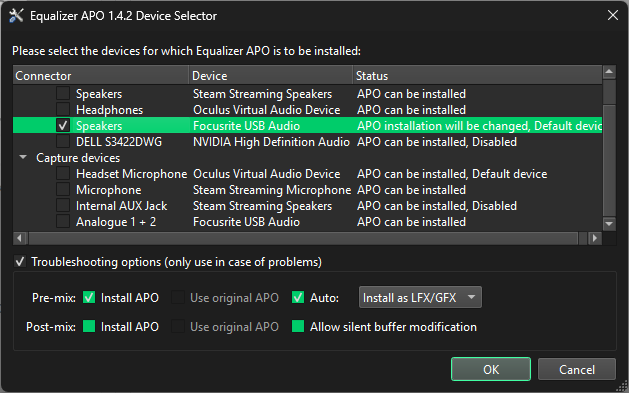
That's alright. We now know that there aren't any other APO's interfering with Equalizer APO.
So now try SFX/MFX and after it (if available) SFX/EFX. It's long shot but worth to try. If one of them work (your Equalizer APO commands work) then try if the distortion is lessened or gone.
Ok, thanks for the tips, I'll try using different modes. It's not distortion btw, it's crackling caused by audio buffer underruns.
Yeah, I know. Sorry about my quick fingers typing.