Related Products
|
||||||
About
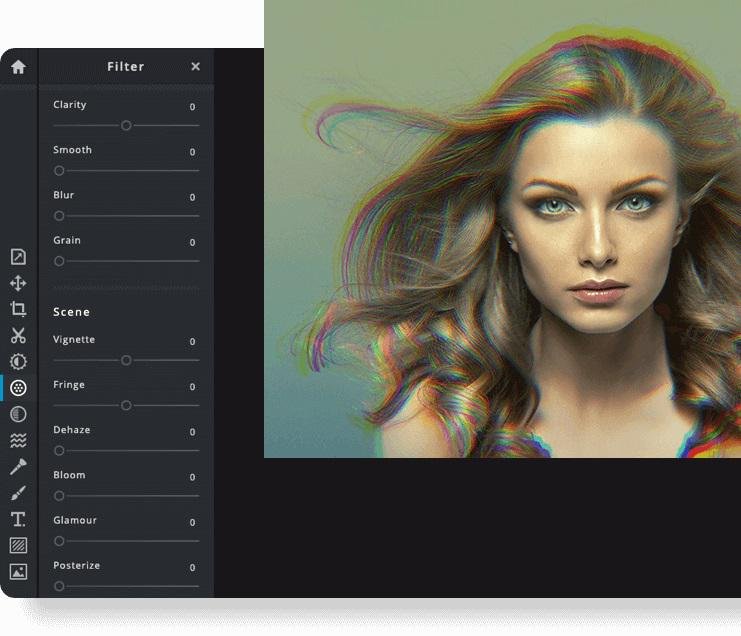
Pixlr the Online Photo Editor that lets you edit photos and create great designs right in your browser for Free. Experience next level, intuitive photo editing and graphical design with AI-powered tools for quick yet professional edits. Our editor opens almost any image format such as PSD (Photoshop), PXD, JPEG, PNG (transparent), WebP, SVG and more. Start from an empty canvas or select one of our professionally crafted templates. Say goodbye to boring and repetitive editing tasks with AI design tools. One click is all it takes to remove backgrounds perfectly from your photos, cut out every strand of hair and more! Let AI and Machine Learning take your photo editing and background removal to a new level! Simpler steps, equally stunning results. Just toggle on and off, or drag sliders from left to right to edit your photos. Achieving unique aesthetic photo effects becomes so much simpler with Pixlr.
|
About
VistaCreate (formerly Crello) is a graphic design platform where anyone can quickly create engaging projects for any industry or occasion —design skills optional. Crello joined the Vista group of companies and changed its brand name to VistaCreate.
Start with one of 50,000 professionally designed templates that are already preformatted and customizable. Easily edit, resize, remove background from images. Edit video content and add sounds and music to create multi-dimensional visuals. Upload your own photos or use VistaCreate Unlimited library of 50M+ free media files including premium images, videos, vectors, backgrounds, and clipart. Easily brand your content with Media Kit functionality. With VistaCreate, everyone can produce designs that look like they took hours, in minutes.
VistaCreate is also available on web, iOS and Android devices.
|
|||||
Platforms Supported
Windows
Not Supported
Mac
Not Supported
Linux
Not Supported
Cloud
Supported
On-Premises
Not Supported
iPhone
Supported
iPad
Supported
Android
Supported
Chromebook
Not Supported
|
Platforms Supported
Windows
Not Supported
Mac
Not Supported
Linux
Not Supported
Cloud
Supported
On-Premises
Not Supported
iPhone
Supported
iPad
Supported
Android
Supported
Chromebook
Not Supported
|
|||||
Audience
Anyone interested in intuitive online photo editing platform with AI-powered tools
|
Audience
VistaCreate was created for and is used by marketing professionals, bloggers and entrepreneurs or small businesses who need to create content daily, but don’t want to spend money and time on expensive services of motion and graphic designers.
|
|||||
Support
Phone Support
Not Supported
24/7 Live Support
Not Supported
Online
Supported
|
Support
Phone Support
Not Supported
24/7 Live Support
Supported
Online
Supported
|
|||||
API
Offers API
Not Supported
|
API
Offers API
Not Supported
|
|||||
Screenshots and Videos |
Screenshots and Videos |
|||||
Pricing
$2.49 per month
$1.49/month if billed annually
Free Version
Not Supported
Free Trial
Supported
|
Pricing
$0
VistaCreate Free plan includes:
- Fully integrated design library of 1 million royalty-free photos, videos, and graphics - No limits for downloads - Background removal tool - Brand Kit, a one-stop design solution that stores brand assets like logo, typography, and color palettes to keep all projects consistent with the brand identity - 10GB storage VistaCreate annual Pro subscription is $10 per month (when paid annually). It includes everything in VistaCreate free plus - Fully integrated design library of 50 million royalty-free files with no attribution needed - Team accounts - Multiple Brand Kits - Unlimited storage
Free Version
Supported
Free Trial
Not Supported
|
|||||
Reviews/
|
Reviews/
|
|||||
Pros & Cons from Real UsersPros
Cons
|
Pros & Cons from Real UsersPros
Cons
|
|||||
Training
Documentation
Supported
Webinars
Not Supported
Live Online
Supported
In Person
Not Supported
|
Training
Documentation
Supported
Webinars
Supported
Live Online
Supported
In Person
Not Supported
|
|||||
Company InformationPixlr
Founded: 2008
Sweden
pixlr.com
|
Company InformationVistaCreate
Founded: 2017
create.vista.com
|
|||||
Alternatives |
Alternatives |
|||||
|
|
||||||
|
|
|
|||||
|
|
||||||
Categories |
Categories |
|||||
Graphic Design Features
Collaboration
Supported
Data Visualization
Supported
Filtering
Supported
Image Database
Supported
Image Editor
Supported
Templates
Supported
Animation Features
Collaboration Tools
Supported
Customizable Branding
Supported
Drag & Drop
Supported
Media Library
Supported
Social Sharing
Supported
Templates
Supported
Text Overlay
Supported
Text to Video
Not Supported
Voice-Over
Not Supported
Desktop Publishing Features
For eBooks
Supported
For Newspapers / Magazines
Supported
For Printing
Supported
Handles Database Formats
Supported
HTML Import / Export
Not Supported
Image Editing
Supported
Multiple Editing Layers
Not Supported
Object Snapping / Grouping
Supported
PDF Export / Import
Supported
Templates
Supported
Video Making Features
Animation
Not Supported
Collaboration Tools
Supported
Customizable Branding
Supported
Drag & Drop
Supported
Media Library
Supported
Privacy Options
Not Supported
Social Sharing
Supported
Templates
Supported
Text Overlay
Supported
Text to Video
Supported
Video Capture
Not Supported
Voice-Over
Not Supported
|
||||||
Integrations
YouTube
Supported
CloudSocial
Not Supported
Gmail
Supported
Google Drive
Supported
HelloWoofy
Not Supported
Prodia
Supported
Shift
Not Supported
Vistaprint
Not Supported
|
Integrations
YouTube
Supported
CloudSocial
Supported
Gmail
Not Supported
Google Drive
Not Supported
HelloWoofy
Supported
Prodia
Not Supported
Shift
Supported
Vistaprint
Supported
|
|||||
|
|
|