Related Products
|
||||||
About
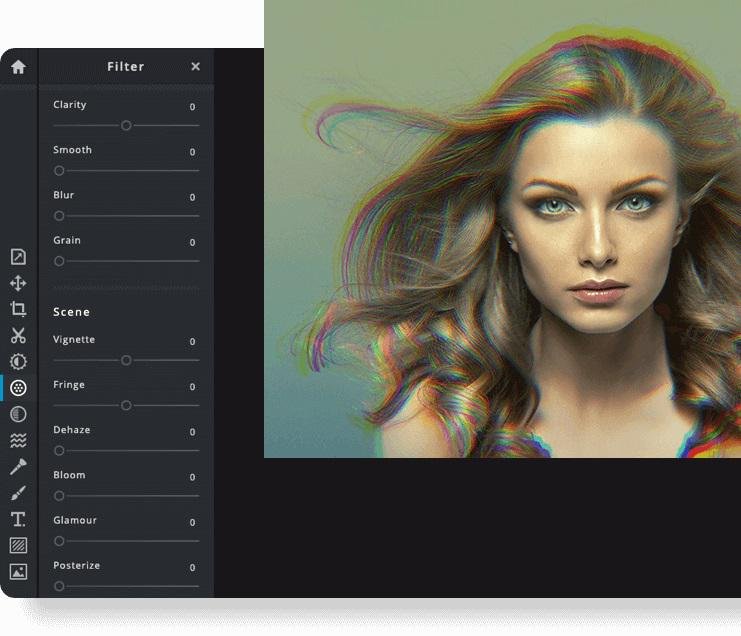
Pixlr the Online Photo Editor that lets you edit photos and create great designs right in your browser for Free. Experience next level, intuitive photo editing and graphical design with AI-powered tools for quick yet professional edits. Our editor opens almost any image format such as PSD (Photoshop), PXD, JPEG, PNG (transparent), WebP, SVG and more. Start from an empty canvas or select one of our professionally crafted templates. Say goodbye to boring and repetitive editing tasks with AI design tools. One click is all it takes to remove backgrounds perfectly from your photos, cut out every strand of hair and more! Let AI and Machine Learning take your photo editing and background removal to a new level! Simpler steps, equally stunning results. Just toggle on and off, or drag sliders from left to right to edit your photos. Achieving unique aesthetic photo effects becomes so much simpler with Pixlr.
|
About
VideoCleaner can natively open a wide range of image and video files, including some that normally require a proprietary player. For all other situations, VideoCleaner includes an optional free screen capture utility (CamStudio) that can dub videos as they playback within their proprietary player. Each feature is controlled by a slider that can move anywhere from its leftmost to rightmost position. You can also use your mouse to drag the slider to a new position, or simply mouse-click on the left or right arrow located at either end of the slider. On the left of the slider is a brief description, often followed by a default value shown within curly brackets. The current slider value is listed in blue to the far right of the slider. Mouse-click on the number in blue to reset the slider back to the value from when opened your video or last pressed F5. In general, the leftmost position turns a feature off and the rightmost turns it on.
|
|||||
Platforms Supported
Windows
Not Supported
Mac
Not Supported
Linux
Not Supported
Cloud
Supported
On-Premises
Not Supported
iPhone
Supported
iPad
Supported
Android
Supported
Chromebook
Not Supported
|
Platforms Supported
Windows
Supported
Mac
Not Supported
Linux
Not Supported
Cloud
Not Supported
On-Premises
Not Supported
iPhone
Not Supported
iPad
Not Supported
Android
Not Supported
Chromebook
Not Supported
|
|||||
Audience
Anyone interested in intuitive online photo editing platform with AI-powered tools
|
Audience
Companies seeking a Forensic Video enhancement and tamper detection software
|
|||||
Support
Phone Support
Not Supported
24/7 Live Support
Not Supported
Online
Supported
|
Support
Phone Support
Not Supported
24/7 Live Support
Not Supported
Online
Supported
|
|||||
API
Offers API
Not Supported
|
API
Offers API
Not Supported
|
|||||
Screenshots and Videos |
Screenshots and Videos |
|||||
Pricing
$2.49 per month
$1.49/month if billed annually
Free Version
Not Supported
Free Trial
Supported
|
Pricing
Free
Free Version
Supported
Free Trial
Not Supported
|
|||||
Reviews/
|
Reviews/
|
|||||
Pros & Cons from Real UsersPros
Cons
|
||||||
Training
Documentation
Supported
Webinars
Not Supported
Live Online
Supported
In Person
Not Supported
|
Training
Documentation
Supported
Webinars
Not Supported
Live Online
Not Supported
In Person
Not Supported
|
|||||
Company InformationPixlr
Founded: 2008
Sweden
pixlr.com
|
Company InformationVideoCleaner
www.videocleaner.com/index.html
|
|||||
Alternatives |
Alternatives |
|||||
|
|
||||||
|
|
||||||
|
|
||||||
Categories |
Categories |
|||||
Integrations
Gmail
Supported
Google Drive
Supported
Prodia
Supported
YouTube
Supported
|
Integrations
Gmail
Not Supported
Google Drive
Not Supported
Prodia
Not Supported
YouTube
Not Supported
|
|||||
|
|
|