SnapseedGoogle
|
||||||
Related Products
|
||||||
About
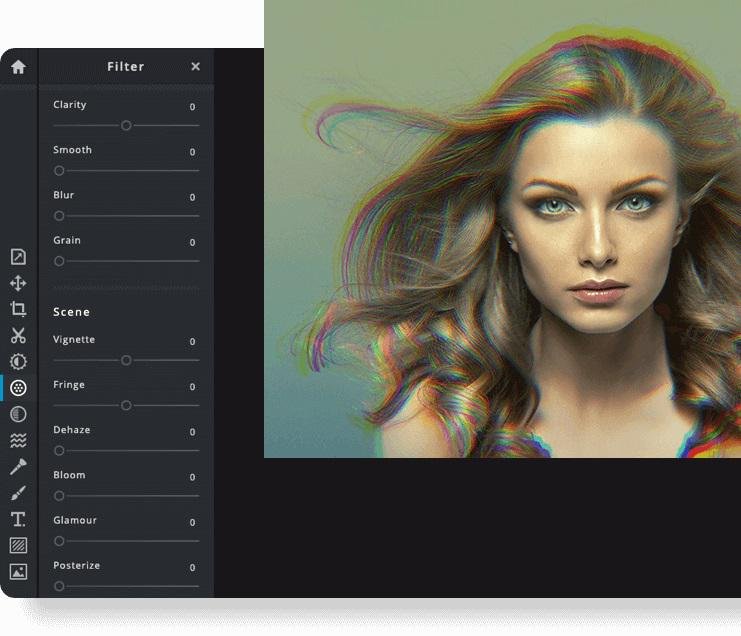
Pixlr the Online Photo Editor that lets you edit photos and create great designs right in your browser for Free. Experience next level, intuitive photo editing and graphical design with AI-powered tools for quick yet professional edits. Our editor opens almost any image format such as PSD (Photoshop), PXD, JPEG, PNG (transparent), WebP, SVG and more. Start from an empty canvas or select one of our professionally crafted templates. Say goodbye to boring and repetitive editing tasks with AI design tools. One click is all it takes to remove backgrounds perfectly from your photos, cut out every strand of hair and more! Let AI and Machine Learning take your photo editing and background removal to a new level! Simpler steps, equally stunning results. Just toggle on and off, or drag sliders from left to right to edit your photos. Achieving unique aesthetic photo effects becomes so much simpler with Pixlr.
|
About
Snapseed is a complete and professional photo editor developed by Google.
• 29 Tools and Filters, including: Healing, Brush, Structure, HDR, Perspective (see list below)
• Opens JPG and RAW files
• Save your personal looks and apply them to new photos later
• Selective filter brush
• All styles can be tweaked with fine, precise control
• Details – magically brings out surface structures in images
• Crop – crop to standard sizes or freely
• Rotate – rotate by 90°, or straighten a skewed horizon
• Perspective – fix skewed lines and perfect the geometry of horizons or buildings
• White Balance – adjust the colors so that the image looks more natural
• Brush – selectively retouch exposure, saturation, brightness or warmth
• Selective – the renown “Control Point” technology: Position up to 8 points on the image and assign enhancements, the algorithm does the rest magically
• Healing – remove the uninvited neighbor from a group picture
• Vignette – add a soft darkness
|
|||||
Platforms Supported
Windows
Not Supported
Mac
Not Supported
Linux
Not Supported
Cloud
Supported
On-Premises
Not Supported
iPhone
Supported
iPad
Supported
Android
Supported
Chromebook
Not Supported
|
Platforms Supported
Windows
Supported
Mac
Supported
Linux
Not Supported
Cloud
Not Supported
On-Premises
Not Supported
iPhone
Supported
iPad
Supported
Android
Supported
Chromebook
Supported
|
|||||
Audience
Anyone interested in intuitive online photo editing platform with AI-powered tools
|
Audience
Anyone interested in a complete photo editing app that works on all devices
|
|||||
Support
Phone Support
Not Supported
24/7 Live Support
Not Supported
Online
Supported
|
Support
Phone Support
Not Supported
24/7 Live Support
Not Supported
Online
Not Supported
|
|||||
API
Offers API
Not Supported
|
API
Offers API
Not Supported
|
|||||
Screenshots and Videos |
Screenshots and Videos |
|||||
Pricing
$2.49 per month
$1.49/month if billed annually
Free Version
Not Supported
Free Trial
Supported
|
Pricing
No information available.
Free Version
Supported
Free Trial
Not Supported
|
|||||
Reviews/
|
Reviews/
|
|||||
Pros & Cons from Real UsersPros
Cons
|
Pros & Cons from Real UsersPros
Cons
|
|||||
Training
Documentation
Supported
Webinars
Not Supported
Live Online
Supported
In Person
Not Supported
|
Training
Documentation
Supported
Webinars
Not Supported
Live Online
Not Supported
In Person
Not Supported
|
|||||
Company InformationPixlr
Founded: 2008
Sweden
pixlr.com
|
Company InformationGoogle
Founded: 1998
United States
play.google.com
|
|||||
Alternatives |
Alternatives |
|||||
|
|
||||||
|
|
|
|||||
|
|
||||||
Categories |
Categories |
|||||
Integrations
Gmail
Supported
Google Drive
Supported
Prodia
Supported
YouTube
Supported
|
Integrations
Gmail
Not Supported
Google Drive
Not Supported
Prodia
Not Supported
YouTube
Not Supported
|
|||||
|
|
|