OvermonitorUnistellar Industries, LLC
|
Paessler PRTGPaessler GmbH
|
|||||
About
Overmonitor is a cloud-based infrastructure, website, and endpoint monitoring platform built for fast setup without enterprise complexity. Monitor websites, APIs, servers, processes, Windows services, event logs, performance counters, SNMP data, uptime, response time, DNS, SSL certificates, internal endpoints, and network health from one dashboard.
The lightweight 2.1 MB agent runs as an idle process, requires no inbound firewall exceptions or open ports, and sends a secure heartbeat every minute. Configure monitoring quickly through the web interface and target checks by city-level geography. Maintenance windows suppress expected noise, while configurable alerts, push notifications, and audible dashboards keep the right people informed.
Multi-location endpoint checks validate incidents, reduce false alarms, expose regional problems, and reveal how availability and responsiveness differ across target markets.
Distributed Monitors expand Overmonitor’s network by allowing eligible servers to opt in and check up to 10 external endpoints. Checks add negligible data to the existing heartbeat, require no extra configuration or firewall changes, execute no remote web scripts, and store no monitored data on the server. If a participating server or network becomes unavailable, its checks are automatically reassigned. Participation also earns prorated invoice credits.
Trend Analysis turns historical infrastructure metrics into proactive capacity planning. Choose from thousands of performance counters, including CPU utilization, available memory, and disk space, then assign minimum and maximum thresholds. Once enough data has been collected, Overmonitor applies linear regression to estimate when a metric may cross its limits. A configurable planning horizon controls when responsible team members are alerted, helping you rebalance workloads, tune resources, or scale capacity before performance becomes an outage or unbudgeted emergency. Trend Analysis is included with every server metric at no additional charge.
Overmonitor also includes process rollups, embeddable performance graphs, endpoint health visibility, flexible retention, multiple users with roles, and à la carte pricing so you pay only for the monitoring you need. Detect outages, correlate website symptoms with server health, analyze performance, track availability, and improve end-user experience before small issues become downtime.
|
About
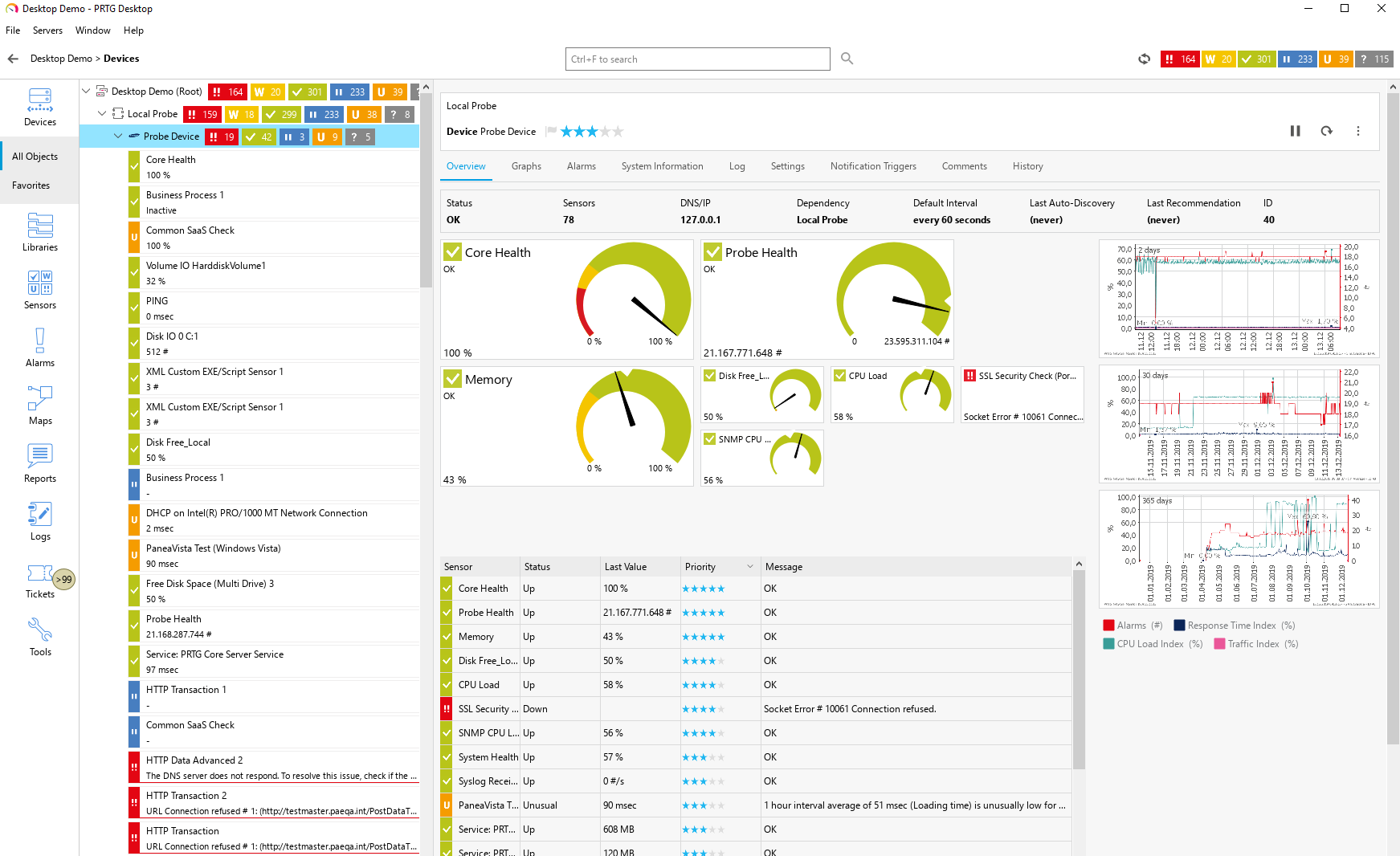
Paessler PRTG is an all-inclusive monitoring software solution developed by Paessler. Equipped with an easy-to-use, intuitive interface with a cutting-edge monitoring engine, PRTG optimizes connections and workloads as well as reduces operational costs by avoiding outages while saving time and controlling service level agreements (SLAs). The solution is packed with specialized monitoring features that include flexible alerting, cluster failover solution, distributed monitoring, in-depth reporting, maps and dashboards, and more.
PRTG monitors your entire IT infrastructure. All important technologies are supported:
• SNMP: ready-to-use and custom options
• WMI and Windows Performance Counters
• SSH: for Linux/Unix and macOS systems
• Traffic analysis using flow protocols or packet sniffing
• HTTP requests
• REST APIs returning XML or JSON
• Ping, SQL, and many more
|
|||||
Platforms Supported
Windows
Not Supported
Mac
Not Supported
Linux
Not Supported
Cloud
Supported
On-Premises
Not Supported
iPhone
Not Supported
iPad
Not Supported
Android
Not Supported
Chromebook
Not Supported
|
Platforms Supported
Windows
Supported
Mac
Not Supported
Linux
Not Supported
Cloud
Supported
On-Premises
Supported
iPhone
Supported
iPad
Supported
Android
Supported
Chromebook
Not Supported
|
|||||
Audience
Ideal for individual site owners, developers, side-business operators, small businesses, SaaS companies, MSPs, and corporate IT departments looking for cloud-based website, infrastructure, server, and endpoint monitoring with practical alerts, performance visibility, and lightweight deployment.
|
Audience
Caters to tech staff, system administrators, and companies of any size, from small office/home office (SOHO) to enterprises that need their IT network to be reliable and easy to monitor on a real-time basis.
|
|||||
Support
Phone Support
Supported
24/7 Live Support
Not Supported
Online
Supported
|
Support
Phone Support
Supported
24/7 Live Support
Not Supported
Online
Supported
|
|||||
API
Offers API
Supported
|
API
Offers API
Supported
|
|||||
Screenshots and Videos |
Screenshots and Videos |
|||||
Pricing
$3.00 per month
Pricing starts at $3.00/month for one basic endpoint monitor from one monitoring location with one user. Overmonitor uses flexible à la carte pricing, so costs scale based on endpoint type, number of endpoints, monitoring locations, user access, user agents, data retention, and optional features. HTTP checks, additional monitoring locations, longer retention, and expanded access can be added as needed. Discounts may be available for distributed monitoring enrollment.
Free Version
Not Supported
Free Trial
Supported
|
Pricing
$2149 for PRTG 500
PRTG 100
Free of charge • 100 free sensors PRTG 500- Start Small & Upgrade Later From $2,149 500 Sensors PRTG 1000- Small & Medium Sized Environments From $3,899 1000 Sensors PRTG 2500- Medium Sized Environments From $8,099 2,500 Sensors Best Value: PRTG 5000- Large Environments From $14,999 5,000 Sensors PRTG 10000- Very Large Environments From $17,899 10.000 Sensors PRTG Enterprise Custom Pricing • Unlimited sensors • Unlimited server installations All pricing is based on a subscription basis.
Free Version
Supported
Free Trial
Supported
|
|||||
Reviews/
|
Reviews/
|
|||||
Pros & Cons from Real UsersPros
Cons
|
||||||
Training
Documentation
Supported
Webinars
Not Supported
Live Online
Supported
In Person
Not Supported
|
Training
Documentation
Supported
Webinars
Supported
Live Online
Supported
In Person
Supported
|
|||||
Company InformationUnistellar Industries, LLC
Founded: 2009
United States
www.overmonitor.com
|
Company InformationPaessler GmbH
Founded: 1997
Germany
www.paessler.com
|
|||||
Alternatives |
Alternatives |
|||||
|
|
||||||
|
|
||||||
|
|
||||||
|
|
|
|||||
CategoriesOvermonitor is a cloud-based monitoring platform for websites, servers, endpoints, and infrastructure. It helps teams monitor uptime, response time, SSL certificates, endpoint health, Windows services, processes, event logs, and internal availability from a centralized online dashboard. With a lightweight 2.1 MB agent that reports a heartbeat every minute from inside your network, Overmonitor combines external monitoring with internal visibility. Use city-level geotargeted checks, practical maintenance windows, push notifications, audible dashboard alerts, process rollups, and embeddable graphs to detect outages, reduce alert noise, and analyze performance. Built for developers, side-business operators, small businesses, SaaS companies, MSPs, and corporate IT departments, Overmonitor delivers useful monitoring without enterprise complexity. Overmonitor gives businesses practical IT infrastructure monitoring for websites, servers, endpoints, internal services, processes, Windows services, event logs, uptime, SSL certificates, and network availability. A lightweight 2.1 MB agent pairs with your account and reports a heartbeat every minute from inside your network, providing visibility beyond basic public uptime checks. Use Overmonitor to detect outages, monitor infrastructure health, identify failed services or stalled processes, and reduce alert noise with maintenance windows that work. Designed for side-business operators, small businesses, SaaS teams, MSPs, and corporate IT departments, Overmonitor combines fast setup, push notifications, audible dashboard alerts, embeddable graphs, and flexible à la carte pricing. Overmonitor provides simple, cloud-based server monitoring for teams that need visibility into server availability, endpoint health, processes, Windows services, event logs, and internal network status. Install the lightweight 2.1 MB agent, pair it with your account, and receive a once-per-minute heartbeat from inside your environment. Overmonitor helps detect server outages, failed services, stalled processes, endpoint issues, and performance problems before they become major downtime. Features include push notifications, audible dashboard alerts, process monitor rollups, maintenance windows, embeddable graphs, and flexible à la carte pricing. It is ideal for individual developers, side-business operators, small businesses, SaaS companies, MSPs, and IT departments that want practical server monitoring without a bloated platform. Overmonitor provides cloud-based website monitoring to help you detect outages, slow response times, SSL certificate issues, and performance problems before they impact customers. Track uptime, response time, availability, and end-user experience from a simple dashboard with city-level geotargeted checks, push notifications, audible dashboard alerts, and embeddable performance graphs. Overmonitor is built for individual site owners, developers, side-business operators, SaaS companies, MSPs, and IT teams that need practical website availability monitoring without enterprise complexity. Configure checks quickly, define maintenance windows that reduce alert noise, and get notified when your website, application, API, or customer-facing service is unavailable or degraded. |
Categories |
|||||
IT Infrastructure Monitoring Features
Alerts / Notifications
Supported
Application Monitoring
Supported
Bandwidth Monitoring
Supported
Capacity Planning
Supported
Configuration Change Management
Not Supported
Data Movement Monitoring
Not Supported
Health Monitoring
Supported
Multi-Platform Support
Supported
Performance Monitoring
Supported
Point-in-Time Visibility
Not Supported
Reporting / Analytics
Not Supported
Virtual Machine Monitoring
Supported
Website Monitoring Features
Availability Testing
Supported
Event Logs
Supported
Event-Based Notifications
Supported
FTP Monitoring
Supported
Mail Server Monitoring
Supported
Maintenance Scheduling
Supported
Performance Metrics
Supported
Real Time Monitoring
Not Supported
Transaction Monitoring
Not Supported
Uptime Reporting
Supported
|
IT Infrastructure Monitoring Features
Alerts / Notifications
Supported
Application Monitoring
Supported
Bandwidth Monitoring
Supported
Capacity Planning
Not Supported
Configuration Change Management
Not Supported
Data Movement Monitoring
Supported
Health Monitoring
Supported
Multi-Platform Support
Supported
Performance Monitoring
Supported
Point-in-Time Visibility
Supported
Reporting / Analytics
Supported
Virtual Machine Monitoring
Supported
Website Monitoring Features
Availability Testing
Supported
Event Logs
Not Supported
Event-Based Notifications
Supported
FTP Monitoring
Supported
Mail Server Monitoring
Supported
Maintenance Scheduling
Not Supported
Performance Metrics
Supported
Real Time Monitoring
Supported
Transaction Monitoring
Supported
Uptime Reporting
Supported
Database Monitoring Features
Anomaly Detection
Supported
Autodiscovery
Supported
Capacity Planning
Not Supported
Dashboard
Supported
Dependency Tracking
Not Supported
Historical Trend Analysis
Supported
Multitenancy
Not Supported
Notifications / Alerts
Supported
Performance Monitoring
Supported
Permissions / Access Controls
Not Supported
Predictive Analytics
Not Supported
Prioritization
Not Supported
Query Analysis
Not Supported
Resource Optimization
Supported
Troubleshooting
Supported
Network Monitoring Features
Bandwidth Monitoring
Supported
Baseline Manager
Supported
Diagnostic Tools
Supported
Internet Usage Monitoring
Supported
IP Address Monitoring
Supported
Real Time Analytics
Supported
Resource Management
Not Supported
Server Monitoring
Supported
SLA Monitoring
Supported
Uptime Monitoring
Supported
Web Traffic Reporting
Supported
System Monitoring Features
Alerts / Notifications
Supported
Antivirus Management
Not Supported
Data Backup / Recovery
Not Supported
Device Monitoring
Supported
Inventory Management
Supported
Patch Management
Supported
Policy-based Automation
Not Supported
Remote Monitoring
Supported
Reporting / Analytics
Supported
Risk Analysis
Supported
Server Monitoring
Supported
Service Configuration Management
Not Supported
VoIP Monitoring Features
Alerts / Notifications
Supported
Call Detail Record (CDR) Analysis
Supported
Call Quality Monitoring
Supported
IP SLA Monitoring
Supported
Jitter Testing
Supported
Latency Monitoring
Supported
MOS Monitoring
Supported
Packet Loss Monitoring
Supported
QoS Monitoring
Supported
Reporting / Analytics
Supported
Troubleshooting
Supported
|
|||||
Integrations
ALVAO IT Service Management
Not Supported
AlertOps
Not Supported
Amazon Linux 2
Supported
Amazon Web Services (AWS)
Supported
AutoMonX
Not Supported
BrightGauge
Not Supported
BulkSMS.com
Not Supported
Check Point Infinity
Not Supported
DNSWatch
Not Supported
Debian
Supported
|
Integrations
ALVAO IT Service Management
Supported
AlertOps
Supported
Amazon Linux 2
Not Supported
Amazon Web Services (AWS)
Not Supported
AutoMonX
Supported
BrightGauge
Supported
BulkSMS.com
Supported
Check Point Infinity
Supported
DNSWatch
Supported
Debian
Not Supported
|
|||||
|
|