PimNote

PimNote

Pimtel
+
+

Related Products

  • Paligo
    104 Ratings
    Visit Website
  • Nasdaq Metrio
    14 Ratings
    Visit Website
  • Maropost Marketing Cloud
    152 Ratings
    Visit Website
  • Macaw AMS
    8 Ratings
    Visit Website
  • Intelex
    193 Ratings
    Visit Website
  • LinkSquares
    727 Ratings
    Visit Website
  • Creatio
    589 Ratings
    Visit Website
  • MRPeasy
    257 Ratings
    Visit Website
  • Nexcess Digital Cloud
    205 Ratings
    Visit Website
  • Silverware
    12 Ratings
    Visit Website

About

Notepad++ is a free source code editor and Notepad replacement that supports several languages. Running in the MS Windows environment, its use is governed by GNU General Public License. Based on the powerful editing component Scintilla, Notepad++ is written in C++ and uses pure Win32 API and STL which ensures a higher execution speed and smaller program size. By optimizing as many routines as possible without losing user friendliness, Notepad++ is trying to reduce the world carbon dioxide emissions. When using less CPU power, the PC can throttle down and reduce power consumption, resulting in a greener environment.

About

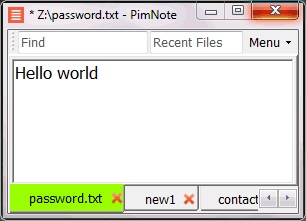
PimNote is a simple text editor for faster document access. It also combines the useful and lacking features of all other text editors. Designed for knowledge management. One-click access to the recent file list helps you write a new idea to the related file quickly before forgetting it. The unlimited and searchable recent file list helps you easily reach an old file that was opened a long time ago. The one-click find history list and search help you type less. Designed for remote working. No freezing from a remote file monitoring/opening/writing when disconnected. Files are cached for offline use by just closing the application without closing the tabs. Auto reconnect the network drive while opening the file. Repeated file notifications are informed politely on the top bar instead of a pop-up dialog box that requires frequent actions and tends to be mispressed.

Platforms Supported

Windows Supported
Mac Not Supported
Linux Not Supported
Cloud Not Supported
On-Premises Not Supported
iPhone Not Supported
iPad Not Supported
Android Not Supported
Chromebook Not Supported

Platforms Supported

Windows Supported
Mac Not Supported
Linux Not Supported
Cloud Not Supported
On-Premises Not Supported
iPhone Not Supported
iPad Not Supported
Android Not Supported
Chromebook Not Supported

Audience

Developers

Audience

Everyone who write text without coding especially remote workers

Support

Phone Support Not Supported
24/7 Live Support Not Supported
Online Not Supported

Support

Phone Support Not Supported
24/7 Live Support Not Supported
Online Supported

API

Offers API Not Supported

API

Offers API Not Supported

Screenshots and Videos

Screenshots and Videos

Pricing

Free
Free Version Supported
Free Trial Not Supported

Pricing

No information available.
Free Version Supported
Free Trial Not Supported

Reviews/Ratings

Overall 4.7 / 5
ease 5.0 / 5
features 4.5 / 5
design 4.0 / 5
support 4.7 / 5

Reviews/Ratings

Overall 0.0 / 5
ease 0.0 / 5
features 0.0 / 5
design 0.0 / 5
support 0.0 / 5

This software hasn't been reviewed yet. Be the first to provide a review:

Review this Software

Pros & Cons from Real Users

Pros

  • It is easy to use and the interface is not confusing or messy. It keeps things simple, but incredibly powerful. Tabs, macros, plug-ins, etc - it just makes work so much better.
  • Notepad++ is renowned for its speedy operation and lightweight design. It is a good option for coding and text editing jobs since it launches quickly and uses little system resources.
  • 1. It is lightweight and runs smooth in all the systems. 2. It allows opening multiple tabs and files side by side. 3. Furthermore, it allows saving documents with various extensions and format. 4. It supports dark mode theme natively. 5. It has indentation feature as well as syntax highlighting for many programming languages.
  • Notepad++ is a very solid text editor. It has a simple user interface and provides a nice list of features. For my purposes, the most useful was the ability to bookmark lines, macro effects in the search and replace screen and the various customization options.
  • - It is a lightweight code editor that supports all the major programming languages. - The user interface of the application is clean and simple. - It supports multiple tab editing and view. - It has all the necessary feature to support efficient programming like, syntax highlighting, debugging and plugin support.

Cons

  • No cons - it's all good. I have used the product for so many years, that if a PC I'm using doesn't have it, I keep a USB stick with it on there. Love it!
  • Notepad++ has no integrated collaborative capabilities and is primarily meant for solitary usage. Users might have to utilize third-party solutions for group coding or editing projects.
  • 1. It is a lightweight note editor with some specific features which helps in programming, no cons in my opinion.
  • My main concern with this tool is the aesthetic. While customizable, the process for doing so is cumbersome. This program also has less features than other editors such as Visual Studio code.
  • - It lags while opening a large file. - It does not have features like auto-completion and code formatting.

Training

Documentation Supported
Webinars Not Supported
Live Online Not Supported
In Person Not Supported

Training

Documentation Supported
Webinars Not Supported
Live Online Not Supported
In Person Supported

Company Information

Notepad++
Founded: 2003
sourceforge.net/projects/notepadplusplus.mirror/

Company Information

Pimtel
Founded: 2018
www.pimtel.com/pimnote/

Alternatives

Alternatives

Caxton

Caxton

HWY Enigma LLC
Caxton

Caxton

HWY Enigma LLC
TextMate

TextMate

MacroMates
EditPlus

EditPlus

Sangil Kim (ES-Computing)
Pulsar

Pulsar

Pulsar-Edit
NoteTab

NoteTab

Fookes Software

Categories

Code Editors Supported
HTML Editors Supported
Text Editors Supported
XML Editors Supported

Categories

Text Editors Supported

Integrations

C# Supported
C Supported
C++ Supported
CSS Supported
D Supported
Editpad Supported
Erlang Supported
HTML Supported
Java Supported
LaTeX Supported
MATLAB Supported
Nim Supported
PHP Supported
Pascal Supported
Postscript Supported
R Supported
Ruby Supported
Tcl Supported
XML Supported
YAML Supported

Integrations

C# Supported
C Not Supported
C++ Not Supported
CSS Not Supported
D Not Supported
Editpad Not Supported
Erlang Not Supported
HTML Not Supported
Java Not Supported
LaTeX Not Supported
MATLAB Not Supported
Nim Not Supported
PHP Not Supported
Pascal Not Supported
Postscript Not Supported
R Not Supported
Ruby Not Supported
Tcl Not Supported
XML Not Supported
YAML Not Supported
Claim Notepad++ and update features and information
Claim PimNote and update features and information