Time Cockpitsoftware architects
|
||||||
Related Products
|
||||||
About
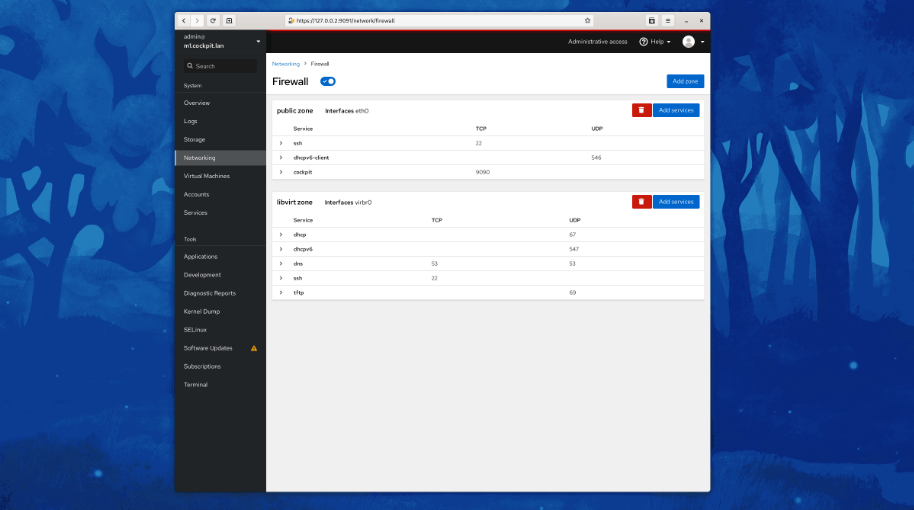
Cockpit is a web-based graphical interface for servers, intended for everyone, especially those who are new to Linux, familiar and expert admins. Thanks to Cockpit intentionally using system APIs and commands, a whole team of admins can manage a system in the way they prefer, including the command line and utilities right alongside Cockpit. See your server in a web browser and perform system tasks with a mouse. It’s easy to start containers, administer storage, configure networks, and inspect logs. Basically, you can think of Cockpit like a graphical “desktop interface”, but for individual servers. Have a favorite app or command-line tool that you use on your servers? Keep using the command line, Ansible, and your other favorite tools and add Cockpit to the mix with no issues. Cockpit uses the same system tooling you would use from the command line. You can switch back and forth between Cockpit and whatever else you like.
|
About
Use time cockpit’s graphical calendar to manage your time sheet independent of whether you work offline in the full client or online in the browser. Switch between day, week, or month view depending on the level of details you need. The graphical visualization ensures that you will immediately recognize booking mistakes like missing timesheet entries or unwanted overlapping timesheet entries. Use drag & drop to quickly change the duration of a timesheet entry, to move it or to copy it to another day. Context menus and the ribbon show you the commands that are available. Use keyboard shortcuts when you got more familiar with the graphical calendar. You get all these productivity features in the full client and in the online browser client. Time cockpit can display your Microsoft Outlook appointments in the graphical calendar. If you plan your future work in Outlook, convert appointments into time sheet entries by simply double-clicking them.
|
|||||
Platforms Supported
Windows
Supported
Mac
Supported
Linux
Supported
Cloud
Not Supported
On-Premises
Not Supported
iPhone
Not Supported
iPad
Not Supported
Android
Supported
Chromebook
Not Supported
|
Platforms Supported
Windows
Not Supported
Mac
Not Supported
Linux
Not Supported
Cloud
Supported
On-Premises
Not Supported
iPhone
Not Supported
iPad
Not Supported
Android
Not Supported
Chromebook
Not Supported
|
|||||
Audience
Admins, professionals and anyone requiring a web-based graphical interface for their servers
|
Audience
Time Tracking software for anyone
|
|||||
Support
Phone Support
Not Supported
24/7 Live Support
Not Supported
Online
Supported
|
Support
Phone Support
Supported
24/7 Live Support
Not Supported
Online
Supported
|
|||||
API
Offers API
Not Supported
|
API
Offers API
Not Supported
|
|||||
Screenshots and Videos |
Screenshots and Videos |
|||||
Pricing
No information available.
Free Version
Supported
Free Trial
Not Supported
|
Pricing
No information available.
Free Version
Not Supported
Free Trial
Not Supported
|
|||||
Reviews/
|
Reviews/
|
|||||
Training
Documentation
Supported
Webinars
Not Supported
Live Online
Not Supported
In Person
Not Supported
|
Training
Documentation
Supported
Webinars
Not Supported
Live Online
Not Supported
In Person
Not Supported
|
|||||
Company InformationCockpit
cockpit-project.org
|
Company Informationsoftware architects
Austria
www.timecockpit.com
|
|||||
Alternatives |
Alternatives |
|||||
|
|
||||||
|
|
||||||
|
|
|
|||||
|
|
||||||
Categories |
Categories |
|||||
Time Tracking Features
Automatic Time Capture
Not Supported
Billable & Non-Billable Hours
Supported
Billing & Invoicing
Not Supported
Employee Database
Not Supported
Expense Tracking
Not Supported
Mobile Time Tracking
Not Supported
Multiple Billing Rates
Not Supported
Offline Time Tracking
Supported
Online Time Tracking
Supported
Overtime Calculation
Not Supported
Time per Project Reporting
Not Supported
Timesheet Management
Supported
Vacation / Leave Tracking
Not Supported
|
||||||
Integrations
Ansible
Supported
CentOS
Supported
Debian
Supported
Fedora
Supported
Fedora CoreOS
Supported
Jira
Not Supported
Jira Work Management
Not Supported
Microsoft 365
Not Supported
Red Hat Enterprise Linux
Supported
Ubuntu
Supported
|
Integrations
Ansible
Not Supported
CentOS
Not Supported
Debian
Not Supported
Fedora
Not Supported
Fedora CoreOS
Not Supported
Jira
Supported
Jira Work Management
Supported
Microsoft 365
Supported
Red Hat Enterprise Linux
Not Supported
Ubuntu
Not Supported
|
|||||
|
|
|