Blender

Blender

Blender Foundation
+
+

Related Products

  • InMotion Hosting
    3,211 Ratings
    Visit Website
  • LTX
    182 Ratings
    Visit Website
  • 11x
    70 Ratings
    Visit Website
  • SaaSify
    122 Ratings
    Visit Website
  • Azore CFD
    26 Ratings
    Visit Website
  • Adobe Firefly
    25,051 Ratings
    Visit Website
  • Safetica
    416 Ratings
    Visit Website
  • Screencapt
    140 Ratings
    Visit Website
  • Highcharts
    122 Ratings
    Visit Website
  • DbVisualizer
    593 Ratings
    Visit Website

About

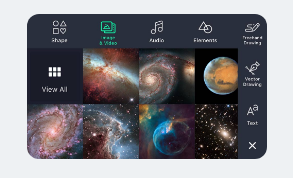
Be part of the movement with Alight Motion, the world's first professional motion design app for smartphones and tablets. Create videos with professional-quality animation, visual effects, motion graphics and more! Alight Motion supports multiple layers of graphics, video, and audio, as well as a library of vector shapes, and custom vector and freehand illustrations. Combine building blocks from our library of over 100+ customizable effects to create an infinite variety of unique and sophisticated professional visual effects to precisely suit your needs and express your creativity. Alight Motion has everything you need to produce professional-quality results right on your phone or tablet. 100+ basic effect building blocks that can be combined to create sophisticated visual effects. Animation easing for more fluid motion, pick from presets or build your own timing curves. Export MP4 video in H.264 and HEVC, GIF animation, PNG sequences and more.

About

Blender is the free and open source 3D creation suite. It supports the entirety of the 3D pipeline—modeling, rigging, animation, simulation, rendering, compositing and motion tracking, video editing and 2D animation pipeline. Cycles is Blender’s built-in powerful unbiased path-tracer engine that offers stunning ultra-realistic rendering. Blender’s comprehensive array of modeling tools make creating, transforming and editing your models a breeze. VFX professionals say: “Probably the best tracker in the market”. Blender includes production ready camera and object tracking. Allowing you to import raw footage, track the footage, mask areas and see the camera movements live in your 3D scene. Eliminating the need to switch between programs. Thanks to the high quality rigging and animation tools, Blender is being used for numerous short films, advertisements, TV series and feature films now.

Platforms Supported

Windows Not Supported
Mac Not Supported
Linux Not Supported
Cloud Not Supported
On-Premises Not Supported
iPhone Supported
iPad Supported
Android Supported
Chromebook Not Supported

Platforms Supported

Windows Supported
Mac Supported
Linux Supported
Cloud Not Supported
On-Premises Not Supported
iPhone Not Supported
iPad Not Supported
Android Not Supported
Chromebook Not Supported

Audience

Anyone looking for a solution to create videos with professional quality animation and visual effects

Audience

Creators, 3D modelers, artists, animators, and more

Support

Phone Support Not Supported
24/7 Live Support Not Supported
Online Supported

Support

Phone Support Not Supported
24/7 Live Support Not Supported
Online Supported

API

Offers API Not Supported

API

Offers API Not Supported

Screenshots and Videos

Screenshots and Videos

Pricing

No information available.
Free Version Supported
Free Trial Not Supported

Pricing

No information available.
Free Version Supported
Free Trial Not Supported

Reviews/Ratings

Overall 4.5 / 5
ease 3.5 / 5
features 4.5 / 5
design 4.5 / 5
support 5.0 / 5

Reviews/Ratings

Overall 4.3 / 5
ease 3.4 / 5
features 4.4 / 5
design 4.3 / 5
support 4.1 / 5

Pros & Cons from Real Users

Pros

  • Great app for keyframe animations, visual effects, and professional video editing.
  • • Create your own Animations, Video and Photo Edits • Visual Effects • One of the best for Editing in phones • Many features like key frames, masks, layers, etc. • Can have presets

Cons

  • Requires a decent smartphone for smooth rendering and high-export performance without lag.
  • • Too laggy sometimes • Exporting takes time if your project is too long or have too many layers • Watermark

Pros & Cons from Real Users

Pros

  • More than only 3D modelling Tools. Can also do Video Editing. Fluid and particle Simulation. 3D Printing. Architectural Design. Support many file formats. Great Texture Painting. Python Programming.
  • Great Marketing, No, excellent marketing. Wait, overwhelming marketing. Damn they expect a lot of Pros. Not sure why they assume that.
  • In this software you can do complete 3D work, rendering, video editing, sculpting, game design and more. In modeling and UV mapping node base support is really good in Blender. There are lot of keyboard shortcuts which help to speed up your work. Best realistic renderer as compared with other alternative software. There are lot of features which I've never seen in other alternative software, like Blender can create a 3D model automatically only by picture.
  • It offers excellent three-dimensional development and animation. It has lots of video tutorials to makes learning easy. The functions are well placed and easy to understand it's options.
  • Free & Open source Customizable interface 3D modelling and rendering Works great for building animations Simulation tools Inbuilt video editor Integration with many pipeline tools Great community Powerful API

Cons

  • Difficult to learn. Confusing UI for beginners. No parametric modelling Not suitable for 3D modelling of mechanical parts.
  • No, I need to be fair. Reading through their marketing articles and all the …’Consigned’ reviews (hey, watch your mouth, I didn’t say ‘Paid/), I was captivated. I ran off and downloaded Blender. Why? because I downloaded the latest version before and when Trying to install it I was told it can’t be installed on my current hardware. Nice one. Blender just wasted my data. Thank you Blender, for not telling me upfront. BTW, will Blender give me the money to buy a new Mac so I can use their latest version? Hey, we have to keep the economy going, right? But, fair is fair. I went to search for an older version and I found one, latest possible for my OS, the Blender 282a. Yay. Then came another hit. Trying to open it (After having it installed, of course (I know I have to mention this because Big Tech Gurus don’t know common sense), I got told that Blender was damaged and that I should move it to the BIN. Guess what? I did! But fair is fair, right? I gave it another go, I installed it once more and now could open it. Funny how Intelligent Tech doesn’t work. Right, but now I got another intelligent Tech Work not working. Can’t ‘Render’. I’ll stop here because otherwise I go on forever and that is enough to decide to DUMP Blender, for good. Enough time wasted on this piece of crap.
  • Every thing is great in Blender. There are no cons yet.
  • Its a time taking tool but gives your excellent animations.
  • For a free software, there is hardly any con that i can mention.

Training

Documentation Not Supported
Webinars Not Supported
Live Online Not Supported
In Person Not Supported

Training

Documentation Supported
Webinars Not Supported
Live Online Not Supported
In Person Not Supported

Company Information

Alight Motion
Founded: 2018
United States
alightmotion.com

Company Information

Blender Foundation
Founded: 1994
www.blender.org

Alternatives

Video Star

Video Star

Frontier Design Group

Alternatives

Roux

Roux

Scandy
VN

VN

Ubiquiti Labs
Scandy Pro

Scandy Pro

Scandy
Motion Ninja

Motion Ninja

changpeng
Expressive Animator

Expressive Animator

Expressive™
Character Creator

Character Creator

Reallusion

Categories

Animation Supported
Video Making Supported

Categories

3D Modeling Supported
3D Painting Supported
3D Printing Supported
3D Rendering Supported
Animation Supported
Game Development Supported
Industrial Design Supported
Motion Capture Supported
Surface Modeling Supported
Video Editing Supported
Voxel Editors Supported

Game Development Features

2D Not Supported
3D Supported
Analytics Not Supported
Animation Supported
Asset Management Not Supported
Drag & Drop Not Supported
eCommerce Not Supported
IT Asset Management Supported
Network Management Not Supported
Physics Not Supported
Player Management Not Supported
Prototyping Not Supported
Virtual Reality Not Supported

Video Editing Features

3D Video Editing Not Supported
Audio Tools Supported
Brand Overlay Not Supported
Collaboration Not Supported
Media Library Not Supported
Social Sharing Not Supported
Speed Adjustment Supported
Split / Merge Supported
Supports HD Resolution Not Supported
Text Overlay Not Supported
Video Capture Not Supported
Video Stabilization Not Supported

Integrations

AccuRIG Not Supported
AgentOne Not Supported
Blendergrid Not Supported
Cartwheel Not Supported
Cerebro Not Supported
Character Creator Not Supported
Concierge Render Not Supported
Copernicus Computing Not Supported
Drop & Render Not Supported
Edificius Not Supported
GradedBlue Not Supported
Helio Not Supported
Minsar Studio Not Supported
Puntt AI Not Supported
Rokoko Not Supported
Simulon Not Supported
Xsens Not Supported
iClone Not Supported
iRender Not Supported
picoCAD Not Supported

Integrations

AccuRIG Supported
AgentOne Supported
Blendergrid Supported
Cartwheel Supported
Cerebro Supported
Character Creator Supported
Concierge Render Supported
Copernicus Computing Supported
Drop & Render Supported
Edificius Supported
GradedBlue Supported
Helio Supported
Minsar Studio Supported
Puntt AI Supported
Rokoko Supported
Simulon Supported
Xsens Supported
iClone Supported
iRender Supported
picoCAD Supported
Claim Alight Motion and update features and information
Claim Blender and update features and information