StageToolsrelleumSystem GmbH
|
||||||
Related Products
|
||||||
About
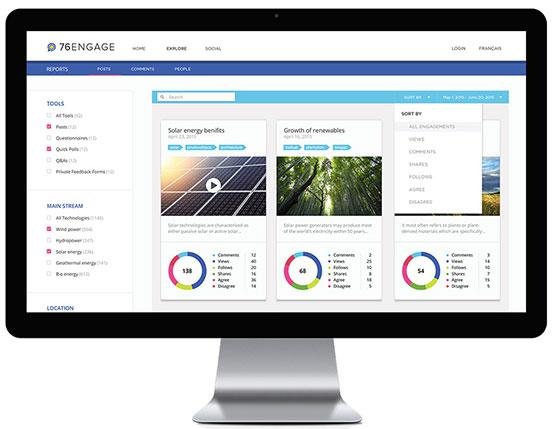
Built from the perspective of the digital engagement manager. 76engage is a platform for effective digital engagement. It provides all the publishing, management, moderation, analysis, and reporting capabilities that the digital engagement manager could ask for. Frame discussions with clear context and background information. 76engage provides engagement managers with a familiar and intuitive content management backend, making it easy to publish content, images, videos and more. Review, moderate, adjust participation policies and never miss a beat thanks to automated moderation alerts. 76engage makes it easy for moderators to stay on top of discussions without having to stay glued to their computers. Track and analyse engagement. 76engage provides a robust reporting back end allowing analysts to define reporting parameters, download reports for distribution and export data for analysis using their analysis tool of choice.
|
About
StageTools combines structured meeting facilitation and visual interaction in a single, seamlessly integrated Teams app.
- Everything directly in Microsoft Teams: No app switching, no interruptions.
- Interactive presentations: Participants can zoom, draw, highlight, and use a laser pointer on content together.
- One-click moderator handover: Anyone can spontaneously take over moderation without interrupting the meeting.
- Custom Stage Panel: You can control StageTools and e.g. the participant list at the same time.
- Timed agenda with countdown: Structured time management ensures more focus and discipline.
- Live polls & decisions: Decisions are made directly in the meeting and automatically documented.
- Screenshots & moderator notes: Important moments can be captured, and moderators have their own note area.
- Automatic minutes & tasks: Everything is documented and available immediately after the meeting.
|
|||||
Platforms Supported
Windows
Not Supported
Mac
Not Supported
Linux
Not Supported
Cloud
Supported
On-Premises
Not Supported
iPhone
Supported
iPad
Supported
Android
Supported
Chromebook
Not Supported
|
Platforms Supported
Windows
Not Supported
Mac
Not Supported
Linux
Not Supported
Cloud
Supported
On-Premises
Not Supported
iPhone
Not Supported
iPad
Not Supported
Android
Not Supported
Chromebook
Not Supported
|
|||||
Audience
Companies or invidiuals interested in a platform for effective digital engagement
|
Audience
For hybrid teams, workshops, and project meetings in Microsoft Teams
|
|||||
Support
Phone Support
Not Supported
24/7 Live Support
Not Supported
Online
Supported
|
Support
Phone Support
Supported
24/7 Live Support
Not Supported
Online
Supported
|
|||||
API
Offers API
Not Supported
|
API
Offers API
Supported
|
|||||
Screenshots and Videos |
Screenshots and Videos |
|||||
Pricing
No information available.
Free Version
Not Supported
Free Trial
Not Supported
|
Pricing
$8/month/organizer
Co-organizers do not require a license
Meeting Preparation with Externals Participants Share Meeting Minutes with Externals participants Unlimited topics Unlimited documents Unlimited notes Unlimited decisions Unlimited tasks
Free Version
Supported
Free Trial
Supported
|
|||||
Reviews/
|
Reviews/
|
|||||
Pros & Cons from Real UsersPros
Cons
|
||||||
Training
Documentation
Supported
Webinars
Not Supported
Live Online
Not Supported
In Person
Not Supported
|
Training
Documentation
Supported
Webinars
Supported
Live Online
Supported
In Person
Not Supported
|
|||||
Company Information76engage
Founded: 2016
Canada
76engage.com
|
Company InformationrelleumSystem GmbH
Founded: 1998
Germany
www.relleum-system.com
|
|||||
Alternatives |
Alternatives |
|||||
|
|
|
|||||
|
|
||||||
|
|
|
|||||
Categories |
Categories |
|||||
Collaboration Features
Brainstorming
Supported
Calendar Management
Not Supported
Chat / Messaging
Not Supported
Contact Management
Not Supported
Content Management
Supported
Document Management
Supported
Project Management
Not Supported
Real Time Editing
Supported
Task Management
Supported
Version Control
Not Supported
Video Conferencing
Supported
|
||||||
Integrations
Microsoft Teams
Not Supported
|
||||||
|
|
|