
 Download
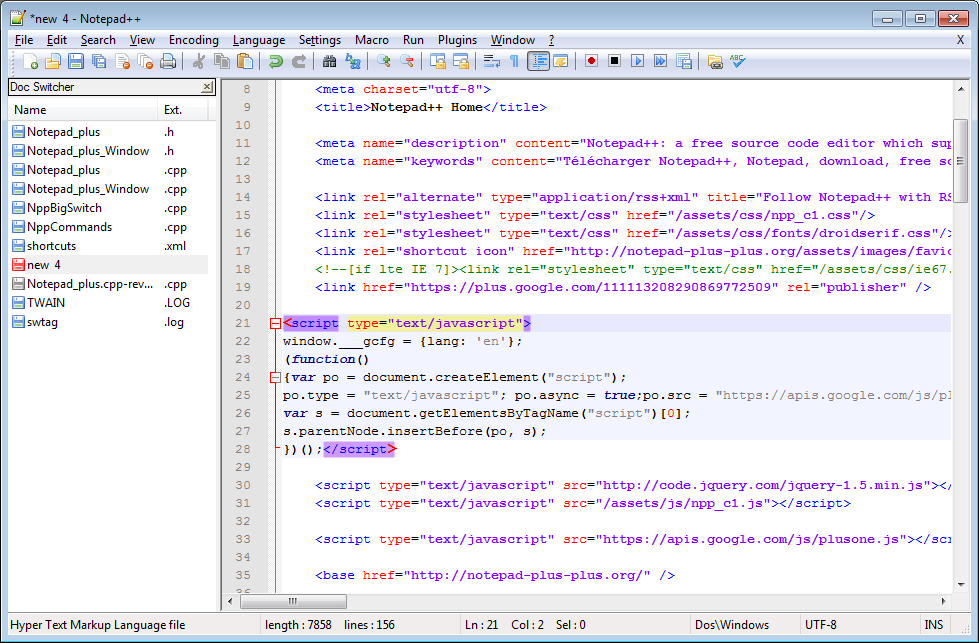
Notepad++ is a source code editor that is free to use and is available in various languages. The source code editor is also written in C++ and is based on the Scintilla editing component. Notepad++ offers a wide range of features, such as autosaving, line bookmarking, simultaneous editing, tabbed document interface, and many more features. Over 140 plugins are also available to use in the default program.
Notepad++ takes advantage of higher execution speed and smaller program size by using Win32 API and STL. The ability to optimize efficiency without sacrificing user-friendliness results in an environment-friendly technology that reduces carbon dioxide emissions. Ultimately, the reduction in power consumption is much better for the environment while still being a viable option for businesses.
If you like this project consider donating.
https://notepad-plus-plus.org/donate/
Features
- Syntax Folding
- Syntax Highlighting
- Perl Compatible Regular Expression Search/Replace
- Customizable
- Auto-completion
- Multi-Document (Tab interface)
- Multi-View
- WYSIWYG (Printing)
- Zoom in and zoom out
- Multi-Language environment supported
- Bookmark
- Macro recording and playback
Project Samples
License
GNU General Public License version 2.0 (GPLv2)User Reviews
-
Literally the first thing I install on a new work laptop I have been using Notepad++ daily at my job for a couple of years now and it is easily one of my absolute favorite tools. It is just so fast and completely lightweight compared to heavy IDEs. Whenever I need to quickly open up a random config file, paste some messy text to clean up, or compare two logs side by side during a hectic shift, this is always what I open. It never crashes and it handles massive files like a champ without turning my laptop into a space heater. I honestly do not think I could get through my daily workflow without it at this point. It is just a classic, reliable staple for anyone who has to look at text or code all day long.
-
Simple and fast. I use it every day for notes and small files. Love that from 2016
-
不错很快
-
I have used Notepad++ for 20 years and it is one of the first things I install on any computer that I work with. In my work, I am constantly tweaking code and need to compare multiple documents. I've tried other programs, but Notepad++ can do it all. I build macros to clean up data and there are more features than I've actually used. I'm always discovering something new and helpful with it.
-
Great text editor, thx
