There is ongoing work on improving TCoolEdit, much of it covered by other tickets. In particular, see "Syntax highlighting overhaul" [feature-requests:#252] and "Unicode support in CoolPrj" [feature-requests:#54], as well as other CoolPrj feature requests and CoolPrj bug tickets.
This ticket will document the broader changes to the design and implementation. Starting in [r8229] and continuing in [r8350], the code has been refactored and rewritten based on a cleaner modular design, guided by the following overarching principles and separation of concerns:
- TCoolEdit no longer has direct write access to TCoolTextBuffer.
- Changes to the buffer have to be done via TSource, a new class managing the buffer.
- TSource has no access to TCoolEdit or any view state.
- All document changes via TSource are transactional, i.e. recorded and can be undone/redone.
- All handling of the command history is encapsulated by TSource.
- A transactional command is encapsulated by the abstract class TSource::TCmd.
- TCmd is based on the classic Command pattern.
- TCmd and derived classes are granted low-level write access to the buffer through a reference passed to virtual member functions Execute and Undo.
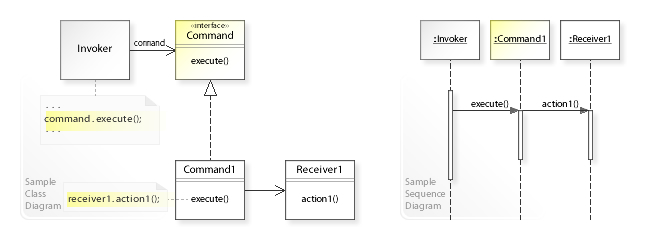
While TSource implements the basic buffer commands, such as TClearCmd, TDeleteTextCmd and TInsertTextCmd, higher-level commands are implemented by TCoolEdit using inheritance and composition. For example, TCoolEdit::TInsertCharCmd represents the insertion of a character, which includes first clearing the current selection, if any. To do this, it derives from TSource::TMacroCmd, which encapsulates a series of subcommands; in this case TCoolEdit::TDeleteSelectionCmd and TSource::TInsertTextCmd.
Going forward, the intention is to make TCoolEdit and TSource follow the Model-view-controller (MVC) pattern, possibly implemented using OWL's built-in Doc/View:
- One or more TCoolEdit views perform operations on a single TSource document.
- Changes to the TSource document are communicated to its views through notifications.
- Notification handlers in the views update TCoolEdit state, such as cursor position, text selection, scroll range, syntax highlighting and window refresh.

In MVC terms, TSource functions as both the “Controller” (executing editor commands) and the “Model” (document) in the Doc/View architecture. The encapsulated TCoolTextBuffer is the low‑level, UI-agnostic core of that model.




With [r8350], the undo and redo functionality is now based on the classic Command design pattern as laid out in the ticket description.
This has some notable differences from the old design, as well as from @elotter's revised solution (see TCoolTextBuffer::TUndoNode on "branches/7-coolprj-dev"):
Note that by combining command execute and redo we eliminate the duplicated code in the old solution. The code implementing the command is now fully encapsulated in Execute.
Another notable difference is the introduction of TMacroCmd, a base class encapsulating a series of commands also derived from TCmd. This cleanly solves the case where a command needs to perform subcommands already encapsulated by other TCmd classes, thereby eliminating code duplication.
With these changes, the implementation of the TCoolEdit member functions issuing edit commands has become much simpler and cleaner, following a similar pattern that can be simplified further by encapsulation and refactoring (planned). See the implementation of TCoolEdit::DeleteSelection and subsequent functions.
Related
Commit: [r8350]
Last edit: Vidar Hasfjord 2025-09-06
Revision [r8364] makes the transition to Doc/View and a fully notification driven update model, for better separation of concerns, simpler code, and more powerful possible extensions; in particular, support for multiple views.
The changes to the code were less painful than I feared. Everything slotted together nicely without much hassle. There may still be some Doc/View related clean-up to be done, considering I just forged ahead and merged TCoolDocument into TSource and TCoolEditView into the main TCoolEdit code without much thought. In particular, the file handling should probably be better aligned with TDocManager functionality, allowing the removal of redundant code (I've pruned quite a bit already).
Anyway, the interesting part is the new notification architecture. All view updates now happen in a single event handler TCoolEdit::VnBufferChange. Outside this function, the update functions, AdjustScroller, InvalidateLines, etc., which cluttered the code all over before, are now nowhere to be seen. This has simplified the code a lot.
That said, for correct view updates, commands now need to carefully pass accurate information about the changes they make. This information is represented by the new class TBufferChange. The commands return this structure to TSource, which in turn generates a notification message to the connected views, passing a reference to TBufferChange along. See TSource::ExecuteCommand.
I chose to do it this way, rather than having TTextBuffer generate fine-grained notifications on every buffer update. Now, TTextBuffer can remain simple, fast and low-level. But the responsibility for generating accurate and effective change information now lies with the commands. The good news is that it seems to work very well already, without much effort.
One cool advantage of the new code is that TSyntaxParser now has all the information it needs in one place to make more granular and effective updates of the parser state (cookies). Invalidation and refresh now cascade beyond the edited line(s) less often. Further optimisation should be possible with little effort, it seems.
Here is a summary of highlights:
PS. "cooledit.cpp" is now under 4000 lines of code! It has shrunk nicely as I've ripped out needless complexity and brittle functionality. We are now approaching a clean and robust editor core on which we can more confidently build going forward.
Related
Commit: [r8364]
Last edit: Vidar Hasfjord 2025-10-03
Revision [r8394] and [r8402] make further progress on simplifying the code and decoupling the modules.
TTextBuffer simplified and optimised
TTextBuffer is now fully decoupled from editor concerns by removing the data stored alongside the text in the buffer (i.e. the old TLineInfo::Flags member).
Most flags were unused anyway, except for the bookmark flags. However, the whole bookmark functionality has been removed for now, since it is currently not in use on the trunk, and it also could use a redesign. For example, looking at Visual Studio, it would make more sense designing bookmark management as an encapsulated component on project or application level.
TTextBuffer::TLine now simply holds a standard string.
This implies both pointer indirection (from string object to its buffer) and dynamic allocation (presuming the buffer is dynamically allocated). However, standard strings apply small string optimisation (SSO), which means they can store short strings within the object itself, eliminating dynamic allocation of the buffer.
For example, Microsoft's standard library implementation applies SSO for strings of up to 7 wide characters or 15 narrow characters (see "Inside STL: The string"). This means that short lines, such as empty lines and lines with just starting and ending braces, incur no dynamic allocation at all.
Meanwhile, the old implementation always allocates a buffer of a minimum set size (16 + 1). It also has some additional issues:
In short, the new implementation is simpler and better in any way (correctness, space, time and maintainability).
Custom search code is gone
Revision [r8394] also removes all the custom search code (TCoolSearchEngine, TCoolEngineDescr and subclasses). This code was bug-ridden and no longer maintained, and its utility is questionable. The remaining search function TTextBuffer::Search has been reimplemented simply using tstring::find and rfind.
TFindDlg and TReplaceDlg moves to OWLExt
Another modularity change was made in [r8402] by moving the search dialogs to OWLExt ("include/owlext/findreplace.h"). The dialogs were renamed from TCoolFindDlg and TCoolReplaceDlg in [r8361], then thoroughly revamped in [r8394], with bugs fixed and functionality improved. They now have conventional behaviour:
The dialogs also have neat usability improvements:
Note: While revamping the dialogs, I didn't appreciate that they were modelled on the standard common dialogs. I made a few name changes etc. that do not match the standard dialogs. Going forward, we may consider making the dialogs true custom versions of the common dialogs, e.g. by deriving from owl::TFindDialog and TReplaceDialog and implementing the custom notification message the standard way.
TBufferChange enhanced and usage simplified
Revision [r8394] also makes tracking buffer changes much simpler. TSource::TBufferChange now has a new constructor and additional member functions (SetRangeInfo, Accumulate, IsValid, IsEmpty, GetLineCount, GetLineShift, GetType, TransformOldPos and TransformOldRange). These additions make it much easier to handle buffer changes.
For example, TSource::TMacroCmd::Execute now just calls Accumulate for the subcommands to calculate the total buffer change on Execute, Undo and Redo.
Support for command merging
Revision [r8394] also adds support for merging commands in the command history. This has been done in a very general way:
Currently, as of [r8408], the only command that supports merging is TSource::TMacroCmd. However, all the text insertion commands support merging by default, since they all derive from TInsertionMacroCmd (contains an initial TDeleteSelectionCmd, if there is a selection).
To prevent excessive merging, TMacroCmd::Merge restricts merging to commands of exact same type. Additionally, a new notification has been added.
TSource::vnIsRejectingCmdMerge is sent by TSource::Execute to allow any view to refuse a merge. Currently, TCoolEdit::VnIsRejectingCmdMerge refuses the merging of commands invoked at different locations (except for text replacements performed as part of Replace All, which are merged).
Support for overtype mode
In revision [r8394], class TCoolEdit::TOvertypeCharCmd, class TSource::TOverwriteTextCmd and function TTextBuffer::OverwriteText were added to support overtype mode. TOvertypeCharCmd derives from TInsertionMacroCmd, hence enjoys the same support for merging as TInsertCharCmd does.
Related
Commit: [r8361]
Commit: [r8394]
Commit: [r8402]
Commit: [r8408]
Last edit: Vidar Hasfjord 2026-02-07
Revision [r8485] comprises a big set of further changes; Doc/View design implementation completion, restructured command handling, UI components (menus, accelerators, bitmaps), code improvements and fixes.
Doc/View design implementation (near) completion
Multiple views are now supported. Each view is a separate control with completely separate view state (cursor position, selection, parser), although persistent settings are shared.
(Using views to implement multi-cursor functionality is an intriguing idea, as each cursor can be seen as a distinct view state in the same window.)
Additional commands
Inspired by Erwin's work on "branches/7-coolprj-dev", new commands have been added (similar to commands found in Visual Studio):
Command dispatch overhaul with menus added
All edit command dispatch is now done in the response table (no longer in EvChar/EvKeyDown). Command keyboard mapping is implemented using an accelerator table. This allows conventional and flexible menus and shortcuts to be assigned. TCoolEdit::GetMenuDescriptor now provides a fully-fledged menu with Edit and Search submenus, complete with bitmaps, for dynamic main menu merging. The Edit submenu does double-duty as a context menu.
Settings property sheet with new General page
The new General page has indentation settings and modes, and in particular now allows the indentation size to be set. The selected value is a new persistent setting (default: 2).
UI improvements
A bit of polishing of the UI has also been done:
Note that the scroll bars behave erratically at times, and may need to be reset by resizing the window. However, this is a general issue within the implementation of TScroller [bugs:#623].
The dynamic cursor restrainment results in the common and convenient "column memory" when you move the cursor from a long line to a shorter (or empty) line and back. Interestingly, this was very simply achieved, without having to introduce and manage another data member. Instead, TCoolEdit::CursorPos now stores the unrestrained position, while GetCursorPos returns the restrained position.
Collateral internal changes
In preparation for more detailed tracking of text buffer changes, the order of the TPos members and constructor parameters have been swapped (to make use of default comparison operators for lexical ordering). To prevent accidental errors mixing up character index and line index, strong typing has been introduced for the indexes: TLineIndex and TCharIndex.
For more details on other internal changes made, see the revision log.
Related
Bugs: #623
Commit: [r8485]
Last edit: Vidar Hasfjord 2025-10-16