
Menu
▾
▴
gnuplot-info — For questions and discussion about gnuplot
You can subscribe to this list here.
| 2003 |
Jan
|
Feb
|
Mar
|
Apr
|
May
|
Jun
|
Jul
|
Aug
|
Sep
|
Oct
(2) |
Nov
(2) |
Dec
|
|---|---|---|---|---|---|---|---|---|---|---|---|---|
| 2004 |
Jan
(3) |
Feb
(1) |
Mar
(2) |
Apr
(22) |
May
(52) |
Jun
(43) |
Jul
(36) |
Aug
(59) |
Sep
(37) |
Oct
(55) |
Nov
(39) |
Dec
(36) |
| 2005 |
Jan
(64) |
Feb
(40) |
Mar
(62) |
Apr
(58) |
May
(256) |
Jun
(77) |
Jul
(80) |
Aug
(39) |
Sep
(56) |
Oct
(36) |
Nov
(113) |
Dec
(68) |
| 2006 |
Jan
(43) |
Feb
(64) |
Mar
(69) |
Apr
(60) |
May
(71) |
Jun
(53) |
Jul
(63) |
Aug
(63) |
Sep
(76) |
Oct
(85) |
Nov
(82) |
Dec
(73) |
| 2007 |
Jan
(75) |
Feb
(82) |
Mar
(84) |
Apr
(104) |
May
(67) |
Jun
(101) |
Jul
(107) |
Aug
(138) |
Sep
(128) |
Oct
(106) |
Nov
(112) |
Dec
(112) |
| 2008 |
Jan
(94) |
Feb
(87) |
Mar
(146) |
Apr
(169) |
May
(75) |
Jun
(26) |
Jul
(26) |
Aug
(7) |
Sep
(18) |
Oct
(53) |
Nov
(42) |
Dec
(19) |
| 2009 |
Jan
(43) |
Feb
(39) |
Mar
(18) |
Apr
(45) |
May
(66) |
Jun
(87) |
Jul
(56) |
Aug
(41) |
Sep
(56) |
Oct
(139) |
Nov
(98) |
Dec
(88) |
| 2010 |
Jan
(81) |
Feb
(79) |
Mar
(83) |
Apr
(97) |
May
(124) |
Jun
(84) |
Jul
(53) |
Aug
(85) |
Sep
(89) |
Oct
(50) |
Nov
(98) |
Dec
(78) |
| 2011 |
Jan
(97) |
Feb
(74) |
Mar
(68) |
Apr
(54) |
May
(63) |
Jun
(59) |
Jul
(65) |
Aug
(58) |
Sep
(37) |
Oct
(40) |
Nov
(59) |
Dec
(35) |
| 2012 |
Jan
(16) |
Feb
(56) |
Mar
(63) |
Apr
(25) |
May
(48) |
Jun
(58) |
Jul
(20) |
Aug
(13) |
Sep
(43) |
Oct
(35) |
Nov
(20) |
Dec
(17) |
| 2013 |
Jan
(22) |
Feb
(11) |
Mar
(51) |
Apr
(34) |
May
(57) |
Jun
(27) |
Jul
(70) |
Aug
(30) |
Sep
(38) |
Oct
(53) |
Nov
(40) |
Dec
(25) |
| 2014 |
Jan
(26) |
Feb
(35) |
Mar
(60) |
Apr
(12) |
May
(17) |
Jun
(15) |
Jul
(9) |
Aug
(18) |
Sep
(46) |
Oct
(18) |
Nov
(19) |
Dec
(15) |
| 2015 |
Jan
(17) |
Feb
(28) |
Mar
(21) |
Apr
(54) |
May
(36) |
Jun
(8) |
Jul
(30) |
Aug
(13) |
Sep
(3) |
Oct
(28) |
Nov
(3) |
Dec
(3) |
| 2016 |
Jan
(11) |
Feb
(9) |
Mar
(29) |
Apr
(10) |
May
(8) |
Jun
(5) |
Jul
(50) |
Aug
(57) |
Sep
(13) |
Oct
(5) |
Nov
(17) |
Dec
(11) |
| 2017 |
Jan
(3) |
Feb
(23) |
Mar
(16) |
Apr
(7) |
May
(15) |
Jun
(12) |
Jul
(48) |
Aug
(15) |
Sep
(3) |
Oct
(20) |
Nov
(28) |
Dec
(21) |
| 2018 |
Jan
(13) |
Feb
(21) |
Mar
(21) |
Apr
(7) |
May
(3) |
Jun
(7) |
Jul
(27) |
Aug
(38) |
Sep
(4) |
Oct
(30) |
Nov
(22) |
Dec
|
| 2019 |
Jan
(5) |
Feb
(16) |
Mar
(1) |
Apr
(9) |
May
(7) |
Jun
(20) |
Jul
(13) |
Aug
(3) |
Sep
(2) |
Oct
(2) |
Nov
(2) |
Dec
(4) |
| 2020 |
Jan
(6) |
Feb
(11) |
Mar
(1) |
Apr
(18) |
May
(4) |
Jun
(5) |
Jul
(12) |
Aug
(1) |
Sep
(3) |
Oct
(7) |
Nov
(1) |
Dec
(17) |
| 2021 |
Jan
(1) |
Feb
(11) |
Mar
(16) |
Apr
(6) |
May
(5) |
Jun
(1) |
Jul
(1) |
Aug
(2) |
Sep
(8) |
Oct
(10) |
Nov
(4) |
Dec
(4) |
| 2022 |
Jan
(9) |
Feb
(35) |
Mar
(4) |
Apr
|
May
(3) |
Jun
(49) |
Jul
(11) |
Aug
|
Sep
(5) |
Oct
(2) |
Nov
(16) |
Dec
(13) |
| 2023 |
Jan
|
Feb
(8) |
Mar
(3) |
Apr
|
May
(8) |
Jun
|
Jul
(5) |
Aug
|
Sep
|
Oct
(2) |
Nov
|
Dec
(2) |
| 2024 |
Jan
(6) |
Feb
(9) |
Mar
|
Apr
(26) |
May
(24) |
Jun
|
Jul
(4) |
Aug
(2) |
Sep
(1) |
Oct
(10) |
Nov
(9) |
Dec
|
| 2025 |
Jan
|
Feb
(22) |
Mar
|
Apr
(1) |
May
|
Jun
|
Jul
|
Aug
|
Sep
(1) |
Oct
(1) |
Nov
|
Dec
(4) |
| 2026 |
Jan
|
Feb
(24) |
Mar
(20) |
Apr
(18) |
May
(2) |
Jun
(2) |
Jul
(2) |
Aug
(3) |
Sep
|
Oct
|
Nov
|
Dec
|
|
From: Michael S. <Mic...@bo...> - 2026-04-01 16:26:54
|
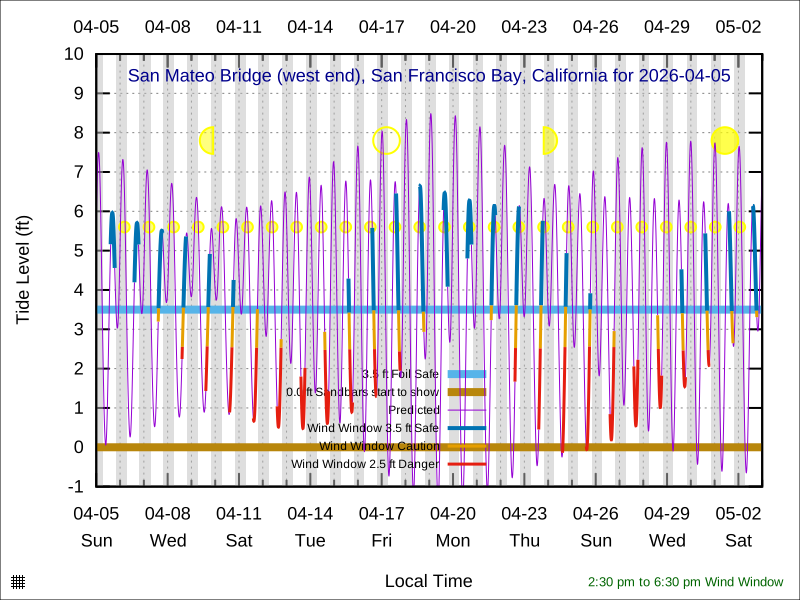
Theozh, Thanks for the script. I learned about some nice gnuplot features by reading it and testing it. Is there a way to associate hypertext with objects? I would like to add hypertext labels for the moon phases it https://boardsailor.com/palo_alto/third_avenue_28_day_forecast.svg Thanks, Michael On Wed, Apr 1, 2026 at 1:48 AM theozh via gnuplot-info < gnu...@li...> wrote: > in case this is still of interest... > If the values in the 4th column are numbers, you could pick the RGB-value > from a string. > Check for example `help linecolor variable` and `help word` > > Hope this helps, Theo. > > ### point color depending on column value > reset session > > $Data <<EOD > 1 4 foo 1 > 2 3 bar 3 > 5 8 baz 2 > EOD > > set key noautotitle > myLabel(col) = sprintf("%s", strcol(col)) > myColor(col) = int(word("0xff0000 0x00ff00 0x0000ff", int(column(col)))) > > plot $Data u 1:2:(myLabel(3)):(myColor(4)) w labels hypertext point pt 7 > lc rgb var > ### end of script > > > > _______________________________________________ > gnuplot-info mailing list > gnu...@li... > Membership management via: > https://lists.sourceforge.net/lists/listinfo/gnuplot-info > |
|
From: theozh <th...@gm...> - 2026-04-01 08:48:39
|
in case this is still of interest...
If the values in the 4th column are numbers, you could pick the RGB-value from a string.
Check for example `help linecolor variable` and `help word`

Hope this helps, Theo.

### point color depending on column value
reset session

$Data <<EOD
1   4   foo     1
2   3   bar     3
5   8   baz     2
EOD

set key noautotitle
myLabel(col) = sprintf("%s", strcol(col))
myColor(col) = int(word("0xff0000 0x00ff00 0x0000ff", int(column(col))))

plot $Data u 1:2:(myLabel(3)):(myColor(4)) w labels hypertext point pt 7 lc rgb var
### end of script
|
|
From: Bjorn B. <bjo...@gm...> - 2026-03-31 16:06:13
|
Haha, I do my best! Thanks for investigating, fixing, and suggesting a workaround. I'm looking forward to gnuplot 6.0.5/6.1. :) On Tue, Mar 31, 2026 at 1:23 AM Ethan Merritt <eam...@gm...> wrote: > > > > On Mon, Mar 30, 2026 at 12:22 AM Bjorn Buckwalter <bjo...@gm...> wrote: >> >> Thanks Ethan for digging to the bottom of this and for the workaround! (I guess that the other workaround is simply to not use `\` and have very long lines, at the expense of readability, of course.) >> >> Note that I still see the second problem that I mentioned at the end of an earlier email. I repeat it here. This is the message I get if I include your "junk" code prior to my script. As expected the data files are not found, but the strange thing is the last message: >> >> ``` >> reference a string of length 6144 >> garbage >> "$plot_polar" line 13: warning: Cannot find or open file "world_110m.txt" >> "$plot_polar" line 13: warning: Cannot find or open file "data/ReportA.txt" >> "$plot_polar" line 13: warning: Cannot find or open file "data/ReportA.txt" >> "$plot_polar" line 13: undefined variable: orbit >> ``` >> >> I have had trouble where this last message/error pops up sometimes and I haven't been able to nail down the exact circumstances. I believe in this case that it refers to `title orbit`. If I change that to `notitle` it disappears. And changing from `notitle` to `title orbit` in the preceding line does not trigger the message. This seems also somehow related to the length of the command. >> >> Many thanks, >> Bjorn > > > You have a talent for finding bugs. > I have filed this one on the bug tracker > https://sourceforge.net/p/gnuplot/bugs/2865/ > It contains a 1-line example that triggers the bug. > > I think you can get this error message only if (a) the previous plot did not find any points to plot > and (b) the current plot gives no explicit title. > > You can avoid this error message in your particular script by adding a title to the line that plots 0 > for [orbit in orbits] \ > 'data/Report'.orbit.'.txt' using (lon($7)):($3 == 2030 ? filter_lat($6) : NaN) \ > lc rgb next_color(n) title orbit, \ > 0 title "0", \ > ^^^^^^^^^^^^^^^ > > Why? The plot that found no points had already stored a function to generate what > would have been the title. But then it never plotted anything and neither evaluated nor > cleared that function afterwards. So then if the _next_ plot doesn't provide a title of its > own it inherits the function to generate one. In this case that generated title, which would > have been wrong in any case, references a variable that is no longer in scope. > The bug will be easy to fix in the code, but the work-around is also easy > -- give the following plot a title. > > Ethan |
|
From: Ethan M. <eam...@gm...> - 2026-03-30 23:23:29
|
On Mon, Mar 30, 2026 at 12:22 AM Bjorn Buckwalter <
bjo...@gm...> wrote:

> Thanks Ethan for digging to the bottom of this and for the workaround! (I
> guess that the other workaround is simply to not use `\` and have very long
> lines, at the expense of readability, of course.)
>
> Note that I still see the second problem that I mentioned at the end of an
> earlier email. I repeat it here. This is the message I get if I include
> your "junk" code prior to my script. As expected the data files are not
> found, but the strange thing is the last message:
>
> ```
> reference a string of length  6144
> garbage
> "$plot_polar" line 13: warning: Cannot find or open file "world_110m.txt"
> "$plot_polar" line 13: warning: Cannot find or open file "data/ReportA.txt"
> "$plot_polar" line 13: warning: Cannot find or open file "data/ReportA.txt"
> "$plot_polar" line 13: undefined variable: orbit
> ```
>
> I have had trouble where this last message/error pops up sometimes and I
> haven't been able to nail down the exact circumstances. I believe in this
> case that it refers to `title orbit`. If I change that to `notitle` it
> disappears. And changing from `notitle` to `title orbit` in the preceding
> line does not trigger the message. This seems also somehow related to the
> length of the command.
>
> Many thanks,
> Bjorn
>

You have a talent for finding bugs.
I have filed this one on the bug tracker
       https://sourceforge.net/p/gnuplot/bugs/2865/
It contains a 1-line example that triggers the bug.

I think you can get this error message only if (a) the previous plot did
not find any points to plot
and (b) the current plot gives no explicit title.

You can avoid this error message in your particular script by adding a
title to the line that plots 0
        for [orbit in orbits] \
     'data/Report'.orbit.'.txt' using (lon($7)):($3 == 2030 ?
filter_lat($6) : NaN) \
       lc rgb next_color(n) title orbit, \
   0 title "0", \
^^^^^^^^^^^^^^^

Why?  The plot that found no points had already stored a function to
generate what
would have been the title.  But then it never plotted anything and neither
evaluated nor
cleared that function afterwards.  So then if the _next_ plot doesn't
provide a title of its
own it inherits the function to generate one.  In this case that
generated title,
which would
have been wrong in any case, references a variable that is no longer in
scope.
The bug will be easy to fix in the code, but the work-around is also easy
 -- give the following plot a title.

 Ethan
|
|
From: theozh <th...@gm...> - 2026-03-30 15:26:33
|
my suggestion would be: 1. separate your blocks by TWO empty lines 2. modify the last plot command line to ... $DATA u 1:2:3:(column(-2)+1) w l lc var column(-2) is the block index, which is used for variable color hope this helps, Theo. |
|
From: Bjorn B. <bjo...@gm...> - 2026-03-30 14:59:48
|
Hi all,

I have a question about the feature of `splot` that “If all blocks
contain the same number of points, gnuplot will draw cross-isolines
between points in the blocks, connecting corresponding points.” In
particular, I wonder if that feature can be turned off.

In my case, I have equally sized block that I want to plot and
individual lines, and not have them connected with a surface. This
example illustrates the problem:

```
set angles degrees
set view 70,140
set isotropic
set mapping spherical
set hidden3d offset 0

# Set up the Earth grid
set parametric
set samples 32
set isosamples 37
set urange [-90:90]
set vrange [0:360]

set style data lines
set zlabel "Earth radii" rotate

$DATA << EOD
# Orbit 1
 0   0 2
 0  30 2
 0  60 2
 0  90 2
 0 120 2
 0 180 2
 0 210 2
 0 240 2
 0 270 2
 0 300 2
 0 330 2
 0 360 2

# Orbit 2
30   0 2
30  30 2
30  60 2
30  90 2
30 120 2
30 180 2
30 210 2
30 240 2
30 270 2
30 300 2
30 330 2
30 360 2

# Orbit 3
60   0 2
60  30 2
60  60 2
60  90 2
60 120 2
60 180 2
60 210 2
60 240 2
60 270 2
60 300 2
60 330 2
60 360 2
EOD

# The for loop is necessary to prevent iso grid lines being drawn by
# gnuplot due to regular data block sizes.
splot \
  cos(u*2)*cos(v),cos(u*2)*sin(v),sin(u*2) lc "dark-grey" notitle ,\
  $DATA
```

The workaround I have is to plot the lines in a for loop and use
`every`. It is OK here in the example but quite a bit messier in my
“production” code:

```
splot \
  cos(u*2)*cos(v),cos(u*2)*sin(v),sin(u*2) lc "dark-grey" notitle ,\
    for [j = 0:2] $DATA every :::j::j
```

There was a similar question in 2015 which seems to have not been
answered: https://sourceforge.net/p/gnuplot/mailman/gnuplot-info/thread/5523D38B.2010001%40lpccaen.in2p3.fr/#msg33740382

Many thanks,
Bjorn
|
|
From: Bjorn B. <bjo...@gm...> - 2026-03-30 07:22:16
|
Thanks Ethan for digging to the bottom of this and for the workaround! (I
guess that the other workaround is simply to not use `\` and have very long
lines, at the expense of readability, of course.)

Note that I still see the second problem that I mentioned at the end of an
earlier email. I repeat it here. This is the message I get if I include
your "junk" code prior to my script. As expected the data files are not
found, but the strange thing is the last message:

```
reference a string of length  6144
garbage
"$plot_polar" line 13: warning: Cannot find or open file "world_110m.txt"
"$plot_polar" line 13: warning: Cannot find or open file "data/ReportA.txt"
"$plot_polar" line 13: warning: Cannot find or open file "data/ReportA.txt"
"$plot_polar" line 13: undefined variable: orbit
```

I have had trouble where this last message/error pops up sometimes and I
haven't been able to nail down the exact circumstances. I believe in this
case that it refers to `title orbit`. If I change that to `notitle` it
disappears. And changing from `notitle` to `title orbit` in the preceding
line does not trigger the message. This seems also somehow related to the
length of the command.

Many thanks,
Bjorn


On Mon, Mar 30, 2026 at 1:34 AM Ethan Merritt <eam...@gm...> wrote:

> On Sunday, 29 March 2026 10:25:16 PDT Bjorn Buckwalter wrote:
> > Hi Philipp and all,
> >
> > So, trying to minimize a bit more, I realized that a key piece of
> > information that was omitted seems to be that the plot command is inside
> a
> > function block. Below is a case that reproduces the error for me that you
> > could test. I realised that if I take the command out of the function it
> > works properly.
> >
> > By the way I am on macos and `gnuplot --version` says `gnuplot 6.0
> > patchlevel 4`.
> >
> > Here is the case that fails with the error in question. Since it fails
> > early (at least for me) you will not actually need the data files:
> >
> > ```
> > local lon(x) = x
> > local lat(x) = x
> > local filter_lat(x) = x
> > local next_color(x) = "#00FF00"
> > local next_color_t(x, y) = "#00FF00"
> >
> > local lat1 = 0
> >
> > function $plot_polar(orbits) <<EOF
> >   plot \
> >     'world_110m.txt' using (lon($1)):(filter_lat($2)) linecolor "gray"
> > notitle , \
> >     lat(0) black dt 2 title "Equator" , \
> >     lat(66.6) black dt 5 title "Arctic/Antarctic circle", \
> >     lat(-66.6) black dt 5 notitle , \
> >     for [orbit in orbits] \
> >       'data/Report'.orbit.'.txt' using (lon($7)):(filter_lat($6)) \
> >         lc rgb next_color_t(1, 'cc') notitle, \
> >     for [orbit in orbits] \
> >       'data/Report'.orbit.'.txt' using (lon($7)):($3 == 2030 ?
> > filter_lat($6) : NaN) \
> >         lc rgb next_color(n) title orbit, \
> >     0, \
> >     1
> > EOF
> >
> > _ = $plot_polar("A")
> > ```
> >
> > The error message:
> >
> > ```
> >   plot     'world_110m.txt' using (lon($1)):(filter_lat($2)) linecolor
> > "gray" notitle ,     lat(0) black dt 2 title "Equator" ,     lat(66.6)
> > black dt 5 title "Arctic/Antarctic circle",     lat(-66.6) black dt 5
> > notitle ,     for [orbit in orbits]       'data/Report'.orbit.'.txt'
> using
> > (lon($7)):(filter_lat($6))         lc rgb next_color_t(1, 'cc') notitle,
> >   for [orbit in orbits]       'data/Report'.orbit.'.txt' using
> > (lon($7)):($3 == 2030 ? filter_lat($6) : NaN)         lc rgb
> next_color(n)
> > title orbit,     0, \    1
> >
> >                                                                 ^
> > "$plot_polar" line 13: invalid character \
> > ```
> >
> > If I change the `linecolor` in the first line of `plot` to `lc`, The
> error
> > does not occur.
>
> This is a strange one.
>
> I believe I have tracked it down to a program bug that has has nothing in
> particular to do with the details of your script, although as you noted it
> is
> more likely to be triggered by a function block than by input from a file.
> You just got unlucky.
>
> The program has no fixed limit on input line length or command length.
> The size of the command buffer is expanded if necessary to hold the
> next bit of input.   The new input is appended to the current content of
> the buffer, except that if the current buffer ends in a backslash it is
> appended on top of the backslash rather than after it.
>
> The bug is that the check for a trailing backslash gets skipped if the next
> chunk of input is the one that causes the command buffer to be expanded,
> so the command buffer is left with a spurious backslash character.
>
> I don't have an immediately work-around for existing binaries other than
> to note that once the command buffer has been expanded, the bug will
> not trigger again.   So even though the first invocation of the function
> block fails, a subsequent invocation will succeed because this time the
> buffer does not need to be expanded and the check for a backslash is
> made correctly.
>
> Or I suppose you could prefix the script with a useless bit of code that
> constructs and executes a very long command so that the command
> buffer gets expanded:
>
>   junk = "garbage garbage garbage "
>   do for [i=1:8] { junk = junk . junk }
>   command = 'print "' . junk . '" [1:8]'
>   print "reference a string of length ", strlen(junk)
>   eval(command)
>   ...
>   start your real script here
>
>  - Ethan
>
>
>
> > If you test, you may instead get:
> >
> > ```
> > "$plot_polar" line 13: warning: Cannot find or open file "world_110m.txt"
> > "$plot_polar" line 13: warning: Cannot find or open file
> "data/ReportA.txt"
> > "$plot_polar" line 13: warning: Cannot find or open file
> "data/ReportA.txt"
> > "$plot_polar" line 13: undefined variable: orbit
> > ```
> >
> > By the way, the last message is rather curious. I have had trouble where
> > this pops up sometimes and I haven't been able to nail down the exact
> > circumstances. I believe in this case that it refers to `title orbit`.
> If I
> > change that to `notitle` it disappears. And changing from `notitle` to
> > `title orbit` in the preceding line does not trigger the message. This
> > seems also somehow related to the length of the command.
> >
> > I guess Hernán's suggestion to generate a “flat” gnuplot script with a
> > non-gnuplot script could allow me to avoid using function blocks. (At
> least
> > that is how I interpreted the suggestion).
> >
> > Thanks,
> > Bjorn
> >
> >
> > On Sun, Mar 29, 2026 at 2:24 PM Philipp K. Janert <ph...@ja...>
> wrote:
> >
> > > On Sun, 29 Mar 2026 11:49:01 +0200
> > > Bjorn Buckwalter <bjo...@gm...> wrote:
> > >
> > > > Thanks Jesper and Philpp. Jespers suggestion with variables can
> > > > likely help – I will try it!
> > >
> > > It's not so easy for me to reproduce your
> > > problem, because I don't have access to the
> > > data files, etc.
> > >
> > > The cmd does not seem overly long. I still
> > > suspect that there is a problem with one of
> > > the CRs not being properly escaped - such
> > > as having a blank after a backslash, but
> > > before the actual CR. The error msg in your
> > > original email points to that, too.
> > >
> > > I did not dig into the code to see whether
> > > there is an actual limit to the length of
> > > the cmd line. Ethan would know.
> > >
> > > Do you enter the cmd interactively, or do
> > > you have it in a file, which you load?
> > >
> > > >
> > > > FYI here is an example plot command that fails:
> > > >
> > > > ```
> > > >   plot \
> > > >     'world_110m.txt' using (lon($1)):(filter_lat($2)) with lines
> > > > linecolor "gray" notitle , \
> > > >     lat(0) with lines black dashtype 2 title "Equator" , \
> > > >     lat(66.6) with lines black dashtype 5 title "Arctic/Antarctic
> > > > circle", \ lat(-66.6) with lines black dashtype 5 notitle , \
> > > >     for [orbit in orbits] \
> > > >       'data/Report'.orbit.'.txt' using (lon($7)):(filter_lat($6)) \
> > > >         with lines linecolor rgb next_color_t(n, 'cc') notitle, \
> > > >     for [orbit in orbits] \
> > > >       'data/Report'.orbit.'.txt' using (lon($7)):($3 == 2030 ?
> > > > filter_lat($6) : NaN) \
> > > >         with lines linecolor rgb next_color(n) title orbit, \
> > > >     lat(lat1) black notitle  # edge of plot
> > > > ```
> > > >
> > > > There is A LOT going on there with various custom functions, etc. I
> > > > tried to make a minimal and “dependency-free” example but failed to
> > > > reproduce the behavior. I could maybe try harder.
> > > >
> > > > Here is in any case the error from gnuplot. The command has been
> > > > concatenated at all baskslashes except the last:
> > > >
> > > > ```
> > > >   plot     'world_110m.txt' using (lon($1)):(filter_lat($2)) with
> > > > lines linecolor "gray" notitle ,     lat(0) with lines black dashtype
> > > > 2 title "Equator" ,     lat(66.6) with lines black dashtype 5 title
> > > > "Arctic/Antarctic circle",     lat(-66.6) with lines black dashtype 5
> > > > notitle ,     for [orbit in orbits]       'data/Report'.orbit.'.txt'
> > > > using (lon($7)):(filter_lat($6))         with lines linecolor rgb
> > > > next_color_t(n, 'cc') notitle,     for [orbit in orbits]
> > > > 'data/Report'.orbit.'.txt' using (lon($7)):($3 == 2030 ?
> > > > filter_lat($6) : NaN)         with lines linecolor rgb next_color(n)
> > > > title orbit, \    lat(lat1) black notitle  # edge of plot
> > > >
> > > >
> > > >
> > > >
> > > >
> > > >
> > > >
> > > >
> > > >    ^
> > > > "$plot_polar" line 15: invalid character \
> > > > ```
> > > >
> > > > There is nothing wrong with the backslash (no trailing spaces, etc.).
> > > >
> > > > If I change it as so (just shortening style definitions) it works:
> > > >
> > > > ```
> > > >   set style data lines
> > > >   plot \
> > > >     'world_110m.txt' using (lon($1)):(filter_lat($2)) lc "gray"
> > > > notitle , \ lat(0) black dt 2 title "Equator" , \
> > > >     lat(66.6) black dt 5 title "Arctic/Antarctic circle", \
> > > >     lat(-66.6) black dt 5 notitle , \
> > > >     for [orbit in orbits] \
> > > >       'data/Report'.orbit.'.txt' using (lon($7)):(filter_lat($6)) \
> > > >         lc rgb next_color_t(n, 'cc') notitle, \
> > > >     for [orbit in orbits] \
> > > >       'data/Report'.orbit.'.txt' using (lon($7)):($3 == 2030 ?
> > > > filter_lat($6) : NaN) \
> > > >         lc rgb next_color(n) title orbit, \
> > > >     lat(lat1) black notitle  # edge of plot
> > > > ```
> > > >
> > > > All I did was remove `with lines` (using `set style data lines`
> > > > instead and replace `linecolor` and `dashtype` with `lc` and `dt`,
> > > > respectively. This is why I say it seems to be somehow related to the
> > > > length/number of characters of a command.
> > > >
> > > > Thanks,
> > > > Bjorn
> > > >
> > > >
> > > > On Sun, Mar 29, 2026 at 5:28 AM Philipp K. Janert <ph...@ja...
> >
> > > > wrote:
> > > >
> > > > > On Sat, 28 Mar 2026 22:13:40 +0100
> > > > > Bjorn Buckwalter <bjo...@gm...> wrote:
> > > > >
> > > > > > HI all,
> > > > >
> > > > > How long (in characters) are the command lines that
> > > > > you are using? Mine frequently run long, and it has
> > > > > never been a problem.
> > > > >
> > > > > Is it possible that you have problems with embedded
> > > > > newlines, or that something goes awry if your command
> > > > > line runs into a new line in your terminal?
> > > > >
> > > > > Best,
> > > > >
> > > > >                 Ph.
> > > > >
> > > > > >
> > > > > > I rather often run into a problem of my plot commands being too
> > > > > > long, typically resulting in a not-very-helpful error message
> > > > > > such as:
> > > > > >
> > > > > > "$plot_polar" line 21: invalid character \
> > > > > >
> > > > > > It took a lot of head scratching to realize the root of the
> > > > > > problem. I assume there are strong reasons for both the
> > > > > > limitation on command length and the poor error message.
> > > > > >
> > > > > > I cannot be the only one running into this problem. The situation
> > > > > > being what it is, what are the rest of you doing to manage when
> > > > > > you run up against this limit? Replacing `linecolor` with `lc`,
> > > > > > etc, will only get me so far and at the expense of readability.
> > > > > >
> > > > > > Many thanks,
> > > > > > Bjorn
> > > > > >
> > > > > > _______________________________________________
> > > > > > gnuplot-info mailing list
> > > > > > gnu...@li...
> > > > > > Membership management via:
> > > > > > https://lists.sourceforge.net/lists/listinfo/gnuplot-info
> > > > >
> > > > >
> > > > >
> > > > > --
> > > > >
> > > > > Philipp K. Janert
> > > > > www.janert.me
> > > > >
> > > > >
> > > > > _______________________________________________
> > > > > gnuplot-info mailing list
> > > > > gnu...@li...
> > > > > Membership management via:
> > > > > https://lists.sourceforge.net/lists/listinfo/gnuplot-info
> > > > >
> > >
> > >
> > >
> > > --
> > >
> > > Philipp K. Janert
> > > www.janert.me
> > >
> > >
> > > _______________________________________________
> > > gnuplot-info mailing list
> > > gnu...@li...
> > > Membership management via:
> > > https://lists.sourceforge.net/lists/listinfo/gnuplot-info
> > >
> >
> > _______________________________________________
> > gnuplot-info mailing list
> > gnu...@li...
> > Membership management via:
> https://lists.sourceforge.net/lists/listinfo/gnuplot-info
> >
>
>
>
>
>
|
|
From: Ethan M. <eam...@gm...> - 2026-03-29 23:35:06
|
On Sunday, 29 March 2026 10:25:16 PDT Bjorn Buckwalter wrote:
> Hi Philipp and all,
>
> So, trying to minimize a bit more, I realized that a key piece of
> information that was omitted seems to be that the plot command is inside a
> function block. Below is a case that reproduces the error for me that you
> could test. I realised that if I take the command out of the function it
> works properly.
>
> By the way I am on macos and `gnuplot --version` says `gnuplot 6.0
> patchlevel 4`.
>
> Here is the case that fails with the error in question. Since it fails
> early (at least for me) you will not actually need the data files:
>
> ```
> local lon(x) = x
> local lat(x) = x
> local filter_lat(x) = x
> local next_color(x) = "#00FF00"
> local next_color_t(x, y) = "#00FF00"
>
> local lat1 = 0
>
> function $plot_polar(orbits) <<EOF
>   plot \
>     'world_110m.txt' using (lon($1)):(filter_lat($2)) linecolor "gray"
> notitle , \
>     lat(0) black dt 2 title "Equator" , \
>     lat(66.6) black dt 5 title "Arctic/Antarctic circle", \
>     lat(-66.6) black dt 5 notitle , \
>     for [orbit in orbits] \
>       'data/Report'.orbit.'.txt' using (lon($7)):(filter_lat($6)) \
>         lc rgb next_color_t(1, 'cc') notitle, \
>     for [orbit in orbits] \
>       'data/Report'.orbit.'.txt' using (lon($7)):($3 == 2030 ?
> filter_lat($6) : NaN) \
>         lc rgb next_color(n) title orbit, \
>     0, \
>     1
> EOF
>
> _ = $plot_polar("A")
> ```
>
> The error message:
>
> ```
>   plot     'world_110m.txt' using (lon($1)):(filter_lat($2)) linecolor
> "gray" notitle ,     lat(0) black dt 2 title "Equator" ,     lat(66.6)
> black dt 5 title "Arctic/Antarctic circle",     lat(-66.6) black dt 5
> notitle ,     for [orbit in orbits]       'data/Report'.orbit.'.txt' using
> (lon($7)):(filter_lat($6))         lc rgb next_color_t(1, 'cc') notitle,
>   for [orbit in orbits]       'data/Report'.orbit.'.txt' using
> (lon($7)):($3 == 2030 ? filter_lat($6) : NaN)         lc rgb next_color(n)
> title orbit,     0, \    1
>
>                                                                 ^
> "$plot_polar" line 13: invalid character \
> ```
>
> If I change the `linecolor` in the first line of `plot` to `lc`, The error
> does not occur.

This is a strange one.

I believe I have tracked it down to a program bug that has has nothing in
particular to do with the details of your script, although as you noted it is
more likely to be triggered by a function block than by input from a file.
You just got unlucky.

The program has no fixed limit on input line length or command length.
The size of the command buffer is expanded if necessary to hold the
next bit of input.   The new input is appended to the current content of
the buffer, except that if the current buffer ends in a backslash it is
appended on top of the backslash rather than after it.

The bug is that the check for a trailing backslash gets skipped if the next
chunk of input is the one that causes the command buffer to be expanded,
so the command buffer is left with a spurious backslash character.

I don't have an immediately work-around for existing binaries other than
to note that once the command buffer has been expanded, the bug will
not trigger again.   So even though the first invocation of the function
block fails, a subsequent invocation will succeed because this time the
buffer does not need to be expanded and the check for a backslash is
made correctly.

Or I suppose you could prefix the script with a useless bit of code that
constructs and executes a very long command so that the command
buffer gets expanded:

  junk = "garbage garbage garbage "
  do for [i=1:8] { junk = junk . junk }
  command = 'print "' . junk . '" [1:8]'
  print "reference a string of length ", strlen(junk)
  eval(command)
  ...
  start your real script here

 - Ethan


> If you test, you may instead get:
>
> ```
> "$plot_polar" line 13: warning: Cannot find or open file "world_110m.txt"
> "$plot_polar" line 13: warning: Cannot find or open file "data/ReportA.txt"
> "$plot_polar" line 13: warning: Cannot find or open file "data/ReportA.txt"
> "$plot_polar" line 13: undefined variable: orbit
> ```
>
> By the way, the last message is rather curious. I have had trouble where
> this pops up sometimes and I haven't been able to nail down the exact
> circumstances. I believe in this case that it refers to `title orbit`. If I
> change that to `notitle` it disappears. And changing from `notitle` to
> `title orbit` in the preceding line does not trigger the message. This
> seems also somehow related to the length of the command.
>
> I guess Hernán's suggestion to generate a “flat” gnuplot script with a
> non-gnuplot script could allow me to avoid using function blocks. (At least
> that is how I interpreted the suggestion).
>
> Thanks,
> Bjorn
>
>
> On Sun, Mar 29, 2026 at 2:24 PM Philipp K. Janert <ph...@ja...> wrote:
>
> > On Sun, 29 Mar 2026 11:49:01 +0200
> > Bjorn Buckwalter <bjo...@gm...> wrote:
> >
> > > Thanks Jesper and Philpp. Jespers suggestion with variables can
> > > likely help – I will try it!
> >
> > It's not so easy for me to reproduce your
> > problem, because I don't have access to the
> > data files, etc.
> >
> > The cmd does not seem overly long. I still
> > suspect that there is a problem with one of
> > the CRs not being properly escaped - such
> > as having a blank after a backslash, but
> > before the actual CR. The error msg in your
> > original email points to that, too.
> >
> > I did not dig into the code to see whether
> > there is an actual limit to the length of
> > the cmd line. Ethan would know.
> >
> > Do you enter the cmd interactively, or do
> > you have it in a file, which you load?
> >
> > >
> > > FYI here is an example plot command that fails:
> > >
> > > ```
> > >   plot \
> > >     'world_110m.txt' using (lon($1)):(filter_lat($2)) with lines
> > > linecolor "gray" notitle , \
> > >     lat(0) with lines black dashtype 2 title "Equator" , \
> > >     lat(66.6) with lines black dashtype 5 title "Arctic/Antarctic
> > > circle", \ lat(-66.6) with lines black dashtype 5 notitle , \
> > >     for [orbit in orbits] \
> > >       'data/Report'.orbit.'.txt' using (lon($7)):(filter_lat($6)) \
> > >         with lines linecolor rgb next_color_t(n, 'cc') notitle, \
> > >     for [orbit in orbits] \
> > >       'data/Report'.orbit.'.txt' using (lon($7)):($3 == 2030 ?
> > > filter_lat($6) : NaN) \
> > >         with lines linecolor rgb next_color(n) title orbit, \
> > >     lat(lat1) black notitle  # edge of plot
> > > ```
> > >
> > > There is A LOT going on there with various custom functions, etc. I
> > > tried to make a minimal and “dependency-free” example but failed to
> > > reproduce the behavior. I could maybe try harder.
> > >
> > > Here is in any case the error from gnuplot. The command has been
> > > concatenated at all baskslashes except the last:
> > >
> > > ```
> > >   plot     'world_110m.txt' using (lon($1)):(filter_lat($2)) with
> > > lines linecolor "gray" notitle ,     lat(0) with lines black dashtype
> > > 2 title "Equator" ,     lat(66.6) with lines black dashtype 5 title
> > > "Arctic/Antarctic circle",     lat(-66.6) with lines black dashtype 5
> > > notitle ,     for [orbit in orbits]       'data/Report'.orbit.'.txt'
> > > using (lon($7)):(filter_lat($6))         with lines linecolor rgb
> > > next_color_t(n, 'cc') notitle,     for [orbit in orbits]
> > > 'data/Report'.orbit.'.txt' using (lon($7)):($3 == 2030 ?
> > > filter_lat($6) : NaN)         with lines linecolor rgb next_color(n)
> > > title orbit, \    lat(lat1) black notitle  # edge of plot
> > >
> > >
> > >
> > >
> > >
> > >
> > >
> > >
> > >    ^
> > > "$plot_polar" line 15: invalid character \
> > > ```
> > >
> > > There is nothing wrong with the backslash (no trailing spaces, etc.).
> > >
> > > If I change it as so (just shortening style definitions) it works:
> > >
> > > ```
> > >   set style data lines
> > >   plot \
> > >     'world_110m.txt' using (lon($1)):(filter_lat($2)) lc "gray"
> > > notitle , \ lat(0) black dt 2 title "Equator" , \
> > >     lat(66.6) black dt 5 title "Arctic/Antarctic circle", \
> > >     lat(-66.6) black dt 5 notitle , \
> > >     for [orbit in orbits] \
> > >       'data/Report'.orbit.'.txt' using (lon($7)):(filter_lat($6)) \
> > >         lc rgb next_color_t(n, 'cc') notitle, \
> > >     for [orbit in orbits] \
> > >       'data/Report'.orbit.'.txt' using (lon($7)):($3 == 2030 ?
> > > filter_lat($6) : NaN) \
> > >         lc rgb next_color(n) title orbit, \
> > >     lat(lat1) black notitle  # edge of plot
> > > ```
> > >
> > > All I did was remove `with lines` (using `set style data lines`
> > > instead and replace `linecolor` and `dashtype` with `lc` and `dt`,
> > > respectively. This is why I say it seems to be somehow related to the
> > > length/number of characters of a command.
> > >
> > > Thanks,
> > > Bjorn
> > >
> > >
> > > On Sun, Mar 29, 2026 at 5:28 AM Philipp K. Janert <ph...@ja...>
> > > wrote:
> > >
> > > > On Sat, 28 Mar 2026 22:13:40 +0100
> > > > Bjorn Buckwalter <bjo...@gm...> wrote:
> > > >
> > > > > HI all,
> > > >
> > > > How long (in characters) are the command lines that
> > > > you are using? Mine frequently run long, and it has
> > > > never been a problem.
> > > >
> > > > Is it possible that you have problems with embedded
> > > > newlines, or that something goes awry if your command
> > > > line runs into a new line in your terminal?
> > > >
> > > > Best,
> > > >
> > > >                 Ph.
> > > >
> > > > >
> > > > > I rather often run into a problem of my plot commands being too
> > > > > long, typically resulting in a not-very-helpful error message
> > > > > such as:
> > > > >
> > > > > "$plot_polar" line 21: invalid character \
> > > > >
> > > > > It took a lot of head scratching to realize the root of the
> > > > > problem. I assume there are strong reasons for both the
> > > > > limitation on command length and the poor error message.
> > > > >
> > > > > I cannot be the only one running into this problem. The situation
> > > > > being what it is, what are the rest of you doing to manage when
> > > > > you run up against this limit? Replacing `linecolor` with `lc`,
> > > > > etc, will only get me so far and at the expense of readability.
> > > > >
> > > > > Many thanks,
> > > > > Bjorn
> > > > >
> > > > > _______________________________________________
> > > > > gnuplot-info mailing list
> > > > > gnu...@li...
> > > > > Membership management via:
> > > > > https://lists.sourceforge.net/lists/listinfo/gnuplot-info
> > > >
> > > >
> > > >
> > > > --
> > > >
> > > > Philipp K. Janert
> > > > www.janert.me
> > > >
> > > >
> > > > _______________________________________________
> > > > gnuplot-info mailing list
> > > > gnu...@li...
> > > > Membership management via:
> > > > https://lists.sourceforge.net/lists/listinfo/gnuplot-info
> > > >
> >
> >
> >
> > --
> >
> > Philipp K. Janert
> > www.janert.me
> >
> >
> > _______________________________________________
> > gnuplot-info mailing list
> > gnu...@li...
> > Membership management via:
> > https://lists.sourceforge.net/lists/listinfo/gnuplot-info
> >
>
> _______________________________________________
> gnuplot-info mailing list
> gnu...@li...
> Membership management via: https://lists.sourceforge.net/lists/listinfo/gnuplot-info
>
|
|
From: Helmut H. <he...@ha...> - 2026-03-29 23:09:34
|
Hi all,
I've encountered similar problems running gnuplot on Win11. It seems
gnuplot does not like blanks after a continuation slash. When having
line breaks right after the slash the problem went away.
Cheers,
--Helmut

On 3/29/2026 2:02 PM, Philipp K. Janert wrote:
> On Sun, 29 Mar 2026 19:25:16 +0200
> Bjorn Buckwalter <bjo...@gm...> wrote:
>
>> Hi Philipp and all,
> Bjorn -
>
> At this point, I really think reproducability
> is key.
>
> Nothing I have seen so far suggests that there
> is a problem with an arbitrary length limitation
> w/in gnuplot. Instead, something seems to be
> wrong in the very complicated command, function,
> variable situation that you maintain.
>
> Two things:
> - Maybe you should go back and try to build up
>    your command again from scratch, one bit at a
>    time? And notice when and where it starts to
>    break?
> - On a more strategic level: my recommendation
>    would be to move some, if not most, of the
>    data processing OUT of gnuplot, so that you
>    have a data file with the actual data that
>    you want to plot. In the long run, this will
>    probably turn out to be a better workflow.
>
> Best,
>
> 		Ph.
>
>> So, trying to minimize a bit more, I realized that a key piece of
>> information that was omitted seems to be that the plot command is
>> inside a function block. Below is a case that reproduces the error
>> for me that you could test. I realised that if I take the command out
>> of the function it works properly.
>>
>> By the way I am on macos and `gnuplot --version` says `gnuplot 6.0
>> patchlevel 4`.
>>
>> Here is the case that fails with the error in question. Since it fails
>> early (at least for me) you will not actually need the data files:
>>
>> ```
>> local lon(x) = x
>> local lat(x) = x
>> local filter_lat(x) = x
>> local next_color(x) = "#00FF00"
>> local next_color_t(x, y) = "#00FF00"
>>
>> local lat1 = 0
>>
>> function $plot_polar(orbits) <<EOF
>>    plot \
>>      'world_110m.txt' using (lon($1)):(filter_lat($2)) linecolor "gray"
>> notitle , \
>>      lat(0) black dt 2 title "Equator" , \
>>      lat(66.6) black dt 5 title "Arctic/Antarctic circle", \
>>      lat(-66.6) black dt 5 notitle , \
>>      for [orbit in orbits] \
>>        'data/Report'.orbit.'.txt' using (lon($7)):(filter_lat($6)) \
>>          lc rgb next_color_t(1, 'cc') notitle, \
>>      for [orbit in orbits] \
>>        'data/Report'.orbit.'.txt' using (lon($7)):($3 == 2030 ?
>> filter_lat($6) : NaN) \
>>          lc rgb next_color(n) title orbit, \
>>      0, \
>>      1
>> EOF
>>
>> _ = $plot_polar("A")
>> ```
>>
>> The error message:
>>
>> ```
>>    plot     'world_110m.txt' using (lon($1)):(filter_lat($2)) linecolor
>> "gray" notitle ,     lat(0) black dt 2 title "Equator" ,     lat(66.6)
>> black dt 5 title "Arctic/Antarctic circle",     lat(-66.6) black dt 5
>> notitle ,     for [orbit in orbits]       'data/Report'.orbit.'.txt'
>> using (lon($7)):(filter_lat($6))         lc rgb next_color_t(1, 'cc')
>> notitle, for [orbit in orbits]       'data/Report'.orbit.'.txt' using
>> (lon($7)):($3 == 2030 ? filter_lat($6) : NaN)         lc rgb
>> next_color(n) title orbit,     0, \    1
>>
>>
>>
>>
>>
>>
>>                                                                  ^
>> "$plot_polar" line 13: invalid character \
>> ```
>>
>> If I change the `linecolor` in the first line of `plot` to `lc`, The
>> error does not occur. If you test, you may instead get:
>>
>> ```
>> "$plot_polar" line 13: warning: Cannot find or open file
>> "world_110m.txt" "$plot_polar" line 13: warning: Cannot find or open
>> file "data/ReportA.txt" "$plot_polar" line 13: warning: Cannot find
>> or open file "data/ReportA.txt" "$plot_polar" line 13: undefined
>> variable: orbit ```
>>
>> By the way, the last message is rather curious. I have had trouble
>> where this pops up sometimes and I haven't been able to nail down the
>> exact circumstances. I believe in this case that it refers to `title
>> orbit`. If I change that to `notitle` it disappears. And changing
>> from `notitle` to `title orbit` in the preceding line does not
>> trigger the message. This seems also somehow related to the length of
>> the command.
>>
>> I guess Hernán's suggestion to generate a “flat” gnuplot script with a
>> non-gnuplot script could allow me to avoid using function blocks. (At
>> least that is how I interpreted the suggestion).
>>
>> Thanks,
>> Bjorn
>>
>>
>> On Sun, Mar 29, 2026 at 2:24 PM Philipp K. Janert <ph...@ja...>
>> wrote:
>>
>>> On Sun, 29 Mar 2026 11:49:01 +0200
>>> Bjorn Buckwalter <bjo...@gm...> wrote:
>>>
>>>> Thanks Jesper and Philpp. Jespers suggestion with variables can
>>>> likely help – I will try it!
>>> It's not so easy for me to reproduce your
>>> problem, because I don't have access to the
>>> data files, etc.
>>>
>>> The cmd does not seem overly long. I still
>>> suspect that there is a problem with one of
>>> the CRs not being properly escaped - such
>>> as having a blank after a backslash, but
>>> before the actual CR. The error msg in your
>>> original email points to that, too.
>>>
>>> I did not dig into the code to see whether
>>> there is an actual limit to the length of
>>> the cmd line. Ethan would know.
>>>
>>> Do you enter the cmd interactively, or do
>>> you have it in a file, which you load?
>>>
>>>> FYI here is an example plot command that fails:
>>>>
>>>> ```
>>>>    plot \
>>>>      'world_110m.txt' using (lon($1)):(filter_lat($2)) with lines
>>>> linecolor "gray" notitle , \
>>>>      lat(0) with lines black dashtype 2 title "Equator" , \
>>>>      lat(66.6) with lines black dashtype 5 title "Arctic/Antarctic
>>>> circle", \ lat(-66.6) with lines black dashtype 5 notitle , \
>>>>      for [orbit in orbits] \
>>>>        'data/Report'.orbit.'.txt' using (lon($7)):(filter_lat($6))
>>>> \ with lines linecolor rgb next_color_t(n, 'cc') notitle, \
>>>>      for [orbit in orbits] \
>>>>        'data/Report'.orbit.'.txt' using (lon($7)):($3 == 2030 ?
>>>> filter_lat($6) : NaN) \
>>>>          with lines linecolor rgb next_color(n) title orbit, \
>>>>      lat(lat1) black notitle  # edge of plot
>>>> ```
>>>>
>>>> There is A LOT going on there with various custom functions, etc.
>>>> I tried to make a minimal and “dependency-free” example but
>>>> failed to reproduce the behavior. I could maybe try harder.
>>>>
>>>> Here is in any case the error from gnuplot. The command has been
>>>> concatenated at all baskslashes except the last:
>>>>
>>>> ```
>>>>    plot     'world_110m.txt' using (lon($1)):(filter_lat($2)) with
>>>> lines linecolor "gray" notitle ,     lat(0) with lines black
>>>> dashtype 2 title "Equator" ,     lat(66.6) with lines black
>>>> dashtype 5 title "Arctic/Antarctic circle",     lat(-66.6) with
>>>> lines black dashtype 5 notitle ,     for [orbit in orbits]
>>>> 'data/Report'.orbit.'.txt' using (lon($7)):(filter_lat($6))
>>>>    with lines linecolor rgb next_color_t(n, 'cc') notitle,     for
>>>> [orbit in orbits] 'data/Report'.orbit.'.txt' using (lon($7)):($3
>>>> == 2030 ? filter_lat($6) : NaN)         with lines linecolor rgb
>>>> next_color(n) title orbit, \    lat(lat1) black notitle  # edge
>>>> of plot
>>>>
>>>>
>>>>
>>>>
>>>>
>>>>
>>>>
>>>>
>>>>     ^
>>>> "$plot_polar" line 15: invalid character \
>>>> ```
>>>>
>>>> There is nothing wrong with the backslash (no trailing spaces,
>>>> etc.).
>>>>
>>>> If I change it as so (just shortening style definitions) it works:
>>>>
>>>> ```
>>>>    set style data lines
>>>>    plot \
>>>>      'world_110m.txt' using (lon($1)):(filter_lat($2)) lc "gray"
>>>> notitle , \ lat(0) black dt 2 title "Equator" , \
>>>>      lat(66.6) black dt 5 title "Arctic/Antarctic circle", \
>>>>      lat(-66.6) black dt 5 notitle , \
>>>>      for [orbit in orbits] \
>>>>        'data/Report'.orbit.'.txt' using (lon($7)):(filter_lat($6))
>>>> \ lc rgb next_color_t(n, 'cc') notitle, \
>>>>      for [orbit in orbits] \
>>>>        'data/Report'.orbit.'.txt' using (lon($7)):($3 == 2030 ?
>>>> filter_lat($6) : NaN) \
>>>>          lc rgb next_color(n) title orbit, \
>>>>      lat(lat1) black notitle  # edge of plot
>>>> ```
>>>>
>>>> All I did was remove `with lines` (using `set style data lines`
>>>> instead and replace `linecolor` and `dashtype` with `lc` and `dt`,
>>>> respectively. This is why I say it seems to be somehow related to
>>>> the length/number of characters of a command.
>>>>
>>>> Thanks,
>>>> Bjorn
>>>>
>>>>
>>>> On Sun, Mar 29, 2026 at 5:28 AM Philipp K. Janert
>>>> <ph...@ja...> wrote:
>>>>
>>>>> On Sat, 28 Mar 2026 22:13:40 +0100
>>>>> Bjorn Buckwalter <bjo...@gm...> wrote:
>>>>>
>>>>>> HI all,
>>>>> How long (in characters) are the command lines that
>>>>> you are using? Mine frequently run long, and it has
>>>>> never been a problem.
>>>>>
>>>>> Is it possible that you have problems with embedded
>>>>> newlines, or that something goes awry if your command
>>>>> line runs into a new line in your terminal?
>>>>>
>>>>> Best,
>>>>>
>>>>>                  Ph.
>>>>>
>>>>>> I rather often run into a problem of my plot commands being
>>>>>> too long, typically resulting in a not-very-helpful error
>>>>>> message such as:
>>>>>>
>>>>>> "$plot_polar" line 21: invalid character \
>>>>>>
>>>>>> It took a lot of head scratching to realize the root of the
>>>>>> problem. I assume there are strong reasons for both the
>>>>>> limitation on command length and the poor error message.
>>>>>>
>>>>>> I cannot be the only one running into this problem. The
>>>>>> situation being what it is, what are the rest of you doing to
>>>>>> manage when you run up against this limit? Replacing
>>>>>> `linecolor` with `lc`, etc, will only get me so far and at
>>>>>> the expense of readability.
>>>>>>
>>>>>> Many thanks,
>>>>>> Bjorn
>>>>>>
>>>>>> _______________________________________________
>>>>>> gnuplot-info mailing list
>>>>>> gnu...@li...
>>>>>> Membership management via:
>>>>>> https://lists.sourceforge.net/lists/listinfo/gnuplot-info
>>>>>
>>>>>
>>>>> --
>>>>>
>>>>> Philipp K. Janert
>>>>> www.janert.me
>>>>>
>>>>>
>>>>> _______________________________________________
>>>>> gnuplot-info mailing list
>>>>> gnu...@li...
>>>>> Membership management via:
>>>>> https://lists.sourceforge.net/lists/listinfo/gnuplot-info
>>>>>
>>>
>>>
>>> --
>>>
>>> Philipp K. Janert
>>> www.janert.me
>>>
>>>
>>> _______________________________________________
>>> gnuplot-info mailing list
>>> gnu...@li...
>>> Membership management via:
>>> https://lists.sourceforge.net/lists/listinfo/gnuplot-info
>>>
>
>
|
|
From: Philipp K. J. <ph...@ja...> - 2026-03-29 18:03:08
|
On Sun, 29 Mar 2026 19:25:16 +0200
Bjorn Buckwalter <bjo...@gm...> wrote:

> Hi Philipp and all,

Bjorn -

At this point, I really think reproducability
is key.

Nothing I have seen so far suggests that there
is a problem with an arbitrary length limitation
w/in gnuplot. Instead, something seems to be
wrong in the very complicated command, function,
variable situation that you maintain.

Two things:
- Maybe you should go back and try to build up
  your command again from scratch, one bit at a
  time? And notice when and where it starts to
  break?
- On a more strategic level: my recommendation
  would be to move some, if not most, of the
  data processing OUT of gnuplot, so that you
  have a data file with the actual data that
  you want to plot. In the long run, this will
  probably turn out to be a better workflow.

Best,

		Ph.

>
> So, trying to minimize a bit more, I realized that a key piece of
> information that was omitted seems to be that the plot command is
> inside a function block. Below is a case that reproduces the error
> for me that you could test. I realised that if I take the command out
> of the function it works properly.
>
> By the way I am on macos and `gnuplot --version` says `gnuplot 6.0
> patchlevel 4`.
>
> Here is the case that fails with the error in question. Since it fails
> early (at least for me) you will not actually need the data files:
>
> ```
> local lon(x) = x
> local lat(x) = x
> local filter_lat(x) = x
> local next_color(x) = "#00FF00"
> local next_color_t(x, y) = "#00FF00"
>
> local lat1 = 0
>
> function $plot_polar(orbits) <<EOF
>   plot \
>     'world_110m.txt' using (lon($1)):(filter_lat($2)) linecolor "gray"
> notitle , \
>     lat(0) black dt 2 title "Equator" , \
>     lat(66.6) black dt 5 title "Arctic/Antarctic circle", \
>     lat(-66.6) black dt 5 notitle , \
>     for [orbit in orbits] \
>       'data/Report'.orbit.'.txt' using (lon($7)):(filter_lat($6)) \
>         lc rgb next_color_t(1, 'cc') notitle, \
>     for [orbit in orbits] \
>       'data/Report'.orbit.'.txt' using (lon($7)):($3 == 2030 ?
> filter_lat($6) : NaN) \
>         lc rgb next_color(n) title orbit, \
>     0, \
>     1
> EOF
>
> _ = $plot_polar("A")
> ```
>
> The error message:
>
> ```
>   plot     'world_110m.txt' using (lon($1)):(filter_lat($2)) linecolor
> "gray" notitle ,     lat(0) black dt 2 title "Equator" ,     lat(66.6)
> black dt 5 title "Arctic/Antarctic circle",     lat(-66.6) black dt 5
> notitle ,     for [orbit in orbits]       'data/Report'.orbit.'.txt'
> using (lon($7)):(filter_lat($6))         lc rgb next_color_t(1, 'cc')
> notitle, for [orbit in orbits]       'data/Report'.orbit.'.txt' using
> (lon($7)):($3 == 2030 ? filter_lat($6) : NaN)         lc rgb
> next_color(n) title orbit,     0, \    1
>
>
>
>
>
>
>                                                                 ^
> "$plot_polar" line 13: invalid character \
> ```
>
> If I change the `linecolor` in the first line of `plot` to `lc`, The
> error does not occur. If you test, you may instead get:
>
> ```
> "$plot_polar" line 13: warning: Cannot find or open file
> "world_110m.txt" "$plot_polar" line 13: warning: Cannot find or open
> file "data/ReportA.txt" "$plot_polar" line 13: warning: Cannot find
> or open file "data/ReportA.txt" "$plot_polar" line 13: undefined
> variable: orbit ```
>
> By the way, the last message is rather curious. I have had trouble
> where this pops up sometimes and I haven't been able to nail down the
> exact circumstances. I believe in this case that it refers to `title
> orbit`. If I change that to `notitle` it disappears. And changing
> from `notitle` to `title orbit` in the preceding line does not
> trigger the message. This seems also somehow related to the length of
> the command.
>
> I guess Hernán's suggestion to generate a “flat” gnuplot script with a
> non-gnuplot script could allow me to avoid using function blocks. (At
> least that is how I interpreted the suggestion).
>
> Thanks,
> Bjorn
>
>
> On Sun, Mar 29, 2026 at 2:24 PM Philipp K. Janert <ph...@ja...>
> wrote:
>
> > On Sun, 29 Mar 2026 11:49:01 +0200
> > Bjorn Buckwalter <bjo...@gm...> wrote:
> >
> > > Thanks Jesper and Philpp. Jespers suggestion with variables can
> > > likely help – I will try it!
> >
> > It's not so easy for me to reproduce your
> > problem, because I don't have access to the
> > data files, etc.
> >
> > The cmd does not seem overly long. I still
> > suspect that there is a problem with one of
> > the CRs not being properly escaped - such
> > as having a blank after a backslash, but
> > before the actual CR. The error msg in your
> > original email points to that, too.
> >
> > I did not dig into the code to see whether
> > there is an actual limit to the length of
> > the cmd line. Ethan would know.
> >
> > Do you enter the cmd interactively, or do
> > you have it in a file, which you load?
> >
> > >
> > > FYI here is an example plot command that fails:
> > >
> > > ```
> > >   plot \
> > >     'world_110m.txt' using (lon($1)):(filter_lat($2)) with lines
> > > linecolor "gray" notitle , \
> > >     lat(0) with lines black dashtype 2 title "Equator" , \
> > >     lat(66.6) with lines black dashtype 5 title "Arctic/Antarctic
> > > circle", \ lat(-66.6) with lines black dashtype 5 notitle , \
> > >     for [orbit in orbits] \
> > >       'data/Report'.orbit.'.txt' using (lon($7)):(filter_lat($6))
> > > \ with lines linecolor rgb next_color_t(n, 'cc') notitle, \
> > >     for [orbit in orbits] \
> > >       'data/Report'.orbit.'.txt' using (lon($7)):($3 == 2030 ?
> > > filter_lat($6) : NaN) \
> > >         with lines linecolor rgb next_color(n) title orbit, \
> > >     lat(lat1) black notitle  # edge of plot
> > > ```
> > >
> > > There is A LOT going on there with various custom functions, etc.
> > > I tried to make a minimal and “dependency-free” example but
> > > failed to reproduce the behavior. I could maybe try harder.
> > >
> > > Here is in any case the error from gnuplot. The command has been
> > > concatenated at all baskslashes except the last:
> > >
> > > ```
> > >   plot     'world_110m.txt' using (lon($1)):(filter_lat($2)) with
> > > lines linecolor "gray" notitle ,     lat(0) with lines black
> > > dashtype 2 title "Equator" ,     lat(66.6) with lines black
> > > dashtype 5 title "Arctic/Antarctic circle",     lat(-66.6) with
> > > lines black dashtype 5 notitle ,     for [orbit in orbits]
> > > 'data/Report'.orbit.'.txt' using (lon($7)):(filter_lat($6))
> > >   with lines linecolor rgb next_color_t(n, 'cc') notitle,     for
> > > [orbit in orbits] 'data/Report'.orbit.'.txt' using (lon($7)):($3
> > > == 2030 ? filter_lat($6) : NaN)         with lines linecolor rgb
> > > next_color(n) title orbit, \    lat(lat1) black notitle  # edge
> > > of plot
> > >
> > >
> > >
> > >
> > >
> > >
> > >
> > >
> > >    ^
> > > "$plot_polar" line 15: invalid character \
> > > ```
> > >
> > > There is nothing wrong with the backslash (no trailing spaces,
> > > etc.).
> > >
> > > If I change it as so (just shortening style definitions) it works:
> > >
> > > ```
> > >   set style data lines
> > >   plot \
> > >     'world_110m.txt' using (lon($1)):(filter_lat($2)) lc "gray"
> > > notitle , \ lat(0) black dt 2 title "Equator" , \
> > >     lat(66.6) black dt 5 title "Arctic/Antarctic circle", \
> > >     lat(-66.6) black dt 5 notitle , \
> > >     for [orbit in orbits] \
> > >       'data/Report'.orbit.'.txt' using (lon($7)):(filter_lat($6))
> > > \ lc rgb next_color_t(n, 'cc') notitle, \
> > >     for [orbit in orbits] \
> > >       'data/Report'.orbit.'.txt' using (lon($7)):($3 == 2030 ?
> > > filter_lat($6) : NaN) \
> > >         lc rgb next_color(n) title orbit, \
> > >     lat(lat1) black notitle  # edge of plot
> > > ```
> > >
> > > All I did was remove `with lines` (using `set style data lines`
> > > instead and replace `linecolor` and `dashtype` with `lc` and `dt`,
> > > respectively. This is why I say it seems to be somehow related to
> > > the length/number of characters of a command.
> > >
> > > Thanks,
> > > Bjorn
> > >
> > >
> > > On Sun, Mar 29, 2026 at 5:28 AM Philipp K. Janert
> > > <ph...@ja...> wrote:
> > >
> > > > On Sat, 28 Mar 2026 22:13:40 +0100
> > > > Bjorn Buckwalter <bjo...@gm...> wrote:
> > > >
> > > > > HI all,
> > > >
> > > > How long (in characters) are the command lines that
> > > > you are using? Mine frequently run long, and it has
> > > > never been a problem.
> > > >
> > > > Is it possible that you have problems with embedded
> > > > newlines, or that something goes awry if your command
> > > > line runs into a new line in your terminal?
> > > >
> > > > Best,
> > > >
> > > >                 Ph.
> > > >
> > > > >
> > > > > I rather often run into a problem of my plot commands being
> > > > > too long, typically resulting in a not-very-helpful error
> > > > > message such as:
> > > > >
> > > > > "$plot_polar" line 21: invalid character \
> > > > >
> > > > > It took a lot of head scratching to realize the root of the
> > > > > problem. I assume there are strong reasons for both the
> > > > > limitation on command length and the poor error message.
> > > > >
> > > > > I cannot be the only one running into this problem. The
> > > > > situation being what it is, what are the rest of you doing to
> > > > > manage when you run up against this limit? Replacing
> > > > > `linecolor` with `lc`, etc, will only get me so far and at
> > > > > the expense of readability.
> > > > >
> > > > > Many thanks,
> > > > > Bjorn
> > > > >
> > > > > _______________________________________________
> > > > > gnuplot-info mailing list
> > > > > gnu...@li...
> > > > > Membership management via:
> > > > > https://lists.sourceforge.net/lists/listinfo/gnuplot-info
> > > >
> > > >
> > > >
> > > > --
> > > >
> > > > Philipp K. Janert
> > > > www.janert.me
> > > >
> > > >
> > > > _______________________________________________
> > > > gnuplot-info mailing list
> > > > gnu...@li...
> > > > Membership management via:
> > > > https://lists.sourceforge.net/lists/listinfo/gnuplot-info
> > > >
> >
> >
> >
> > --
> >
> > Philipp K. Janert
> > www.janert.me
> >
> >
> > _______________________________________________
> > gnuplot-info mailing list
> > gnu...@li...
> > Membership management via:
> > https://lists.sourceforge.net/lists/listinfo/gnuplot-info
> >


--

Philipp K. Janert
www.janert.me
|
|
From: Bjorn B. <bjo...@gm...> - 2026-03-29 17:59:12
|
Thank you Hernán for the further elaboration and the provided example! On Sun, Mar 29, 2026 at 7:53 PM Hernán De Angelis < var...@gm...> wrote: > Hi Bjorn, > > Yes, you understood correctly. Here you can see a very simple example > using Perl (but almost any other scripting language works): > > https://github.com/dhdeangelis/lcplot > > where the script downloads data, parses it in groups meant to be plotted > as different sets of points and chooses visually pleasant (for me) tic > parameters. This is written into a gnuplot script that is then passed as > argument for gnuplot. > > Arbitrarily complex gnuplot scripts can be efficiently written this way as > long as they respect gnuplot's syntax. Not shown in this example, but care > is necessary to adequately scape any eventual special character like "\", > "&". In Perl for example the sigils "$", "@", and "%" need to be escaped > when writing a gnuplot file using "\". Other precautions may apply in other > languages. > > Many script languages hace wrapper modules for gnuplot that may make life > easier. I personally prefer the above method though. > > Best of luck > > Hernán > > > Den 2026-03-29 kl. 19:32, skrev Bjorn Buckwalter: > > Hi Hernán and thanks for the suggestion. > > Do I understand correctly that you propose using a script written in > another language to generate the gnuplot script (the "configuration file")? > This may indeed be a good option, to generate a verbose and repetitive but > straight-forward gnuplot script. > > I will admit that I was rather happy to have my plotting infrastructure > being only self-contained gnuplot code, but I will seriously consider this. > > Thanks, > Bjorn > > > > > > On Sun, Mar 29, 2026 at 12:23 PM Hernán De Angelis < > var...@gm...> wrote: > >> You may already had this suggestion, as in using variables, but consider >> that given the length and complexity of your command, it is perhaps a >> better idea to use a script to do all steps from building your set of >> plot instructions, writing them to a configuration file, and then >> running the gnuplot command. I do this all the time to a good effect. >> >> /H. >> >> Den 2026-03-29 kl. 11:49, skrev Bjorn Buckwalter: >> > Thanks Jesper and Philpp. Jespers suggestion with variables can likely >> help >> > – I will try it! >> > >> > FYI here is an example plot command that fails: >> > >> > ``` >> > plot \ >> > 'world_110m.txt' using (lon($1)):(filter_lat($2)) with lines >> linecolor >> > "gray" notitle , \ >> > lat(0) with lines black dashtype 2 title "Equator" , \ >> > lat(66.6) with lines black dashtype 5 title "Arctic/Antarctic >> circle", \ >> > lat(-66.6) with lines black dashtype 5 notitle , \ >> > for [orbit in orbits] \ >> > 'data/Report'.orbit.'.txt' using (lon($7)):(filter_lat($6)) \ >> > with lines linecolor rgb next_color_t(n, 'cc') notitle, \ >> > for [orbit in orbits] \ >> > 'data/Report'.orbit.'.txt' using (lon($7)):($3 == 2030 ? >> > filter_lat($6) : NaN) \ >> > with lines linecolor rgb next_color(n) title orbit, \ >> > lat(lat1) black notitle # edge of plot >> > ``` >> > >> > There is A LOT going on there with various custom functions, etc. I >> tried >> > to make a minimal and “dependency-free” example but failed to reproduce >> the >> > behavior. I could maybe try harder. >> > >> > Here is in any case the error from gnuplot. The command has been >> > concatenated at all baskslashes except the last: >> > >> > ``` >> > plot 'world_110m.txt' using (lon($1)):(filter_lat($2)) with lines >> > linecolor "gray" notitle , lat(0) with lines black dashtype 2 title >> > "Equator" , lat(66.6) with lines black dashtype 5 title >> > "Arctic/Antarctic circle", lat(-66.6) with lines black dashtype 5 >> > notitle , for [orbit in orbits] 'data/Report'.orbit.'.txt' >> using >> > (lon($7)):(filter_lat($6)) with lines linecolor rgb >> next_color_t(n, >> > 'cc') notitle, for [orbit in orbits] >> 'data/Report'.orbit.'.txt' >> > using (lon($7)):($3 == 2030 ? filter_lat($6) : NaN) with lines >> > linecolor rgb next_color(n) title orbit, \ lat(lat1) black notitle # >> > edge of plot >> > >> > >> > >> > >> > >> > >> > >> > >> > ^ >> > "$plot_polar" line 15: invalid character \ >> > ``` >> > >> > There is nothing wrong with the backslash (no trailing spaces, etc.). >> > >> > If I change it as so (just shortening style definitions) it works: >> > >> > ``` >> > set style data lines >> > plot \ >> > 'world_110m.txt' using (lon($1)):(filter_lat($2)) lc "gray" >> notitle , \ >> > lat(0) black dt 2 title "Equator" , \ >> > lat(66.6) black dt 5 title "Arctic/Antarctic circle", \ >> > lat(-66.6) black dt 5 notitle , \ >> > for [orbit in orbits] \ >> > 'data/Report'.orbit.'.txt' using (lon($7)):(filter_lat($6)) \ >> > lc rgb next_color_t(n, 'cc') notitle, \ >> > for [orbit in orbits] \ >> > 'data/Report'.orbit.'.txt' using (lon($7)):($3 == 2030 ? >> > filter_lat($6) : NaN) \ >> > lc rgb next_color(n) title orbit, \ >> > lat(lat1) black notitle # edge of plot >> > ``` >> > >> > All I did was remove `with lines` (using `set style data lines` instead >> and >> > replace `linecolor` and `dashtype` with `lc` and `dt`, respectively. >> This >> > is why I say it seems to be somehow related to the length/number of >> > characters of a command. >> > >> > Thanks, >> > Bjorn >> > >> > >> > On Sun, Mar 29, 2026 at 5:28 AM Philipp K. Janert<ph...@ja...> >> wrote: >> > >> >> On Sat, 28 Mar 2026 22:13:40 +0100 >> >> Bjorn Buckwalter<bjo...@gm...> wrote: >> >> >> >>> HI all, >> >> How long (in characters) are the command lines that >> >> you are using? Mine frequently run long, and it has >> >> never been a problem. >> >> >> >> Is it possible that you have problems with embedded >> >> newlines, or that something goes awry if your command >> >> line runs into a new line in your terminal? >> >> >> >> Best, >> >> >> >> Ph. >> >> >> >>> I rather often run into a problem of my plot commands being too long, >> >>> typically resulting in a not-very-helpful error message such as: >> >>> >> >>> "$plot_polar" line 21: invalid character \ >> >>> >> >>> It took a lot of head scratching to realize the root of the problem. I >> >>> assume there are strong reasons for both the limitation on command >> >>> length and the poor error message. >> >>> >> >>> I cannot be the only one running into this problem. The situation >> >>> being what it is, what are the rest of you doing to manage when you >> >>> run up against this limit? Replacing `linecolor` with `lc`, etc, will >> >>> only get me so far and at the expense of readability. >> >>> >> >>> Many thanks, >> >>> Bjorn >> >>> >> >>> _______________________________________________ >> >>> gnuplot-info mailing list >> >>> gnu...@li... >> >>> Membership management via: >> >>> https://lists.sourceforge.net/lists/listinfo/gnuplot-info >> >> >> >> >> >> -- >> >> >> >> Philipp K. Janert >> >> www.janert.me >> >> >> >> >> >> _______________________________________________ >> >> gnuplot-info mailing list >> >> gnu...@li... >> >> Membership management via: >> >> https://lists.sourceforge.net/lists/listinfo/gnuplot-info >> >> >> > _______________________________________________ >> > gnuplot-info mailing list >> > gnu...@li... >> > Membership management via: >> https://lists.sourceforge.net/lists/listinfo/gnuplot-info >> >> _______________________________________________ >> gnuplot-info mailing list >> gnu...@li... >> Membership management via: >> https://lists.sourceforge.net/lists/listinfo/gnuplot-info >> > > |
|
From: Hernán De A. <var...@gm...> - 2026-03-29 17:53:26
|
Hi Bjorn, Yes, you understood correctly. Here you can see a very simple example using Perl (but almost any other scripting language works): https://github.com/dhdeangelis/lcplot where the script downloads data, parses it in groups meant to be plotted as different sets of points and chooses visually pleasant (for me) tic parameters. This is written into a gnuplot script that is then passed as argument for gnuplot. Arbitrarily complex gnuplot scripts can be efficiently written this way as long as they respect gnuplot's syntax. Not shown in this example, but care is necessary to adequately scape any eventual special character like "\", "&". In Perl for example the sigils "$", "@", and "%" need to be escaped when writing a gnuplot file using "\". Other precautions may apply in other languages. Many script languages hace wrapper modules for gnuplot that may make life easier. I personally prefer the above method though. Best of luck Hernán Den 2026-03-29 kl. 19:32, skrev Bjorn Buckwalter: > Hi Hernán and thanks for the suggestion. > > Do I understand correctly that you propose using a script written in > another language to generate the gnuplot script (the "configuration > file")? This may indeed be a good option, to generate a verbose and > repetitive but straight-forward gnuplot script. > > I will admit that I was rather happy to have my plotting > infrastructure being only self-contained gnuplot code, but I will > seriously consider this. > > Thanks, > Bjorn > > > > > On Sun, Mar 29, 2026 at 12:23 PM Hernán De Angelis > <var...@gm...> wrote: > > You may already had this suggestion, as in using variables, but > consider > that given the length and complexity of your command, it is perhaps a > better idea to use a script to do all steps from building your set of > plot instructions, writing them to a configuration file, and then > running the gnuplot command. I do this all the time to a good effect. > > /H. > > Den 2026-03-29 kl. 11:49, skrev Bjorn Buckwalter: > > Thanks Jesper and Philpp. Jespers suggestion with variables can > likely help > > – I will try it! > > > > FYI here is an example plot command that fails: > > > > ``` > > plot \ > > 'world_110m.txt' using (lon($1)):(filter_lat($2)) with > lines linecolor > > "gray" notitle , \ > > lat(0) with lines black dashtype 2 title "Equator" , \ > > lat(66.6) with lines black dashtype 5 title > "Arctic/Antarctic circle", \ > > lat(-66.6) with lines black dashtype 5 notitle , \ > > for [orbit in orbits] \ > > 'data/Report'.orbit.'.txt' using (lon($7)):(filter_lat($6)) \ > > with lines linecolor rgb next_color_t(n, 'cc') notitle, \ > > for [orbit in orbits] \ > > 'data/Report'.orbit.'.txt' using (lon($7)):($3 == 2030 ? > > filter_lat($6) : NaN) \ > > with lines linecolor rgb next_color(n) title orbit, \ > > lat(lat1) black notitle # edge of plot > > ``` > > > > There is A LOT going on there with various custom functions, > etc. I tried > > to make a minimal and “dependency-free” example but failed to > reproduce the > > behavior. I could maybe try harder. > > > > Here is in any case the error from gnuplot. The command has been > > concatenated at all baskslashes except the last: > > > > ``` > > plot 'world_110m.txt' using (lon($1)):(filter_lat($2)) > with lines > > linecolor "gray" notitle , lat(0) with lines black dashtype > 2 title > > "Equator" , lat(66.6) with lines black dashtype 5 title > > "Arctic/Antarctic circle", lat(-66.6) with lines black > dashtype 5 > > notitle , for [orbit in orbits] 'data/Report'.orbit.'.txt' > using > > (lon($7)):(filter_lat($6)) with lines linecolor rgb > next_color_t(n, > > 'cc') notitle, for [orbit in orbits] 'data/Report'.orbit.'.txt' > > using (lon($7)):($3 == 2030 ? filter_lat($6) : NaN) with lines > > linecolor rgb next_color(n) title orbit, \ lat(lat1) black > notitle # > > edge of plot > > > > > > > > > > > > > > > > > > ^ > > "$plot_polar" line 15: invalid character \ > > ``` > > > > There is nothing wrong with the backslash (no trailing spaces, > etc.). > > > > If I change it as so (just shortening style definitions) it works: > > > > ``` > > set style data lines > > plot \ > > 'world_110m.txt' using (lon($1)):(filter_lat($2)) lc "gray" > notitle , \ > > lat(0) black dt 2 title "Equator" , \ > > lat(66.6) black dt 5 title "Arctic/Antarctic circle", \ > > lat(-66.6) black dt 5 notitle , \ > > for [orbit in orbits] \ > > 'data/Report'.orbit.'.txt' using (lon($7)):(filter_lat($6)) \ > > lc rgb next_color_t(n, 'cc') notitle, \ > > for [orbit in orbits] \ > > 'data/Report'.orbit.'.txt' using (lon($7)):($3 == 2030 ? > > filter_lat($6) : NaN) \ > > lc rgb next_color(n) title orbit, \ > > lat(lat1) black notitle # edge of plot > > ``` > > > > All I did was remove `with lines` (using `set style data lines` > instead and > > replace `linecolor` and `dashtype` with `lc` and `dt`, > respectively. This > > is why I say it seems to be somehow related to the length/number of > > characters of a command. > > > > Thanks, > > Bjorn > > > > > > On Sun, Mar 29, 2026 at 5:28 AM Philipp K. > Janert<ph...@ja...> wrote: > > > >> On Sat, 28 Mar 2026 22:13:40 +0100 > >> Bjorn Buckwalter<bjo...@gm...> wrote: > >> > >>> HI all, > >> How long (in characters) are the command lines that > >> you are using? Mine frequently run long, and it has > >> never been a problem. > >> > >> Is it possible that you have problems with embedded > >> newlines, or that something goes awry if your command > >> line runs into a new line in your terminal? > >> > >> Best, > >> > >> Ph. > >> > >>> I rather often run into a problem of my plot commands being > too long, > >>> typically resulting in a not-very-helpful error message such as: > >>> > >>> "$plot_polar" line 21: invalid character \ > >>> > >>> It took a lot of head scratching to realize the root of the > problem. I > >>> assume there are strong reasons for both the limitation on command > >>> length and the poor error message. > >>> > >>> I cannot be the only one running into this problem. The situation > >>> being what it is, what are the rest of you doing to manage > when you > >>> run up against this limit? Replacing `linecolor` with `lc`, > etc, will > >>> only get me so far and at the expense of readability. > >>> > >>> Many thanks, > >>> Bjorn > >>> > >>> _______________________________________________ > >>> gnuplot-info mailing list > >>> gnu...@li... > >>> Membership management via: > >>> https://lists.sourceforge.net/lists/listinfo/gnuplot-info > >> > >> > >> -- > >> > >> Philipp K. Janert > >> www.janert.me <http://www.janert.me> > >> > >> > >> _______________________________________________ > >> gnuplot-info mailing list > >> gnu...@li... > >> Membership management via: > >> https://lists.sourceforge.net/lists/listinfo/gnuplot-info > >> > > _______________________________________________ > > gnuplot-info mailing list > > gnu...@li... > > Membership management > via:https://lists.sourceforge.net/lists/listinfo/gnuplot-info > > _______________________________________________ > gnuplot-info mailing list > gnu...@li... > Membership management via: > https://lists.sourceforge.net/lists/listinfo/gnuplot-info > |
|
From: Bjorn B. <bjo...@gm...> - 2026-03-29 17:32:43
|
Hi Hernán and thanks for the suggestion. Do I understand correctly that you propose using a script written in another language to generate the gnuplot script (the "configuration file")? This may indeed be a good option, to generate a verbose and repetitive but straight-forward gnuplot script. I will admit that I was rather happy to have my plotting infrastructure being only self-contained gnuplot code, but I will seriously consider this. Thanks, Bjorn On Sun, Mar 29, 2026 at 12:23 PM Hernán De Angelis < var...@gm...> wrote: > You may already had this suggestion, as in using variables, but consider > that given the length and complexity of your command, it is perhaps a > better idea to use a script to do all steps from building your set of > plot instructions, writing them to a configuration file, and then > running the gnuplot command. I do this all the time to a good effect. > > /H. > > Den 2026-03-29 kl. 11:49, skrev Bjorn Buckwalter: > > Thanks Jesper and Philpp. Jespers suggestion with variables can likely > help > > – I will try it! > > > > FYI here is an example plot command that fails: > > > > ``` > > plot \ > > 'world_110m.txt' using (lon($1)):(filter_lat($2)) with lines > linecolor > > "gray" notitle , \ > > lat(0) with lines black dashtype 2 title "Equator" , \ > > lat(66.6) with lines black dashtype 5 title "Arctic/Antarctic > circle", \ > > lat(-66.6) with lines black dashtype 5 notitle , \ > > for [orbit in orbits] \ > > 'data/Report'.orbit.'.txt' using (lon($7)):(filter_lat($6)) \ > > with lines linecolor rgb next_color_t(n, 'cc') notitle, \ > > for [orbit in orbits] \ > > 'data/Report'.orbit.'.txt' using (lon($7)):($3 == 2030 ? > > filter_lat($6) : NaN) \ > > with lines linecolor rgb next_color(n) title orbit, \ > > lat(lat1) black notitle # edge of plot > > ``` > > > > There is A LOT going on there with various custom functions, etc. I tried > > to make a minimal and “dependency-free” example but failed to reproduce > the > > behavior. I could maybe try harder. > > > > Here is in any case the error from gnuplot. The command has been > > concatenated at all baskslashes except the last: > > > > ``` > > plot 'world_110m.txt' using (lon($1)):(filter_lat($2)) with lines > > linecolor "gray" notitle , lat(0) with lines black dashtype 2 title > > "Equator" , lat(66.6) with lines black dashtype 5 title > > "Arctic/Antarctic circle", lat(-66.6) with lines black dashtype 5 > > notitle , for [orbit in orbits] 'data/Report'.orbit.'.txt' > using > > (lon($7)):(filter_lat($6)) with lines linecolor rgb > next_color_t(n, > > 'cc') notitle, for [orbit in orbits] 'data/Report'.orbit.'.txt' > > using (lon($7)):($3 == 2030 ? filter_lat($6) : NaN) with lines > > linecolor rgb next_color(n) title orbit, \ lat(lat1) black notitle # > > edge of plot > > > > > > > > > > > > > > > > > > ^ > > "$plot_polar" line 15: invalid character \ > > ``` > > > > There is nothing wrong with the backslash (no trailing spaces, etc.). > > > > If I change it as so (just shortening style definitions) it works: > > > > ``` > > set style data lines > > plot \ > > 'world_110m.txt' using (lon($1)):(filter_lat($2)) lc "gray" notitle > , \ > > lat(0) black dt 2 title "Equator" , \ > > lat(66.6) black dt 5 title "Arctic/Antarctic circle", \ > > lat(-66.6) black dt 5 notitle , \ > > for [orbit in orbits] \ > > 'data/Report'.orbit.'.txt' using (lon($7)):(filter_lat($6)) \ > > lc rgb next_color_t(n, 'cc') notitle, \ > > for [orbit in orbits] \ > > 'data/Report'.orbit.'.txt' using (lon($7)):($3 == 2030 ? > > filter_lat($6) : NaN) \ > > lc rgb next_color(n) title orbit, \ > > lat(lat1) black notitle # edge of plot > > ``` > > > > All I did was remove `with lines` (using `set style data lines` instead > and > > replace `linecolor` and `dashtype` with `lc` and `dt`, respectively. This > > is why I say it seems to be somehow related to the length/number of > > characters of a command. > > > > Thanks, > > Bjorn > > > > > > On Sun, Mar 29, 2026 at 5:28 AM Philipp K. Janert<ph...@ja...> > wrote: > > > >> On Sat, 28 Mar 2026 22:13:40 +0100 > >> Bjorn Buckwalter<bjo...@gm...> wrote: > >> > >>> HI all, > >> How long (in characters) are the command lines that > >> you are using? Mine frequently run long, and it has > >> never been a problem. > >> > >> Is it possible that you have problems with embedded > >> newlines, or that something goes awry if your command > >> line runs into a new line in your terminal? > >> > >> Best, > >> > >> Ph. > >> > >>> I rather often run into a problem of my plot commands being too long, > >>> typically resulting in a not-very-helpful error message such as: > >>> > >>> "$plot_polar" line 21: invalid character \ > >>> > >>> It took a lot of head scratching to realize the root of the problem. I > >>> assume there are strong reasons for both the limitation on command > >>> length and the poor error message. > >>> > >>> I cannot be the only one running into this problem. The situation > >>> being what it is, what are the rest of you doing to manage when you > >>> run up against this limit? Replacing `linecolor` with `lc`, etc, will > >>> only get me so far and at the expense of readability. > >>> > >>> Many thanks, > >>> Bjorn > >>> > >>> _______________________________________________ > >>> gnuplot-info mailing list > >>> gnu...@li... > >>> Membership management via: > >>> https://lists.sourceforge.net/lists/listinfo/gnuplot-info > >> > >> > >> -- > >> > >> Philipp K. Janert > >> www.janert.me > >> > >> > >> _______________________________________________ > >> gnuplot-info mailing list > >> gnu...@li... > >> Membership management via: > >> https://lists.sourceforge.net/lists/listinfo/gnuplot-info > >> > > _______________________________________________ > > gnuplot-info mailing list > > gnu...@li... > > Membership management via: > https://lists.sourceforge.net/lists/listinfo/gnuplot-info > > _______________________________________________ > gnuplot-info mailing list > gnu...@li... > Membership management via: > https://lists.sourceforge.net/lists/listinfo/gnuplot-info > |
|
From: Bjorn B. <bjo...@gm...> - 2026-03-29 17:25:45
|
Hi Philipp and all,

So, trying to minimize a bit more, I realized that a key piece of
information that was omitted seems to be that the plot command is inside a
function block. Below is a case that reproduces the error for me that you
could test. I realised that if I take the command out of the function it
works properly.

By the way I am on macos and `gnuplot --version` says `gnuplot 6.0
patchlevel 4`.

Here is the case that fails with the error in question. Since it fails
early (at least for me) you will not actually need the data files:

```
local lon(x) = x
local lat(x) = x
local filter_lat(x) = x
local next_color(x) = "#00FF00"
local next_color_t(x, y) = "#00FF00"

local lat1 = 0

function $plot_polar(orbits) <<EOF
  plot \
    'world_110m.txt' using (lon($1)):(filter_lat($2)) linecolor "gray"
notitle , \
    lat(0) black dt 2 title "Equator" , \
    lat(66.6) black dt 5 title "Arctic/Antarctic circle", \
    lat(-66.6) black dt 5 notitle , \
    for [orbit in orbits] \
      'data/Report'.orbit.'.txt' using (lon($7)):(filter_lat($6)) \
        lc rgb next_color_t(1, 'cc') notitle, \
    for [orbit in orbits] \
      'data/Report'.orbit.'.txt' using (lon($7)):($3 == 2030 ?
filter_lat($6) : NaN) \
        lc rgb next_color(n) title orbit, \
    0, \
    1
EOF

_ = $plot_polar("A")
```

The error message:

```
  plot     'world_110m.txt' using (lon($1)):(filter_lat($2)) linecolor
"gray" notitle ,     lat(0) black dt 2 title "Equator" ,     lat(66.6)
black dt 5 title "Arctic/Antarctic circle",     lat(-66.6) black dt 5
notitle ,     for [orbit in orbits]       'data/Report'.orbit.'.txt' using
(lon($7)):(filter_lat($6))         lc rgb next_color_t(1, 'cc') notitle,
  for [orbit in orbits]       'data/Report'.orbit.'.txt' using
(lon($7)):($3 == 2030 ? filter_lat($6) : NaN)         lc rgb next_color(n)
title orbit,     0, \    1


                                                                ^
"$plot_polar" line 13: invalid character \
```

If I change the `linecolor` in the first line of `plot` to `lc`, The error
does not occur. If you test, you may instead get:

```
"$plot_polar" line 13: warning: Cannot find or open file "world_110m.txt"
"$plot_polar" line 13: warning: Cannot find or open file "data/ReportA.txt"
"$plot_polar" line 13: warning: Cannot find or open file "data/ReportA.txt"
"$plot_polar" line 13: undefined variable: orbit
```

By the way, the last message is rather curious. I have had trouble where
this pops up sometimes and I haven't been able to nail down the exact
circumstances. I believe in this case that it refers to `title orbit`. If I
change that to `notitle` it disappears. And changing from `notitle` to
`title orbit` in the preceding line does not trigger the message. This
seems also somehow related to the length of the command.

I guess Hernán's suggestion to generate a “flat” gnuplot script with a
non-gnuplot script could allow me to avoid using function blocks. (At least
that is how I interpreted the suggestion).

Thanks,
Bjorn


On Sun, Mar 29, 2026 at 2:24 PM Philipp K. Janert <ph...@ja...> wrote:

> On Sun, 29 Mar 2026 11:49:01 +0200
> Bjorn Buckwalter <bjo...@gm...> wrote:
>
> > Thanks Jesper and Philpp. Jespers suggestion with variables can
> > likely help – I will try it!
>
> It's not so easy for me to reproduce your
> problem, because I don't have access to the
> data files, etc.
>
> The cmd does not seem overly long. I still
> suspect that there is a problem with one of
> the CRs not being properly escaped - such
> as having a blank after a backslash, but
> before the actual CR. The error msg in your
> original email points to that, too.
>
> I did not dig into the code to see whether
> there is an actual limit to the length of
> the cmd line. Ethan would know.
>
> Do you enter the cmd interactively, or do
> you have it in a file, which you load?
>
> >
> > FYI here is an example plot command that fails:
> >
> > ```
> >   plot \
> >     'world_110m.txt' using (lon($1)):(filter_lat($2)) with lines
> > linecolor "gray" notitle , \
> >     lat(0) with lines black dashtype 2 title "Equator" , \
> >     lat(66.6) with lines black dashtype 5 title "Arctic/Antarctic
> > circle", \ lat(-66.6) with lines black dashtype 5 notitle , \
> >     for [orbit in orbits] \
> >       'data/Report'.orbit.'.txt' using (lon($7)):(filter_lat($6)) \
> >         with lines linecolor rgb next_color_t(n, 'cc') notitle, \
> >     for [orbit in orbits] \
> >       'data/Report'.orbit.'.txt' using (lon($7)):($3 == 2030 ?
> > filter_lat($6) : NaN) \
> >         with lines linecolor rgb next_color(n) title orbit, \
> >     lat(lat1) black notitle  # edge of plot
> > ```
> >
> > There is A LOT going on there with various custom functions, etc. I
> > tried to make a minimal and “dependency-free” example but failed to
> > reproduce the behavior. I could maybe try harder.
> >
> > Here is in any case the error from gnuplot. The command has been
> > concatenated at all baskslashes except the last:
> >
> > ```
> >   plot     'world_110m.txt' using (lon($1)):(filter_lat($2)) with
> > lines linecolor "gray" notitle ,     lat(0) with lines black dashtype
> > 2 title "Equator" ,     lat(66.6) with lines black dashtype 5 title
> > "Arctic/Antarctic circle",     lat(-66.6) with lines black dashtype 5
> > notitle ,     for [orbit in orbits]       'data/Report'.orbit.'.txt'
> > using (lon($7)):(filter_lat($6))         with lines linecolor rgb
> > next_color_t(n, 'cc') notitle,     for [orbit in orbits]
> > 'data/Report'.orbit.'.txt' using (lon($7)):($3 == 2030 ?
> > filter_lat($6) : NaN)         with lines linecolor rgb next_color(n)
> > title orbit, \    lat(lat1) black notitle  # edge of plot
> >
> >
> >
> >
> >
> >
> >
> >
> >    ^
> > "$plot_polar" line 15: invalid character \
> > ```
> >
> > There is nothing wrong with the backslash (no trailing spaces, etc.).
> >
> > If I change it as so (just shortening style definitions) it works:
> >
> > ```
> >   set style data lines
> >   plot \
> >     'world_110m.txt' using (lon($1)):(filter_lat($2)) lc "gray"
> > notitle , \ lat(0) black dt 2 title "Equator" , \
> >     lat(66.6) black dt 5 title "Arctic/Antarctic circle", \
> >     lat(-66.6) black dt 5 notitle , \
> >     for [orbit in orbits] \
> >       'data/Report'.orbit.'.txt' using (lon($7)):(filter_lat($6)) \
> >         lc rgb next_color_t(n, 'cc') notitle, \
> >     for [orbit in orbits] \
> >       'data/Report'.orbit.'.txt' using (lon($7)):($3 == 2030 ?
> > filter_lat($6) : NaN) \
> >         lc rgb next_color(n) title orbit, \
> >     lat(lat1) black notitle  # edge of plot
> > ```
> >
> > All I did was remove `with lines` (using `set style data lines`
> > instead and replace `linecolor` and `dashtype` with `lc` and `dt`,
> > respectively. This is why I say it seems to be somehow related to the
> > length/number of characters of a command.
> >
> > Thanks,
> > Bjorn
> >
> >
> > On Sun, Mar 29, 2026 at 5:28 AM Philipp K. Janert <ph...@ja...>
> > wrote:
> >
> > > On Sat, 28 Mar 2026 22:13:40 +0100
> > > Bjorn Buckwalter <bjo...@gm...> wrote:
> > >
> > > > HI all,
> > >
> > > How long (in characters) are the command lines that
> > > you are using? Mine frequently run long, and it has
> > > never been a problem.
> > >
> > > Is it possible that you have problems with embedded
> > > newlines, or that something goes awry if your command
> > > line runs into a new line in your terminal?
> > >
> > > Best,
> > >
> > >                 Ph.
> > >
> > > >
> > > > I rather often run into a problem of my plot commands being too
> > > > long, typically resulting in a not-very-helpful error message
> > > > such as:
> > > >
> > > > "$plot_polar" line 21: invalid character \
> > > >
> > > > It took a lot of head scratching to realize the root of the
> > > > problem. I assume there are strong reasons for both the
> > > > limitation on command length and the poor error message.
> > > >
> > > > I cannot be the only one running into this problem. The situation
> > > > being what it is, what are the rest of you doing to manage when
> > > > you run up against this limit? Replacing `linecolor` with `lc`,
> > > > etc, will only get me so far and at the expense of readability.
> > > >
> > > > Many thanks,
> > > > Bjorn
> > > >
> > > > _______________________________________________
> > > > gnuplot-info mailing list
> > > > gnu...@li...
> > > > Membership management via:
> > > > https://lists.sourceforge.net/lists/listinfo/gnuplot-info
> > >
> > >
> > >
> > > --
> > >
> > > Philipp K. Janert
> > > www.janert.me
> > >
> > >
> > > _______________________________________________
> > > gnuplot-info mailing list
> > > gnu...@li...
> > > Membership management via:
> > > https://lists.sourceforge.net/lists/listinfo/gnuplot-info
> > >
>
>
>
> --
>
> Philipp K. Janert
> www.janert.me
>
>
> _______________________________________________
> gnuplot-info mailing list
> gnu...@li...
> Membership management via:
> https://lists.sourceforge.net/lists/listinfo/gnuplot-info
>
|
|
From: hchiPer <hc...@gm...> - 2026-03-29 14:11:16
|
I'm willing to test your plot command, but I can't because it is full of functions, parameters, script arguments and referenced files that you don't provide: I get an 'undefined function: lon' error, not 'invalid character \' I was only able to find world_110m.txt from this page: https://gnuplotting.org/tag/parametric/ (I presume it's the one you are using but I'm not sure). Le 28/03/26 à 22:13, Bjorn Buckwalter a écrit : > HI all, > > I rather often run into a problem of my plot commands being too long, > typically resulting in a not-very-helpful error message such as: > > "$plot_polar" line 21: invalid character \ > > It took a lot of head scratching to realize the root of the problem. I > assume there are strong reasons for both the limitation on command length > and the poor error message. > > I cannot be the only one running into this problem. The situation being > what it is, what are the rest of you doing to manage when you run up > against this limit? Replacing `linecolor` with `lc`, etc, will only get me > so far and at the expense of readability. > > Many thanks, > Bjorn > > _______________________________________________ > gnuplot-info mailing list > gnu...@li... > Membership management via: https://lists.sourceforge.net/lists/listinfo/gnuplot-info |
|
From: Philipp K. J. <ph...@ja...> - 2026-03-29 12:23:54
|
On Sun, 29 Mar 2026 11:49:01 +0200 Bjorn Buckwalter <bjo...@gm...> wrote: > Thanks Jesper and Philpp. Jespers suggestion with variables can > likely help – I will try it! It's not so easy for me to reproduce your problem, because I don't have access to the data files, etc. The cmd does not seem overly long. I still suspect that there is a problem with one of the CRs not being properly escaped - such as having a blank after a backslash, but before the actual CR. The error msg in your original email points to that, too. I did not dig into the code to see whether there is an actual limit to the length of the cmd line. Ethan would know. Do you enter the cmd interactively, or do you have it in a file, which you load? > > FYI here is an example plot command that fails: > > ``` > plot \ > 'world_110m.txt' using (lon($1)):(filter_lat($2)) with lines > linecolor "gray" notitle , \ > lat(0) with lines black dashtype 2 title "Equator" , \ > lat(66.6) with lines black dashtype 5 title "Arctic/Antarctic > circle", \ lat(-66.6) with lines black dashtype 5 notitle , \ > for [orbit in orbits] \ > 'data/Report'.orbit.'.txt' using (lon($7)):(filter_lat($6)) \ > with lines linecolor rgb next_color_t(n, 'cc') notitle, \ > for [orbit in orbits] \ > 'data/Report'.orbit.'.txt' using (lon($7)):($3 == 2030 ? > filter_lat($6) : NaN) \ > with lines linecolor rgb next_color(n) title orbit, \ > lat(lat1) black notitle # edge of plot > ``` > > There is A LOT going on there with various custom functions, etc. I > tried to make a minimal and “dependency-free” example but failed to > reproduce the behavior. I could maybe try harder. > > Here is in any case the error from gnuplot. The command has been > concatenated at all baskslashes except the last: > > ``` > plot 'world_110m.txt' using (lon($1)):(filter_lat($2)) with > lines linecolor "gray" notitle , lat(0) with lines black dashtype > 2 title "Equator" , lat(66.6) with lines black dashtype 5 title > "Arctic/Antarctic circle", lat(-66.6) with lines black dashtype 5 > notitle , for [orbit in orbits] 'data/Report'.orbit.'.txt' > using (lon($7)):(filter_lat($6)) with lines linecolor rgb > next_color_t(n, 'cc') notitle, for [orbit in orbits] > 'data/Report'.orbit.'.txt' using (lon($7)):($3 == 2030 ? > filter_lat($6) : NaN) with lines linecolor rgb next_color(n) > title orbit, \ lat(lat1) black notitle # edge of plot > > > > > > > > > ^ > "$plot_polar" line 15: invalid character \ > ``` > > There is nothing wrong with the backslash (no trailing spaces, etc.). > > If I change it as so (just shortening style definitions) it works: > > ``` > set style data lines > plot \ > 'world_110m.txt' using (lon($1)):(filter_lat($2)) lc "gray" > notitle , \ lat(0) black dt 2 title "Equator" , \ > lat(66.6) black dt 5 title "Arctic/Antarctic circle", \ > lat(-66.6) black dt 5 notitle , \ > for [orbit in orbits] \ > 'data/Report'.orbit.'.txt' using (lon($7)):(filter_lat($6)) \ > lc rgb next_color_t(n, 'cc') notitle, \ > for [orbit in orbits] \ > 'data/Report'.orbit.'.txt' using (lon($7)):($3 == 2030 ? > filter_lat($6) : NaN) \ > lc rgb next_color(n) title orbit, \ > lat(lat1) black notitle # edge of plot > ``` > > All I did was remove `with lines` (using `set style data lines` > instead and replace `linecolor` and `dashtype` with `lc` and `dt`, > respectively. This is why I say it seems to be somehow related to the > length/number of characters of a command. > > Thanks, > Bjorn > > > On Sun, Mar 29, 2026 at 5:28 AM Philipp K. Janert <ph...@ja...> > wrote: > > > On Sat, 28 Mar 2026 22:13:40 +0100 > > Bjorn Buckwalter <bjo...@gm...> wrote: > > > > > HI all, > > > > How long (in characters) are the command lines that > > you are using? Mine frequently run long, and it has > > never been a problem. > > > > Is it possible that you have problems with embedded > > newlines, or that something goes awry if your command > > line runs into a new line in your terminal? > > > > Best, > > > > Ph. > > > > > > > > I rather often run into a problem of my plot commands being too > > > long, typically resulting in a not-very-helpful error message > > > such as: > > > > > > "$plot_polar" line 21: invalid character \ > > > > > > It took a lot of head scratching to realize the root of the > > > problem. I assume there are strong reasons for both the > > > limitation on command length and the poor error message. > > > > > > I cannot be the only one running into this problem. The situation > > > being what it is, what are the rest of you doing to manage when > > > you run up against this limit? Replacing `linecolor` with `lc`, > > > etc, will only get me so far and at the expense of readability. > > > > > > Many thanks, > > > Bjorn > > > > > > _______________________________________________ > > > gnuplot-info mailing list > > > gnu...@li... > > > Membership management via: > > > https://lists.sourceforge.net/lists/listinfo/gnuplot-info > > > > > > > > -- > > > > Philipp K. Janert > > www.janert.me > > > > > > _______________________________________________ > > gnuplot-info mailing list > > gnu...@li... > > Membership management via: > > https://lists.sourceforge.net/lists/listinfo/gnuplot-info > > -- Philipp K. Janert www.janert.me |
|
From: Werner L. <wer...@pe...> - 2026-03-29 12:23:18
|
I use plot-commands ext6ending over 200 - 300 lines, never had a problem. Just my 5 Cents. Enjoy your Sunday! _________________________________________________ Dr. Werner Lippert Founder peaq GmbH Mobile +41 79 218 84 26 Neugutstrasse 12 wer...@pe... CH-8304 Wallisellen www.peaq.ch _________________________________________________ Get the most out of your Hitachi Storage Systems With peaq IOportal, SAM4H, Crosscharging and Lifecycle Services On 29 Mar 2026, at 11:49, Bjorn Buckwalter <bjo...@gm...> wrote: Thanks Jesper and Philpp. Jespers suggestion with variables can likely help – I will try it! FYI here is an example plot command that fails: ``` plot \ 'world_110m.txt' using (lon($1)):(filter_lat($2)) with lines linecolor "gray" notitle , \ lat(0) with lines black dashtype 2 title "Equator" , \ lat(66.6) with lines black dashtype 5 title "Arctic/Antarctic circle", \ lat(-66.6) with lines black dashtype 5 notitle , \ for [orbit in orbits] \ 'data/Report'.orbit.'.txt' using (lon($7)):(filter_lat($6)) \ with lines linecolor rgb next_color_t(n, 'cc') notitle, \ for [orbit in orbits] \ 'data/Report'.orbit.'.txt' using (lon($7)):($3 == 2030 ? filter_lat($6) : NaN) \ with lines linecolor rgb next_color(n) title orbit, \ lat(lat1) black notitle # edge of plot ``` There is A LOT going on there with various custom functions, etc. I tried to make a minimal and “dependency-free” example but failed to reproduce the behavior. I could maybe try harder. Here is in any case the error from gnuplot. The command has been concatenated at all baskslashes except the last: ``` plot 'world_110m.txt' using (lon($1)):(filter_lat($2)) with lines linecolor "gray" notitle , lat(0) with lines black dashtype 2 title "Equator" , lat(66.6) with lines black dashtype 5 title "Arctic/Antarctic circle", lat(-66.6) with lines black dashtype 5 notitle , for [orbit in orbits] 'data/Report'.orbit.'.txt' using (lon($7)):(filter_lat($6)) with lines linecolor rgb next_color_t(n, 'cc') notitle, for [orbit in orbits] 'data/Report'.orbit.'.txt' using (lon($7)):($3 == 2030 ? filter_lat($6) : NaN) with lines linecolor rgb next_color(n) title orbit, \ lat(lat1) black notitle # edge of plot ^ "$plot_polar" line 15: invalid character \ ``` There is nothing wrong with the backslash (no trailing spaces, etc.). If I change it as so (just shortening style definitions) it works: ``` set style data lines plot \ 'world_110m.txt' using (lon($1)):(filter_lat($2)) lc "gray" notitle , \ lat(0) black dt 2 title "Equator" , \ lat(66.6) black dt 5 title "Arctic/Antarctic circle", \ lat(-66.6) black dt 5 notitle , \ for [orbit in orbits] \ 'data/Report'.orbit.'.txt' using (lon($7)):(filter_lat($6)) \ lc rgb next_color_t(n, 'cc') notitle, \ for [orbit in orbits] \ 'data/Report'.orbit.'.txt' using (lon($7)):($3 == 2030 ? filter_lat($6) : NaN) \ lc rgb next_color(n) title orbit, \ lat(lat1) black notitle # edge of plot ``` All I did was remove `with lines` (using `set style data lines` instead and replace `linecolor` and `dashtype` with `lc` and `dt`, respectively. This is why I say it seems to be somehow related to the length/number of characters of a command. Thanks, Bjorn On Sun, Mar 29, 2026 at 5:28 AM Philipp K. Janert <ph...@ja...> wrote: On Sat, 28 Mar 2026 22:13:40 +0100 Bjorn Buckwalter <bjo...@gm...> wrote: HI all, How long (in characters) are the command lines that you are using? Mine frequently run long, and it has never been a problem. Is it possible that you have problems with embedded newlines, or that something goes awry if your command line runs into a new line in your terminal? Best, Ph. I rather often run into a problem of my plot commands being too long, typically resulting in a not-very-helpful error message such as: "$plot_polar" line 21: invalid character \ It took a lot of head scratching to realize the root of the problem. I assume there are strong reasons for both the limitation on command length and the poor error message. I cannot be the only one running into this problem. The situation being what it is, what are the rest of you doing to manage when you run up against this limit? Replacing `linecolor` with `lc`, etc, will only get me so far and at the expense of readability. Many thanks, Bjorn _______________________________________________ gnuplot-info mailing list gnu...@li... Membership management via: https://lists.sourceforge.net/lists/listinfo/gnuplot-info -- Philipp K. Janert www.janert.me _______________________________________________ gnuplot-info mailing list gnu...@li... Membership management via: https://lists.sourceforge.net/lists/listinfo/gnuplot-info _______________________________________________ gnuplot-info mailing list gnu...@li... Membership management via: https://lists.sourceforge.net/lists/listinfo/gnuplot-info |
|
From: Hernán De A. <var...@gm...> - 2026-03-29 10:22:43
|
You may already had this suggestion, as in using variables, but consider that given the length and complexity of your command, it is perhaps a better idea to use a script to do all steps from building your set of plot instructions, writing them to a configuration file, and then running the gnuplot command. I do this all the time to a good effect. /H. Den 2026-03-29 kl. 11:49, skrev Bjorn Buckwalter: > Thanks Jesper and Philpp. Jespers suggestion with variables can likely help > – I will try it! > > FYI here is an example plot command that fails: > > ``` > plot \ > 'world_110m.txt' using (lon($1)):(filter_lat($2)) with lines linecolor > "gray" notitle , \ > lat(0) with lines black dashtype 2 title "Equator" , \ > lat(66.6) with lines black dashtype 5 title "Arctic/Antarctic circle", \ > lat(-66.6) with lines black dashtype 5 notitle , \ > for [orbit in orbits] \ > 'data/Report'.orbit.'.txt' using (lon($7)):(filter_lat($6)) \ > with lines linecolor rgb next_color_t(n, 'cc') notitle, \ > for [orbit in orbits] \ > 'data/Report'.orbit.'.txt' using (lon($7)):($3 == 2030 ? > filter_lat($6) : NaN) \ > with lines linecolor rgb next_color(n) title orbit, \ > lat(lat1) black notitle # edge of plot > ``` > > There is A LOT going on there with various custom functions, etc. I tried > to make a minimal and “dependency-free” example but failed to reproduce the > behavior. I could maybe try harder. > > Here is in any case the error from gnuplot. The command has been > concatenated at all baskslashes except the last: > > ``` > plot 'world_110m.txt' using (lon($1)):(filter_lat($2)) with lines > linecolor "gray" notitle , lat(0) with lines black dashtype 2 title > "Equator" , lat(66.6) with lines black dashtype 5 title > "Arctic/Antarctic circle", lat(-66.6) with lines black dashtype 5 > notitle , for [orbit in orbits] 'data/Report'.orbit.'.txt' using > (lon($7)):(filter_lat($6)) with lines linecolor rgb next_color_t(n, > 'cc') notitle, for [orbit in orbits] 'data/Report'.orbit.'.txt' > using (lon($7)):($3 == 2030 ? filter_lat($6) : NaN) with lines > linecolor rgb next_color(n) title orbit, \ lat(lat1) black notitle # > edge of plot > > > > > > > > > ^ > "$plot_polar" line 15: invalid character \ > ``` > > There is nothing wrong with the backslash (no trailing spaces, etc.). > > If I change it as so (just shortening style definitions) it works: > > ``` > set style data lines > plot \ > 'world_110m.txt' using (lon($1)):(filter_lat($2)) lc "gray" notitle , \ > lat(0) black dt 2 title "Equator" , \ > lat(66.6) black dt 5 title "Arctic/Antarctic circle", \ > lat(-66.6) black dt 5 notitle , \ > for [orbit in orbits] \ > 'data/Report'.orbit.'.txt' using (lon($7)):(filter_lat($6)) \ > lc rgb next_color_t(n, 'cc') notitle, \ > for [orbit in orbits] \ > 'data/Report'.orbit.'.txt' using (lon($7)):($3 == 2030 ? > filter_lat($6) : NaN) \ > lc rgb next_color(n) title orbit, \ > lat(lat1) black notitle # edge of plot > ``` > > All I did was remove `with lines` (using `set style data lines` instead and > replace `linecolor` and `dashtype` with `lc` and `dt`, respectively. This > is why I say it seems to be somehow related to the length/number of > characters of a command. > > Thanks, > Bjorn > > > On Sun, Mar 29, 2026 at 5:28 AM Philipp K. Janert<ph...@ja...> wrote: > >> On Sat, 28 Mar 2026 22:13:40 +0100 >> Bjorn Buckwalter<bjo...@gm...> wrote: >> >>> HI all, >> How long (in characters) are the command lines that >> you are using? Mine frequently run long, and it has >> never been a problem. >> >> Is it possible that you have problems with embedded >> newlines, or that something goes awry if your command >> line runs into a new line in your terminal? >> >> Best, >> >> Ph. >> >>> I rather often run into a problem of my plot commands being too long, >>> typically resulting in a not-very-helpful error message such as: >>> >>> "$plot_polar" line 21: invalid character \ >>> >>> It took a lot of head scratching to realize the root of the problem. I >>> assume there are strong reasons for both the limitation on command >>> length and the poor error message. >>> >>> I cannot be the only one running into this problem. The situation >>> being what it is, what are the rest of you doing to manage when you >>> run up against this limit? Replacing `linecolor` with `lc`, etc, will >>> only get me so far and at the expense of readability. >>> >>> Many thanks, >>> Bjorn >>> >>> _______________________________________________ >>> gnuplot-info mailing list >>> gnu...@li... >>> Membership management via: >>> https://lists.sourceforge.net/lists/listinfo/gnuplot-info >> >> >> -- >> >> Philipp K. Janert >> www.janert.me >> >> >> _______________________________________________ >> gnuplot-info mailing list >> gnu...@li... >> Membership management via: >> https://lists.sourceforge.net/lists/listinfo/gnuplot-info >> > _______________________________________________ > gnuplot-info mailing list > gnu...@li... > Membership management via:https://lists.sourceforge.net/lists/listinfo/gnuplot-info |
|
From: Bjorn B. <bjo...@gm...> - 2026-03-29 09:49:29
|
Thanks Jesper and Philpp. Jespers suggestion with variables can likely help
– I will try it!

FYI here is an example plot command that fails:

```
  plot \
    'world_110m.txt' using (lon($1)):(filter_lat($2)) with lines linecolor
"gray" notitle , \
    lat(0) with lines black dashtype 2 title "Equator" , \
    lat(66.6) with lines black dashtype 5 title "Arctic/Antarctic circle", \
    lat(-66.6) with lines black dashtype 5 notitle , \
    for [orbit in orbits] \
      'data/Report'.orbit.'.txt' using (lon($7)):(filter_lat($6)) \
        with lines linecolor rgb next_color_t(n, 'cc') notitle, \
    for [orbit in orbits] \
      'data/Report'.orbit.'.txt' using (lon($7)):($3 == 2030 ?
filter_lat($6) : NaN) \
        with lines linecolor rgb next_color(n) title orbit, \
    lat(lat1) black notitle  # edge of plot
```

There is A LOT going on there with various custom functions, etc. I tried
to make a minimal and “dependency-free” example but failed to reproduce the
behavior. I could maybe try harder.

Here is in any case the error from gnuplot. The command has been
concatenated at all baskslashes except the last:

```
  plot     'world_110m.txt' using (lon($1)):(filter_lat($2)) with lines
linecolor "gray" notitle ,     lat(0) with lines black dashtype 2 title
"Equator" ,     lat(66.6) with lines black dashtype 5 title
"Arctic/Antarctic circle",     lat(-66.6) with lines black dashtype 5
notitle ,     for [orbit in orbits]       'data/Report'.orbit.'.txt' using
(lon($7)):(filter_lat($6))         with lines linecolor rgb next_color_t(n,
'cc') notitle,     for [orbit in orbits]       'data/Report'.orbit.'.txt'
using (lon($7)):($3 == 2030 ? filter_lat($6) : NaN)         with lines
linecolor rgb next_color(n) title orbit, \    lat(lat1) black notitle  #
edge of plot


   ^
"$plot_polar" line 15: invalid character \
```

There is nothing wrong with the backslash (no trailing spaces, etc.).

If I change it as so (just shortening style definitions) it works:

```
  set style data lines
  plot \
    'world_110m.txt' using (lon($1)):(filter_lat($2)) lc "gray" notitle , \
    lat(0) black dt 2 title "Equator" , \
    lat(66.6) black dt 5 title "Arctic/Antarctic circle", \
    lat(-66.6) black dt 5 notitle , \
    for [orbit in orbits] \
      'data/Report'.orbit.'.txt' using (lon($7)):(filter_lat($6)) \
        lc rgb next_color_t(n, 'cc') notitle, \
    for [orbit in orbits] \
      'data/Report'.orbit.'.txt' using (lon($7)):($3 == 2030 ?
filter_lat($6) : NaN) \
        lc rgb next_color(n) title orbit, \
    lat(lat1) black notitle  # edge of plot
```

All I did was remove `with lines` (using `set style data lines` instead and
replace `linecolor` and `dashtype` with `lc` and `dt`, respectively. This
is why I say it seems to be somehow related to the length/number of
characters of a command.

Thanks,
Bjorn


On Sun, Mar 29, 2026 at 5:28 AM Philipp K. Janert <ph...@ja...> wrote:

> On Sat, 28 Mar 2026 22:13:40 +0100
> Bjorn Buckwalter <bjo...@gm...> wrote:
>
> > HI all,
>
> How long (in characters) are the command lines that
> you are using? Mine frequently run long, and it has
> never been a problem.
>
> Is it possible that you have problems with embedded
> newlines, or that something goes awry if your command
> line runs into a new line in your terminal?
>
> Best,
>
>                 Ph.
>
> >
> > I rather often run into a problem of my plot commands being too long,
> > typically resulting in a not-very-helpful error message such as:
> >
> > "$plot_polar" line 21: invalid character \
> >
> > It took a lot of head scratching to realize the root of the problem. I
> > assume there are strong reasons for both the limitation on command
> > length and the poor error message.
> >
> > I cannot be the only one running into this problem. The situation
> > being what it is, what are the rest of you doing to manage when you
> > run up against this limit? Replacing `linecolor` with `lc`, etc, will
> > only get me so far and at the expense of readability.
> >
> > Many thanks,
> > Bjorn
> >
> > _______________________________________________
> > gnuplot-info mailing list
> > gnu...@li...
> > Membership management via:
> > https://lists.sourceforge.net/lists/listinfo/gnuplot-info
>
>
>
> --
>
> Philipp K. Janert
> www.janert.me
>
>
> _______________________________________________
> gnuplot-info mailing list
> gnu...@li...
> Membership management via:
> https://lists.sourceforge.net/lists/listinfo/gnuplot-info
>
|
|
From: Philipp K. J. <ph...@ja...> - 2026-03-29 03:28:05
|
On Sat, 28 Mar 2026 22:13:40 +0100 Bjorn Buckwalter <bjo...@gm...> wrote: > HI all, How long (in characters) are the command lines that you are using? Mine frequently run long, and it has never been a problem. Is it possible that you have problems with embedded newlines, or that something goes awry if your command line runs into a new line in your terminal? Best, Ph. > > I rather often run into a problem of my plot commands being too long, > typically resulting in a not-very-helpful error message such as: > > "$plot_polar" line 21: invalid character \ > > It took a lot of head scratching to realize the root of the problem. I > assume there are strong reasons for both the limitation on command > length and the poor error message. > > I cannot be the only one running into this problem. The situation > being what it is, what are the rest of you doing to manage when you > run up against this limit? Replacing `linecolor` with `lc`, etc, will > only get me so far and at the expense of readability. > > Many thanks, > Bjorn > > _______________________________________________ > gnuplot-info mailing list > gnu...@li... > Membership management via: > https://lists.sourceforge.net/lists/listinfo/gnuplot-info -- Philipp K. Janert www.janert.me |
|
From: Philipp K. J. <ph...@ja...> - 2026-03-28 22:07:15
|
On Sat, 28 Mar 2026 22:13:40 +0100 Bjorn Buckwalter <bjo...@gm...> wrote: > HI all, How long (in characters) are the command lines that you are using? Mine frequently run long, and it has never been a problem. Is it possible that you have problems with embedded newlines, or that something goes awry if your command line runs into a new line in your terminal? Best, Ph. > > I rather often run into a problem of my plot commands being too long, > typically resulting in a not-very-helpful error message such as: > > "$plot_polar" line 21: invalid character \ > > It took a lot of head scratching to realize the root of the problem. I > assume there are strong reasons for both the limitation on command > length and the poor error message. > > I cannot be the only one running into this problem. The situation > being what it is, what are the rest of you doing to manage when you > run up against this limit? Replacing `linecolor` with `lc`, etc, will > only get me so far and at the expense of readability. > > Many thanks, > Bjorn > > _______________________________________________ > gnuplot-info mailing list > gnu...@li... > Membership management via: > https://lists.sourceforge.net/lists/listinfo/gnuplot-info -- Philipp K. Janert www.janert.me |
|
From: Bjorn B. <bjo...@gm...> - 2026-03-28 21:14:08
|
HI all, I rather often run into a problem of my plot commands being too long, typically resulting in a not-very-helpful error message such as: "$plot_polar" line 21: invalid character \ It took a lot of head scratching to realize the root of the problem. I assume there are strong reasons for both the limitation on command length and the poor error message. I cannot be the only one running into this problem. The situation being what it is, what are the rest of you doing to manage when you run up against this limit? Replacing `linecolor` with `lc`, etc, will only get me so far and at the expense of readability. Many thanks, Bjorn |
|
From: theozh <th...@gm...> - 2026-02-27 08:39:41
|
what about an if/else statement? Something like...

myHomeDir = GPVAL_SYSNAME[1:7] eq "Windows" ? system("echo %userprofile%") : system("echo ~")

Maybe you could also use the gnuplot variable GPVAL_PWD instead, which is the current working directory, but not necessarily the home directory.
|
|
From: Alan <ala...@gm...> - 2026-02-26 22:44:03
|
Just updated to Gnuplot 6.0 patch level 4 (on Windows). Running scripts now intermittently produces: Warning: slow font initialization qt_processTermEvent received a GE_fontprops event. This should not have happened |
|
From: Alan <ala...@gm...> - 2026-02-26 20:54:00
|
Hello Ethan, Thank you very much for noticing this thread! Your solution does not work for me on Windows, for two separate reasons. First of all, although Windows honors the forward slash as a path separator (even cmd does!), it seems Gnuplot doesn't always do path normalization, so using the tilde in a forward slashed path on Windows fails. Yet for shared scripts, of course I want to use the more standard forward slash. Second of all, if I do start a backslashed (i.e., Windows style) path with a tilde, Gnuplot expands the tilde not to my home directory but rather to my AppData\Roaming directory. I would like access to the actual user home directory. Thank you again for your help. Alan Isaac On Thu, Feb 26, 2026 at 2:36 PM Ethan Merritt <eam...@gm...> wrote: > Gnuplot uses the linux/unix convention that ~ (tilde) represents the > user's home directory. > This is taken from the environmental variable HOME on linux and > USERPROFILE on windows. > So > gnuplot> load "~/myscript.gp" > loads myscript.gp from the user's home directory. > gnuplot> set print "~/sub/output.txt" > gnuplot> print "# New script" > gnuplot> print "# that doesn't do anything" > gnuplot> unset output > will create and write to a new file in a subdirectory of the user's HOME > directory. > > Ethan > > > > On Thu, Feb 26, 2026 at 10:06 AM Alan <ala...@gm...> wrote: > >> Thanks for helping to look for a workaround, but I do not think so. >> >> Too many different computers and people involved. >> >> Let me ask this differently. >> According to the manual (p.64), "The program then looks in the user’s HOME >> directory". >> So after launching, Gnuplot has already determined the location of the >> home >> directory. >> Is there any way to ask Gnuplot for its value (as a string)? >> If not, is there any reason for developers to avoid adding such a feature? >> >> Thanks, Alan >> >> On Thu, Feb 26, 2026 at 10:51 AM Peter Rockett <p.r...@sh... >> > >> wrote: >> >> > OK. Is the GNUPLOT_LIB environment variable what you need? Or the >> > .gnuplot & GNUPLOT.INI startup files? >> > >> > P. >> > >> > On 26/02/2026 14:12, Alan wrote: >> > > I would like to have data stored both >> > > relative to the script file and more importantly relative to the home >> > > directory, >> > > and I would like an easy way to find the data on multiple systems >> > > where the same relative relationships hold. >> > > >> > > Most important is being able to find the home directory >> > > in the gnuplot script in a system independent way. >> > > For example, I'd like my home and work computers >> > > to have an output folder that is fixed relative to the home directory, >> > > and I'd like Gnuplot to be able to find it without relying on >> `system`, >> > > which requires a different commands depending on the shell. >> > > (Powershell or cmd on Windows, vs zsh on Mac, vs bash or dash on >> Linux, >> > > etc.) >> > > >> > > Also desirable is for the script to be able to find data >> > > relative to the script's location, no matter what the >> > > current working directory from which Gnuplot is launched. >> > > As a simple example, suppose I am in folder `a` and do >> > > gnuplot ./gnuplot/myscript.gpi >> > > Then the pwd for Gnuplot becomes `a`, not the script directory. >> > > In the script, I'd like to ask Gnuplot for the script directory. >> > > >> > > Hope that's clearer, Alan >> > > >> > > On Thu, Feb 26, 2026 at 7:34 AM Peter Rockett via gnuplot-info < >> > > gnu...@li...> wrote: >> > > >> > >> Not totally clear of the objective here, but FWIW, you can specify a >> > >> path using "./abc/efg/hij" (i.e. using a forward slash) on both >> Windows >> > >> /and/ Unix/Linux, whereas Unix does not understand the '\' character >> in >> > >> this context. So the forward slash is system independent. >> > >> >> > >> P. >> > >> >> > >> On 25/02/2026 18:10, Alan wrote: >> > >>> Does Gnuplot offer a system independent way to >> > >>> create directory names relative to the home folder (especially) >> > >>> and also relative to the script folder? >> > >>> >> > >>> I am aware of `system`, but that depends on the OS shell. >> > >>> I'm not a C programmer, but I believe the tricks to retrieve this >> > >>> information in a system independent way are pretty standard. (?) >> > >>> >> > >>> Thank you. >> > >>> >> > >>> _______________________________________________ >> > >>> gnuplot-info mailing list >> > >>> gnu...@li... >> > >>> Membership management via: >> > >> https://lists.sourceforge.net/lists/listinfo/gnuplot-info >> > >> _______________________________________________ >> > >> gnuplot-info mailing list >> > >> gnu...@li... >> > >> Membership management via: >> > >> https://lists.sourceforge.net/lists/listinfo/gnuplot-info >> > >> >> > > _______________________________________________ >> > > gnuplot-info mailing list >> > > gnu...@li... >> > > Membership management via: >> > https://lists.sourceforge.net/lists/listinfo/gnuplot-info >> > >> >> _______________________________________________ >> gnuplot-info mailing list >> gnu...@li... >> Membership management via: >> https://lists.sourceforge.net/lists/listinfo/gnuplot-info >> > |
635 messages has been excluded from this view by a project administrator.

