
Menu
▾
▴
gnuplot-beta — Developers and beta testers of new gnuplot code
You can subscribe to this list here.
| 2001 |
Jan
|
Feb
(1) |
Mar
|
Apr
|
May
|
Jun
|
Jul
(1) |
Aug
|
Sep
|
Oct
|
Nov
|
Dec
|
|---|---|---|---|---|---|---|---|---|---|---|---|---|
| 2002 |
Jan
(1) |
Feb
|
Mar
|
Apr
|
May
|
Jun
|
Jul
(1) |
Aug
(1) |
Sep
|
Oct
|
Nov
(1) |
Dec
|
| 2003 |
Jan
|
Feb
|
Mar
|
Apr
|
May
|
Jun
|
Jul
(1) |
Aug
(1) |
Sep
|
Oct
(83) |
Nov
(57) |
Dec
(111) |
| 2004 |
Jan
(38) |
Feb
(121) |
Mar
(107) |
Apr
(241) |
May
(102) |
Jun
(190) |
Jul
(239) |
Aug
(158) |
Sep
(184) |
Oct
(193) |
Nov
(47) |
Dec
(68) |
| 2005 |
Jan
(190) |
Feb
(105) |
Mar
(99) |
Apr
(65) |
May
(92) |
Jun
(250) |
Jul
(197) |
Aug
(128) |
Sep
(101) |
Oct
(183) |
Nov
(186) |
Dec
(42) |
| 2006 |
Jan
(102) |
Feb
(122) |
Mar
(154) |
Apr
(196) |
May
(181) |
Jun
(281) |
Jul
(310) |
Aug
(198) |
Sep
(145) |
Oct
(188) |
Nov
(134) |
Dec
(90) |
| 2007 |
Jan
(134) |
Feb
(181) |
Mar
(157) |
Apr
(57) |
May
(81) |
Jun
(204) |
Jul
(60) |
Aug
(37) |
Sep
(17) |
Oct
(90) |
Nov
(122) |
Dec
(72) |
| 2008 |
Jan
(130) |
Feb
(108) |
Mar
(160) |
Apr
(38) |
May
(83) |
Jun
(42) |
Jul
(75) |
Aug
(16) |
Sep
(71) |
Oct
(57) |
Nov
(59) |
Dec
(152) |
| 2009 |
Jan
(73) |
Feb
(213) |
Mar
(67) |
Apr
(40) |
May
(46) |
Jun
(82) |
Jul
(73) |
Aug
(57) |
Sep
(108) |
Oct
(36) |
Nov
(153) |
Dec
(77) |
| 2010 |
Jan
(42) |
Feb
(171) |
Mar
(150) |
Apr
(6) |
May
(22) |
Jun
(34) |
Jul
(31) |
Aug
(38) |
Sep
(32) |
Oct
(59) |
Nov
(13) |
Dec
(62) |
| 2011 |
Jan
(114) |
Feb
(139) |
Mar
(126) |
Apr
(51) |
May
(53) |
Jun
(29) |
Jul
(41) |
Aug
(29) |
Sep
(35) |
Oct
(87) |
Nov
(42) |
Dec
(20) |
| 2012 |
Jan
(111) |
Feb
(66) |
Mar
(35) |
Apr
(59) |
May
(71) |
Jun
(32) |
Jul
(11) |
Aug
(48) |
Sep
(60) |
Oct
(87) |
Nov
(16) |
Dec
(38) |
| 2013 |
Jan
(5) |
Feb
(19) |
Mar
(41) |
Apr
(47) |
May
(14) |
Jun
(32) |
Jul
(18) |
Aug
(68) |
Sep
(9) |
Oct
(42) |
Nov
(12) |
Dec
(10) |
| 2014 |
Jan
(14) |
Feb
(139) |
Mar
(137) |
Apr
(66) |
May
(72) |
Jun
(142) |
Jul
(70) |
Aug
(31) |
Sep
(39) |
Oct
(98) |
Nov
(133) |
Dec
(44) |
| 2015 |
Jan
(70) |
Feb
(27) |
Mar
(36) |
Apr
(11) |
May
(15) |
Jun
(70) |
Jul
(30) |
Aug
(63) |
Sep
(18) |
Oct
(15) |
Nov
(42) |
Dec
(29) |
| 2016 |
Jan
(37) |
Feb
(48) |
Mar
(59) |
Apr
(28) |
May
(30) |
Jun
(43) |
Jul
(47) |
Aug
(14) |
Sep
(21) |
Oct
(26) |
Nov
(10) |
Dec
(2) |
| 2017 |
Jan
(26) |
Feb
(27) |
Mar
(44) |
Apr
(11) |
May
(32) |
Jun
(28) |
Jul
(75) |
Aug
(45) |
Sep
(35) |
Oct
(285) |
Nov
(99) |
Dec
(16) |
| 2018 |
Jan
(8) |
Feb
(8) |
Mar
(42) |
Apr
(35) |
May
(23) |
Jun
(12) |
Jul
(16) |
Aug
(11) |
Sep
(8) |
Oct
(16) |
Nov
(5) |
Dec
(8) |
| 2019 |
Jan
(9) |
Feb
(28) |
Mar
(4) |
Apr
(10) |
May
(7) |
Jun
(4) |
Jul
(4) |
Aug
|
Sep
(4) |
Oct
|
Nov
(23) |
Dec
(3) |
| 2020 |
Jan
(19) |
Feb
(3) |
Mar
(22) |
Apr
(17) |
May
(10) |
Jun
(69) |
Jul
(18) |
Aug
(23) |
Sep
(25) |
Oct
(11) |
Nov
(20) |
Dec
(9) |
| 2021 |
Jan
(1) |
Feb
(7) |
Mar
(9) |
Apr
|
May
(1) |
Jun
(8) |
Jul
(6) |
Aug
(8) |
Sep
(7) |
Oct
|
Nov
(2) |
Dec
(23) |
| 2022 |
Jan
(23) |
Feb
(9) |
Mar
(9) |
Apr
|
May
(8) |
Jun
(1) |
Jul
(6) |
Aug
(8) |
Sep
(30) |
Oct
(5) |
Nov
(4) |
Dec
(6) |
| 2023 |
Jan
(2) |
Feb
(5) |
Mar
(7) |
Apr
(3) |
May
(8) |
Jun
(45) |
Jul
(8) |
Aug
|
Sep
(2) |
Oct
(14) |
Nov
(7) |
Dec
(2) |
| 2024 |
Jan
(4) |
Feb
(4) |
Mar
|
Apr
(7) |
May
(2) |
Jun
(1) |
Jul
|
Aug
(5) |
Sep
|
Oct
|
Nov
(4) |
Dec
(14) |
| 2025 |
Jan
(22) |
Feb
(6) |
Mar
(5) |
Apr
(14) |
May
(6) |
Jun
(11) |
Jul
(19) |
Aug
|
Sep
(17) |
Oct
(1) |
Nov
(2) |
Dec
(18) |
| 2026 |
Jan
|
Feb
|
Mar
(5) |
Apr
|
May
(2) |
Jun
(1) |
Jul
(6) |
Aug
(1) |
Sep
|
Oct
|
Nov
|
Dec
|
|
From: Daniel J S. <dan...@ie...> - 2014-11-16 02:32:51
|
On 11/15/2014 07:31 PM, sfeam wrote:
> On Saturday, 15 November 2014 07:18:36 PM Daniel J Sebald wrote:
>
>>
>
>>  When the hang happens on your system, is the their a daemon in the
>
>>  process list or is the gnuplot process active and consuming CPU?

I meant "zombie", not daemon.


> I see the same as shown by the trace that Allin posted.
>
> The main process is gone, and the child process is in a
>
> poll() somewhere in a wxt library routine that bizarrely
>
> seems (from its name) to have something to do with audio.
>
> #0 0x00007fc0e243e30d in poll () from /lib64/libc.so.6
>
> #1 0x00007fc0e6715434 in g_main_context_iterate.isra.24 () from
> /lib64/libglib-2.0.so.0
>
> #2 0x00007fc0e671589a in g_main_loop_run () from /lib64/libglib-2.0.so.0
>
> #3 0x00007fc0e53ed2e9 in initable_init () from /lib64/libgio-2.0.so.0
>
> #4 0x00007fc0e537c54a in g_initable_new_valist () from
> /lib64/libgio-2.0.so.0
>
> #5 0x00007fc0e537c62c in g_initable_new () from /lib64/libgio-2.0.so.0
>
> #6 0x00007fc0d44e4bbd in
> gvfs_remote_volume_monitor_proxy_new_for_bus_sync ()
>
> from /usr/lib64/gio/modules/libgioremote-volume-monitor.so
>
> Ethan

Yes, strange.

My guess would be that stopping the GUI thread with an event and then
restarting it is the source of the problem, or something within the
interrupt handler code (but so convoluted to follow).  You could try
this simple test and see if the file dialog button always functions or
not when leaving the main thread be--remove the lines of code as below
with comments:

+++++
Index: src/wxterminal/wxt_gui.cpp
===================================================================
RCS file: /cvsroot/gnuplot/gnuplot/src/wxterminal/wxt_gui.cpp,v
retrieving revision 1.128.2.6
diff -u -r1.128.2.6 wxt_gui.cpp
--- src/wxterminal/wxt_gui.cpp	12 Nov 2014 05:20:18 -0000	1.128.2.6
+++ src/wxterminal/wxt_gui.cpp	16 Nov 2014 02:21:55 -0000
@@ -3923,7 +3923,7 @@

  	wxCommandEvent event(wxExitLoopEvent);
  	wxt_MutexGuiEnter();
-	dynamic_cast<wxtApp*>(wxTheApp)->SendEvent( event );
+//	dynamic_cast<wxtApp*>(wxTheApp)->SendEvent( event );
  	wxt_MutexGuiLeave();

  	/* handle eventual interrupt, and restore original sigint handler */
@@ -4018,7 +4018,7 @@
  		freopen("/dev/null","w",stderr);

  		/* (re)start gui loop */
-		wxTheApp->OnRun();
+//		wxTheApp->OnRun();

  		FPRINTF((stderr,"child process: event loop exited\n"));
  # ifdef HAVE_WORKING_FORK
+++++

The gnuplot command line process will remain suspended and
uninterruptable, but the idea is to test the GUI behavior.

There must be some way of doing this without having to stop/restart a
thread in the process.

Dan
|
|
From: sfeam <sf...@us...> - 2014-11-16 01:32:08
|
On Saturday, 15 November 2014 07:18:36 PM Daniel J Sebald wrote: > > When the hang happens on your system, is the their a daemon in the > process list or is the gnuplot process active and consuming CPU? I see the same as shown by the trace that Allin posted. The main process is gone, and the child process is in a poll() somewhere in a wxt library routine that bizarrely seems (from its name) to have something to do with audio. #0 0x00007fc0e243e30d in poll () from /lib64/libc.so.6 #1 0x00007fc0e6715434 in g_main_context_iterate.isra.24 () from /lib64/libglib-2.0.so.0 #2 0x00007fc0e671589a in g_main_loop_run () from /lib64/libglib-2.0.so.0 #3 0x00007fc0e53ed2e9 in initable_init () from /lib64/libgio-2.0.so.0 #4 0x00007fc0e537c54a in g_initable_new_valist () from /lib64/libgio-2.0.so.0 #5 0x00007fc0e537c62c in g_initable_new () from /lib64/libgio-2.0.so.0 #6 0x00007fc0d44e4bbd in gvfs_remote_volume_monitor_proxy_new_for_bus_sync () from /usr/lib64/gio/modules/libgioremote-volume-monitor.so Ethan |
|
From: Daniel J S. <dan...@ie...> - 2014-11-16 01:18:50
|
On 11/15/2014 06:56 PM, Allin Cottrell wrote: > On Sat, 15 Nov 2014, Daniel J Sebald wrote: > >> On 11/15/2014 02:36 PM, sfeam wrote: >>> On Saturday, 15 November 2014 03:07:27 PM Allin Cottrell wrote: >>> >>> > On Sat, 15 Nov 2014, sfeam wrote: >>> >>> > > On Saturday, 15 November 2014 01:54:32 PM Allin Cottrell wrote: >>> > > > > On 11/15/2014 11:55 AM, Allin Cottrell wrote: >>> > > > > > On Sat, 15 Nov 2014, Daniel J Sebald wrote: >>> > > > > > > On 11/15/2014 11:36 AM, Allin Cottrell wrote: >>> > > > > > > > I just tried out the file save button in the gnuplot wxt >>> > > > > > > > window. It >>> > > > > > > > works nicely... except that I'm seeing a delay of up to >>> 40 > > > > > > > seconds >>> > > > > > > > between clicking the button and the file-save dialog > > >>> > > > > > opening. >>> > > > > > > > > > > > > > > This is on a lightly loaded system, with >>> gnuplot > > > > > > > launched via gnuplot -persist<plotfile>. >>> > > > > > > > > > > > > What operating system? >>> >>> > > > > > Arch Linux. No other programs showing odd delays in response. >>> >>> > > > Aha. No such problem if I run gnuplot interactively, load > > > >>> the plot file and display the plot. Then the Save button > > > works >>> instantly. The loooong delay just happens when > > > gnuplot is run >>> with -persist. >>> >>> > > > > In that case it might be informative to establish where the >>> > > program is hung/delayed. >>> > > Fire up gnuplot -persist, determinine its <pid>, then hit >>> > > the problematic button. >>> > > While it is in the hung state, from another terminal run >>> >>> > > $ gdb -p <pid> >>> >>> > > gdb> where >>> >>> > > to establish where the code is hung. >>> >>> > OK, I'm attaching the output from this. >>> > Allin Cottrell >>> >>> I can reproduce this now, so at least I can investigate as I >>> find time. No ideas at the moment, other than it may indicate an >>> interlock failure in the gvfs/dbus library code. We could report >>> that upstream to gtk, but I am afraid that we would then run >>> into the problem that upstream development is focused on gtk3, >>> while the problem is occurring in 2.8. I suppose we could >>> disable the Export-to-File widget in persist mode, but that >>> would be unfortunate. >> >> I don't see this delay on my system (Gnome, GTK 2.0). >> >> If it still works, just slow, I'd say simply display some message >> "File dialog in persist mode may run slow", the first time the user >> attempts to save a file. But lets see if there is a bug there first. >> >> One thing that I notice is that in the WXT setting (the wrench) there >> is a check box for persist mode. If launching gnuplot with "-persist", >> that check box is not checked when I think it should be. >> >> If launching gnuplot without "-persist", does using the setting to >> change the "persist" checkbox also result in a slowdown when trying to >> save a file? > > Here are my results (again, with today's CVS): > > 1) I do: gnuplot -persist <plotfile> > > The dialog opened by the wxt wrench icon shows the "persist" box > checked; it always takes a long time for the Save dialog to appear. > > 2) I do: gnuplot (interactive) ; then 'load' plotfile > > a) If I click the wxt wrench icon, the dialog shows the "persist" box > checked. If I click the Save icon while the calling gnuplot instance is > still active, it always works instantly. > > (b) If I type 'quit' in the calling gnuplot instance, then try the Save > icon in the wxt window, sometimes the Save dialog still comes up > instantly and sometimes it takes ages. I haven't yet determined if > there's any reliable predictor for the variant behaviors. OK. Ethan explained the "atexit" code to me, so I see how that is being called. Again, I can't make this hang on my system at all. I wonder if there might be a race condition here. wxt_atexit does a fork and Ethan confirmed on his system that is the last thing that is happening before a hang. However, the strange part of this wxt_atexit() code--if I'm understanding correctly--is that it appears to suspend the process with a signal interrupt and then restart the process in the child. What if that signal interrupt is done asynchronously in the O.S.? It could be that the fork happens/restart happens before the signal interrupt filters its way to the processes. When the hang happens on your system, is the their a daemon in the process list or is the gnuplot process active and consuming CPU? Dan |
|
From: sfeam <sf...@us...> - 2014-11-16 01:12:10
|
On Saturday, 15 November 2014 05:02:52 PM sfeam wrote: > On Saturday, 15 November 2014 07:56:05 PM Allin Cottrell wrote: > > > Here are my results (again, with today's CVS): > > The behaviour you report is different in detail from what I see here. > > > > 1) I do: gnuplot -persist <plotfile> > > > > The dialog opened by the wxt wrench icon shows the "persist" box > > checked; it always takes a long time for the Save dialog to appear. > > I don't see any delay at all for this test case Oops. Sorry, I misunderstood. Yes I do see the delay for this case if the <plotfile> exits rather than issuing "pause mouse" or something of the sort. Ethan > > > > 2) I do: gnuplot (interactive) ; then 'load' plotfile > > > > a) If I click the wxt wrench icon, the dialog shows the "persist" > > box checked. If I click the Save icon while the calling gnuplot > > instance is still active, it always works instantly. > > yes > > > (b) If I type 'quit' in the calling gnuplot instance, then try the > > Save icon in the wxt window, sometimes the Save dialog still comes > > up instantly and sometimes it takes ages. I haven't yet determined > > if there's any reliable predictor for the variant behaviors. > > this is the case in which I see a delay. > 'quit', or simply running gnuplot -persist file.gp, > causes the main process to exit, leaving a subprocess > to manage the persistent plot window. This is the state > from whihc the toolbar button is slow to respond. > > Ethan > > > > Allin Cottrell > |
|
From: sfeam <sf...@us...> - 2014-11-16 01:04:10
|
On Saturday, 15 November 2014 07:56:05 PM Allin Cottrell wrote: > Here are my results (again, with today's CVS): The behaviour you report is different in detail from what I see here. > 1) I do: gnuplot -persist <plotfile> > > The dialog opened by the wxt wrench icon shows the "persist" box > checked; it always takes a long time for the Save dialog to appear. I don't see any delay at all for this test case > 2) I do: gnuplot (interactive) ; then 'load' plotfile > > a) If I click the wxt wrench icon, the dialog shows the "persist" > box checked. If I click the Save icon while the calling gnuplot > instance is still active, it always works instantly. yes > (b) If I type 'quit' in the calling gnuplot instance, then try the > Save icon in the wxt window, sometimes the Save dialog still comes > up instantly and sometimes it takes ages. I haven't yet determined > if there's any reliable predictor for the variant behaviors. this is the case in which I see a delay. 'quit', or simply running gnuplot -persist file.gp, causes the main process to exit, leaving a subprocess to manage the persistent plot window. This is the state from whihc the toolbar button is slow to respond. Ethan > Allin Cottrell |
|
From: Allin C. <cot...@wf...> - 2014-11-16 00:56:14
|
On Sat, 15 Nov 2014, Daniel J Sebald wrote: > On 11/15/2014 02:36 PM, sfeam wrote: >> On Saturday, 15 November 2014 03:07:27 PM Allin Cottrell wrote: >> >> > On Sat, 15 Nov 2014, sfeam wrote: >> >> > > On Saturday, 15 November 2014 01:54:32 PM Allin Cottrell wrote: >> > > > > On 11/15/2014 11:55 AM, Allin Cottrell wrote: >> > > > > > On Sat, 15 Nov 2014, Daniel J Sebald wrote: >> > > > > > > On 11/15/2014 11:36 AM, Allin Cottrell wrote: >> > > > > > > > I just tried out the file save button in the gnuplot wxt >> > > > > > > > window. It >> > > > > > > > works nicely... except that I'm seeing a delay of up to 40 >> > > > > > > > seconds >> > > > > > > > between clicking the button and the file-save dialog >> > > > > > > > opening. >> > > > > > > > >> > > > > > > > This is on a lightly loaded system, with gnuplot >> > > > > > > > launched via gnuplot -persist<plotfile>. >> > > > > > > >> > > > > > > What operating system? >> >> > > > > > Arch Linux. No other programs showing odd delays in response. >> >> > > > Aha. No such problem if I run gnuplot interactively, load >> > > > the plot file and display the plot. Then the Save button >> > > > works instantly. The loooong delay just happens when >> > > > gnuplot is run with -persist. >> >> > > >> > > In that case it might be informative to establish where the >> > > program is hung/delayed. >> > > Fire up gnuplot -persist, determinine its <pid>, then hit >> > > the problematic button. >> > > While it is in the hung state, from another terminal run >> >> > > $ gdb -p <pid> >> >> > > gdb> where >> >> > > to establish where the code is hung. >> >> > OK, I'm attaching the output from this. >> > Allin Cottrell >> >> I can reproduce this now, so at least I can investigate as I >> find time. No ideas at the moment, other than it may indicate an >> interlock failure in the gvfs/dbus library code. We could report >> that upstream to gtk, but I am afraid that we would then run >> into the problem that upstream development is focused on gtk3, >> while the problem is occurring in 2.8. I suppose we could >> disable the Export-to-File widget in persist mode, but that >> would be unfortunate. > > I don't see this delay on my system (Gnome, GTK 2.0). > > If it still works, just slow, I'd say simply display some message "File > dialog in persist mode may run slow", the first time the user attempts to > save a file. But lets see if there is a bug there first. > > One thing that I notice is that in the WXT setting (the wrench) there is a > check box for persist mode. If launching gnuplot with "-persist", that check > box is not checked when I think it should be. > > If launching gnuplot without "-persist", does using the setting to change the > "persist" checkbox also result in a slowdown when trying to save a file? Here are my results (again, with today's CVS): 1) I do: gnuplot -persist <plotfile> The dialog opened by the wxt wrench icon shows the "persist" box checked; it always takes a long time for the Save dialog to appear. 2) I do: gnuplot (interactive) ; then 'load' plotfile a) If I click the wxt wrench icon, the dialog shows the "persist" box checked. If I click the Save icon while the calling gnuplot instance is still active, it always works instantly. (b) If I type 'quit' in the calling gnuplot instance, then try the Save icon in the wxt window, sometimes the Save dialog still comes up instantly and sometimes it takes ages. I haven't yet determined if there's any reliable predictor for the variant behaviors. Allin Cottrell |
|
From: Daniel J S. <dan...@ie...> - 2014-11-15 22:51:01
|
On 11/15/2014 02:36 PM, sfeam wrote: > On Saturday, 15 November 2014 03:07:27 PM Allin Cottrell wrote: > >> On Sat, 15 Nov 2014, sfeam wrote: > >> > >> > On Saturday, 15 November 2014 01:54:32 PM Allin Cottrell wrote: > >> >>> On 11/15/2014 11:55 AM, Allin Cottrell wrote: > >> >>>> On Sat, 15 Nov 2014, Daniel J Sebald wrote: > >> >>>> > >> >>>>> On 11/15/2014 11:36 AM, Allin Cottrell wrote: > >> >>>>>> I just tried out the file save button in the gnuplot wxt window. It > >> >>>>>> works nicely... except that I'm seeing a delay of up to 40 seconds > >> >>>>>> between clicking the button and the file-save dialog opening. > >> >>>>>> > >> >>>>>> This is on a lightly loaded system, with gnuplot launched via > >> >>>>>> gnuplot -persist<plotfile>. > >> >>>>> > >> >>>>> What operating system? > >> >>>> > >> >>>> Arch Linux. No other programs showing odd delays in response. > >> >> > >> >> Aha. No such problem if I run gnuplot interactively, load the plot > >> >> file and display the plot. Then the Save button works instantly. The > >> >> loooong delay just happens when gnuplot is run with -persist. > >> > > >> > In that case it might be informative to establish where the > >> > program is hung/delayed. > >> > Fire up gnuplot -persist, determinine its <pid>, then hit > >> > the problematic button. > >> > While it is in the hung state, from another terminal run > >> > $ gdb -p <pid> > >> > gdb> where > >> > > >> > to establish where the code is hung. > >> > >> OK, I'm attaching the output from this. > >> > >> Allin Cottrell > > I can reproduce this now, so at least I can investigate as I find time. > > No ideas at the moment, other than it may indicate an interlock failure > > in the gvfs/dbus library code. We could report that upstream to gtk, > > but I am afraid that we would then run into the problem that upstream > > development is focused on gtk3, while the problem is occurring in 2.8. > > I suppose we could disable the Export-to-File widget in persist mode, > > but that would be unfortunate. I don't see this delay on my system (Gnome, GTK 2.0). If it still works, just slow, I'd say simply display some message "File dialog in persist mode may run slow", the first time the user attempts to save a file. But lets see if there is a bug there first. One thing that I notice is that in the WXT setting (the wrench) there is a check box for persist mode. If launching gnuplot with "-persist", that check box is not checked when I think it should be. If launching gnuplot without "-persist", does using the setting to change the "persist" checkbox also result in a slowdown when trying to save a file? Dan |
|
From: Allin C. <cot...@wf...> - 2014-11-15 22:41:07
|
Here's an issue which (hopefully) ought to be somewhat simpler than the last one I mentioned -- although I've taken a look in the code and I'm having difficulty seeing where it's coming from. Here's a trivial test case (uncomment one or the other term/output): <gnuplot> set term pngcairo size 640,480 font "Sans,10" set output 'pngcairo.png' # set term wxt size 640,480 font "Sans,10" plot '-' notitle w l, 0.10 notitle w l lt 0 1 0.5 2 -0.5 3 0.5 4 -0.5 5 0.5 6 -0.5 </gnuplot> I'm comparing the pngcairo.png produced via the pngcairo terminal and a file named wxt.png which I produced via the "Save File" button in a gnuplot wxt window (and which is a faithful rendition of what is displayed on-screen via wxt). The PNG files are basically identical except for the horizontal line at y = 0.10 with "lt 0". With the wxt term this line is just as I would wish it to be; with the pngcairo term it is, IMO, too faint. The two files (produced via the script above with current CVS gnuplot master) are available as: http://users.wfu.edu/cottrell/gp5/pngcairo.png http://users.wfu.edu/cottrell/gp5/wxt.png -- Allin Cottrell Department of Economics Wake Forest University |
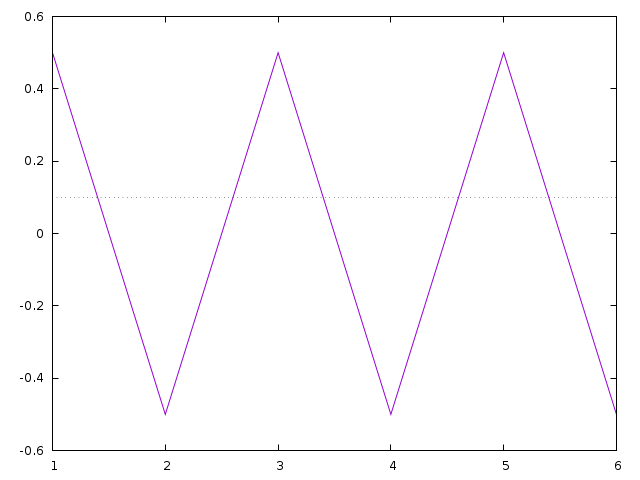
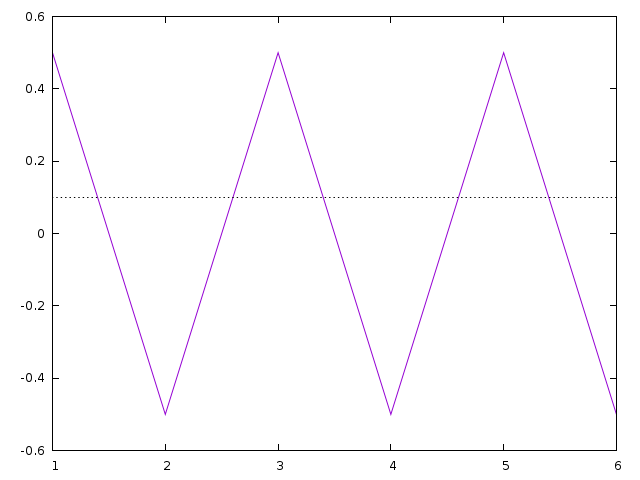
|
From: sfeam <sf...@us...> - 2014-11-15 20:40:09
|
On Saturday, 15 November 2014 03:07:27 PM Allin Cottrell wrote: > On Sat, 15 Nov 2014, sfeam wrote: > > > On Saturday, 15 November 2014 01:54:32 PM Allin Cottrell wrote: > >>> On 11/15/2014 11:55 AM, Allin Cottrell wrote: > >>>> On Sat, 15 Nov 2014, Daniel J Sebald wrote: > >>>> > >>>>> On 11/15/2014 11:36 AM, Allin Cottrell wrote: > >>>>>> I just tried out the file save button in the gnuplot wxt window. It > >>>>>> works nicely... except that I'm seeing a delay of up to 40 seconds > >>>>>> between clicking the button and the file-save dialog opening. > >>>>>> > >>>>>> This is on a lightly loaded system, with gnuplot launched via > >>>>>> gnuplot -persist<plotfile>. > >>>>> > >>>>> What operating system? > >>>> > >>>> Arch Linux. No other programs showing odd delays in response. > >> > >> Aha. No such problem if I run gnuplot interactively, load the plot > >> file and display the plot. Then the Save button works instantly. The > >> loooong delay just happens when gnuplot is run with -persist. > > > > In that case it might be informative to establish where the > > program is hung/delayed. > > Fire up gnuplot -persist, determinine its <pid>, then hit > > the problematic button. > > While it is in the hung state, from another terminal run > > $ gdb -p <pid> > > gdb> where > > > > to establish where the code is hung. > > OK, I'm attaching the output from this. > > Allin Cottrell I can reproduce this now, so at least I can investigate as I find time. No ideas at the moment, other than it may indicate an interlock failure in the gvfs/dbus library code. We could report that upstream to gtk, but I am afraid that we would then run into the problem that upstream development is focused on gtk3, while the problem is occurring in 2.8. I suppose we could disable the Export-to-File widget in persist mode, but that would be unfortunate. Ethan |
|
From: Allin C. <cot...@wf...> - 2014-11-15 20:07:38
|
On Sat, 15 Nov 2014, sfeam wrote: > On Saturday, 15 November 2014 01:54:32 PM Allin Cottrell wrote: >>> On 11/15/2014 11:55 AM, Allin Cottrell wrote: >>>> On Sat, 15 Nov 2014, Daniel J Sebald wrote: >>>> >>>>> On 11/15/2014 11:36 AM, Allin Cottrell wrote: >>>>>> I just tried out the file save button in the gnuplot wxt window. It >>>>>> works nicely... except that I'm seeing a delay of up to 40 seconds >>>>>> between clicking the button and the file-save dialog opening. >>>>>> >>>>>> This is on a lightly loaded system, with gnuplot launched via >>>>>> gnuplot -persist<plotfile>. >>>>> >>>>> What operating system? >>>> >>>> Arch Linux. No other programs showing odd delays in response. >> >> Aha. No such problem if I run gnuplot interactively, load the plot >> file and display the plot. Then the Save button works instantly. The >> loooong delay just happens when gnuplot is run with -persist. > > In that case it might be informative to establish where the > program is hung/delayed. > Fire up gnuplot -persist, determinine its <pid>, then hit > the problematic button. > While it is in the hung state, from another terminal run > $ gdb -p <pid> > gdb> where > > to establish where the code is hung. OK, I'm attaching the output from this. Allin Cottrell |
|
From: sfeam <sf...@us...> - 2014-11-15 19:20:11
|
On Saturday, 15 November 2014 01:54:32 PM Allin Cottrell wrote: > > On 11/15/2014 11:55 AM, Allin Cottrell wrote: > >> On Sat, 15 Nov 2014, Daniel J Sebald wrote: > >> > >>> On 11/15/2014 11:36 AM, Allin Cottrell wrote: > >>>> I just tried out the file save button in the gnuplot wxt window. It > >>>> works nicely... except that I'm seeing a delay of up to 40 seconds > >>>> between clicking the button and the file-save dialog opening. > >>>> > >>>> This is on a lightly loaded system, with gnuplot launched via > >>>> gnuplot -persist<plotfile>. > >>> > >>> What operating system? > >> > >> Arch Linux. No other programs showing odd delays in response. > > Aha. No such problem if I run gnuplot interactively, load the plot > file and display the plot. Then the Save button works instantly. The > loooong delay just happens when gnuplot is run with -persist. In that case it might be informative to establish where the program is hung/delayed. Fire up gnuplot -persist, determinine its <pid>, then hit the problematic button. While it is in the hung state, from another terminal run $ gdb -p <pid> gdb> where to establish where the code is hung. Ethan |
|
From: Allin C. <cot...@wf...> - 2014-11-15 18:54:42
|
> On 11/15/2014 11:55 AM, Allin Cottrell wrote: >> On Sat, 15 Nov 2014, Daniel J Sebald wrote: >> >>> On 11/15/2014 11:36 AM, Allin Cottrell wrote: >>>> I just tried out the file save button in the gnuplot wxt window. It >>>> works nicely... except that I'm seeing a delay of up to 40 seconds >>>> between clicking the button and the file-save dialog opening. >>>> >>>> This is on a lightly loaded system, with gnuplot launched via >>>> gnuplot -persist<plotfile>. >>> >>> What operating system? >> >> Arch Linux. No other programs showing odd delays in response. Aha. No such problem if I run gnuplot interactively, load the plot file and display the plot. Then the Save button works instantly. The loooong delay just happens when gnuplot is run with -persist. Allin Cottrell |
|
From: Allin C. <cot...@wf...> - 2014-11-15 18:35:50
|
On Sat, 15 Nov 2014, Daniel J Sebald wrote: > On 11/15/2014 11:55 AM, Allin Cottrell wrote: >> On Sat, 15 Nov 2014, Daniel J Sebald wrote: >> >>> On 11/15/2014 11:36 AM, Allin Cottrell wrote: >>>> I just tried out the file save button in the gnuplot wxt window. It >>>> works nicely... except that I'm seeing a delay of up to 40 seconds >>>> between clicking the button and the file-save dialog opening. >>>> >>>> This is on a lightly loaded system, with gnuplot launched via >>>> gnuplot -persist<plotfile>. >>> >>> What operating system? >> >> Arch Linux. No other programs showing odd delays in response. > > I was thinking is might the Windows font issue again, but no... > > Searching, I'm seeing this comment about a program called "upower": > > https://wiki.archlinux.org/index.php/KDE#Dolphin_and_File_Dialogs_are_extremely_slow_to_start > > Is upower running on your system? upowerd was running under systemd. I tried stopping and disabling upower but it didn't make an appreciable difference. When I press the save button it stays pressed and the wxt window becomes unresponsive -- the other buttons won't work and the window doesn't repaint itself if obscured. Then eventually the file dialog appears. Quite peculiar. Allin Cottrell |
|
From: Daniel J S. <dan...@ie...> - 2014-11-15 18:08:09
|
On 11/15/2014 11:55 AM, Allin Cottrell wrote: > On Sat, 15 Nov 2014, Daniel J Sebald wrote: > >> On 11/15/2014 11:36 AM, Allin Cottrell wrote: >>> I just tried out the file save button in the gnuplot wxt window. It >>> works nicely... except that I'm seeing a delay of up to 40 seconds >>> between clicking the button and the file-save dialog opening. >>> >>> This is on a lightly loaded system, with gnuplot launched via >>> gnuplot -persist<plotfile>. >> >> What operating system? > > Arch Linux. No other programs showing odd delays in response. I was thinking is might the Windows font issue again, but no... Searching, I'm seeing this comment about a program called "upower": https://wiki.archlinux.org/index.php/KDE#Dolphin_and_File_Dialogs_are_extremely_slow_to_start Is upower running on your system? Dan |
|
From: Allin C. <cot...@wf...> - 2014-11-15 17:36:29
|
I just tried out the file save button in the gnuplot wxt window. It works nicely... except that I'm seeing a delay of up to 40 seconds between clicking the button and the file-save dialog opening. This is on a lightly loaded system, with gnuplot launched via gnuplot -persist <plotfile>. -- Allin Cottrell Department of Economics Wake Forest University, NC |
|
From: Allin C. <cot...@wf...> - 2014-11-15 17:31:12
|
On Fri, 14 Nov 2014, sfeam wrote: > On Friday, 14 November 2014 08:00:26 PM Allin Cottrell wrote: >> Any ideas what's wrong here? After doing, in a directory containing >> the gnuplot CVS sources, >> >> make clean >> cvs update -d -P >> ./prepare >> ./configure --prefix=opt/gnuplot >> make >> >> I'm getting: >> >> make[2]: Entering directory `/home/allin/cfiles/gpcvs/gnuplot/docs' >> Building allterm.h >> [...] >> In file included from doc2x.h:70:0, >> from doc2tex.c:63: >> allterm.h:2265:33: fatal error: lua/gnuplot-tikz.help: No such file >> or directory > > Fixed in CVS (for some value of "fixed"). > Now if lua is not present or if you ./configure --without-lua > then it will not include the help section for tikz in the docs. > This is imperfect, because if you change your mind later and > do ./configure --with-lua it won't go back and rebuild the > help file. Thanks. The build now goes fine here after configuring --without-lua. Allin Cottrell |
|
From: Hans-Bernhard B. <HBB...@t-...> - 2014-11-15 11:02:45
|
Am 15.11.2014 um 08:12 schrieb sfeam: > Now if lua is not present or if you ./configure --without-lua then it > will not include the help section for tikz in the docs. > This is imperfect, because if you change your mind later and do > ./configure --with-lua it won't go back and rebuild the help file. I've looked at this a bit. I don't think there really is a need to build a dummy version because it is used is only by term.h, and then only #ifdef HAVE_LUA. I think that for this to work correctly, the "build gnuplot-tikz.help" section is in the wrong Makefile. As-is, if the file isn't there, docs/Makefile fails to build it before trying to use it, and therefore fails to build docs/allterm.h. And we cannot safely assume that docs/Makefile will always be run before term/Makefile. So docs/Makefile has to handle the creation of that file itself, and while at it, the file should actually be moved to the docs directory, since its only purpose is to be included in allterm.h: if BUILD_LUA LUA_HELP = gnuplot-tikz.help $(LUA_HELP): $(top_srcdir)/term/lua/gnuplot-tikz.lua lua $< termhelp > $@ else LUA_HELP = endif allterm.h: $(CORETERM) $(LUA_HELP) I'll check this (and the removal of corresponding code in term/Makefile.am.in) in soon, unless there are objections. As an aside, I propose to upgrade the entire auto-tools configuration to current versions (autoconf 2.69, automake 1.14). Some of our automake support scripts are almost a decade out of date... This I will only check in after some discussion. |
|
From: sfeam <sf...@us...> - 2014-11-15 07:16:08
|
On Friday, 14 November 2014 08:00:26 PM Allin Cottrell wrote: > Any ideas what's wrong here? After doing, in a directory containing > the gnuplot CVS sources, > > make clean > cvs update -d -P > ./prepare > ./configure --prefix=opt/gnuplot > make > > I'm getting: > > make[2]: Entering directory `/home/allin/cfiles/gpcvs/gnuplot/docs' > Building allterm.h > [...] > In file included from doc2x.h:70:0, > from doc2tex.c:63: > allterm.h:2265:33: fatal error: lua/gnuplot-tikz.help: No such file > or directory Fixed in CVS (for some value of "fixed"). Now if lua is not present or if you ./configure --without-lua then it will not include the help section for tikz in the docs. This is imperfect, because if you change your mind later and do ./configure --with-lua it won't go back and rebuild the help file. Ethan |
|
From: Allin C. <cot...@wf...> - 2014-11-15 03:38:55
|
On Fri, 14 Nov 2014, sfeam wrote: > On Friday, 14 November 2014 08:00:26 PM Allin Cottrell wrote: >> Any ideas what's wrong here? After doing, in a directory containing >> the gnuplot CVS sources, > > Since term/lua/gnuplot-tikz.help is a constructed file that is > created by the build process, it should not be necessary to keep > a copy in the repository. Nevertheless there was one there and > it was out of date. So I removed it. > > It is supposed to be recreated if the configure script finds lua. > Do you not have lua on your machine? Did ./configure not find it? I do have a lua binary, /usr/bin/lua, but no lua "dev" files. (This is on Fedora 20.) Apparently the configure script did not look for a lua binary: $ grep lua config.log configure:11433: $PKG_CONFIG --exists --print-errors "lua" Package lua was not found in the pkg-config search path. Perhaps you should add the directory containing `lua.pc' No package 'lua' found configure:11451: $PKG_CONFIG --exists --print-errors "lua" Package lua was not found in the pkg-config search path. Perhaps you should add the directory containing `lua.pc' No package 'lua' found No package 'lua' found configure:11494: $PKG_CONFIG --exists --print-errors "lua5.1" Package lua5.1 was not found in the pkg-config search path. Perhaps you should add the directory containing `lua5.1.pc' No package 'lua5.1' found configure:11512: $PKG_CONFIG --exists --print-errors "lua5.1" Package lua5.1 was not found in the pkg-config search path. Perhaps you should add the directory containing `lua5.1.pc' No package 'lua5.1' found No package 'lua5.1' found configure:11641: WARNING: Could not find support for lua using pkg-config. configure:11650: checking for library containing luaL_openlibs /home/allin/cfiles/gpcvs/gnuplot/conftest.c:130: undefined reference to `luaL_openlibs' | char luaL_openlibs (); | return luaL_openlibs (); configure:11681: gcc -o conftest -g -O2 conftest.c -llua -ldl -lm >&5 /usr/bin/ld: cannot find -llua | char luaL_openlibs (); | return luaL_openlibs (); configure:11681: gcc -o conftest -g -O2 conftest.c -llua5.1 -ldl -lm >&5 /usr/bin/ld: cannot find -llua5.1 | char luaL_openlibs (); | return luaL_openlibs (); configure:16314: result: lua/TikZ terminal: no configure:16523: result: TeX *.sty for lua/tikz terminal: no ac_cv_search_luaL_openlibs=no Allin Cottrell |
|
From: Daniel J S. <dan...@ie...> - 2014-11-15 03:38:28
|
On 11/14/2014 09:20 PM, sfeam wrote: > On Friday, 14 November 2014 08:00:26 PM Allin Cottrell wrote: > >> Any ideas what's wrong here? After doing, in a directory containing > >> the gnuplot CVS sources, > > Since term/lua/gnuplot-tikz.help is a constructed file that is > > created by the build process, it should not be necessary to keep > > a copy in the repository. Nevertheless there was one there and > > it was out of date. So I removed it. > > It is supposed to be recreated if the configure script finds lua. > > Do you not have lua on your machine? Did ./configure not find it? > > I am not sure if the best solution is to put a copy of gnuplot-tikz.help > > back in the repository, or to skip inclusion of the terminal help > > in the manual if the terminal itself is not built. > > Right now the manual contains help text for all terminals, not just > > the ones that have been configured in. I notice CVS has an ignore file. If gnuplot-tikz.help is put back in the repository, then the file name entered in .cvsignore will no diff hunks be created from "cvs diff" if the file is regenerated? Dan |
|
From: sfeam <sf...@us...> - 2014-11-15 03:24:10
|
On Friday, 14 November 2014 08:00:26 PM Allin Cottrell wrote: > Any ideas what's wrong here? After doing, in a directory containing > the gnuplot CVS sources, Since term/lua/gnuplot-tikz.help is a constructed file that is created by the build process, it should not be necessary to keep a copy in the repository. Nevertheless there was one there and it was out of date. So I removed it. It is supposed to be recreated if the configure script finds lua. Do you not have lua on your machine? Did ./configure not find it? I am not sure if the best solution is to put a copy of gnuplot-tikz.help back in the repository, or to skip inclusion of the terminal help in the manual if the terminal itself is not built. Right now the manual contains help text for all terminals, not just the ones that have been configured in. Ethan > make clean > cvs update -d -P > ./prepare > ./configure --prefix=opt/gnuplot > make > > I'm getting: > > make[2]: Entering directory `/home/allin/cfiles/gpcvs/gnuplot/docs' > Building allterm.h > [...] > In file included from doc2x.h:70:0, > from doc2tex.c:63: > allterm.h:2265:33: fatal error: lua/gnuplot-tikz.help: No such file > or directory > > Earlier, ./configure gave: > > ** Configuration summary for gnuplot 5.1: > > [...] > cairo-based pdf and png terminals: yes > lua/TikZ terminal: no > wxt terminal: yes > [...] > > No lua/TikZ terminal is fine by me. > > |
|
From: Daniel J S. <dan...@ie...> - 2014-11-15 01:46:44
|
On 11/14/2014 07:00 PM, Allin Cottrell wrote: > Any ideas what's wrong here? After doing, in a directory containing > the gnuplot CVS sources, > > make clean > cvs update -d -P > ./prepare > ./configure --prefix=opt/gnuplot > make > > I'm getting: > > make[2]: Entering directory `/home/allin/cfiles/gpcvs/gnuplot/docs' > Building allterm.h > [...] > In file included from doc2x.h:70:0, > from doc2tex.c:63: > allterm.h:2265:33: fatal error: lua/gnuplot-tikz.help: No such file > or directory > > Earlier, ./configure gave: > > ** Configuration summary for gnuplot 5.1: > > [...] > cairo-based pdf and png terminals: yes > lua/TikZ terminal: no > wxt terminal: yes > [...] > > No lua/TikZ terminal is fine by me. That help text looks to be generated (from term/lua/README): " lua gnuplot-tikz.lua termhelp > gnuplot-tikz.help generates the version to be included in gnuplot help system. " My guess is that somehow the configure script is placing the string #include "lua/gnuplot-tikz.help" inside docs/allterm.h when it shouldn't--or the file gnuplot-tikz.help is not being generated when it should be (but since you don't have lua, there is no way of running "lua gnuplot-tikz.lua termhelp > gnuplot-tikz.help". Here is the script that generates the allterm.h file: allterm.h: $(CORETERM) @echo "Building allterm.h" @for e in `egrep "^[ ]*START_HELP" $(CORETERM) |\ LC_ALL=C sort -f -t':' -k2` ; do \ f=`echo $$e |cut -d\: -f1` ; s=`echo $$e | cut -d\: -f2` ;\ sed -n "/^[ ]*$$s/,/^[ ]*END_HELP/p" $$f ; \ done >$@ it looks to be searching files for a particular string. This is related to what Hans pointed out the other day, when I pointed out that after I build I get a diff hunk because the lua tikz help is regenerated and is different from what was in the repository. Since gnuplot-tikz.help is generated, it technically shouldn't be in the repository. But that leads to the problem you are seeing if the file is not present unless generated. We need some way in the script above to leave out lua/gnuplot-tikz.help from the documentation. Either we could not add "lua.trm" to CORETERM contingent on the presence of "lua" on the system, or place a copy of someone's "lua" help in the repository and not generate it as part of the build process. Dan |
|
From: Allin C. <cot...@wf...> - 2014-11-15 01:00:40
|
Any ideas what's wrong here? After doing, in a directory containing
the gnuplot CVS sources,

make clean
cvs update -d -P
./prepare
./configure --prefix=opt/gnuplot
make

I'm getting:

make[2]: Entering directory `/home/allin/cfiles/gpcvs/gnuplot/docs'
Building allterm.h
[...]
In file included from doc2x.h:70:0,
                  from doc2tex.c:63:
allterm.h:2265:33: fatal error: lua/gnuplot-tikz.help: No such file
or directory

Earlier, ./configure gave:

** Configuration summary for gnuplot 5.1:

[...]
cairo-based pdf and png terminals: yes
lua/TikZ terminal: no
wxt terminal: yes
[...]

No lua/TikZ terminal is fine by me.

--
Allin Cottrell
Department of Economics
Wake Forest University
|
|
From: <pl...@pi...> - 2014-11-14 11:32:46
|
On 11/13/14 19:14, Karl Ratzsch wrote: > Am 13.11.2014 um 18:20 schrieb Philipp K. Janert: >> >> Here are some things to think about: >> >> 1) We now have loops. But we don't have an >> iterable data structure. No, wait, we have >> one - we fake it as white-space separated >> string. (I admit the ingenuity of the thought, >> but - how kludgy is THAT?) >> >> So, before too long, the loops will beget >> an array. That seems certain. > > Arrays would be very, very useful for plotting. Think of a multiplot, > one plot with five datasets plus fitted curves, and an inset showing a > regression on the fitted parameters. The simplest way to do that in > gnuplot today is have an external script that generates your gnuplot > script. ;-) > > >> 2) Once we have arrays, there will be a >> desire to load files into them. Otherwise, >> why have arrays, right? So, arrays will >> beget a "read_file" feature. > > Yes. It´ll be a single command, not interfering with anything. With > that, I could e.g. leave all the fitting to another program (although > gnuplot does a very good job at it! Try fitting in Origin.) and hand the > parameters over to gnuplot in a straightforward manner. > >> 3) Now that we can read file(s) into >> arrays, it's natural that we want to >> operate on them. One could do that with >> loops, but (again) it's natural to do >> things like array1 + array2, right? > > Same, but who would want it, if not to plot the result, which is very > reasonable for a plotting program? > >> >> 4) Whereas items 1-3 lie in the future, the >> following is already an issue today: we have >> loops and conditionals, so it seems natural >> to write functions. Well - we don't HAVE >> functions, but we can fake them as scripts >> that we load with "call". Problem is that >> these scripts don't define local variables - >> any variable I use in my script will become >> a variable in the gnuplot session. To prevent >> clobbering existing variables, I therefore >> need to prepend a prefix to the name of each >> variable "MY_SCRIPT_i", "MY_SCRIPT_j", and so >> on. Very kludgy. Hence, it is reasonable to >> ask for functions with local variables. > > I agree this would be one step too far, but you can import library > functions today, so there´s no real need for this. And i guess it would > be quite hard to find a (backward compatible) syntax for this, let alone > implementing it. > >> I also think that it is a misdirection of effort: >> do we really need to figure out how to design >> functions with locally scoped variables? This >> has already been done, several times. Would it >> not be better to leverage other people's work? >> >> If gnuplot needs to acquire programming features >> to stay competitive, then it should try to borrow >> them from somewhere else, where all these problems >> have already been solved - rather than inventing >> the wheel (and poorly, at that). > > As long as "keep it backward compatible" stays the most important > paradigm in the development, i don´t quite see how the "programming > environment" features could get out of hand too badly. It makes sure the > learning curve will stay flat in the beginning. > > Interfacing gnuplot with other programs is however an issue today, imo. > That would be, for example, much easier with an array variable that can > be read in from a file, see above, and also keep away further need for > new complex features. > > Karl > > There have been a number of times when I've regretted the lack of an index array structure in gnuplot. Sometimes I've been able to hack something to do what I want using some kind of iteration but this often involves changing something else to shoehorn it into a form where it can be done with an iteration. I do think this would be a useful addition. Peter. |
|
From: <pl...@pi...> - 2014-11-14 11:20:28
|
On 11/13/14 20:38, Ethan A Merritt wrote: >> And THAT I think is the wrong direction. If >> >somebody wants R, why would they use gnuplot? > Because they find it easier to make nice plots? I did try using R at one stage and had to dump the result out to a text file and use gnuplot to get what I wanted. So I agree with Ethan on that one. Then I found that R has a habit of changing your data to what it "thinks" you wanted it be. Bizarrely, I ended up with more data points than I started with. I did not bother working out exactly where it got the extra data from to insert because I prefer to spend time working on my own code rather than double checking my data at every step to ensure that the "language" I'm using has not decided change it for me. I don't want a programming language screwing around any more that I want my girlfriend screwing around. In fact, I may have more tolerance for the latter. Plus the documentation is terse and incomplete half the time so I never really know even what it is supposed to be doing. YMMV. |
28 messages has been excluded from this view by a project administrator.

