VoiceMeeterVB-Audio Software
|
VoxalNCH Software
|
|||||
Related Products
|
||||||
About
VoiceMeeter is a Virtual Audio Device Mixer able to manage any audio sources on Windows PC; Audio coming from Physical Inputs (e.g. Microphone) as well as audio coming from any application (including Audio Pro ASIO Applications). This offers possibilities to mix your voice with your music player, browser, web radio, video game, and with the sound coming from any audio DAW like Cubase, Ableton Live or Pro Tools (possibly in the same time) for Skype-call or any VOIP / recording workflow. By supporting All Audio Interfaces (MME, KS, WaveRT, Direct-X and ASIO interface) Voicemeeter becomes also an audio bridge between applications: for ASIO Applications willing to use Windows Audio Device Driver (like MME or WDM) as well as for Windows MME player willing to use ASIO device through Voicemeeter solution. Everything works in all ways.
As Audio Mixer, Voicemeeter is able to mix 3 audio inputs devices to 3 audio output devices (2 physicals and 1 virtual) through 2 busses A & B.
|
About
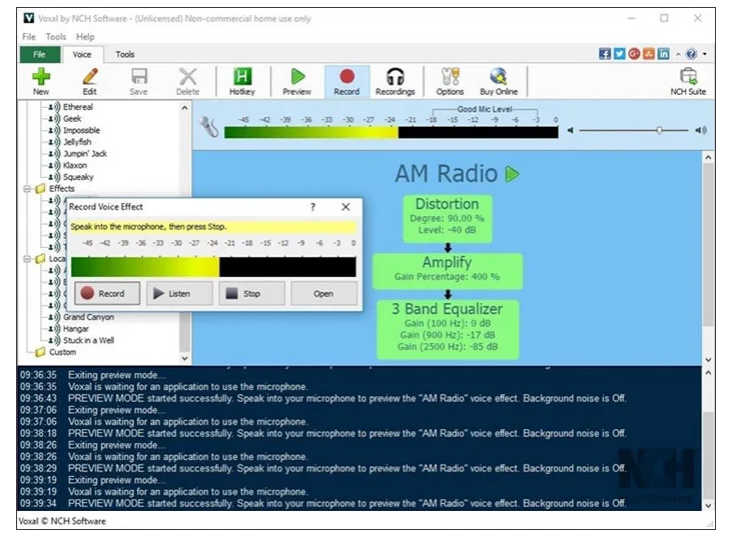
Modify, change, and disguise your voice in any application or game that uses a microphone to add another dimension of creativity. From ‘girl’ to ‘alien’, the voice-changing options are limitless. Voice disguiser for anonymity over the radio or the internet. Change voices for voiceovers and other audio projects. Voxal seamlessly works with other applications, so you don't need to change any configurations or settings in other programs. Simply install and start creating voice distortions in minutes. Effects can be applied to existing files. Apply effects in real-time using a microphone or other audio input device. Load and save effect chains for voice modification. Vocal effect library includes robot, girl, boy, alien, atmospheric, echo, and many more. Create unlimited, custom voice effects. Works with all existing applications and games. Create voices for characters in audiobooks. Output the changed audio to speakers to hear the effects live.
|
|||||
Platforms Supported
Windows
Supported
Mac
Not Supported
Linux
Not Supported
Cloud
Not Supported
On-Premises
Not Supported
iPhone
Not Supported
iPad
Not Supported
Android
Not Supported
Chromebook
Not Supported
|
Platforms Supported
Windows
Supported
Mac
Supported
Linux
Not Supported
Cloud
Not Supported
On-Premises
Not Supported
iPhone
Not Supported
iPad
Not Supported
Android
Not Supported
Chromebook
Not Supported
|
|||||
Audience
Users that need a virtual audio device mixer
|
Audience
Individuals in need of a tool to modify, change and disguise their voice in any application
|
|||||
Support
Phone Support
Not Supported
24/7 Live Support
Not Supported
Online
Supported
|
Support
Phone Support
Supported
24/7 Live Support
Not Supported
Online
Supported
|
|||||
API
Offers API
Not Supported
|
API
Offers API
Not Supported
|
|||||
Screenshots and Videos |
Screenshots and Videos |
|||||
PricingSoftware with Donationware
Free Version
Supported
Free Trial
Not Supported
|
Pricing
$24.99 one-time payment
Free Version
Supported
Free Trial
Not Supported
|
|||||
Reviews/
|
Reviews/
|
|||||
Pros & Cons from Real UsersPros
Cons
|
||||||
Training
Documentation
Supported
Webinars
Not Supported
Live Online
Not Supported
In Person
Not Supported
|
Training
Documentation
Supported
Webinars
Not Supported
Live Online
Not Supported
In Person
Supported
|
|||||
Company InformationVB-Audio Software
Founded: 1999
France
voicemeeter.com
|
Company InformationNCH Software
United States
www.nchsoftware.com/voicechanger/index.html
|
|||||
Alternatives |
Alternatives |
|||||
|
|
|
|||||
|
|
|
|||||
|
|
|
|||||
|
|
||||||
Categories |
Categories |
|||||
Audio Editing Features
Audio Effects
Supported
Batch Processing
Not Supported
Export Audio (Multiple File Types)
Not Supported
Record Live Audio
Not Supported
Record Multiple Simultaneous Tracks
Not Supported
Scrub, Search, Bookmark
Not Supported
Sound Editing Tools
Not Supported
Spectral Analysis / FFT
Not Supported
Speech Synthesis (TTS)
Not Supported
Swappable Patches
Not Supported
Virtual Instruments
Not Supported
Virtual Mixing
Supported
Voice Changer
Supported
|
||||||
Integrations
Skype
Supported
Discord
Not Supported
Google Voice
Supported
TeamSpeak
Not Supported
|
Integrations
Skype
Supported
Discord
Supported
Google Voice
Not Supported
TeamSpeak
Supported
|
|||||
|
|
|