QuickReviewer

QuickReviewer

Clavis Technologies Pvt. Ltd.
+
+

Related Products

  • Filecamp
    177 Ratings
    Visit Website
  • Air
    849 Ratings
    Visit Website
  • Wrike
    7,631 Ratings
    Visit Website
  • Nasdaq Boardvantage
    307 Ratings
    Visit Website
  • SurveySparrow
    3,065 Ratings
    Visit Website
  • Traild
    6 Ratings
    Visit Website
  • HR Partner
    205 Ratings
    Visit Website
  • Summ
    842 Ratings
    Visit Website
  • Haast
    4 Ratings
    Visit Website
  • BrandMail
    327 Ratings
    Visit Website

About

QuickReviewer is an online proofing software for teams that are looking for faster design approval process through more rapid feedback and approval. Review videos, HTML, PDFs, and images. It’s more than just an annotation tool – no more conflicting feedbacks! Organize feedback on creative projects without having to exchange multiple emails or files. Drag and drop to upload files and share them with any number of reviewers. Highlight text, pinpoint or add comments. Each reviewer is colour-coded for easy distinction, and they can reply or upvote on each other’s comments. QuickReviewer is mobile-responsive, so review or approve files from your mobile device anytime and anywhere.

About

VoiceDeck is a client review and approval platform for video, audio, stills, and PDF decks—all managed through a single share link. Clients can open your link in any browser without logging in or installing software. They simply type their name to leave timecoded video comments with drawing tools, image pins, or page notes on PDFs. Approvals are tied to specific reviewers and versions, ensuring clear record-keeping that resets when v2 is uploaded. Each link features custom access controls like passphrases, expiration dates, download toggles, and instant revocation. Internal team notes remain hidden from clients, and approved deliverables are distributed right from the original link. Pricing is strictly based on storage rather than seats, offering unlimited team members and client reviewers across every tier, including a free 10 GB plan with no credit card required.

Platforms Supported

Windows Supported
Mac Supported
Linux Not Supported
Cloud Supported
On-Premises Not Supported
iPhone Not Supported
iPad Not Supported
Android Not Supported
Chromebook Not Supported

Platforms Supported

Windows Not Supported
Mac Not Supported
Linux Not Supported
Cloud Supported
On-Premises Not Supported
iPhone Not Supported
iPad Not Supported
Android Not Supported
Chromebook Not Supported

Audience

Marketing Teams, Media House, Graphic designers, Web Developers, Project Managers

Audience

Video creators and agencies

Support

Phone Support Supported
24/7 Live Support Not Supported
Online Supported

Support

Phone Support Not Supported
24/7 Live Support Not Supported
Online Supported

API

Offers API Not Supported

API

Offers API Not Supported

Screenshots and Videos

Screenshots and Videos

No images available

Pricing

$35 Per Month
Save $72 /yr
Free Version Supported
Free Trial Supported

Pricing

$50/month
Free Version Supported
Free Trial Not Supported

Reviews/Ratings

Overall 5.0 / 5
ease 5.0 / 5
features 5.0 / 5
design 5.0 / 5
support 5.0 / 5

Reviews/Ratings

Overall 0.0 / 5
ease 0.0 / 5
features 0.0 / 5
design 0.0 / 5
support 0.0 / 5

This software hasn't been reviewed yet. Be the first to provide a review:

Review this Software

Pros & Cons from Real Users

Pros

  • A design team can only be efficient and meet timelines if they can review drafts in time. QuickReviewer helped our team come together and work efficiently and collaboratively on a large customer project. With dozens of images to sort and place, QuickReviewer helped teams pinpoint, highlight and comment on items so that designers could quickly make the changes and finalize content. We completed our last project 20% faster than the previous one.
  • When working with a team, QuickReviewer is an excellent tool to utilise to gather feedback on creative proofs (both internal teams or clients). QuickReviewer gives you complete control over the creative review process by allowing you to establish unique creative workflows, distribute creative proofs easily, In addition, I believe their pricing is competitive.
  • What we like best about QuickReviewer is how simple it is to share videos and proofs with anyone, and they can add comments and recommendations on the timeline. We get emails when someone comments or approves the work; this is a huge time saver because we used to send like 20 emails back and forth to get the job done.
  • I enjoy how we can share work across our teams in different office locations, and they can critique my design in real time. Approving work has become considerably easier, and faster, especially with version control. I love the compare feature. I can see exactly what part of the document was changed, and it eliminates a lot of painful switching between PDFs or printing the files to identify the differences. The programme is extremely user-friendly, and my team members quickly learned how to use it.
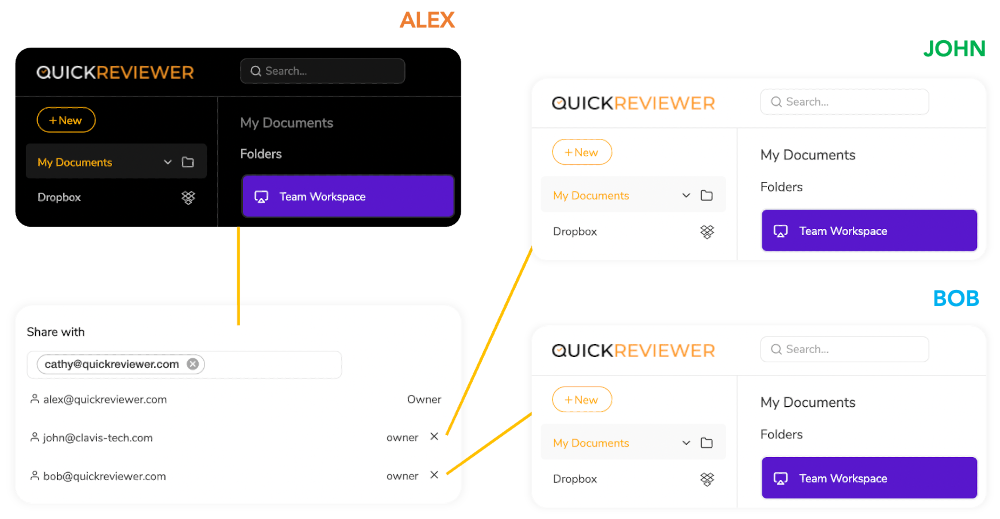
  • I like the flexibility and options to create workspaces and share them with my team. The workspace option is nice because not everyone wants to give access to everything all of the time. I particularly love that it supports Adobe files and connects with PhotoShop and InDesign.

Cons

  • Websites cannot be added for review without placing a code snippet or Wordpress plug in. If I'm sharing multiple sites for review, I feel it's tedious to add a plugin or a code snippet to each site.
  • It can take a few sessions to learn QuickReviewer if you're new to it. There is obviously a learning curve, as I have used other creative review programmes that are far more intuitive. Some features, for example, are buried in the platform, and without clear assistance from a QuickReviewer rep, I wouldn't know how to access them. However, now that I've had some experience with the tool, I can confidently state that this is no longer an issue. QuickReviewer's support and customer success teams are also quite helpful and responsive.
  • I don’t have any dislikes about QuickReviewer because it does what we require. I do have some feature recommendations that would take the product to the next level. Workflow and range based video comments would be two of them. We’ve shared them with the support team, and hope to see these features come out soon.
  • One drawback is that I can’t combine multiple documents into a single proof. That’s a feature I look forward to.
  • Setting a deadline for a proof isn’t intuitive. You have to right click on a file to choose that option, and it doesn’t give you the option to set reminders. As a feature request, I would like to send automated reminders before the deadlines. It would also be better if you move or add the deadline option to the share file window.

Training

Documentation Not Supported
Webinars Not Supported
Live Online Supported
In Person Not Supported

Training

Documentation Supported
Webinars Not Supported
Live Online Not Supported
In Person Not Supported

Company Information

Clavis Technologies Pvt. Ltd.
Founded: 2011
India
www.quickreviewer.com

Company Information

VoiceDeck
Founded: 2026
United Arab Emirates
voicedeck.io

Alternatives

Alternatives

HoldFast

HoldFast

Smoke & Oakum LLC
Notism

Notism

HarborNation
Palette

Palette

Palette Tools Inc.
QuickReviewer

QuickReviewer

Clavis Technologies Pvt. Ltd.

Categories

Categories

Online Proofing Features

Audit Trail Not Supported
Due Date Tracking Not Supported
File Sharing Supported
Markup Tools Not Supported
Role-Based Permissions Not Supported
Status Tracking Supported
Version Control Supported

Integrations

Adobe Illustrator Supported
Adobe InDesign Supported
Adobe Photoshop Supported
Adobe Premiere Pro Supported
Dropbox Supported
Google Drive Supported

Integrations

Adobe Illustrator Not Supported
Adobe InDesign Not Supported
Adobe Photoshop Not Supported
Adobe Premiere Pro Not Supported
Dropbox Not Supported
Google Drive Not Supported
Claim QuickReviewer and update features and information
Claim VoiceDeck and update features and information