Paessler PRTGPaessler GmbH
|
Spiceworks IP ScannerSpiceworks
|
|||||
Related Products
|
||||||
About
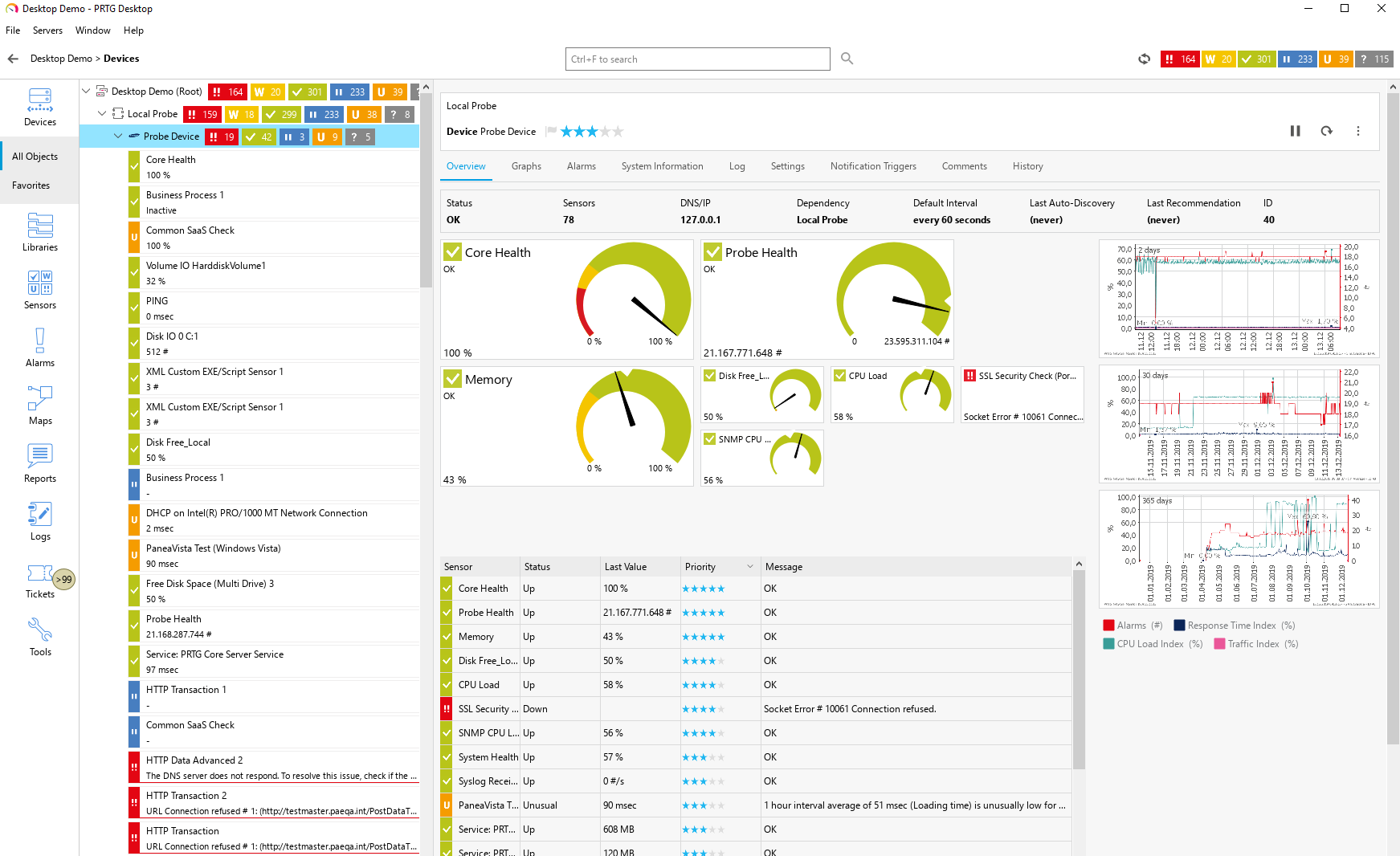
Paessler PRTG is an all-inclusive monitoring software solution developed by Paessler. Equipped with an easy-to-use, intuitive interface with a cutting-edge monitoring engine, PRTG optimizes connections and workloads as well as reduces operational costs by avoiding outages while saving time and controlling service level agreements (SLAs). The solution is packed with specialized monitoring features that include flexible alerting, cluster failover solution, distributed monitoring, in-depth reporting, maps and dashboards, and more.
PRTG monitors your entire IT infrastructure. All important technologies are supported:
• SNMP: ready-to-use and custom options
• WMI and Windows Performance Counters
• SSH: for Linux/Unix and macOS systems
• Traffic analysis using flow protocols or packet sniffing
• HTTP requests
• REST APIs returning XML or JSON
• Ping, SQL, and many more
|
About
Discover the devices on your network automatically with the Spiceworks IP Scanner for basic information like OS and MAC Address. Or get detailed hardware and software information on your workstations and servers like CPU, storage, memory, installed software, serial number, and lots more. Get the information you need, with minimal setup! IP Scanner is a cloud tool that scans your local network and returns a sortable list of the devices it discovers. Devices can be filtered, searched, and exported to CSV. By default, it detects and scans a local subnet, though you can also define a custom IP range. The IP Scanner lists each device’s hostname, IP address, vendor, OS, MAC address, description, open ports, and if it’s up or down. The kind of data returned depends on the type of device being scanned.
|
|||||
Platforms Supported
Windows
Mac
Linux
Cloud
On-Premises
iPhone
iPad
Android
Chromebook
|
Platforms Supported
Windows
Mac
Linux
Cloud
On-Premises
iPhone
iPad
Android
Chromebook
|
|||||
Audience
Caters to tech staff, system administrators, and companies of any size, from small office/home office (SOHO) to enterprises that need their IT network to be reliable and easy to monitor on a real-time basis.
|
Audience
Anyone in need of an advanced IP Scanner solution
|
|||||
Support
Phone Support
24/7 Live Support
Online
|
Support
Phone Support
24/7 Live Support
Online
|
|||||
API
Offers API
|
API
Offers API
|
|||||
Screenshots and Videos |
Screenshots and Videos |
|||||
Pricing
$2149 for PRTG 500
Free Version
Free Trial
|
Pricing
Free
Free Version
Free Trial
|
|||||
Reviews/
|
Reviews/
|
|||||
Training
Documentation
Webinars
Live Online
In Person
|
Training
Documentation
Webinars
Live Online
In Person
|
|||||
Company InformationPaessler GmbH
Founded: 1997
Germany
www.paessler.com
|
Company InformationSpiceworks
Founded: 2006
United States
community.spiceworks.com/tools/ip-scan/
|
|||||
Alternatives |
Alternatives |
|||||
|
|
||||||
|
|
|
|||||
|
|
||||||
|
|
|
|||||
Categories |
Categories |
|||||
Database Monitoring Features
Anomaly Detection
Autodiscovery
Capacity Planning
Dashboard
Dependency Tracking
Historical Trend Analysis
Multitenancy
Notifications / Alerts
Performance Monitoring
Permissions / Access Controls
Predictive Analytics
Prioritization
Query Analysis
Resource Optimization
Troubleshooting
IT Infrastructure Monitoring Features
Alerts / Notifications
Application Monitoring
Bandwidth Monitoring
Capacity Planning
Configuration Change Management
Data Movement Monitoring
Health Monitoring
Multi-Platform Support
Performance Monitoring
Point-in-Time Visibility
Reporting / Analytics
Virtual Machine Monitoring
Network Monitoring Features
Bandwidth Monitoring
Baseline Manager
Diagnostic Tools
Internet Usage Monitoring
IP Address Monitoring
Real Time Analytics
Resource Management
Server Monitoring
SLA Monitoring
Uptime Monitoring
Web Traffic Reporting
System Monitoring Features
Alerts / Notifications
Antivirus Management
Data Backup / Recovery
Device Monitoring
Inventory Management
Patch Management
Policy-based Automation
Remote Monitoring
Reporting / Analytics
Risk Analysis
Server Monitoring
Service Configuration Management
VoIP Monitoring Features
Alerts / Notifications
Call Detail Record (CDR) Analysis
Call Quality Monitoring
IP SLA Monitoring
Jitter Testing
Latency Monitoring
MOS Monitoring
Packet Loss Monitoring
QoS Monitoring
Reporting / Analytics
Troubleshooting
Website Monitoring Features
Availability Testing
Event Logs
Event-Based Notifications
FTP Monitoring
Mail Server Monitoring
Maintenance Scheduling
Performance Metrics
Real Time Monitoring
Transaction Monitoring
Uptime Reporting
|
||||||
Integrations
AutoMonX
BackBox
BulkSMS.com
Check Point IPS
Check Point Infinity
Comet Backup
Dropbox
Ekara
Google Analytics
Google Drive
|
Integrations
AutoMonX
BackBox
BulkSMS.com
Check Point IPS
Check Point Infinity
Comet Backup
Dropbox
Ekara
Google Analytics
Google Drive
|
|||||
|
|
|