QuickReviewerClavis Technologies Pvt. Ltd.
|
||||||
Related Products
|
||||||
About
The fast, visual way to impress your clients. Kill endless client email threads. Share ideas, files and feedback in one frustration-free client portal. Are you wasting time and energy switching from email to online docs, to notepads and apps - and back again? Ideas, inspiration and discussions happen all over the place. But your brilliance means nothing if your clients can't see it. Vital conversations, files and ideas get scattered across inbox-choking email chains and messy shared folders. Juggling poorly suited tools can double your workload, sap enthusiasm and kill project momentum. Who wants that? Bring deliverables and feedback together in one clear view. Unlike email and other tools, Oroson displays feedback and files side-by-side. Save hours chasing for valuable feedback. Spend more time delivering your best work instead. If you find staying on track a hassle, so do your clients. Oroson doesn't force them to add new steps or learn a bunch of tricky tools.
|
About
QuickReviewer is an online proofing software for teams that are looking for faster design approval process through more rapid feedback and approval. Review videos, HTML, PDFs, and images. It’s more than just an annotation tool – no more conflicting feedbacks!
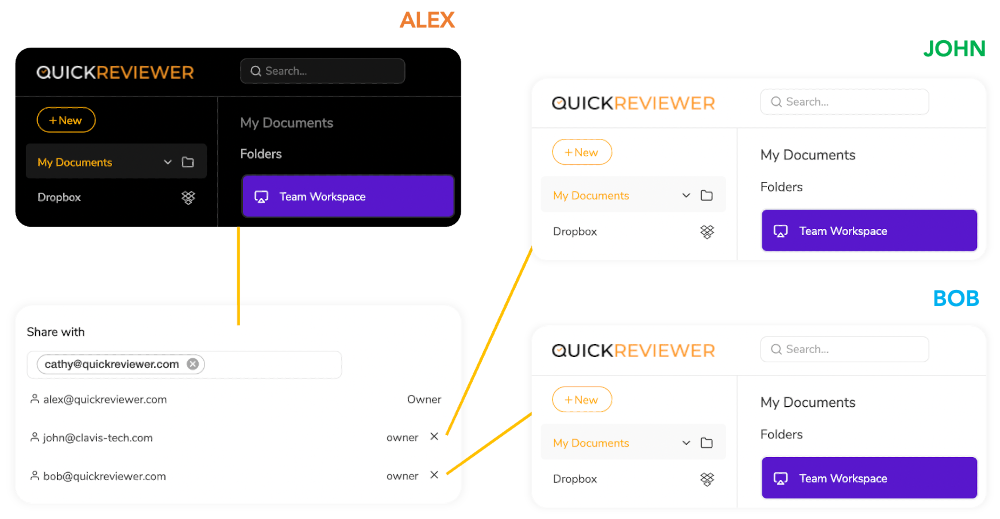
Organize feedback on creative projects without having to exchange multiple emails or files. Drag and drop to upload files and share them with any number of reviewers. Highlight text, pinpoint or add comments. Each reviewer is colour-coded for easy distinction, and they can reply or upvote on each other’s comments.
QuickReviewer is mobile-responsive, so review or approve files from your mobile device anytime and anywhere.
|
|||||
Platforms Supported
Windows
Supported
Mac
Supported
Linux
Not Supported
Cloud
Supported
On-Premises
Not Supported
iPhone
Supported
iPad
Supported
Android
Supported
Chromebook
Not Supported
|
Platforms Supported
Windows
Supported
Mac
Supported
Linux
Not Supported
Cloud
Supported
On-Premises
Not Supported
iPhone
Not Supported
iPad
Not Supported
Android
Not Supported
Chromebook
Not Supported
|
|||||
Audience
Companies of all sizes that want an all-in-one client portal
|
Audience
Marketing Teams, Media House, Graphic designers, Web Developers, Project Managers
|
|||||
Support
Phone Support
Supported
24/7 Live Support
Not Supported
Online
Supported
|
Support
Phone Support
Supported
24/7 Live Support
Not Supported
Online
Supported
|
|||||
API
Offers API
Not Supported
|
API
Offers API
Not Supported
|
|||||
Screenshots and Videos |
Screenshots and Videos |
|||||
Pricing
£49.99 per month
Free Version
Not Supported
Free Trial
Supported
|
Pricing
$35 Per Month
Save $72 /yr
Free Version
Supported
Free Trial
Supported
|
|||||
Reviews/
|
Reviews/
|
|||||
Pros & Cons from Real UsersPros
Cons
|
||||||
Training
Documentation
Not Supported
Webinars
Not Supported
Live Online
Supported
In Person
Not Supported
|
Training
Documentation
Not Supported
Webinars
Not Supported
Live Online
Supported
In Person
Not Supported
|
|||||
Company InformationOroson
Founded: 2013
United Kingdom
oroson.co
|
Company InformationClavis Technologies Pvt. Ltd.
Founded: 2011
India
www.quickreviewer.com
|
|||||
Alternatives |
Alternatives |
|||||
|
|
||||||
|
|
||||||
Categories |
Categories |
|||||
Online Proofing Features
Audit Trail
Not Supported
Due Date Tracking
Not Supported
File Sharing
Supported
Markup Tools
Not Supported
Role-Based Permissions
Not Supported
Status Tracking
Supported
Version Control
Supported
|
||||||
Integrations
Dropbox
Supported
Google Drive
Supported
Adobe Illustrator
Not Supported
Adobe InDesign
Not Supported
Adobe Photoshop
Not Supported
Adobe Premiere Pro
Not Supported
Microsoft OneDrive
Supported
|
Integrations
Dropbox
Supported
Google Drive
Supported
Adobe Illustrator
Supported
Adobe InDesign
Supported
Adobe Photoshop
Supported
Adobe Premiere Pro
Supported
Microsoft OneDrive
Not Supported
|
|||||
|
|
|