| Notezilla | RazorSQL | SQLNotebook | ||||
|---|---|---|---|---|---|---|
Related Products
|
||||||
Notezilla:
About
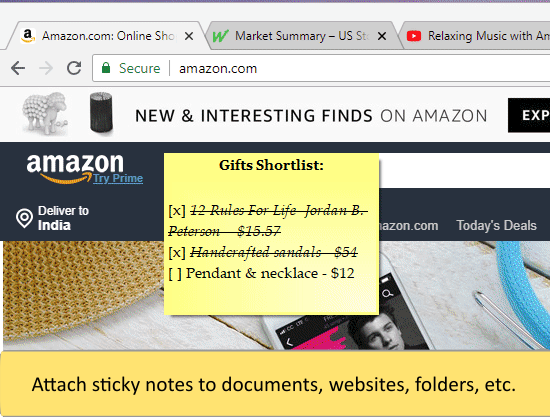
Notezilla is a sticky notes app for Windows & Phones designed to keep you well-equipped & well-organized. It lets you take quick notes on sticky notes (that look like 3M Post-It® Notes), right on your Windows desktop & gives you the best sticky notes experience.
With the optional cloud synchronization feature, you can sync sticky notes between computers, access them from any smartphone using our free apps for iPhone/iPad, Android, etc or send sticky notes to any contact across the globe.
Notezilla is a professionally designed, simple & elegant sticky notes software. Over the last 15 years, it has gained an excellent reputation (read customer reviews) from all over the world.
|
RazorSQL:
About
RazorSQL is an SQL query tool, database browser, SQL editor, and database administration tool for Windows, macOS, Mac OS X, Linux, and Solaris. RazorSQL has been tested on over 40 databases, can connect to databases via either JDBC or ODBC. Browse database objects such as schemas, tables, columns, primary and foreign keys, views, indexes, procedures, functions, and more. Visual tools to create, alter, describe, execute, and drop database objects such as tables, views, indexes, stored procedures, functions, triggers, and more. Includes multi-tabular display of queries with options for filtering, sorting, searching, and much more. Import data from various formats such as delimited files, Excel spreadsheets, and fixed-width files. Includes a robust relational database (HSQLDB) that is up and running with no manual configuration out of the box.
|
SQLNotebook:
About
SQL Notebooks allow developers to write Markdown combined with SQL to produce live HTML5 reports. They offer a lightning-fast, modern HTML5 interface where data sources are queried in real time. Users can create beautiful, live-updating SQL notebooks, easily source control the code, and take static snapshots to share with colleagues who don't have database access. SQL Notebooks are available in both QStudio Version 4, a desktop SQL client based on editing markdown files locally, and Pulse Version 3, which serves as a shared team server accessible via a web address. To help users get started, a showcase of example notebooks has been created in collaboration with leading community members; these examples are snapshotted versions with static data, and the source markdown and most of the data to recreate them are available on GitHub.
|
||||
Notezilla:
Platforms Supported
Windows
Supported
Mac
Not Supported
Linux
Not Supported
Cloud
Supported
On-Premises
Not Supported
iPhone
Supported
iPad
Supported
Android
Supported
Chromebook
Not Supported
|
RazorSQL:
Platforms Supported
Windows
Supported
Mac
Supported
Linux
Supported
Cloud
Not Supported
On-Premises
Not Supported
iPhone
Not Supported
iPad
Not Supported
Android
Not Supported
Chromebook
Not Supported
|
SQLNotebook:
Platforms Supported
Windows
Not Supported
Mac
Not Supported
Linux
Not Supported
Cloud
Supported
On-Premises
Not Supported
iPhone
Not Supported
iPad
Not Supported
Android
Not Supported
Chromebook
Not Supported
|
||||
Notezilla:
Audience
Anyone who wants to use sticky notes
|
RazorSQL:
Audience
DeVops teams looking for a Database management solution
|
SQLNotebook:
Audience
Data scientists in search of a tool to integrate narrative text with live code and visualizations
|
||||
Notezilla:
Support
Phone Support
Not Supported
24/7 Live Support
Not Supported
Online
Supported
|
RazorSQL:
Support
Phone Support
Not Supported
24/7 Live Support
Not Supported
Online
Supported
|
SQLNotebook:
Support
Phone Support
Not Supported
24/7 Live Support
Not Supported
Online
Supported
|
||||
Notezilla:
API
Offers API
Not Supported
|
RazorSQL:
API
Offers API
Not Supported
|
SQLNotebook:
API
Offers API
Not Supported
|
||||
Notezilla:
Screenshots and Videos |
RazorSQL:
Screenshots and Videos |
SQLNotebook:
Screenshots and Videos |
||||
Notezilla:
Pricing
$29.95/year/user
Free Version
Not Supported
Free Trial
Supported
|
RazorSQL:
Pricing
$99.95 one-time payment
Free Version
Not Supported
Free Trial
Not Supported
|
SQLNotebook:
Pricing
No information available.
Free Version
Not Supported
Free Trial
Not Supported
|
||||
Notezilla:
Reviews/
|
RazorSQL:
Reviews/
|
SQLNotebook:
Reviews/
|
||||
Notezilla:
Pros & Cons from Real UsersPros
Cons
|
RazorSQL:
Pros & Cons from Real UsersPros
Cons
|
|||||
Notezilla:
Training
Documentation
Supported
Webinars
Not Supported
Live Online
Not Supported
In Person
Not Supported
|
RazorSQL:
Training
Documentation
Not Supported
Webinars
Not Supported
Live Online
Not Supported
In Person
Not Supported
|
SQLNotebook:
Training
Documentation
Supported
Webinars
Not Supported
Live Online
Supported
In Person
Not Supported
|
||||
Notezilla:
Company InformationConceptworld Corporation
Founded: 2000
India
www.conceptworld.com
|
RazorSQL:
Company InformationRazorSQL
United States
razorsql.com
|
SQLNotebook:
Company InformationTimeStored
United Kingdom
www.timestored.com/sqlnotebook/
|
||||
Notezilla:
Alternatives |
RazorSQL:
Alternatives |
SQLNotebook:
Alternatives |
||||
|
Notezilla:
|
RazorSQL:
|
SQLNotebook:
|
||||
|
Notezilla:
|
RazorSQL:
|
SQLNotebook: | ||||
|
Notezilla:
|
RazorSQL: | SQLNotebook: | ||||
| Notezilla: |
RazorSQL:
|
SQLNotebook: | ||||
Notezilla:
Categories |
RazorSQL:
Categories |
SQLNotebook:
Categories |
||||
Notezilla:
Integrations
Amazon Keyspaces
Not Supported
Amazon SimpleDB
Not Supported
Apache Cassandra
Not Supported
Apache Hive
Not Supported
Couchbase
Not Supported
Firebird
Not Supported
GitHub
Not Supported
Greenplum
Not Supported
HyperSQL DataBase
Not Supported
IBM Informix
Not Supported
|
RazorSQL:
Integrations
Amazon Keyspaces
Supported
Amazon SimpleDB
Supported
Apache Cassandra
Supported
Apache Hive
Supported
Couchbase
Supported
Firebird
Supported
GitHub
Not Supported
Greenplum
Supported
HyperSQL DataBase
Supported
IBM Informix
Supported
|
SQLNotebook:
Integrations
Amazon Keyspaces
Not Supported
Amazon SimpleDB
Not Supported
Apache Cassandra
Not Supported
Apache Hive
Not Supported
Couchbase
Not Supported
Firebird
Not Supported
GitHub
Supported
Greenplum
Not Supported
HyperSQL DataBase
Not Supported
IBM Informix
Not Supported
|
||||
|
Notezilla:
|
RazorSQL:
|
SQLNotebook:
|