Notezilla

Notezilla

Conceptworld Corporation
Pixtel

Pixtel

Pixtel, Inc.
+
+

Related Products

  • DataImpulse
    31 Ratings
    Visit Website
  • Fathom
    7,732 Ratings
    Visit Website
  • Construction Daily Reports
    22 Ratings
    Visit Website
  • Google Workspace
    68,997 Ratings
    Visit Website
  • CompanyCam
    5,584 Ratings
    Visit Website
  • Nasdaq Metrio
    14 Ratings
    Visit Website
  • WEX Field Service Management
    67 Ratings
    Visit Website
  • Mentornity
    99 Ratings
    Visit Website
  • Portfolio Manager
    3 Ratings
    Visit Website
  • WebCatalog Desktop
    1 Rating
    Visit Website

About

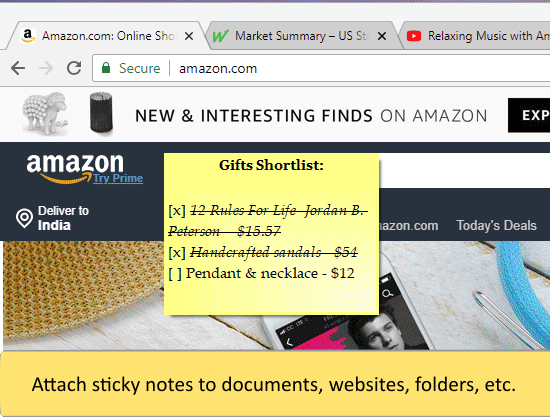
Notezilla is a sticky notes app for Windows & Phones designed to keep you well-equipped & well-organized. It lets you take quick notes on sticky notes (that look like 3M Post-It® Notes), right on your Windows desktop & gives you the best sticky notes experience. With the optional cloud synchronization feature, you can sync sticky notes between computers, access them from any smartphone using our free apps for iPhone/iPad, Android, etc or send sticky notes to any contact across the globe. Notezilla is a professionally designed, simple & elegant sticky notes software. Over the last 15 years, it has gained an excellent reputation (read customer reviews) from all over the world.

About

Pixtel is an all-in-one screen capture and management software for Windows, combining capture, annotation, and sharing in a single tabbed interface. Built for developers, QA engineers, product managers, and technical writers, Pixtel eliminates the need to juggle multiple tools. Capture: Choose from 12 capture modes — region, fullscreen, active window, scrolling, timed, continuous, camera snapshot, screen/camera recording, clipboard, repeat, OCR text extraction, and web clip. Annotate: A unique Virtual Canvas lets you place text, shapes, callouts, arrows, sticky notes, and 20,000+ vector icons anywhere on or beyond the image — fully editable, non-destructively. Manage: Organize screenshots with categories, tags, and auto-detected metadata. Multi-tab interface, grid view, visual bookmarking, bulk import/export, and a usage dashboard keep collections under control. Direct integrations with Google Drive, OneDrive, Dropbox, Box, Jira, MS Word, PowerPoint, OneNote, and email.

Platforms Supported

Windows
Mac
Linux
Cloud
On-Premises
iPhone
iPad
Android
Chromebook

Platforms Supported

Windows
Mac
Linux
Cloud
On-Premises
iPhone
iPad
Android
Chromebook

Audience

Anyone who wants to use sticky notes

Audience

All Windows users specifically, Product/Project Managers, Software Developers, QA Engineers, Tech and Documentation Writers, Business Managers

Support

Phone Support
24/7 Live Support
Online

Support

Phone Support
24/7 Live Support
Online

API

Offers API

API

Offers API

Screenshots and Videos

Screenshots and Videos

Pricing

$29.95/year/user
Free Version
Free Trial

Pricing

$25/year
Free Version
Free Trial

Reviews/Ratings

Overall 4.6 / 5
ease 4.6 / 5
features 4.6 / 5
design 4.4 / 5
support 4.6 / 5

Reviews/Ratings

Overall 5.0 / 5
ease 5.0 / 5
features 5.0 / 5
design 5.0 / 5
support 5.0 / 5

Pros & Cons from Real Users

Pros

  • Easy to use - intuitive. Highly Customizable and Lightweight. Sync between devices. Available across platforms and online as well. Frequent updates. Good support.
  • You can use it as notes or convert a series of items into a checklist to use for task management. Each sticky note can be assigned to a specific folder and have tags added. It feels very similar to Evernote in some regards, albeit significantly trimmed down in functionality. Notes can be starred for later and you can assign due dates with reminders to each note.
  • Create multiple notes Add reminders to notes Formatting options Sync across devices Also Available on mobile devices
  • #1- It's also available on mobile platforms. #1- Very convenient to add notes, the sticky notes are very attractive and catch your attention every time you open desktop. #3- Note reminder option is there, in case you missed it.
  • Notezilla is a very intuitive sticky notes app. It gives me each on-time reminder alarm. You can sync your notes between any devices. Notezilla app is available on cross platforms. Backup notes is also available.

Cons

  • No free personal version (only 30 day trial) - although there is a lifetime validity license at decent price.
  • The app looks unfinished. I know it's supposed to look like Post-it sticky notes, but that's no reason for there to be so much padding missing. If you use the checklist feature, there's practically no padding whatsoever between the checkbox and the edge of the sticky note. For notes that are checklists, the titles have a [x] in them to distinguish them from the others, but this looks awful and is pointless since every note shows a preview of the first line and you will see a [] in the first line of any note that has a checklist anyway. That itself also looks bad. Why not use a symbol like a checkmark or something? Titles have nearly no padding from the top of the notes either. While it's meant to look like a Post-it note, the illusion is entirely lost with the checklists and their highlighted boxes and the symbol on the other side of each line to let you know you can move the list items up and down. I'm really confused as to what they were going for, which makes it look even more like the app is unpolished and unfinished.
  • Expensive - the pricing is too high for such a basic utility
  • #1- We had a very positive overall experience with it.
  • Notezilla is a very intuitive app, I never had any bad experience.

Pros & Cons from Real Users

Pros

  • This feature combines screenshot capture, screen recording, OCR, annotations, and file management in a single application. Offers a "Virtual Canvas" that allows editing beyond image boundaries, useful for documentation and bug reporting. Supports sharing to services such as Google Drive, OneDrive, Dropbox, Jira, and Microsoft Office.
  • Built-in annotation tools (arrows, highlights, text, shapes, blur, etc.) make it easy to explain issues clearly. Auto-save and auto-upload options streamline the workflow and eliminate manual steps. Jira ticket creation directly from the tool helps report bugs quickly with screenshots attached. Saves time for QA, developers, and support teams by integrating capture, annotation, upload, and issue tracking in one place.
  • As a developer or QA working in Scrum cycle, we deal with lot of Jira ticket creation or updation where we will attach relevant screenshots. The Jira integration allows me to quickly capture, annotate, and attach screenshots directly to tickets without switching between multiple tools. It simplifies sharing technical context, improves communication with QA and other team members, and helps speed up issue resolution.
  • Comprehensive screen capture capabilities Rich annotation and editing tools Easy organization and management of captures Useful sharing and integration options Clean and user-friendly interface
  • It helps me provide clear visual explanations, reducing back-and-forth communication and saving time. The platform is reliable, easy to navigate, and consistently helps me stay productive throughout the day.

Cons

  • Pixtel gives good experience, and everything has been working fine so far. I haven't experienced any issues.
  • No drawbacks as of now. Haven't encountered any issues yet.
  • As technology moves forward feature requirement becomes more. I am happy with the current stack
  • Have not experienced any problems worth mentioning.
  • As of now I do not see any issues. It is able to full fill my daily needs.

Training

Documentation
Webinars
Live Online
In Person

Training

Documentation
Webinars
Live Online
In Person

Company Information

Conceptworld Corporation
Founded: 2000
India
www.conceptworld.com

Company Information

Pixtel, Inc.
Founded: 2023
United States
www.pixtel.us

Alternatives

ShixxNOTE

ShixxNOTE

Mavel

Alternatives

Categories

Categories

Screen Recording Features

Annotations / Drawing
Audio Capture
Backup
Collaboration Tools
File Sharing
Multi-Screen Recording
Screen Capture
Speech-to-Text
Video Editing
YouTube Uploading

Integrations

Classic FTP
Dropbox
Evernote
Google
Jira
Microsoft 365
Microsoft OneDrive
Microsoft OneNote
Vimeo
YouTube

Integrations

Classic FTP
Dropbox
Evernote
Google
Jira
Microsoft 365
Microsoft OneDrive
Microsoft OneNote
Vimeo
YouTube
Claim Notezilla and update features and information
Claim Pixtel and update features and information