MobiPDFMobiSystems
|
||||||
About
MobiPDF (formerly PDF Extra) is an intuitive and powerful PDF editor and reader designed for today’s modern user - the cost-efficient alternative to Adobe Acrobat Pro you’ve been looking for.
FEATURES OVERVIEW:
PDF Viewer and Reader: Switch between page views or use "Read Mode" for distraction-free reading.
Create and Edit PDFs: Modify text and images or start with a blank PDF.
Convert to Office Formats: Easily turn PDFs into Word, Excel, PowerPoint, and image files.
Leverage OCR: Transform scanned documents into searchable PDFs.
Organize PDFs: Combine, split, reorder, and compress documents.
Markup and Comment: Highlight, annotate, and add bookmarks or stamps.
Fill PDFs: Seamlessly fill forms or create ones from scratch.
Sign PDFs: Sign your documents anywhere—no ink required!
Secure Your Work: Protect files with passwords, digital signatures, and 256-bit encryption.
Offline Mode: Full functionality without internet access.
Translate PDFs
|
About
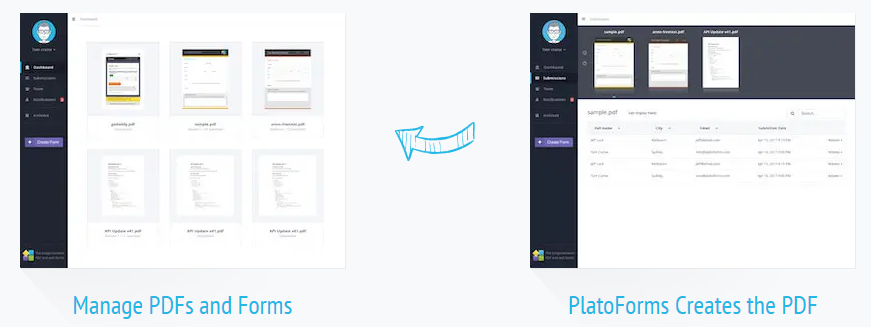
PlatoForms is a powerful and easy-to-use online PDF tool that lets you convert your PDF into Web Forms that your customers can easily fill out using a web browser. The online PDF Form offers features that lets you fill once to generate multiple PDF files as well as complete your PDF in a workflow. It is widely used by businesses to make PDF effortlessly shareable and fillable to their customers online. PDF retains a clean, contemporary and professional design regardless of reader, device or operating system. It supports a diverse range of colours, layouts, fonts and images for a seamless finish. Even if your PDF is setup as a fillable document, it's unwise to send the PDF directly to your customers or colleagues as few people understand how to fill out and save the document. For instance, signing a PDF document using Adobe Acrobat can be tricky for those that are not IT savvy.
|
|||||
Platforms Supported
Windows
Supported
Mac
Not Supported
Linux
Not Supported
Cloud
Supported
On-Premises
Not Supported
iPhone
Supported
iPad
Supported
Android
Supported
Chromebook
Not Supported
|
Platforms Supported
Windows
Supported
Mac
Supported
Linux
Supported
Cloud
Supported
On-Premises
Not Supported
iPhone
Not Supported
iPad
Not Supported
Android
Not Supported
Chromebook
Not Supported
|
|||||
Audience
Anyone who needs reliable PDF editing, SMBs
|
Audience
Individuals and companies interested in an online platform to upload and create online PDF fillable forms
|
|||||
Support
Phone Support
Supported
24/7 Live Support
Not Supported
Online
Supported
|
Support
Phone Support
Supported
24/7 Live Support
Supported
Online
Supported
|
|||||
API
Offers API
Not Supported
|
API
Offers API
Supported
|
|||||
Screenshots and Videos |
Screenshots and Videos |
|||||
Pricing
$49.99
Free Version
Supported
Free Trial
Supported
|
Pricing
$12 per month
Free Version
Supported
Free Trial
Supported
|
|||||
Reviews/
|
Reviews/
|
|||||
Pros from Real UsersPros
|
||||||
Training
Documentation
Supported
Webinars
Not Supported
Live Online
Supported
In Person
Not Supported
|
Training
Documentation
Supported
Webinars
Not Supported
Live Online
Not Supported
In Person
Not Supported
|
|||||
Company InformationMobiSystems
Founded: 2001
United States
mobisystems.com/mobipdf
|
Company InformationPlatoForms
Founded: 2017
Australia
www.platoforms.com
|
|||||
Alternatives |
Alternatives |
|||||
|
|
|
|||||
|
|
|
|||||
|
|
|
|||||
|
|
|
|||||
Categories |
Categories |
|||||
PDF Features
Annotations
Supported
Convert to PDF
Supported
Digital Signature
Supported
Encryption
Supported
Merge / Append
Supported
PDF Reader
Supported
Watermarking
Supported
PDF Editors Features
Access Controls / Permissions
Supported
Annotations
Supported
Commenting / Notes
Supported
Compare Side-by-Side
Not Supported
Customizable Branding
Supported
Delete Pages
Supported
Electronic Signature
Supported
Forms Management
Supported
Full Text Search
Supported
Merge / Append
Supported
Offline Access
Supported
Optical Character Recognition (OCR)
Supported
Rearrange Pages
Supported
Rotate Pages
Supported
Watermarking
Supported
|
PDF Features
Annotations
Not Supported
Convert to PDF
Supported
Digital Signature
Supported
Encryption
Supported
Merge / Append
Not Supported
PDF Reader
Supported
Watermarking
Not Supported
|
|||||
Integrations
Box
Supported
Dropbox
Supported
Google Drive
Supported
Microsoft OneDrive
Supported
Amazon S3
Not Supported
Appcues
Not Supported
Easyflow
Not Supported
Gmail
Not Supported
Google Sheets
Not Supported
MyWorkDrive
Supported
|
Integrations
Box
Supported
Dropbox
Supported
Google Drive
Supported
Microsoft OneDrive
Supported
Amazon S3
Supported
Appcues
Supported
Easyflow
Supported
Gmail
Supported
Google Sheets
Supported
MyWorkDrive
Not Supported
|
|||||
|
|