NotabilityGinger Labs
|
||||||
Related Products
|
||||||
About
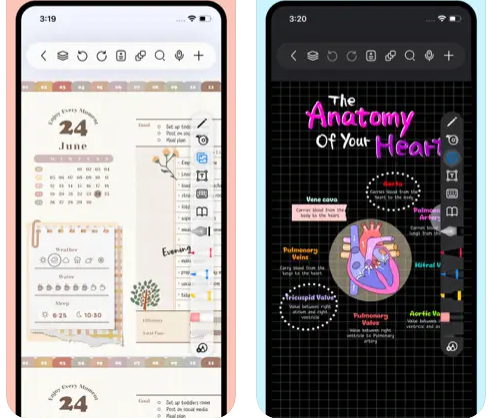
Freenotes offers a digital note-taking experience that blends the feel of writing on paper with powerful AI enhancements. You get realistic pen strokes that mimic lifelike handwriting as you sketch or take notes, along with tools like handwriting-to-text conversion, stickers, and various brush styles. Your notes sync via iCloud and multi-cloud backups. Freenotes supports PDF annotation, letting you mark up, highlight, and translate text directly in your documents; you can also insert hyperlinks to other pages or external web content. It enables picture-in-picture video mode and split-screen support so you can take notes while watching course videos or lectures. With its built-in AI assistant, you can take a screenshot or upload a document and receive instant answers or content summaries. To stay organized, notes can be grouped into folders, and a quick search lets you locate what you need fast.
|
About
Combine handwriting, photos and typing in a single note to bring your projects to life. Use a wide range of note-taking and sketching tools to capture every detail. You can even add and annotate PDFs in Notability. It’s the perfect place to create and organize work, school, and life's information!
Experiment with different tools to create beautiful, hand-crafted notes and sketches. Continue to scale, rotate, and recolor your ideas and sketches until your notes are just how you want them. Once you're done, organize your notes with ease so you always know where to find what matters most.
Zoom in on the specifics, or explore the big picture by combining sketches, outlines, and type. Now you are ready to share your notes with colleagues or study partners through Google Drive, AirDrop, Email and Dropbox.
|
|||||
Platforms Supported
Windows
Not Supported
Mac
Supported
Linux
Not Supported
Cloud
Not Supported
On-Premises
Not Supported
iPhone
Supported
iPad
Supported
Android
Not Supported
Chromebook
Not Supported
|
Platforms Supported
Windows
Not Supported
Mac
Supported
Linux
Not Supported
Cloud
Not Supported
On-Premises
Not Supported
iPhone
Supported
iPad
Supported
Android
Not Supported
Chromebook
Not Supported
|
|||||
Audience
Students and learners requiring a tool that captures handwriting, annotates PDFs, provides AI-powered summaries, and supports video and exam-style workflows
|
Audience
Apple users who want a beautiful and powerful note taking app
|
|||||
Support
Phone Support
Not Supported
24/7 Live Support
Not Supported
Online
Supported
|
Support
Phone Support
Not Supported
24/7 Live Support
Not Supported
Online
Not Supported
|
|||||
API
Offers API
Not Supported
|
API
Offers API
Not Supported
|
|||||
Screenshots and Videos |
Screenshots and Videos |
|||||
Pricing
Free
Free Version
Supported
Free Trial
Not Supported
|
Pricing
No information available.
Free Version
Not Supported
Free Trial
Not Supported
|
|||||
Reviews/
|
Reviews/
|
|||||
Pros & Cons from Real UsersPros
Cons
|
||||||
Training
Documentation
Supported
Webinars
Not Supported
Live Online
Not Supported
In Person
Not Supported
|
Training
Documentation
Not Supported
Webinars
Not Supported
Live Online
Not Supported
In Person
Not Supported
|
|||||
Company InformationFreenotes
China
apps.apple.com/us/app/freenotes-ai-notes-taking/id6464237904
|
Company InformationGinger Labs
Founded: 2008
United States
www.gingerlabs.com
|
|||||
Alternatives |
Alternatives |
|||||
|
|
||||||
|
|
||||||
|
|
||||||
Categories |
Categories |
|||||
Productivity Features
Collaboration
Not Supported
Database Creation
Not Supported
Document Creation
Not Supported
File Sharing
Not Supported
Notes Management
Supported
Office Suite
Not Supported
Presentation Tools
Not Supported
Project Management
Not Supported
Task Management
Not Supported
Team Chat
Not Supported
|
||||||
Integrations
Dropbox
Not Supported
Google Drive
Not Supported
iCloud
Supported
|
||||||
|
|
|