Related Products
|
||||||
About
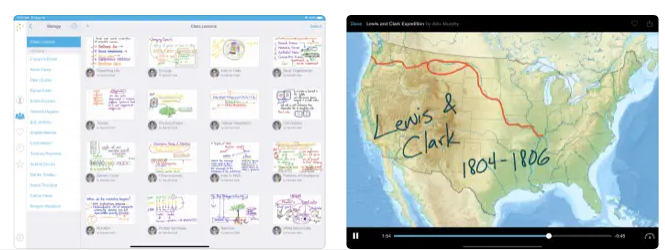
Record your voice and iPad screen to create dynamic video lessons that students and colleagues can access at any time, as needed. Post your videos to Educreations and share them with anyone. You can even share videos via email, Facebook, Twitter, and YouTube, or download and store them in Dropbox or Google Drive. All of your videos are stored safely in the cloud and are accessible everywhere you need them. You control who can see what. Explain any concept and instantly share your thoughts with others. Help students take control of their learning and master each new concept. Replay student work to pinpoint misconceptions, and celebrate their successes. Spend more time engaging students one-on-one. Create time for hands-on learning. Educreations is a unique interactive whiteboard and screencasting tool that's simple, powerful, and fun to use. Annotate, animate, and narrate nearly any type of content as you explain any concept.
|
About
Meet Gimkit, the live learning game show your students will beg to play. With constant updates, new modes and powerups, the game your students play today may not be what your students play tomorrow. Students answer questions on their own device at their own pace. Throughout a Kit, each student will get exposure to the questions multiple times to ensure mastery. Students can reinvest their money by purchasing upgrades & powerups. With millions of combinations, students can make purchases that suit their strengths. All the work students do, most of it is only ever seen by one other person. Ink gives students the tools to create meaningful work and share it with others. Students create posts inside Ink, and they share those with not just you, but each other. By publishing work, it creates a place where students can learn from their peers.
|
|||||
Platforms Supported
Windows
Not Supported
Mac
Not Supported
Linux
Not Supported
Cloud
Not Supported
On-Premises
Not Supported
iPhone
Not Supported
iPad
Supported
Android
Not Supported
Chromebook
Not Supported
|
Platforms Supported
Windows
Not Supported
Mac
Not Supported
Linux
Not Supported
Cloud
Supported
On-Premises
Not Supported
iPhone
Not Supported
iPad
Not Supported
Android
Not Supported
Chromebook
Not Supported
|
|||||
Audience
Educational organizations wanting a tool to create short instructional videos and share them instantly with students
|
Audience
Schools looking for a student engagement, trivia, and game show platform
|
|||||
Support
Phone Support
Not Supported
24/7 Live Support
Not Supported
Online
Supported
|
Support
Phone Support
Not Supported
24/7 Live Support
Not Supported
Online
Supported
|
|||||
API
Offers API
Not Supported
|
API
Offers API
Not Supported
|
|||||
Screenshots and Videos |
Screenshots and Videos |
|||||
Pricing
$8.25 per month
Free Version
Supported
Free Trial
Not Supported
|
Pricing
$4.99 per month
Free Version
Not Supported
Free Trial
Supported
|
|||||
Reviews/
|
Reviews/
|
|||||
Pros & Cons from Real UsersPros
Cons
|
||||||
Training
Documentation
Supported
Webinars
Not Supported
Live Online
Not Supported
In Person
Not Supported
|
Training
Documentation
Supported
Webinars
Not Supported
Live Online
Not Supported
In Person
Not Supported
|
|||||
Company InformationEducreations
United States
www.educreations.com
|
Company InformationGimkit
Founded: 2018
United States
www.gimkit.com
|
|||||
Alternatives |
Alternatives |
|||||
|
|
||||||
|
|
||||||
|
|
||||||
Categories |
Categories |
|||||
Integrations
Dropbox
Supported
Facebook
Supported
Google Drive
Supported
X (Twitter)
Supported
YouTube
Supported
|
Integrations
Dropbox
Not Supported
Facebook
Not Supported
Google Drive
Not Supported
X (Twitter)
Not Supported
YouTube
Not Supported
|
|||||
|
|
|