| Code::Blocks | CodeRunner | PascalABC.NET | ||||
|---|---|---|---|---|---|---|
Related Products
|
||||||
Code::Blocks:
About
Code::Blocks is a free, open-source, cross-platform Integrated Development Environment (IDE) primarily designed for C, C++, and Fortran development. Known for its lightweight design and modular structure, Code::Blocks offers a highly customizable interface with support for multiple compilers, including GCC, Clang, and Microsoft Visual C++. It features an intuitive, user-friendly interface with essential tools like syntax highlighting, code folding, auto-completion, and a robust debugging environment with breakpoints, variable inspection, and call stack tracing. Code::Blocks is highly extensible through plugins, enabling developers to add features like version control, scripting support, and custom build tools. Its lightweight nature, flexibility, and cross-platform compatibility make it a popular choice for students, educators, and developers working on small to medium-sized C/C++ projects.
|
CodeRunner:
About
A lightweight, multi-language programming text editor and IDE for macOS. CodeRunner was designed to support all of the most widely used programming languages and run them instantly. The app is configured to run code in 25 languages out-of-the-box, and additional languages can be configured to run by simply entering their terminal command. With over 200 syntax modes, lots of advanced editing features and thoughtful details, CodeRunner will quickly become your go-to editor for any and all kinds of text files. CodeRunner's code completion is the best you'll find in any IDE. Intelligent matching of typed text enables completions beyond single words. Quickly find the right completion among thousands with the extra-fuzzy search algorithm, helpful documentation snippets, and smart ranking of results. Don't clutter your code with print-statements for debugging. Instead, use CodeRunner's built-in debugging features to set breakpoints and step through your code.
|
PascalABC.NET:
About
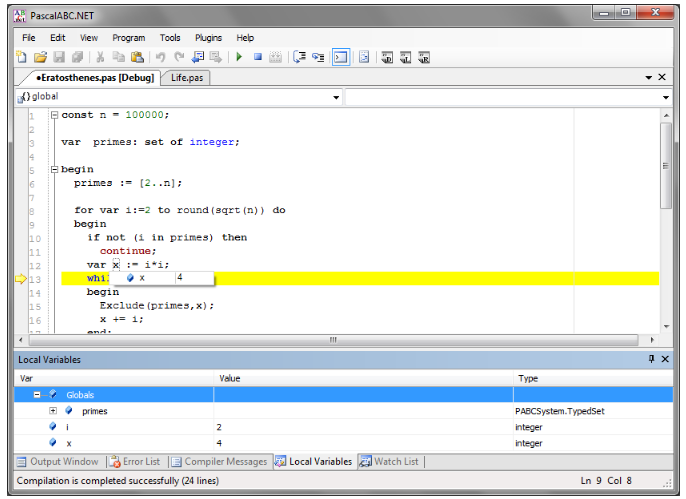
The new generation Pascal programming language combines the simplicity of classic Pascal, a great number of modern extensions, and the broad capabilities of Microsoft .NET Framework. Free, simple, and powerful IDE. Built-in form designer for rapid development of Windows desktop applications. Download the latest version of PascalABC.NET with a build-in form designer. Several extensions of the Pascal language, including the foreach operator, in-block variable definitions, auto type deduction in variable definitions, simplified syntax of units, method implementations inside classes and records, a new operator for object construction, anonymous classes, auto-classes, BigIntegers, etc. The most modern features of programming languages like n-dimensional dynamic arrays, generics, interfaces, operator overloading, exceptions, garbage collection, and lambda expressions. IDE with integrated debugger, IntelliSense system, code templates, and code auto-formatting.
|
||||
Code::Blocks:
Platforms Supported
Windows
Supported
Mac
Supported
Linux
Supported
Cloud
Not Supported
On-Premises
Not Supported
iPhone
Not Supported
iPad
Not Supported
Android
Not Supported
Chromebook
Supported
|
CodeRunner:
Platforms Supported
Windows
Not Supported
Mac
Supported
Linux
Not Supported
Cloud
Not Supported
On-Premises
Not Supported
iPhone
Not Supported
iPad
Not Supported
Android
Not Supported
Chromebook
Not Supported
|
PascalABC.NET:
Platforms Supported
Windows
Supported
Mac
Not Supported
Linux
Supported
Cloud
Not Supported
On-Premises
Not Supported
iPhone
Not Supported
iPad
Not Supported
Android
Not Supported
Chromebook
Not Supported
|
||||
Code::Blocks:
Audience
Developers interested in a free and open source cross-platform IDE
|
CodeRunner:
Audience
Programmers and writers requiring a multi-language programming text editor and IDE for macOS
|
PascalABC.NET:
Audience
Companies and individuals in search of a solution to develop Windows desktop applications
|
||||
Code::Blocks:
Support
Phone Support
Not Supported
24/7 Live Support
Not Supported
Online
Supported
|
CodeRunner:
Support
Phone Support
Not Supported
24/7 Live Support
Not Supported
Online
Supported
|
PascalABC.NET:
Support
Phone Support
Not Supported
24/7 Live Support
Not Supported
Online
Supported
|
||||
Code::Blocks:
API
Offers API
Not Supported
|
CodeRunner:
API
Offers API
Not Supported
|
PascalABC.NET:
API
Offers API
Not Supported
|
||||
Code::Blocks:
Screenshots and Videos |
CodeRunner:
Screenshots and Videos |
PascalABC.NET:
Screenshots and Videos |
||||
Code::Blocks:
Pricing
Free
Open source
Free Version
Supported
Free Trial
Not Supported
|
CodeRunner:
Pricing
$19.99 one-time payment
Free Version
Not Supported
Free Trial
Not Supported
|
PascalABC.NET:
Pricing
Free
Free Version
Supported
Free Trial
Not Supported
|
||||
Code::Blocks:
Reviews/
|
CodeRunner:
Reviews/
|
PascalABC.NET:
Reviews/
|
||||
Code::Blocks:
Pros & Cons from Real UsersPros
Cons
|
||||||
Code::Blocks:
Training
Documentation
Supported
Webinars
Not Supported
Live Online
Not Supported
In Person
Not Supported
|
CodeRunner:
Training
Documentation
Supported
Webinars
Not Supported
Live Online
Not Supported
In Person
Not Supported
|
PascalABC.NET:
Training
Documentation
Supported
Webinars
Not Supported
Live Online
Not Supported
In Person
Not Supported
|
||||
Code::Blocks:
Company InformationCode::Blocks
Founded: 2005
sourceforge.net/projects/codeblocks/
|
CodeRunner:
Company InformationCodeRunner
Founded: 2021
coderunnerapp.com
|
PascalABC.NET:
Company InformationPascalABC.NET
pascalabc.net/en/
|
||||
Code::Blocks:
Alternatives |
CodeRunner:
Alternatives |
PascalABC.NET:
Alternatives |
||||
| Code::Blocks: | CodeRunner: |
PascalABC.NET:
|
||||
| Code::Blocks: |
CodeRunner:
|
PascalABC.NET:
|
||||
|
Code::Blocks:
|
CodeRunner:
|
PascalABC.NET: | ||||
|
Code::Blocks:
|
CodeRunner:
|
PascalABC.NET:
|
||||
Code::Blocks:
Categories |
CodeRunner:
Categories |
PascalABC.NET:
Categories |
||||
Code::Blocks:
Code Editors Features
API
Not Supported
Auto-Complete
Supported
Code Folding
Supported
Column Editing
Supported
Customizable Themes
Supported
Debugging
Supported
Formatting / Table Editing
Supported
Keyboard Shortcuts
Supported
Multi-Monitor Editing
Supported
Syntax Highlighting
Supported
WYSIWYG
Supported
IDE Features
Code Completion
Supported
Compiler
Supported
Cross Platform Support
Supported
Debugger
Supported
Drag and Drop UI
Supported
Integrations and Plugins
Supported
Multi Language Support
Supported
Project Management
Supported
Text Editor / Code Editor
Supported
Text Editors Features
API
Not Supported
Auto-Complete
Supported
Code Folding
Supported
Column Editing
Supported
Customizable Themes
Supported
Debugging
Supported
Formatting / Table Editing
Supported
Keyboard Shortcuts
Supported
Multi-Monitor Editing
Supported
Syntax Highlighting
Supported
WYSIWYG
Supported
|
||||||
Code::Blocks:
Integrations
C
Supported
C#
Not Supported
C++
Supported
Fortran
Supported
Go
Not Supported
HTML
Not Supported
Haskell
Not Supported
IntelliSense
Not Supported
Java
Not Supported
LaTeX
Not Supported
|
CodeRunner:
Integrations
C
Supported
C#
Supported
C++
Supported
Fortran
Not Supported
Go
Supported
HTML
Supported
Haskell
Supported
IntelliSense
Not Supported
Java
Supported
LaTeX
Supported
|
PascalABC.NET:
Integrations
C
Not Supported
C#
Not Supported
C++
Not Supported
Fortran
Not Supported
Go
Not Supported
HTML
Not Supported
Haskell
Not Supported
IntelliSense
Supported
Java
Not Supported
LaTeX
Not Supported
|
||||
|
Code::Blocks:
|
CodeRunner:
|
PascalABC.NET:
|