ZypperSUSE
|
||||||
Related Products
|
||||||
About
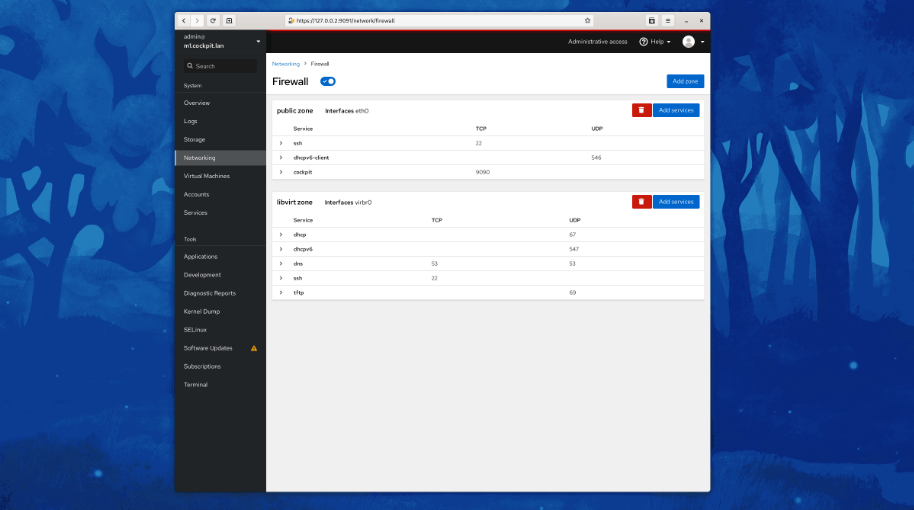
Cockpit is a web-based graphical interface for servers, intended for everyone, especially those who are new to Linux, familiar and expert admins. Thanks to Cockpit intentionally using system APIs and commands, a whole team of admins can manage a system in the way they prefer, including the command line and utilities right alongside Cockpit. See your server in a web browser and perform system tasks with a mouse. It’s easy to start containers, administer storage, configure networks, and inspect logs. Basically, you can think of Cockpit like a graphical “desktop interface”, but for individual servers. Have a favorite app or command-line tool that you use on your servers? Keep using the command line, Ansible, and your other favorite tools and add Cockpit to the mix with no issues. Cockpit uses the same system tooling you would use from the command line. You can switch back and forth between Cockpit and whatever else you like.
|
About
Zypper is a command-line package manager for installing, updating, and removing packages. It can also be used to manage repositories. Zypper works and behaves as a regular command-line tool. It features subcommands, arguments, and options that can be used to perform specific tasks. Zypper offers several benefits compared to graphical package managers. Being a command-line tool, Zypper is faster in use and light on resources. Zypper actions can be scripted. Zypper can be used on systems that do not have graphical desktop environments. This makes it suitable for use with servers and remote machines. The simplest way to execute Zypper is to type its name, followed by a command. Additionally, you can choose from one or more global options by typing them immediately before the command. Some commands require one or more arguments. Executing subcommands in the Zypper shell, and using global Zypper options are not supported.
|
|||||
Platforms Supported
Windows
Supported
Mac
Supported
Linux
Supported
Cloud
Not Supported
On-Premises
Not Supported
iPhone
Not Supported
iPad
Not Supported
Android
Supported
Chromebook
Not Supported
|
Platforms Supported
Windows
Not Supported
Mac
Not Supported
Linux
Supported
Cloud
Not Supported
On-Premises
Not Supported
iPhone
Not Supported
iPad
Not Supported
Android
Not Supported
Chromebook
Not Supported
|
|||||
Audience
Admins, professionals and anyone requiring a web-based graphical interface for their servers
|
Audience
Professionals seeking a command-line solution for installing, updating and removing packages
|
|||||
Support
Phone Support
Not Supported
24/7 Live Support
Not Supported
Online
Supported
|
Support
Phone Support
Supported
24/7 Live Support
Not Supported
Online
Supported
|
|||||
API
Offers API
Not Supported
|
API
Offers API
Not Supported
|
|||||
Screenshots and Videos |
Screenshots and Videos |
|||||
Pricing
No information available.
Free Version
Supported
Free Trial
Not Supported
|
Pricing
Free
Free Version
Supported
Free Trial
Not Supported
|
|||||
Reviews/
|
Reviews/
|
|||||
Training
Documentation
Supported
Webinars
Not Supported
Live Online
Not Supported
In Person
Not Supported
|
Training
Documentation
Supported
Webinars
Not Supported
Live Online
Not Supported
In Person
Supported
|
|||||
Company InformationCockpit
cockpit-project.org
|
Company InformationSUSE
United States
documentation.suse.com/smart/linux/html/concept-zypper/index.html
|
|||||
Alternatives |
Alternatives |
|||||
|
|
||||||
|
|
||||||
|
|
||||||
Categories |
Categories |
|||||
Integrations
Ansible
Supported
CentOS
Supported
Debian
Supported
Fedora
Supported
Fedora CoreOS
Supported
Red Hat Enterprise Linux
Supported
SUSE Linux Enterprise Desktop
Not Supported
Ubuntu
Supported
openSUSE Tumbleweed
Supported
|
Integrations
Ansible
Not Supported
CentOS
Not Supported
Debian
Not Supported
Fedora
Not Supported
Fedora CoreOS
Not Supported
Red Hat Enterprise Linux
Not Supported
SUSE Linux Enterprise Desktop
Supported
Ubuntu
Not Supported
openSUSE Tumbleweed
Not Supported
|
|||||
|
|
|