SWIFT-ENGINEparis-studios
|
||||||
Related Products
|
||||||
About
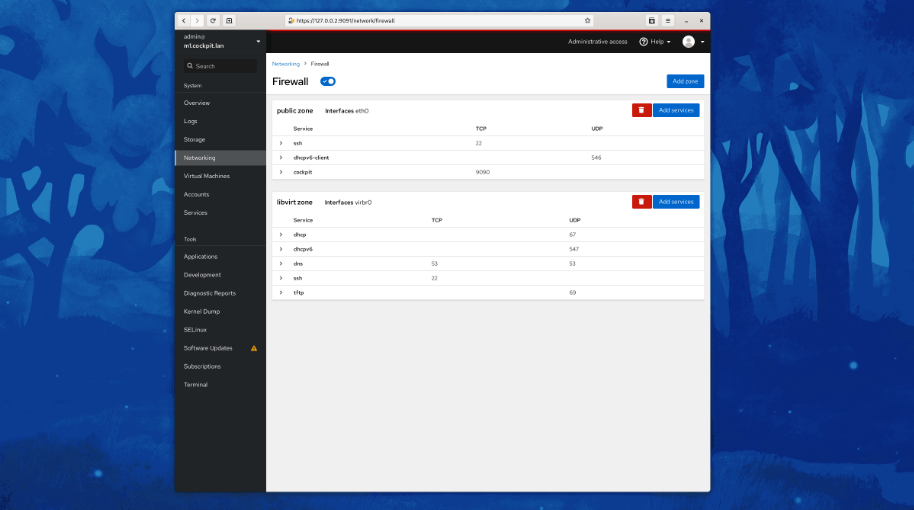
Cockpit is a web-based graphical interface for servers, intended for everyone, especially those who are new to Linux, familiar and expert admins. Thanks to Cockpit intentionally using system APIs and commands, a whole team of admins can manage a system in the way they prefer, including the command line and utilities right alongside Cockpit. See your server in a web browser and perform system tasks with a mouse. It’s easy to start containers, administer storage, configure networks, and inspect logs. Basically, you can think of Cockpit like a graphical “desktop interface”, but for individual servers. Have a favorite app or command-line tool that you use on your servers? Keep using the command line, Ansible, and your other favorite tools and add Cockpit to the mix with no issues. Cockpit uses the same system tooling you would use from the command line. You can switch back and forth between Cockpit and whatever else you like.
|
About
Boost Your Workflow. Swift-Engine Automatically Positions All Programs And Windows In Your Individual Monitor Matrix. The advantages of the SWIFT-ENGINE scale exponentially with the number of programs used at the same time and your available monitor area. Windows cockpit view (grid matrix). Arrange windows in a flash. Optimize workflow. Simple workspace setup. Complete monitor control. Start and place programs automatically with Windows (launch control). Desktop management and organization. Asymmetrical monitor layout. Touch and move windows everywhere. Automatically Arrange Matrix with the mouse wheel or by simply moving the mouse pointer, you can automatically align your active window in predefined areas so you always have a quick overview of all applications. Start Memory Programs Automatically With Windows. Start all your applications with Windows and let them be placed automatically according to your specifications.
|
|||||
Platforms Supported
Windows
Supported
Mac
Supported
Linux
Supported
Cloud
Not Supported
On-Premises
Not Supported
iPhone
Not Supported
iPad
Not Supported
Android
Supported
Chromebook
Not Supported
|
Platforms Supported
Windows
Supported
Mac
Not Supported
Linux
Not Supported
Cloud
Not Supported
On-Premises
Not Supported
iPhone
Not Supported
iPad
Not Supported
Android
Not Supported
Chromebook
Not Supported
|
|||||
Audience
Admins, professionals and anyone requiring a web-based graphical interface for their servers
|
Audience
Freelancers, enterprises, businesses looking for a workflow management software.
|
|||||
Support
Phone Support
Not Supported
24/7 Live Support
Not Supported
Online
Supported
|
Support
Phone Support
Not Supported
24/7 Live Support
Not Supported
Online
Supported
|
|||||
API
Offers API
Not Supported
|
API
Offers API
Not Supported
|
|||||
Screenshots and Videos |
Screenshots and Videos |
|||||
Pricing
No information available.
Free Version
Supported
Free Trial
Not Supported
|
Pricing
$39 per user, one-time payment
Free Version
Supported
Free Trial
Not Supported
|
|||||
Reviews/
|
Reviews/
|
|||||
Training
Documentation
Supported
Webinars
Not Supported
Live Online
Not Supported
In Person
Not Supported
|
Training
Documentation
Supported
Webinars
Not Supported
Live Online
Not Supported
In Person
Not Supported
|
|||||
Company InformationCockpit
cockpit-project.org
|
Company Informationparis-studios
Founded: 2020
Germany
www.paris-studios.de/
|
|||||
Alternatives |
Alternatives |
|||||
|
|
|
|||||
|
|
||||||
|
|
|
|||||
Categories |
Categories |
|||||
Workflow Management Features
Access Controls/Permissions
Supported
Approval Process Control
Not Supported
Business Process Automation
Supported
Calendar Management
Not Supported
Compliance Tracking
Not Supported
Configurable Workflow
Not Supported
Customizable Dashboard
Not Supported
Document Management
Not Supported
Forms Management
Supported
Graphical Workflow Editor
Not Supported
Mobile Access
Not Supported
No-Code
Supported
Task Management
Supported
Third Party Integrations
Supported
Workflow Configuration
Supported
|
||||||
Integrations
Ansible
Supported
CentOS
Supported
Debian
Supported
Fedora
Supported
Fedora CoreOS
Supported
Red Hat Enterprise Linux
Supported
Ubuntu
Supported
openSUSE Tumbleweed
Supported
|
Integrations
Ansible
Not Supported
CentOS
Not Supported
Debian
Not Supported
Fedora
Not Supported
Fedora CoreOS
Not Supported
Red Hat Enterprise Linux
Not Supported
Ubuntu
Not Supported
openSUSE Tumbleweed
Not Supported
|
|||||
|
|
|