PimNotePimtel
|
||||||
Related Products
|
||||||
About
With focused visual tools and preprocessor support, Brackets is a modern text editor that makes it easy to design in the browser. It's crafted from the ground up for web designers and front-end developers. Brackets is a lightweight, yet powerful, modern text editor. We blend visual tools into the editor so you get the right amount of help when you want it without getting in the way of your creative process. You'll enjoy writing code in Brackets. Brackets is an open-source project, supported by an active and passionate community. It's made by other web developers like you! Instead of jumping between file tabs, Brackets lets you open a window into the code you care about most. Want to work on the CSS that applies to a specific ID? Put your mouse cursor on that ID, push Command / Ctrl+E and Brackets will show you all the CSS selectors with that ID in an inline window so you can work on your code side-by-side without any popups.
|
About
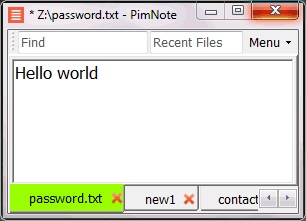
PimNote is a simple text editor for faster document access. It also combines the useful and lacking features of all other text editors.
Designed for knowledge management. One-click access to the recent file list helps you write a new idea to the related file quickly before forgetting it. The unlimited and searchable recent file list helps you easily reach an old file that was opened a long time ago. The one-click find history list and search help you type less.
Designed for remote working. No freezing from a remote file monitoring/opening/writing when disconnected. Files are cached for offline use by just closing the application without closing the tabs. Auto reconnect the network drive while opening the file. Repeated file notifications are informed politely on the top bar instead of a pop-up dialog box that requires frequent actions and tends to be mispressed.
|
|||||
Platforms Supported
Windows
Supported
Mac
Supported
Linux
Supported
Cloud
Not Supported
On-Premises
Not Supported
iPhone
Not Supported
iPad
Not Supported
Android
Not Supported
Chromebook
Not Supported
|
Platforms Supported
Windows
Supported
Mac
Not Supported
Linux
Not Supported
Cloud
Not Supported
On-Premises
Not Supported
iPhone
Not Supported
iPad
Not Supported
Android
Not Supported
Chromebook
Not Supported
|
|||||
Audience
Developers searching for an open source code editor for the web
|
Audience
Everyone who write text without coding especially remote workers
|
|||||
Support
Phone Support
Supported
24/7 Live Support
Not Supported
Online
Supported
|
Support
Phone Support
Not Supported
24/7 Live Support
Not Supported
Online
Supported
|
|||||
API
Offers API
Supported
|
API
Offers API
Not Supported
|
|||||
Screenshots and Videos |
Screenshots and Videos |
|||||
Pricing
No information available.
Free Version
Not Supported
Free Trial
Not Supported
|
Pricing
No information available.
Free Version
Supported
Free Trial
Not Supported
|
|||||
Reviews/
|
Reviews/
|
|||||
Pros & Cons from Real UsersPros
Cons
|
||||||
Training
Documentation
Supported
Webinars
Not Supported
Live Online
Not Supported
In Person
Not Supported
|
Training
Documentation
Supported
Webinars
Not Supported
Live Online
Not Supported
In Person
Supported
|
|||||
Company InformationBrackets
Founded: 2014
United States
brackets.io
|
Company InformationPimtel
Founded: 2018
www.pimtel.com/pimnote/
|
|||||
Alternatives |
Alternatives |
|||||
|
|
||||||
|
|
||||||
|
|
||||||
|
|
||||||
Categories |
Categories |
|||||
Integrations
C#
Not Supported
CSS
Supported
Dash
Supported
Git
Supported
HTML
Supported
JavaScript
Supported
Mermaid Chart
Supported
Racket
Supported
|
Integrations
C#
Supported
CSS
Not Supported
Dash
Not Supported
Git
Not Supported
HTML
Not Supported
JavaScript
Not Supported
Mermaid Chart
Not Supported
Racket
Not Supported
|
|||||
|
|
|