BandizipBandisoft
|
||||||
Related Products
|
||||||
About
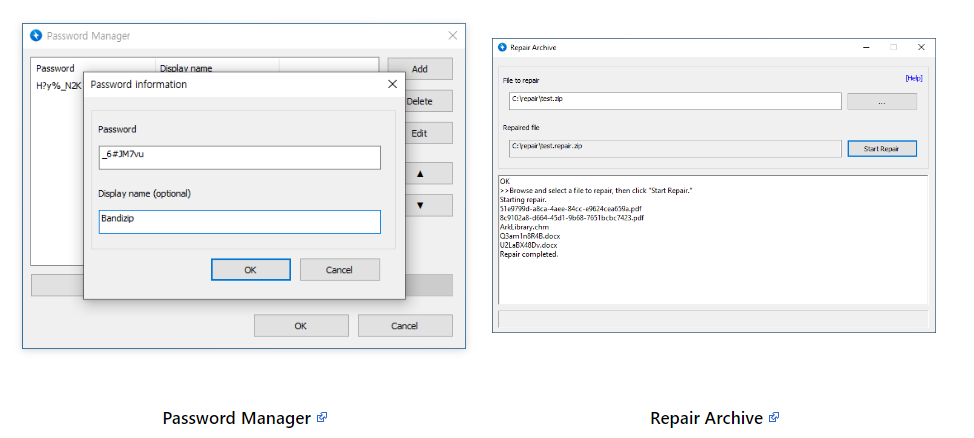
Bandizip is a powerful archiver that provides an ultrafast processing speed and convenient features. Available free of charge, its paid editions support a variety of advanced features. The supported OS is Windows 7/8/8.1/10/11 (32bit/64bit/arm64). All-inclusive compression/decompression/browsing/editing archiver. Extraction for 30+ formats, including RAR/RAR5/7Z/ZIP. Compressing an archive with password and multi-volume. Fast compression with multi-core. Windows 11 Context Menu support. Helps to manage and enter frequently used passwords for handling archives. Analyze a corrupted ZIP archive and collect uncorrupted data as much as possible. Recover an archive’s password with ultrafast speed by optimized brute-force search. View thumbnails of images in an archive without decompression. Detect malware in an archive by the safe and accurate antimalware scan. Up to 6 times faster compression using multi-core.
|
About
Using IMGCentury is easy, and you don’t need much programming or computer knowledge! Follow the steps:
First of all, Open IMGCentury.com in a new tab of any browser.
Then, You can see the “Choose Image” button inside the “Drag and Drop Box.”
You can choose the images that need to be compressed using the Choose Image button or Drag and Drop images inside the Drag and Dropbox.
Once you choose the image, The List of images will appear on the working box, and the compression process will be initiated.
Initially, the compression value has been set to 80%, and the output quality and size of the images will be compressed up to 80% of the input size.
If you are satisfied with the quality of the result, you can click the Download button to download the images.
Or else, you can adjust the compression ratio by using the sliding bar above the working space. Once you have adjusted the compression ratio to the new setting, you don’t need to re-chosen the image.
|
|||||
Platforms Supported
Windows
Mac
Linux
Cloud
On-Premises
iPhone
iPad
Android
Chromebook
|
Platforms Supported
Windows
Mac
Linux
Cloud
On-Premises
iPhone
iPad
Android
Chromebook
|
|||||
Audience
Individuals looking for a solution to compress, decompress, browse and edit files
|
Audience
Anyone that wants to compress images
|
|||||
Support
Phone Support
24/7 Live Support
Online
|
Support
Phone Support
24/7 Live Support
Online
|
|||||
API
Offers API
|
API
Offers API
|
|||||
Screenshots and Videos |
Screenshots and Videos |
|||||
Pricing
Free
Free Version
Free Trial
|
Pricing
No information available.
Free Version
Free Trial
|
|||||
Reviews/
|
Reviews/
|
|||||
Training
Documentation
Webinars
Live Online
In Person
|
Training
Documentation
Webinars
Live Online
In Person
|
|||||
Company InformationBandisoft
en.bandisoft.com/bandizip/
|
Company InformationIMGCentury
Founded: 2022
India
imgcentury.com
|
|||||
Alternatives |
Alternatives |
|||||
|
|
||||||
|
|
|
|||||
|
|
||||||
|
|
||||||
Categories |
Categories |
|||||
Integrations
No info available.
|
Integrations
No info available.
|
|||||
|
|
|