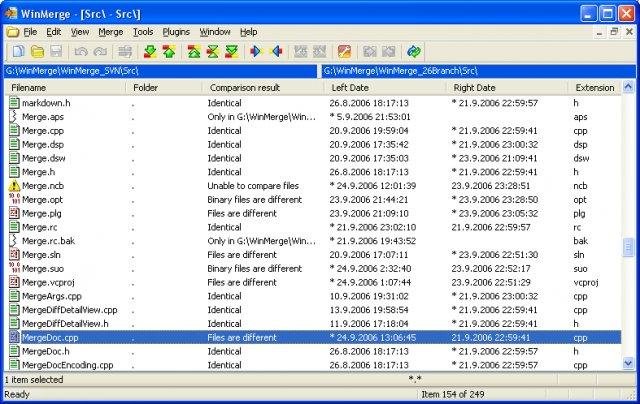
WinMerge is a Windows tool for visual difference display and merging, for both files and directories. It is highly useful for determining what has changed between file versions, and then merging those changes. WinMerge has Unicode support, Flexible syntax coloring editor, Visual SourceSafe integration, and Windows Shell integration. Regexp filtering for filenames and lines. Side-by-side line difference and highlights differences inside lines. A file map shows the overall file differences in a location pane. The user interface is translated into several languages.

Features

  • Visual differencing and merging of text files
  • Flexible editor with syntax highlighting, line numbers and word-wrap
  • Highlights differences inside lines
  • Difference pane shows current difference in two vertical panes
  • Location pane shows map of files compared
  • Moved lines detection
  • Compare folders in one level or recursive
  • Can show folder compare results flat or in a tree-style view
  • Regular Expression based file filters allow excluding and including items
  • Compares binary files in folder compare as well as text files
  • Shell Integration (supports 64-bit Windows versions)
  • Archive file support using 7-Zip
  • Fast compare using file sizes and dates
  • Creates patch files (Normal-, Context- and Unified formats)

Project Samples

Project Activity

See All Activity >

Follow WinMerge

WinMerge Web Site

Other Useful Business Software

The RMM That Puts the Power of Automation in Your Hands Icon
The RMM That Puts the Power of Automation in Your Hands

Take the Mundane and Routine Out of Tech Support With ConnectWise Automate

While we wait for the do-everything astromech droid to become a reality, ConnectWise Automate is the next best thing. With out-of-the-box scripts, around-the-clock monitoring, and unmatched automation capabilities, start doing way more with less and bring real value to your service delivery.

Rate This Project

Login To Rate This Project

User Ratings

★★★★★
★★★★
★★★
★★
166
8
1
1
11
ease 1 of 5 2 of 5 3 of 5 4 of 5 5 of 5 4 / 5
features 1 of 5 2 of 5 3 of 5 4 of 5 5 of 5 4 / 5
design 1 of 5 2 of 5 3 of 5 4 of 5 5 of 5 4 / 5
support 1 of 5 2 of 5 3 of 5 4 of 5 5 of 5 4 / 5

User Reviews

  • Good app!
  • WinMerge is absolutely indispensible – not only for developers. If you are just a regular computer user and realize that your colleagues have created several copies of a file (or even a whole folder), WinMerge helps you quickly find the differences (if any).
  • I am a utilitiophile. And I have a core group that I keep close at hand because they just work, they perform specific tasks and they make my life better. I can go on about how much this has improved since Gen-Zero, but all that is unnecessary. I find it invaluable.
  • Thank you very much for the free open source program!
    1 user found this review helpful.
  • I have been using Notepad++ for years along with certain plugins I thought I could not do without. I had been using the compare plugin for Notepad++ and have always found it clunky and hard to configure to where it makes any sense at all. Someone suggested WinMerge and all I can say is WOW. This is exactly what the Notepad++ Compare plugin should be. From this point forward I will be using WinMerge when it comes to comparing large documents. I send out weekly price sheets for refurbished systems and these documents change from week to week. WinMerge has made updating the latest pricelist easy as can be, whereas before it was a HUGE problem using Notepad++ compare. I went from 30-40 minutes making changes to less than 5 minutes making changes. That's a timesaver and believe it or not time really is money.
Read more reviews >

Additional Project Details

Languages

Croatian, Romanian, Korean, French, Ukrainian, Dutch, Persian, Polish, Slovene, Czech, Italian, Catalan, Greek, English, Portuguese, Serbian, Slovak, Chinese (Traditional), Galician, Bulgarian, Swedish, Turkish, Norwegian, Brazilian Portuguese, Chinese (Simplified), Danish, German, Japanese, Spanish, Russian, Hungarian, Basque (Euskara)

Intended Audience

System Administrators, Developers

User Interface

Win32 (MS Windows)

Programming Language

C++

Registered

2000-10-20