


| Name | Modified | Size | Downloads / Week |
|---|---|---|---|
| Parent folder | |||
| plativka-1.6.0-linux.tar.gz | < 8 hours ago | 13.8 MB | |
| Plativka-1.6.0-macos-arm64.dmg | < 8 hours ago | 135.5 MB | |
| Plativka-1.6.0-macos-x86_64.dmg | < 8 hours ago | 145.7 MB | |
| Plativka-1.6.0-windows-x64-setup.exe | < 8 hours ago | 88.7 MB | |
| Plativka-Desktop-1.6.0-macos-arm64.dmg | < 8 hours ago | 92.4 MB | |
| Plativka-Desktop-1.6.0-macos-x86_64.dmg | < 8 hours ago | 102.0 MB | |
| Plativka-Desktop-1.6.0-windows-x64-setup.exe | < 8 hours ago | 104.3 MB | |
| SHA256SUMS.txt | < 8 hours ago | 714 Bytes | |
| Plativka v1.6.0 source code.tar.gz | < 8 hours ago | 13.9 MB | |
| Plativka v1.6.0 source code.zip | < 8 hours ago | 13.9 MB | |
| README.md | < 8 hours ago | 4.5 kB | |
| Totals: 11 Items | 710.1 MB | 0 | |
What's new / Що нового
English
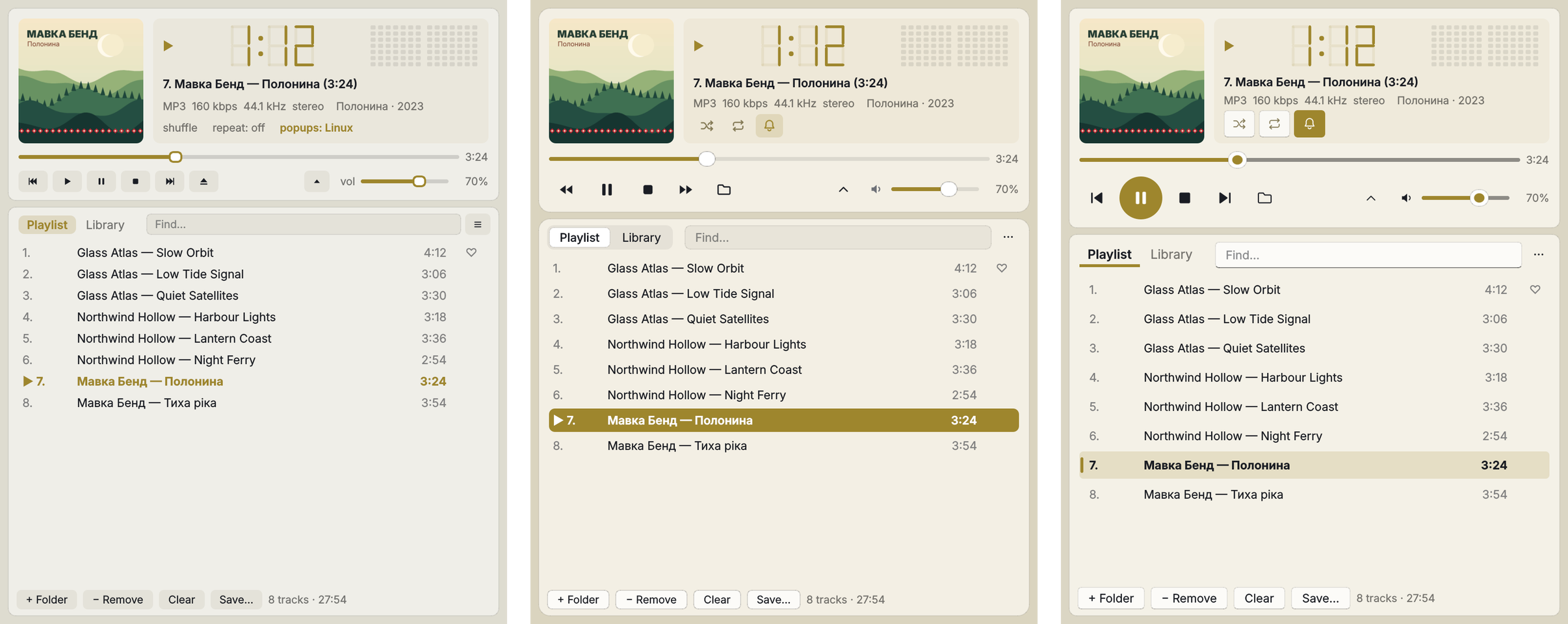
- Three skins: Plativka's own look, macOS or Windows 11 (☰ → View → Skin, or
Shift+T). The layout stays the same; the buttons, icons, sliders, tabs, the playing-track highlight and the translucency follow the chosen system. The colour from the album cover tints the window in every skin. Switches at once, without a restart. - macOS skin on a Mac: the desktop shows through the window, blurred, like in Finder and Music.
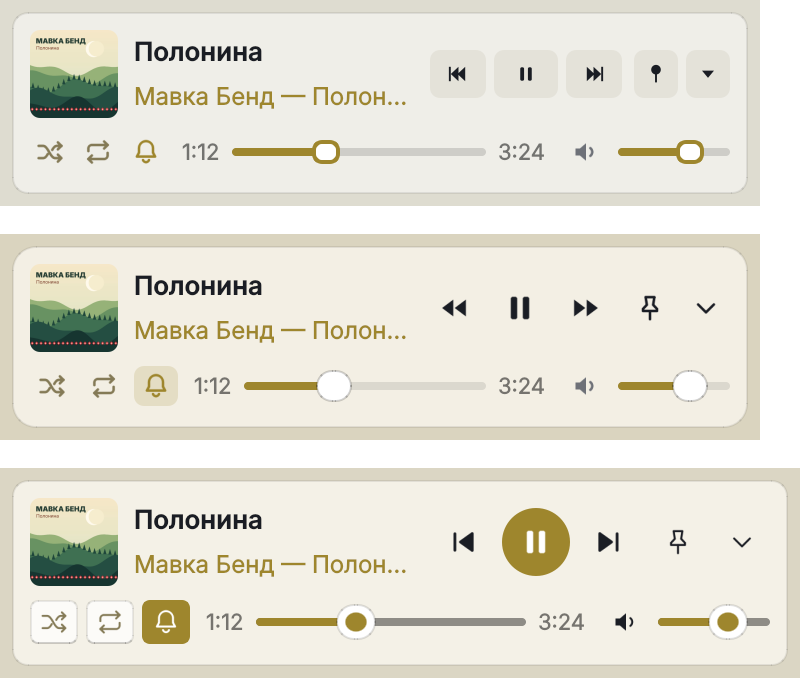
- Smaller compact view and mini player: two rows instead of three — the cover, the title and ⏮ ⏯ ⏭ on top; the switches as icons, the seek bar with the time and the volume below. The mini player is about half the size; the window with the playlist can be made about 100 px narrower. Stop and Add folder are in the menu and on the keys (
V,L). - Switching between the full and the compact view no longer stretches the window to its old height.
Українська
- Три скіни: власний вигляд Платівки, macOS або Windows 11 (☰ → Вигляд → Скін або
Shift+T). Розташування те саме; кнопки, іконки, повзунки, вкладки, виділення треку, що грає, і прозорість — як у вибраній системі. Колір з обкладинки підфарбовує вікно в кожному скіні. Перемикається одразу, без перезапуску. - Скін «macOS» на Mac: крізь вікно розмито видно робочий стіл, як у Finder і Музиці.
- Менші компактний вигляд і міні-плеєр: два ряди замість трьох — обкладинка, назва й ⏮ ⏯ ⏭ угорі; перемикачі іконками, смуга перемотування з часом і гучність унизу. Міні-плеєр приблизно вдвічі менший, вікно зі списком можна зробити вужчим десь на 100 px. Стоп і «Додати теку» — у меню й на клавішах (
V,L). - Перемикання між повним і компактним виглядом більше не розтягує вікно до старої висоти.
How to use / Як користуватися: skins — ☰ → View → Skin (on a Mac: the View menu) or Shift+T; compact view — W, mini player — E. Скіни — ☰ → Вигляд → Скін (на Mac — меню «Вигляд») або Shift+T; компактний вигляд — W, міні-плеєр — E. Guide · Інструкція
Download / Завантажити
| Terminal version / Консольна | Desktop / Віконна | |
|---|---|---|
| macOS · Apple Silicon | Plativka-1.6.0-macos-arm64.dmg |
Plativka-Desktop-1.6.0-macos-arm64.dmg |
| macOS · Intel | Plativka-1.6.0-macos-x86_64.dmg |
Plativka-Desktop-1.6.0-macos-x86_64.dmg |
| Windows 10/11 | Plativka-1.6.0-windows-x64-setup.exe |
Plativka-Desktop-1.6.0-windows-x64-setup.exe |
| Linux | plativka-1.6.0-linux.tar.gz → ./install.sh |
same archive → ./install.sh --desktop |
The desktop DMG opens like the terminal one: the first time, allow it in System Settings → Privacy & Security → "Open Anyway". / Віконний DMG відкривається так само: першого разу дозвольте в «Системні параметри → Приватність і безпека → Усе одно відкрити».
Installation guides / Інструкції: macOS · Windows · Linux
