


| Name | Modified | Size | Downloads / Week |
|---|---|---|---|
| Parent folder | |||
| plativka-1.5.0-linux.tar.gz | 2026-11-12 | 11.3 MB | |
| Plativka-1.5.0-macos-arm64.dmg | 2026-11-12 | 135.5 MB | |
| Plativka-1.5.0-macos-x86_64.dmg | 2026-11-12 | 144.4 MB | |
| Plativka-1.5.0-windows-x64-setup.exe | 2026-11-12 | 88.6 MB | |
| Plativka-Desktop-1.5.0-macos-arm64.dmg | 2026-11-12 | 91.2 MB | |
| Plativka-Desktop-1.5.0-macos-x86_64.dmg | 2026-11-12 | 102.5 MB | |
| Plativka-Desktop-1.5.0-windows-x64-setup.exe | 2026-11-12 | 104.2 MB | |
| SHA256SUMS.txt | 2026-11-12 | 714 Bytes | |
| Plativka v1.5.0 source code.tar.gz | 2026-11-12 | 11.3 MB | |
| Plativka v1.5.0 source code.zip | 2026-11-12 | 11.4 MB | |
| README.md | 2026-11-12 | 7.0 kB | |
| Totals: 11 Items | 700.4 MB | 0 | |
What's new / Що нового
English
- Play next:
Shift+N(or right-click → Play next) puts a song — or a whole album from the library — right after the current one, without reordering the playlist. Several songs can wait in the queue (marked →1, →2…); on the phone remote, touch and hold a song. - Copy to a USB stick (☰ → File, terminal
Shift+C): numbered file names so a car stereo keeps your order; the size and free space are shown first; nothing is overwritten without asking; names are safe for any stick. - Find duplicates (☰ → File, terminal
Shift+X): identical files and the same song in different files (for example MP3 and FLAC of one album). The best copy is ticked to keep — liked, lossless, higher bitrate — and you can change it; the extras go from the playlist only (default) or to the Trash, never permanently. - Covers from the internet (off by default; ☰ → View → Find missing covers online, terminal
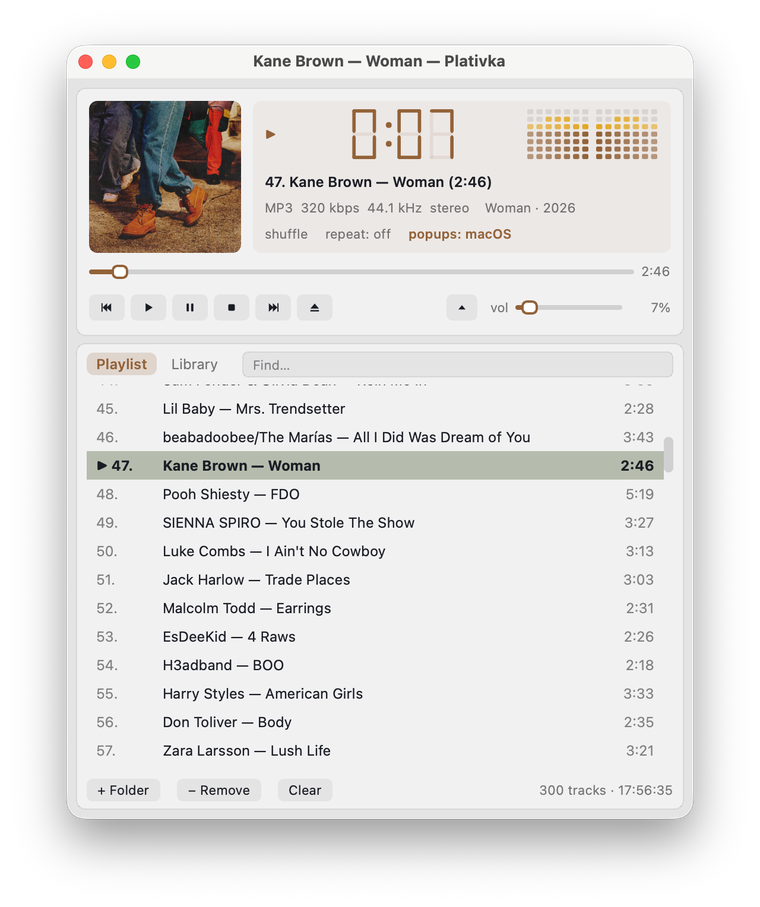
Shift+O): for tracks with no cover in the file or folder, from MusicBrainz / Cover Art Archive, with Apple as a fallback. Only a confident match is used (Cyrillic and Latin spellings count: Океан Ельзи = Okean Elzy); Find cover art… lets you pick one yourself from up to six. Only the artist and album name are sent; found covers are cached and work offline. - The phone remote looks like Plativka: tinted by the cover, the seven-segment clock, the same buttons, light or dark like the player on the computer; a sharper cover. The remote window on the computer is more compact, and the code is shown in large digits.
- The guides now describe favorites and smart lists (added in 1.4.0) in full.
Українська
- Грати наступним:
Shift+N(або правий клік → Грати наступним) ставить пісню — чи цілий альбом із медіатеки — одразу після поточної, не змінюючи порядок списку. У черзі можуть чекати кілька пісень (позначені →1, →2…); на пульті з телефона — утримуйте пісню. - Копіювати на флешку (☰ → Файл, консольна
Shift+C): нумеровані назви, щоб магнітола тримала ваш порядок; спершу видно розмір і вільне місце; без питання нічого не перезаписується; назви безпечні для будь-якої флешки. - Знайти дублікати (☰ → Файл, консольна
Shift+X): однакові файли й та сама пісня в різних файлах (наприклад, MP3 і FLAC одного альбому). Галочкою позначено найкращу копію — улюблену, без втрат, з вищим бітрейтом — і її можна змінити; зайві прибираються лише зі списку (за замовчуванням) або в Кошик, ніколи назавжди. - Обкладинки з інтернету (за замовчуванням вимкнено; ☰ → Вигляд → Шукати обкладинки в інтернеті, консольна
Shift+O): для треків без обкладинки у файлі чи теці — з MusicBrainz / Cover Art Archive, запасний варіант — Apple. Береться лише впевнений збіг (кирилиця й латиниця теж: Океан Ельзи = Okean Elzy); Знайти обкладинку… дає обрати самому з шести варіантів. Надсилається лише виконавець і назва альбому; знайдені обкладинки лежать у кеші й працюють без інтернету. - Пульт з телефона схожий на Платівку: підфарбований кольором обкладинки, семисегментний годинник, ті самі кнопки, світлий чи темний — як плеєр на комп'ютері; чіткіша обкладинка. Вікно пульта на комп'ютері компактніше, а код — великими цифрами.
- В інструкціях тепер повністю описано улюблені й розумні списки (з'явилися в 1.4.0).
How to use / Як користуватися: play next — Shift+N or right-click; copy to a USB stick and find duplicates — ☰ → File (terminal: Shift+C, Shift+X); covers from the internet — ☰ → View → Find missing covers online / Find cover art… (terminal: Shift+O). Грати наступним — Shift+N або правий клік; копіювати на флешку й знайти дублікати — ☰ → Файл (консольна: Shift+C, Shift+X); обкладинки з інтернету — ☰ → Вигляд → Шукати обкладинки в інтернеті / Знайти обкладинку… (консольна: Shift+O). Guide · Інструкція
Download / Завантажити
| Terminal version / Консольна | Desktop / Віконна | |
|---|---|---|
| macOS · Apple Silicon | Plativka-1.5.0-macos-arm64.dmg |
Plativka-Desktop-1.5.0-macos-arm64.dmg |
| macOS · Intel | Plativka-1.5.0-macos-x86_64.dmg |
Plativka-Desktop-1.5.0-macos-x86_64.dmg |
| Windows 10/11 | Plativka-1.5.0-windows-x64-setup.exe |
Plativka-Desktop-1.5.0-windows-x64-setup.exe |
| Linux | plativka-1.5.0-linux.tar.gz → ./install.sh |
same archive → ./install.sh --desktop |
The desktop DMG opens like the terminal one: the first time, allow it in System Settings → Privacy & Security → "Open Anyway". / Віконний DMG відкривається так само: першого разу дозвольте в «Системні параметри → Приватність і безпека → Усе одно відкрити».
Installation guides / Інструкції: macOS · Windows · Linux
