when I try to download the windows installer or msi I get
Secure Connection Failed
The page you are trying to view cannot be shown because the authenticity of the received data could not be verified.
What can you do about it?
The issue is most likely with the website, and there is nothing you can do to resolve it. You can notify the website’s administrator about the problem.
Error Code: PR_END_OF_FILE_ERROR
please help
If you would like to refer to this comment somewhere else in this project, copy and paste the following link:
Google searching the error code PR_END_OF_FILE_ERROR
Is your FireFox updated to the current version?
According to Google:
Seems to be a problem with FireFox browser failed to complete a secure SSL/TLS handshake with a website. Fixes include disabling third-party antivirus SSL scanning, turning off VPN or proxy settings, and clearing local cache data.
Common Causes
Security Software: Antivirus or firewalls intercepting and blocking secure SSL traffic
Proxy and VPNs: Incorrect network routing tools interfering with browser handshakes.
Browser Profile Issues: Corrupted data or conflicting extensions inside Firefox.
. Troubleshooting Steps
Disable Antivirus/Firewall: Temporarily turn off SSL scanning or web protection in software like Bitdefender or third-party suites.
Check Proxy Settings: Go to Firefox settings, search for Network Settings, and change "Use system proxy settings" to No proxy.
Clear Site Data: Click the padlock icon next to the address bar on the problem page and select Clear cookies and site data.
Turn off VPN: Disconnect any active virtual private networks or alternative DNS-over-HTTPS configurations.
Last edit: Enigma2Illusion 2026-07-29
If you would like to refer to this comment somewhere else in this project, copy and paste the following link:
As your own successful results with Enigma2Illusion's direct links suggest, downloading from the source instead of an intermediary like Launchpad.net is often a go-to fix. I asked my dear friend Google, "What are some of the problems encountered when downloading files from launchpad.net?"
(edited to use larger image)
Last edit: Gary Marks 2026-07-29
If you would like to refer to this comment somewhere else in this project, copy and paste the following link:
you already helped me by providing the functional source forge links and it is working now without me having changed anything, no idea why but thank you.
If you would like to refer to this comment somewhere else in this project, copy and paste the following link:

when I try to download the windows installer or msi I get
Secure Connection Failed
The page you are trying to view cannot be shown because the authenticity of the received data could not be verified.
What can you do about it?
The issue is most likely with the website, and there is nothing you can do to resolve it. You can notify the website’s administrator about the problem.
Error Code: PR_END_OF_FILE_ERROR
please help
Downloads work for me using Windows 10 with latest patches and Chrome browser.
https://sourceforge.net/projects/veracrypt/files/VeraCrypt%201.26.29/Windows/VeraCrypt_Setup_arm64_1.26.29.msi/download
https://sourceforge.net/projects/veracrypt/files/VeraCrypt%201.26.29/Windows/VeraCrypt%20Portable%201.26.29.exe/download
https://sourceforge.net/projects/veracrypt/files/VeraCrypt%201.26.29/Windows/VeraCrypt%20Setup%201.26.29.exe/download
I was using the website but it works here, thank you.
Please post the link to the website downloads that gave you the error.
I successfully downloaded the three Windows VeraCrypt files from:
https://veracrypt.jp/en/Downloads.html
https://launchpad.net/veracrypt/trunk/1.26.29/+download/VeraCrypt%20Setup%201.26.29.exe
https://launchpad.net/veracrypt/trunk/1.26.29/+download/VeraCrypt_Setup_x64_1.26.29.msi
Both of the links you provided are currently working for me.
Although the MSI link was very slow to download the 50 MB file taking 2 minutes and 32 seconds.
Last edit: Enigma2Illusion 2026-07-29
not for me
Google searching the error code PR_END_OF_FILE_ERROR
Is your FireFox updated to the current version?
According to Google:
Seems to be a problem with FireFox browser failed to complete a secure SSL/TLS handshake with a website. Fixes include disabling third-party antivirus SSL scanning, turning off VPN or proxy settings, and clearing local cache data.
Common Causes
.
Troubleshooting Steps
Last edit: Enigma2Illusion 2026-07-29
As your own successful results with Enigma2Illusion's direct links suggest, downloading from the source instead of an intermediary like Launchpad.net is often a go-to fix. I asked my dear friend Google, "What are some of the problems encountered when downloading files from launchpad.net?"
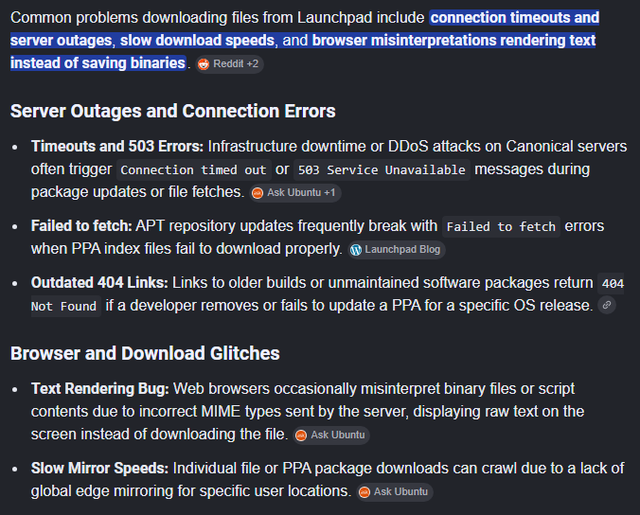
(edited to use larger image)
Last edit: Gary Marks 2026-07-29
you already helped me by providing the functional source forge links and it is working now without me having changed anything, no idea why but thank you.