If you use VERACRYPT and have this error message on a DELL Pc, maybe you have the same problem.
I use Version 1.24 of Veracrypt.
You have so to assign a drive letter to your HD drice using diskmgmt.msc. Then you can mount the drive.
How To :
Go in Veracrypt to see the drive reference : Here Nb 3 :
You have so to assign a drive letter to your HD drice using diskmgmt.msc. Then you can mount the drive.
Then go to seach in Win task bar and write : "" and hit ENTER
In the program; select the same drive number ; here 3 :
clic on ADD :
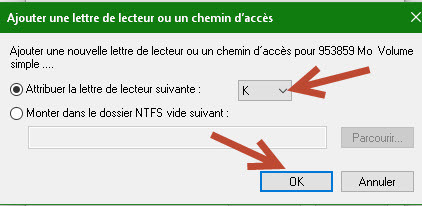
Select a drive lettre that is free; here K: and clic OK:
Then the PC will try to open, you willl have error message to cancel both and then go to VERA to open your drive.
Hope it helps.
Works well on my DELL with USB external Drive encrypted.
If you would like to refer to this comment somewhere else in this project, copy and paste the following link:

If you use VERACRYPT and have this error message on a DELL Pc, maybe you have the same problem.
I use Version 1.24 of Veracrypt.
You have so to assign a drive letter to your HD drice using diskmgmt.msc. Then you can mount the drive.
How To :
Go in Veracrypt to see the drive reference : Here Nb 3 :
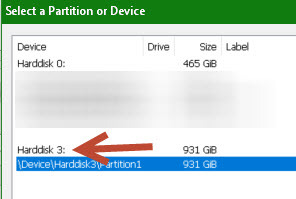
You have so to assign a drive letter to your HD drice using diskmgmt.msc. Then you can mount the drive.
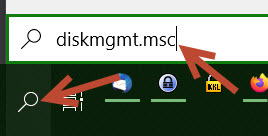
Then go to seach in Win task bar and write : "" and hit ENTER
In the program; select the same drive number ; here 3 :
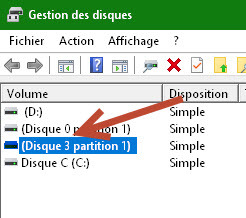
clic on ADD :
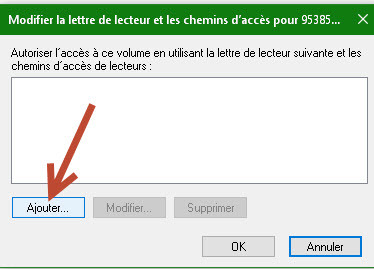
Select a drive lettre that is free; here K: and clic OK:
Then the PC will try to open, you willl have error message to cancel both and then go to VERA to open your drive.
Hope it helps.
Works well on my DELL with USB external Drive encrypted.