My only suggestion is to make sure your browser downloaded the file correctly, so right-click on the file in Windows Explorer and click the Digital Signatures tab...
If you would like to refer to this comment somewhere else in this project, copy and paste the following link:
This issue happens if the machine doesn't have the "thawte Primary Root CA" certificate installed and if Windows is unable to download it automatically from Internet.
On Windows 7, this certificate should be pre-installed so this is strange.
Can you please check the "Digital Signature" panel on the file properties of the exe file (it is called "Signature numériques" in French)? Normally you should see something like screenshots below.
If the machine is connected is connected to internet and if you check the digital signature the way described above, Windows will be able to automatically download any missing certificate and you will not have this error.
If the machine doesn't have internet, then you can download the missing certificate from https://www.thawte.com/roots/thawte_Primary_Root_CA.pem, rename it to thawte_Primary_Root_CA.crt, double click on it and then click "Install Certificate".
If you would like to refer to this comment somewhere else in this project, copy and paste the following link:



Veracrypt 1.23 and 1.23 Hotfix 2 cannot installed under Windows Server 2003 R2 x64.
This distribution package is damaged!
How to resolve it?
My only suggestion is to make sure your browser downloaded the file correctly, so right-click on the file in Windows Explorer and click the Digital Signatures tab...
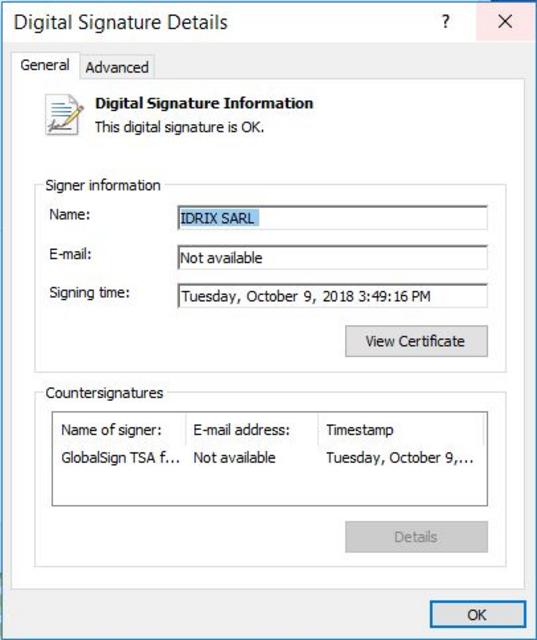
This issue can also be caused by a missing Thawte CA certificate on the Windows machine.
I have posted an answer on this forum for a similar issue and you can find the solution there: https://sourceforge.net/p/veracrypt/discussion/technical/thread/6da4314708/#a749
Here is a quote: