This only occurs when trying to format a large external SATA hard drives (12TB) and not with smaller USB devices (tested up to 128GB). After completion of creating a new volume, Veracrypt will fail to format the volume. I'll mount it and try to format it using Windows but I just get a vague message every time that it failed to format the volume. I can't enter the volume or move files into it.
Third party software doesn't detect the mounted container for some reason. I've also tried to do the encryption with other format types (exFAT and FAT) without any luck.
I scanned the disk using chkdsk which didn't find anything wrong with the drive.
I've also tried to encrypt in place without any luck.
Thanks!
Is this an Advanced Format drive with a native sector size of 4096 bytes without 512 byte sector emulation? To find out, open an elevated (administrative) command window and enter this command: fsutil fsinfo ntfsinfo <drive letter followed by colon>
Look for the line "Bytes Per Physical Sector:" It's nearly a given that this will be 4096 for any drive as large as yours, but just above that line should be one that says "Bytes Per Sector:". If this reads 512, then the drive supports 512-byte sector emulation (512e). But if it reads 4096 instead, it's a 4Kn drive and it may be incompatible with VeraCrypt. VeraCrypt's driver only works with 512-byte sectors (including emulated 512). I have an 8TB Toshiba AF drive with 512e, fully encrypted with VeraCrypt and exhibiting no discernible issues. If yours is a true 4Kn drive, that might explain your formatting issue. Having never experienced this, I can't say if your error messages are consistent with this situation, so it's just a guess.
If you would like to refer to this comment somewhere else in this project, copy and paste the following link:
Thank you for your response!
I get the following:
Bytes Per Sector : 512
Bytes Per Physical Sector : 512
Bytes Per Cluster : 4096
I have 4096 for "Bytes Per Cluster" instead of "Bytes Per Physical Sector:" but I do have 512 for "Bytes Per Sector : ". I'm not sure how to interpret this. Those this suggest it is compatible?
On a separate note. I tried to create a container within the drive and was able to only when having VeraCrypt format it as FAT. NTFS and exFAT returned errors. The drive has always been formatted as NTFS so I'm confused why containers with that same file system don't seem to be supported.
If you would like to refer to this comment somewhere else in this project, copy and paste the following link:
Well I thought I had a good guess, Ezra, but you seem to have a huge drive that adheres to the old standard of 512-byte physical sectors, which makes your formatting issues all the more puzzling since there's no apparent issue with the VeraCrypt driver. BTW, the 4096-byte clusters are not a problem. A cluster is just a group of sectors that the OS uses as the basic allocation unit for files, and nothing about that raises any issues with VeraCrypt. Sorry to say I'm stumped. I hope you'll post back if you get this sorted out.
If you would like to refer to this comment somewhere else in this project, copy and paste the following link:
Can you share what settings you used for your Toshiba? Did you change anything from the default settings? I'll give it another shot.
Encryption Algorithm
Hash Algorithm
Filesystem
Cluster
Quick Format?
If you would like to refer to this comment somewhere else in this project, copy and paste the following link:
Are you attempting to encrypt the HDD or a partition on the HDD?
In VeraCrypt select device, encrypt the HDD drive will show as "Harddisk 1:" and a partition on the HDD will show as "\Device\Harddisk1\Partition1".
Maybe another forum member the same make and model of your external can respond if they encounter any issues based on the size of the encryption of the HDD or partition.
If you would like to refer to this comment somewhere else in this project, copy and paste the following link:
Adding to Enigma2Illusion's question about the drive model, I'm also curious about what kind of enclosure you might have, and whether it has firmware that might be interfering in some way with the operation of VeraCrypt. The thing that raises my curiosity most is that your 12TB drive reportedly has 512-byte physical sectors, but I'm unaware of any currently available drives especially of that size that haven't transitioned to Advanced Format sector size (most with 512-byte emulation). I just downloaded spec sheets for the Western Digital Blue and Black lineups, and all of their current drives even down to 500GB are Advanced Format. So I can't help but wonder about what external enclosure you might have and the effect it might be having. I'm thinking that the enclosure's firmware might be the reason the "fs" command reports 512-byte physical sectors. That was a surprise.
As for my own 8TB Toshiba, it's a SATA drive connected directly to the motherboard controller, so that's one difference that might be meaningful. It's pretty standard AES encryption with SHA-512 hash, NTFS formatting with 4096-byte clusters, not sure about quick or full formatting, and it's partition encryption not full disk.
If you would like to refer to this comment somewhere else in this project, copy and paste the following link:
It's a WD white drive model "WD120EMFZ". Its shucked from a WD EasyStore product.
There is only a single partition on the drive taking up the entire size of the drive. When creating the volume I'm choosing to encrypt that partition. I'm unsure whether I need to remove that partition and attempt to encrypt the entire device instead.
As you can see in the DriveDX screenshot, it reported that the drive does indeed have 4096-byte physical sectors with 512-byte logical sectors. From this, I would surmise that something is causing the "fs" command to return the incorrect result of 512-byte physical sectors, and I'm just guessing that it might be firmware in your docking station/duplicator. As a test, I would suggest returning the drive to the original WD enclosure and re-running that "fs" command to see if gives you an accurate result, and it might not. But if it does, you might be able to successfully encrypt the drive in that configuration, assuming that's otherwise satisfactory.
If you would like to refer to this comment somewhere else in this project, copy and paste the following link:
I'll give you my screenshot below as a basis for comparison with your results, Ezra. It's the "fs" output for my 8TB Toshiba Advanced Format 512e drive with direct SATA connection. And I forgot to mention it before, but even if your new results look good, be sure to start with a relatively small encrypted partition for further testing. Some people have reported nearly crippling speed throughput issues with external drives even though the encryption was technically successful, so be a little cautious before committing 12TB to an encrypted partition. Good luck!
If you would like to refer to this comment somewhere else in this project, copy and paste the following link:
You were correct the dock was causing a different output. I reassembled the enclosure ran it again and got 4096-byte physical sectors with 512-byte logical sectors. Everything seemed to work well with Veracrypt so I tried to perform a full disk encryption only to get the same result. I tried to encrypt in place without any luck. At this point I'm thinking it could be the hardware/software on my computer. I have drive, a 14TB (also a white label WD drive) that I'm thinking of testing out to see if I get a different result if I try to encrypt it.
There is only a single partition on the drive taking up the entire size of the drive. When creating the volume I'm choosing to encrypt that partition. I'm unsure whether I need to remove that partition and attempt to encrypt the entire device instead.
Perfect. I prefer to encrypt the partition even if the one partition is the entire drive since Windows will ask you to format each time you connect the external drive if you remove all partitions and encrypt "Harddisk 1:" which can lead to accidental formatting of the HDD.
I use Western Digital external drives over the past 15+ years. All of my recent drives from 6 TB to 18 TB have Bytes Per Physical Sector : 4096.
I see from the Amazon link you provided that the enclosure has the functionality for cloning drives. Did you use the enclosure to clone from another drive since your external shucked from a WD EasyStore drive Bytes Per Physical Sector is 512 or format using the enclosure software?
Last edit: Enigma2Illusion 2021-08-20
If you would like to refer to this comment somewhere else in this project, copy and paste the following link:
I only use the dock to connect the drives without the additional bulk of the enclosure. I did try to use the original enclosure to encrypt without any luck. See my reply to Marks. I have no clue what else it could be.
If you would like to refer to this comment somewhere else in this project, copy and paste the following link:
I was able to encrypt the 14TB drive but only if it was exFAT and if it was formatted through veracrypt with the original enclosure. Attempting to encrypt with NTFS gave the same error that "Veracrypt was unable to finish the formatting" and that "it failed to create the container". I didn't attempt to use the dock out of fear that it would be a waste of time. Interestingly the drive before encrypting was formatted as exFAT. I'm not sure if this is just a coincidence.
👍
1
If you would like to refer to this comment somewhere else in this project, copy and paste the following link:



This only occurs when trying to format a large external SATA hard drives (12TB) and not with smaller USB devices (tested up to 128GB). After completion of creating a new volume, Veracrypt will fail to format the volume. I'll mount it and try to format it using Windows but I just get a vague message every time that it failed to format the volume. I can't enter the volume or move files into it.
Third party software doesn't detect the mounted container for some reason. I've also tried to do the encryption with other format types (exFAT and FAT) without any luck.
I scanned the disk using chkdsk which didn't find anything wrong with the drive.
Thanks!
Is this an Advanced Format drive with a native sector size of 4096 bytes without 512 byte sector emulation? To find out, open an elevated (administrative) command window and enter this command:
fsutil fsinfo ntfsinfo <drive letter followed by colon>Look for the line "Bytes Per Physical Sector:" It's nearly a given that this will be 4096 for any drive as large as yours, but just above that line should be one that says "Bytes Per Sector:". If this reads 512, then the drive supports 512-byte sector emulation (512e). But if it reads 4096 instead, it's a 4Kn drive and it may be incompatible with VeraCrypt. VeraCrypt's driver only works with 512-byte sectors (including emulated 512). I have an 8TB Toshiba AF drive with 512e, fully encrypted with VeraCrypt and exhibiting no discernible issues. If yours is a true 4Kn drive, that might explain your formatting issue. Having never experienced this, I can't say if your error messages are consistent with this situation, so it's just a guess.
Thank you for your response!
I get the following:
Bytes Per Sector : 512
Bytes Per Physical Sector : 512
Bytes Per Cluster : 4096
I have 4096 for "Bytes Per Cluster" instead of "Bytes Per Physical Sector:" but I do have 512 for "Bytes Per Sector : ". I'm not sure how to interpret this. Those this suggest it is compatible?
On a separate note. I tried to create a container within the drive and was able to only when having VeraCrypt format it as FAT. NTFS and exFAT returned errors. The drive has always been formatted as NTFS so I'm confused why containers with that same file system don't seem to be supported.
Well I thought I had a good guess, Ezra, but you seem to have a huge drive that adheres to the old standard of 512-byte physical sectors, which makes your formatting issues all the more puzzling since there's no apparent issue with the VeraCrypt driver. BTW, the 4096-byte clusters are not a problem. A cluster is just a group of sectors that the OS uses as the basic allocation unit for files, and nothing about that raises any issues with VeraCrypt. Sorry to say I'm stumped. I hope you'll post back if you get this sorted out.
Can you share what settings you used for your Toshiba? Did you change anything from the default settings? I'll give it another shot.
Encryption Algorithm
Hash Algorithm
Filesystem
Cluster
Quick Format?
What is the make and model of the external HDD?
Are you attempting to encrypt the HDD or a partition on the HDD?
In VeraCrypt select device, encrypt the HDD drive will show as "Harddisk 1:" and a partition on the HDD will show as "\Device\Harddisk1\Partition1".
Maybe another forum member the same make and model of your external can respond if they encounter any issues based on the size of the encryption of the HDD or partition.
Adding to Enigma2Illusion's question about the drive model, I'm also curious about what kind of enclosure you might have, and whether it has firmware that might be interfering in some way with the operation of VeraCrypt. The thing that raises my curiosity most is that your 12TB drive reportedly has 512-byte physical sectors, but I'm unaware of any currently available drives especially of that size that haven't transitioned to Advanced Format sector size (most with 512-byte emulation). I just downloaded spec sheets for the Western Digital Blue and Black lineups, and all of their current drives even down to 500GB are Advanced Format. So I can't help but wonder about what external enclosure you might have and the effect it might be having. I'm thinking that the enclosure's firmware might be the reason the "fs" command reports 512-byte physical sectors. That was a surprise.
As for my own 8TB Toshiba, it's a SATA drive connected directly to the motherboard controller, so that's one difference that might be meaningful. It's pretty standard AES encryption with SHA-512 hash, NTFS formatting with 4096-byte clusters, not sure about quick or full formatting, and it's partition encryption not full disk.
It's a WD white drive model "WD120EMFZ". Its shucked from a WD EasyStore product.
There is only a single partition on the drive taking up the entire size of the drive. When creating the volume I'm choosing to encrypt that partition. I'm unsure whether I need to remove that partition and attempt to encrypt the entire device instead.
I'm using a docking station to connect the drive. Specifically: https://www.amazon.com/gp/product/B07WS59SP4/ref=ppx_yo_dt_b_search_asin_title?ie=UTF8&psc=1
I have the original enclosure from WD. If you believe that's the problem I can reassemble it and try again.
Doing a search on this forum I can't find anyone with this specific model or anyone with a 'white' WD drive.
Last edit: Ezra Villan 2021-08-20
Here's an article written by someone trying to discover more about that same model of drive...
https://www.spxlabs.com/blog/2020/10/8/what-hard-drive-is-in-the-western-12tb-digital-easystore
As you can see in the DriveDX screenshot, it reported that the drive does indeed have 4096-byte physical sectors with 512-byte logical sectors. From this, I would surmise that something is causing the "fs" command to return the incorrect result of 512-byte physical sectors, and I'm just guessing that it might be firmware in your docking station/duplicator. As a test, I would suggest returning the drive to the original WD enclosure and re-running that "fs" command to see if gives you an accurate result, and it might not. But if it does, you might be able to successfully encrypt the drive in that configuration, assuming that's otherwise satisfactory.
I'll give you my screenshot below as a basis for comparison with your results, Ezra. It's the "fs" output for my 8TB Toshiba Advanced Format 512e drive with direct SATA connection. And I forgot to mention it before, but even if your new results look good, be sure to start with a relatively small encrypted partition for further testing. Some people have reported nearly crippling speed throughput issues with external drives even though the encryption was technically successful, so be a little cautious before committing 12TB to an encrypted partition. Good luck!
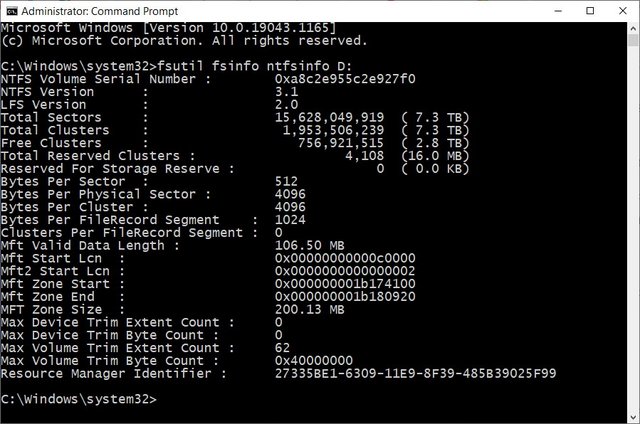
You were correct the dock was causing a different output. I reassembled the enclosure ran it again and got 4096-byte physical sectors with 512-byte logical sectors. Everything seemed to work well with Veracrypt so I tried to perform a full disk encryption only to get the same result. I tried to encrypt in place without any luck. At this point I'm thinking it could be the hardware/software on my computer. I have drive, a 14TB (also a white label WD drive) that I'm thinking of testing out to see if I get a different result if I try to encrypt it.
Perfect. I prefer to encrypt the partition even if the one partition is the entire drive since Windows will ask you to format each time you connect the external drive if you remove all partitions and encrypt "Harddisk 1:" which can lead to accidental formatting of the HDD.
I use Western Digital external drives over the past 15+ years. All of my recent drives from 6 TB to 18 TB have Bytes Per Physical Sector : 4096.
I see from the Amazon link you provided that the enclosure has the functionality for cloning drives. Did you use the enclosure to clone from another drive since your external shucked from a WD EasyStore drive Bytes Per Physical Sector is 512 or format using the enclosure software?
Last edit: Enigma2Illusion 2021-08-20
I only use the dock to connect the drives without the additional bulk of the enclosure. I did try to use the original enclosure to encrypt without any luck. See my reply to Marks. I have no clue what else it could be.
I was able to encrypt the 14TB drive but only if it was exFAT and if it was formatted through veracrypt with the original enclosure. Attempting to encrypt with NTFS gave the same error that "Veracrypt was unable to finish the formatting" and that "it failed to create the container". I didn't attempt to use the dock out of fear that it would be a waste of time. Interestingly the drive before encrypting was formatted as exFAT. I'm not sure if this is just a coincidence.