Clicking on Group name moves the Group Names Tree Window to the clicked Groupname
A lightweight and easy-to-use password manager
Brought to you by:
dreichl

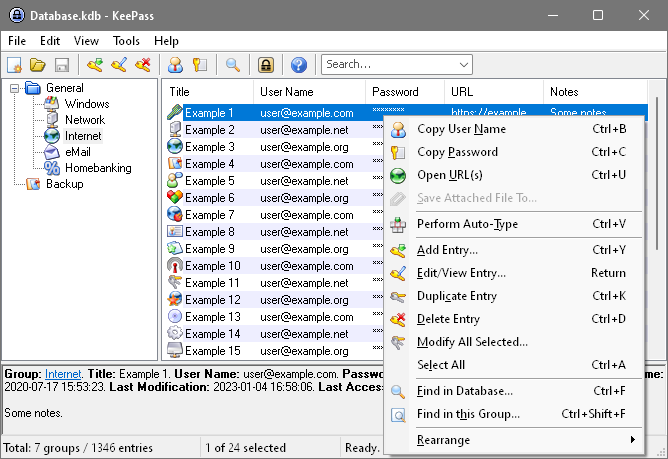
See http://keepass.info/screenshots/main_big.png
When I click on a groupname (like Network below in the picture) then in the Group Names Tree the Network Group Name is highlighted. But the Group Names Tree Window does not jump or move to this then newly highlighted Group Names when the newly highlighted Group Name would be 'out of sight' in the example below Group 14 in the example picture.
The request is therefore: Move the Group Names Tree Window to the clicked Groupname.
Example picture shows the Groupnames Path:
3 Group - 6 Group - 7 Group
After a Quicksearch for an Entry in 7 Group I would see this Groupnames Path:
3 Group - 6 Group - 7 Group
When I then click on 7 Group
I want the Group Names Tree Window moving to this 7 Group
When I then click on 6 Group
I want the Group Names Tree Window moving to this 6 Group
When I then click on 3 Group
I want the Group Names Tree Window moving to this 3 Group
(I believe, in earlier versions clicking on a groupname did take one to the specific groupname in the Group Names Tree Window, but not any more)

Are you requesting that: Quick Searches should be limited to the selected group (e.g. 7 Group) and not search the entire database?
.
After a Quick Search all entries in the database that meet the specified criteria are displayed in a temporary selected group called "Search Results" regardless of which group was selected at the time of the search. These entries are displayed in the right pane (Entry List View pane).
Are you requesting that: After performing a Quick Search, when the user selects a new group the entries displayed in the Entry List View pane should be restricted to those entries that match the criteria of the previous Quick Search and are also contained in the newly selected group?
.
When the user selects a new group after a Quick Search, the search results displayed in the temporary "Search Results" group are discarded and the entries shown in the Entry List View pane are all of the entries contained in the newly selected group.
The entries that are displayed in the Entry List View pane as a result of a user executing a Quick Search, or of manually selecting a Group, have not changed since at least version 1.13 (and probably since the Quick Search feature was first introduced). It is unlikely it will be changed now.
Thanks for the suggestion; I've implemented this now. When clicking on a group link in the entry view, KeePass now ensures that the group is visible in the groups tree.
Here's the latest development snapshot for testing:
http://keepass.info/filepool/KeePass_150417.zip
Best regards,
Dominik