
Menu
▾
▴
gnuplot-beta
|
From: Ethan M. <merritt@u.washington.edu> - 2005-03-22 05:58:43
|
I want to plot a contour map with several explicit paths superimposed on it. So far as I can work it out, the only way to do this currently is using multiplot: set view map set multiplot set contour unset surface splot "map.dat" unset contour set surface splot "path1.dat" with lines, "path2.dat" with lines unset multiplot This works, but I don't like having to depend on multiplot mode to exactly superimpose things. So I am wondering if there is a simple extension to the splot syntax that would allow this within a single plot. I had in mind something like: set view map set contour unset surface splot "map.dat", "path1.dat" nocontour with lines This brings up an issue with whether "unset surface" should have any effect at all on plots that are not contour plots. Right now, unset contour; unset surface; splot <foo> with lines produces a plot with no lines at all, which I think is a bug. So what do you all think - am I overlooking an existing non-multiplot method of superimposing contours and explicit paths? Would a "splot ... nocontour" option be a reasonable extension? Should an explicit "splot <foo> with lines" ignore the status of set/unset surface? -- Ethan A Merritt Biomolecular Structure Center University of Washington 98195-7742 |
|
From: Hans-Bernhard B. <br...@ph...> - 2005-03-22 13:46:10
|
Ethan Merritt wrote: > I want to plot a contour map with several explicit paths > superimposed on it. .. you didn't mention the usually recommended method: doing it via 'set term table' to put the contours into a file, then plotting that along with whatever else you want, in a single 'splot' or 'plot' commands. > So far as I can work it out, the only > way to do this currently is using multiplot: Not really, I think. If the secondary file is not in grid format (isolated isolines), contouring should leave it alone, and you can just plot it along with the contoured surface data. > This works, but I don't like having to depend on multiplot > mode to exactly superimpose things. So I am wondering if there > is a simple extension to the splot syntax that would allow this > within a single plot. Well, setting aside "simple" for a moment, I think the real problem is elsewhere: it's that 'set contour' itself is a flawed user interface concept. Contouring is a data modification method (like 'smooth bezier' in 2D), not a global plotting mode. I.e. we should not need a 'nocontour' option to turn off contouring for one dataset as much as we need a 'contour' option to turn it *on*. What I'm getting at is that 'set contour' needs to be changed like we changed 'set pm3d' already: from a global, all-encompassing gnuplot state to a per-dataset processing option. We need set contour explicit (off by default for backward compatibility) and splot 'file' with contours > This brings up an issue with whether "unset surface" should > have any effect at all on plots that are not contour plots. With my above proposal in place, I guess 'unset surface' could go away completely. It might sense to change its meaning, instead. E.g. it could implement the mildly frequently requested feature of plotting data as simple lines instead of a cross-connected mesh, even though it does have grid structure. 'unset surface' could be changed to disable that automatism. |
|
From: Petr M. <mi...@ph...> - 2005-03-22 16:32:19
|
> .. you didn't mention the usually recommended method: doing it via 'set
> term table' to put the contours into a file, then plotting that along
> with whatever else you want, in a single 'splot' or 'plot' commands.

That's like the only well-working method to draw contours together with pm3d
and surface, and to make contours in a single-color.

Here, we miss "{no}countour" and "{no}surface" options:

set pm3d explicit
splot x+y, x*x+y*y with pm3d

set contour base
splot x+y, x*x+y*y with pm3d

unset surface
splot x+y, x*x+y*y with pm3d

=> now it suppresses even pm3d?!


> I.e. we should not need a 'nocontour' option to turn off contouring for
> one dataset as much as we need a 'contour' option to turn it *on*.
> What I'm getting at is that 'set contour' needs to be changed like we
> changed 'set pm3d' already: from a global, all-encompassing gnuplot
> state to a per-dataset processing option. We need
>
> 	set contour explicit

That's
>
> (off by default for backward compatibility) and
>
> 	splot 'file' with contours

Or
	splot 'file' contours with line ...
?

I wish also an option "samecolor" or whatever... even I have tried:

set contour
set cntrpar levels 30
splot x*x-y*y with line lc rgb "#000000"
splot x*x-y*y with line lc rgb "#000000"

but it uses the whole color palette instead of a single color. Bug?
This works correctly:

splot x*x-y*y with line palette


---
PM
|
|
From: Ethan M. <merritt@u.washington.edu> - 2005-03-22 19:42:36
|
On Tuesday 22 March 2005 08:26 am, Petr Mikulik wrote:
> I wish also an option "samecolor" or whatever... even I have tried:
>
> set contour
> set cntrpar levels 30
> splot x*x-y*y with line lc rgb "#000000"
> splot x*x-y*y with line lc rgb "#000000"
>
> but it uses the whole color palette instead of a single color. Bug?

I suppose it's a bug, although I honestly don't know what the
expected behaviour would be.  If you start a contour series with
a fixed linetype then it auto-increments line types (colors) for
successive contour levels, right?  But if you start it off with
an arbitrary color, as you did with 'lc rgb "#foo"', then how
should it determine the color of the next contour level?

If what you want is to have all contours the same color,
then the obvious syntax would be something like
    set contour samecolor

although surely there must be a better keyword.

--
Ethan A Merritt       merritt@u.washington.edu
Biomolecular Structure Center
Mailstop 357742
University of Washington, Seattle, WA 98195
|
|
From: Hans-Bernhard B. <br...@ph...> - 2005-03-22 19:48:00
|
Ethan Merritt wrote: > If what you want is to have all contours the same color, > then the obvious syntax would be something like > set contour samecolor No "would be" needed --- this already exists, and it's called unset clabel Yes, that *is* definitely one of the top two contestants of most silly option name in all of gnuplot --- the other being 'set ticslevel'. |
|
From: <dan...@ie...> - 2005-03-22 19:53:49
|
> On Tuesday 22 March 2005 08:26 am, Petr Mikulik wrote: >> I wish also an option "samecolor" or whatever... even I have tried: >> >> set contour >> set cntrpar levels 30 >> splot x*x-y*y with line lc rgb "#000000" >> splot x*x-y*y with line lc rgb "#000000" >> >> but it uses the whole color palette instead of a single color. Bug? > > I suppose it's a bug, although I honestly don't know what the > expected behaviour would be. If you start a contour series with > a fixed linetype then it auto-increments line types (colors) for > successive contour levels, right? But if you start it off with > an arbitrary color, as you did with 'lc rgb "#foo"', then how > should it determine the color of the next contour level? > > If what you want is to have all contours the same color, > then the obvious syntax would be something like > set contour samecolor > > although surely there must be a better keyword. Yes, probably a better keyword. Getting back to a previous discussion, without auto-labelling of the level curves, the contour plot with a singl= e color is difficult to interpret. Well, it is probably still of some use for judging overall characteristics of the function. Probably looks nice too. Dan |
|
From: Petr M. <mi...@ph...> - 2005-03-23 14:29:56
|
> Yes, probably a better keyword. Getting back to a previous discussion, > without auto-labelling of the level curves, the contour plot with a single > color is difficult to interpret. Well, it is probably still of some use > for judging overall characteristics of the function. Probably looks nice > too. I've already used a pm3d map (gray) with black contour lines over it: http://www.sci.muni.cz/~mikulik/figs/gp-pm3d-LuminyFig825.gif In figure captions of such figures, it is sufficient to say "contour levels are half a decade of intensity". --- PM |
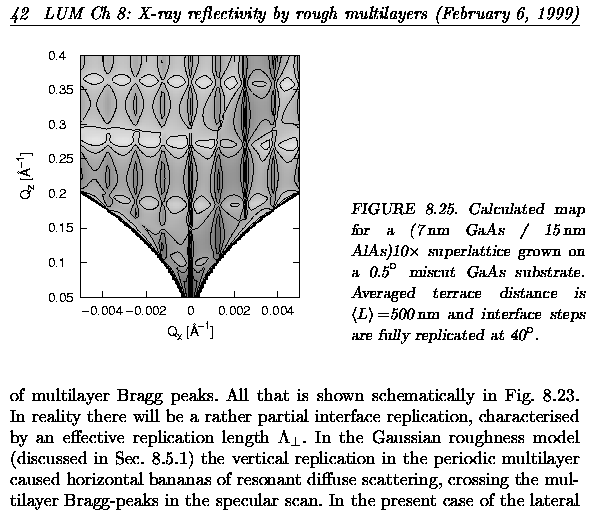
|
From: Petr M. <mi...@ph...> - 2005-03-23 08:52:58
|
> If what you want is to have all contours the same color, > then the obvious syntax would be something like > set contour samecolor > > although surely there must be a better keyword. >No "would be" needed --- this already exists, and it's called > > unset clabel Wow, I never used that! That's even not in any demo! >Yes, that *is* definitely one of the top two contestants of most silly >option name in all of gnuplot --- the other being 'set ticslevel'. Indeed! > > set contour > > set cntrpar levels 30 > > splot x*x-y*y with line lc rgb "#000000" > > splot x*x-y*y with line lc rgb "#000000" > > > > but it uses the whole color palette instead of a single color. Bug? > > I suppose it's a bug, although I honestly don't know what the > expected behaviour would be. If you start a contour series with > a fixed linetype then it auto-increments line types (colors) for > successive contour levels, right? But if you start it off with > an arbitrary color, as you did with 'lc rgb "#foo"', then how > should it determine the color of the next contour level? I think it should not cycle colors at all, and stay with the same color (aka "unset clabel"). Strange -- in this script, the bug shows up again: set contour set cntrpar levels 30 unset clabel splot x*x-y*y with line lt 1 splot x*x-y*y with line lc rgb "#000000" --- PM |
|
From: <dan...@ie...> - 2005-03-23 17:51:03
|
>> I suppose it's a bug, although I honestly don't know what the >> expected behaviour would be. If you start a contour series with >> a fixed linetype then it auto-increments line types (colors) for >> successive contour levels, right? But if you start it off with >> an arbitrary color, as you did with 'lc rgb "#foo"', then how >> should it determine the color of the next contour level? > > I think it should not cycle colors at all, and stay with the same color > (aka > "unset clabel"). I agree. My guess is few will intend to control individual colors of the contour. Perhaps someone would want all the negative level curves in one color and all the positive level curves in another color. Dan |
|
From: Ethan M. <merritt@u.washington.edu> - 2005-03-22 20:50:26
|
On Tuesday 22 March 2005 08:26 am, Petr Mikulik wrote: > > splot 'file' with contours > Or > splot 'file' contours with line ... Do you ever need to plot contours with something other than lines? I know it is currently possible to do set contour; splot "foo" with impulses There's even a special routine for it cntr3d_impulses() but I can't figure out why you'd ever want to do this. -- Ethan A Merritt merritt@u.washington.edu Biomolecular Structure Center Mailstop 357742 University of Washington, Seattle, WA 98195 |
|
From: Ethan M. <merritt@u.washington.edu> - 2005-03-25 05:32:12
|
On Tuesday 22 March 2005 05:46 am, Hans-Bernhard Broeker wrote:
> Ethan Merritt wrote:
> > I want to plot a contour map with several explicit paths
> > superimposed on it.
>
> .. you didn't mention the usually recommended method: doing it via 'set
> term table' to put the contours into a file, then plotting that along
> with whatever else you want, in a single 'splot' or 'plot' commands.

I didn't mention it because it doesn't work in general, and has never
worked in general. It works only if the current terminal is both
interactive and stateless.  The sequence
	set term push; set term table; plot ...; set term pop;
trashes the original terminal state and the output file state.

That's why we haven't been able to include vector.dem in  `make check`
and why that demo doesn't work for most terminals in the first place.

It makes no sense for the tabular output to be considered as a
terminal type anyhow. The core code makes not a single call to the
dummied-up terminal driver entries.

So I have removed "table" as a terminal type altogether, and replaced
it with a pair of commands
	set table {"outfile"}
	...
	unset table

This allows you to dump tabular output without perturbing the current
terminal state. If no explicit outfile is given, the tabular output goes
to gpoutfile. As a sop to backwards compatibility, the command
'set term table' is trapped and translated to 'set table'.
This doesn't make old scripts work any better than before, but if you
did have a working script then it should continue to work. However,
it will work better if you upgrade it to use the new commands instead
of fooling with the terminal type.

As a result of this change, vector.dem now works for all terminal types
and also works from non-interactive scripts.  So I have added it back
to all.dem and 'make check'.

There is still some minor cleanup work needed to remove table.trm
from the configuration and make files.  Otherwise I think this turned
out to be a straightforward fix for a longstanding problem.

--
Ethan A Merritt
Biomolecular Structure Center
University of Washington 98195-7742
|
|
From: <dan...@ie...> - 2005-03-25 06:15:47
|
> As a result of this change, vector.dem now works for all terminal types > and also works from non-interactive scripts. So I have added it back > to all.dem and 'make check'. That's nice. No longer that odd file floating about then. Dan |
|
From: Petr M. <mi...@ph...> - 2005-03-25 11:16:24
|
> So I have removed "table" as a terminal type altogether, and replaced
> it with a pair of commands
> 	set table {"outfile"}
> 	...
> 	unset table

Cool.

BTW, I've just found an old mail from a discussion on potential new options
for the table output, if someone wants to add them (some of these options
would shorten the file size):

I think there was somebody proposing some new options for 'set term table'
recently?

The table terminal can be used to save gridded data into a file. Then it
would be convenient to strip the comments and the last column with flags.
Even though it is possible to parse the output file via an awk script, I
think that the following built-in options could be useful:

set term table [[no]com$ments] [space | tab | separator "xx"] [ [[no]u]
[[no]i] [[no]o] [[no]flag]

current definition is: set term table comments space u i o flag

(*) nocomments - don't write comments to the output file
(*) tab - separate columns by \t instead of single space
(*) i, o, u - write data points which are in, out, undef
(*) noi, noo, nou - don't write data points which are in, out, undef
(*) [no]flag - [don't] write the last column with the u,i,o flag
|

