
Menu
▾
▴
#570 Change behaviour of pointintervalbox
Hey,
currently (v5.4) the pointintervalbox draws a circle behind the symbol if pi=-N.
If you use different symbols this results in either over or undersized circles (e.g. triangles and circles won't fit well).
Why not changing its behaviour from drawing a circle to drawing exactly the same symbol but white (e.g. same pt, same ps)? That would make the outcome quite much nicer.
But thanks for the great work maintaining gnuplot anyways!
Alex


The size of the white circle can be adjusted by
set pointintervalbox.The intent of this option is to give the appearance of a dashed line with alternating line segments and symbols. Since the line may be curving at the point where the symbol appears, the only way to be sure of clipping evenly on both sides is to use a backing circle as the line interruption.
I don't really follow what you are suggesting to do instead. How would drawing the same symbol twice be nicer? How would it even be visible? If you want to draw each symbol twice, possibly in a different color or size, you can do that now by plotting twice:
Is that what you were suggesting, or something different?
Dear Ethan,
thanks for your reply.
The intent you describe is different than what I am using it for.
I use the pi=-1 option to erase the line segment that passes (ideally just) underneath the symbol (as defined in the linespoints help), so that empty symbols really are empty and do not show parts of the line inside. However, combining different symbols, the result is different. As in the attached files, for squares and circles, the area whited out is fine, however for triangles and diamonds, it is too large. If I lower the pointintervalbox number (or increase the pointsize), the line will enter the squares and circles, while better fit triangles and diamonds.
Currently I would need to work around using 3 plots:
In this case the plot is okay, however the key entry still is not perfect (depending on the pointintervalbox setting), besides the fact, the plot is done 3 times.
Best,
Alex
Last edit: Alexander Stangl 2024-02-05
It seems like you are asking for the equivalent of the postscript terminal's point types 70 - 75, polygons with an opaque center. This makes plenty of sense for those shapes, but the idea is not easily extended to other basic shapes like point types 1-3 ,
+x*, or to character symbols in general.Because the notion of an opaque center applies to only a limited number of possible point types, I don't think it would make sense to introduce this as a pointtype property.
My first thought would be to teach other terminal types about postscript's point types 70-75. Downsides to that include the rather odd discontinuity of pre-assigned point type numbers and the conflict with the current scheme of reusing pointtypes cyclically so that the effective point type is (i mod N) where the cycle length N is terminal-dependent. The terminal-dependence of N is admittedly a sore point already. There was previous discussion about adding a command
set pointtype cycle <N>but it was never implemented.Thinking about it a bit further, we could choose a new range of "special" pointtypes, say 1001-1010, for the new types. For the postscript terminal these would just map directly to the existing point types 70-75. Other terminals would need customized new code. Or maybe there could be a new helper routine in the core code that is shared by all terminals that support polygon fill.
Your thoughts?
Hey Ethan,
thanks for your detailed answer. For symbols as you describe, it would not make a difference, indeed.
So maybe the best is as you suggested to make this special pointtypes. But would this be terminal independent? And if so, would it be possible to generally increase the number of available point types? Like all the pt from the postscript terminal mapped to 1000-... ?
A bit off topic, but still related. When using symbols as point type, I can define a font, eg this works:
but I cannot predefine the font of the point type using "set linetype" or "set style line".
Is this intended? And would it be possible to add this functionality so that independent of the font type of the terminal I can define UTF-8 characters as point type symbols?
But still, I guess the postscript symbols mapped to higher pt numbers would be the best option (e.g. to avoid that text symbols can be marked and copied in a pdf graph currently).
I worked on this over the past few days. It's not yet in the git repository, but you can see sample output here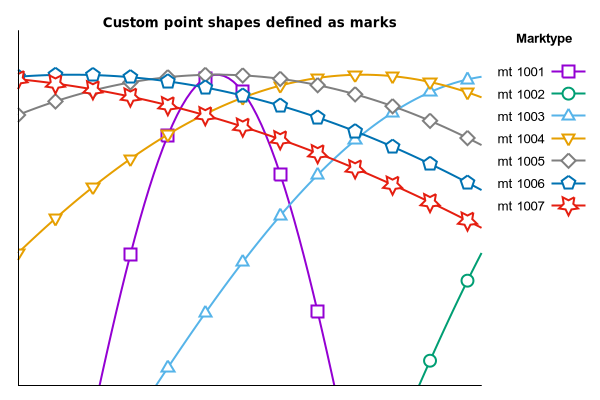
I have implemented 7 special point types, numbers 1001-1007, for the cairo terminals, for postscript, and for qt. I am working on doing the same for svg output. I'm not sure what other terminals beyond that would be possible. tikz? windows?
I do not fully understand your comment about fonts. The UTF-8 escape code for a glyph is not dependent on a particular font, although of course not all fonts provide all glyphs. On my linux systems this is not much of a limitation in practice, since if the current font does not provide the requested glyph then the fontconfig library silently substitutes one from a font that does have it. So it "just works". Does your system not do something similar?
Last edit: Ethan Merritt 2024-03-02
That's great!
Apparently on my system (Version 5.4 patchlevel 6, Win 10) a missing glyph is not replaced.
If I use Arial as font, which doesn't include the used utf8 symbol, the output for each point is a squared box with the UTF-8 hex code:
and see file attached.
Using after pt a font indication works. But I didn't find this behavior documented:
And also the point type size then depends on the font size and cannot controlled via the pointsize command. Also, labels with points don't seem to support utf8 symbols
Therefore, I think generally it would be very nice to have more real point types, as you did now for 1001-1007. Would it be possible to mirror the postscript point types 16-62 also to the special point type register?
I think the failure to find an appropriate glyph is a Windows problem, not a gnuplot problem.
You can think of the character point types as single-character labels. The usual font properties are applicable (name, size, italic, ...).
The postscript point types only work for postscript, so no, there is no way to directly duplicate them for other terminals. I don't find any equivalent glyphs in the unicode tables either, although I may simply not be using the right search terms. The closest I see are unicode points 25D0 - 25D7, shown as character point types in the attached figure.
Okay. As it works as long as you choose the appropriate font thats fine.
Just for my understanding, how do the pre-defined (terminal dependent) point types work? Are they vector graphs?
Thanks!
The reason they are "terminal dependent" is that the details are different for each terminal. For older or stupider terminals (e.g. dot-matrix printers, the dumb terminal) the only thing the program can do is send a character or maybe a hardware command for "point". True vector devices were a thing back in the day (e.g. pen plotters) but almost all newer devices display pixel images created by a vector graphics library. From gnuplot's perspective all terminals implemented to use the same graphics library, or in the case of PostScript the same graphics language, can use a shared set of point-drawing subroutines. But a gnuplot terminal based on cairo shares almost nothing with one based on PostScript or HTML5.
Re: fonts on Windows. A while back, Tatsuro Matsuoka recommended some environmental variable setting that caused Windows to use the more linux-like fontconfig library at least for the wxt terminal. See
https://sourceforge.net/p/gnuplot/discussion/5925/thread/8bf27d79e9/
I don't know how many other terminals that affects.
Special point types 1001 - 1007 are now in the development branch. They are supported by the postscript, cairo, gd, svg, x11, and qt terminals. I leave it for someone else to look into adding them to the windows terminal also.