Menu
▾
▴
Re: [fontforge-users] Composite small caps
|
From: Gé v. G. <gev...@gm...> - 2026-08-24 14:24:24
|
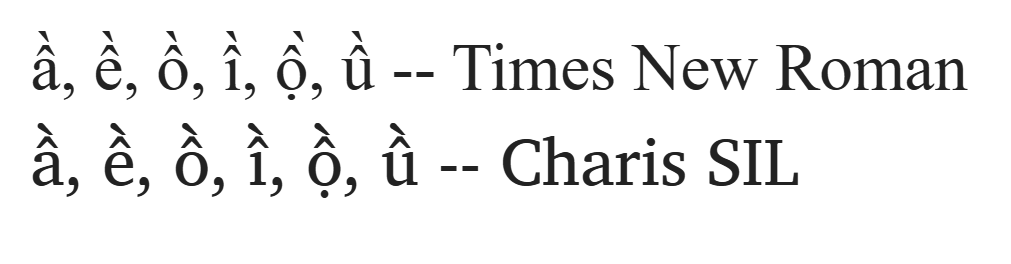
All right, 1. Re. the FF automation: I now understand that the routine (creating composite glyphs from the parts) works well with the combining marks but not with your .cap marks. Therefore, I thought you could temporarily copy your PUA .cap marks into the slots for the combining marks and let the routine run, then restore the combining marks. 2. There are two ways to render accented characters: • Pick up the composite glyph from the font and display it. This is the classic method, easy on the software. • Pick up the necessary two (or more) components from the font and assembling the intended accented letter before displaying it. This requires having anchor points in the glyphs both for letters and (combining diacritical) marks, so the marks can be attached and positioned correctly. With this method, stacking accents becomes possible and is now supported in most applications: https://community.software.sil.org/uploads/default/original/2X/6/6cade8191daba93a2678088024ed27e5539b723b.png 3. And another thought you didn’t ask for: I must confess I don’t feel comfortable using the PUA for a stylistic variant like small caps. I would instead give it its own font – but I don’t know your situation. Maybe your application doesn’t let you combine separate fonts easily. People with more knowledge may be able to advise how a small-caps style can be included in a style set. On Mon, Aug 24, 2026 at 3:55 PM Mauro Sacchetto via fontforge-users < fon...@li...> wrote: > > 1) "If the script works well with the combining marks, you could copy > all your spacing marks into their slots, then let the script do the work > (after you have adjusted their horizontal positioning...)." > > I'm sorry, but I still don't understand. > > I have ALL the modifiers (uni02b9-uni20ff) and ALL the combining marks > (uni0300-uni0362) properly placed in their slots. > > In PUA, I added some .cap diacritics so that the acute, grave, and > circumflex accents are slightly wider and less slanted above the capital > letters, and so on. > > With the anchors and the corresponding "mark" lookups in GPOS, I > position everything appropriately and indeed quickly obtain the compound > glyphs. > > The problem persists only with the usual three .cap marks (grave, acute, > and macron): an anomaly because everything else works, and in these > three cases, and only in these three, it doesn't. Don't you think it > could be a FF bug? Because otherwise, in my opinion, this inconsistent > behavior cannot be explained. > > > 2. I don't understand what you mean by saying that apps use composite > glyphs less and less. In languages like Italian and French, words with > grave and acute accents are constantly used, while in German, they use > the umlaut; certainly, not in English... Not to mention Ancient Greek > (polytonic), which has a plethora of breathings and accents. |