
Menu
▾
▴
1 Attachments
#426 strange behavior when table meets CJK character
sometimes the last character always in a new line alone, like these:
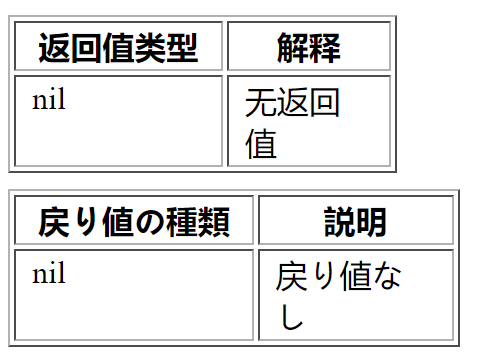
tested on snapshot, seems width is not correct, 55% 45% is better
<table border="1" class="docutils">
<colgroup>
<col width="56%" />
<col width="44%" />
</colgroup>
<thead valign="bottom">
<tr><th class="head">返回值类型</th>
<th class="head">解释</th>
</tr>
</thead>
<tbody valign="top">
<tr><td>nil</td>
<td>无返回值</td>
</tr>
</tbody>
</table>
test:
python rst2html.py test.txt test.html

Table column widths are determined from the rST input, the first table in
the example
test.txthas column widths of 10 and 9 characters, thesecond of 12 characters for both tables.
By default, these values are transformed to percentages
(53%, 47% and 50%, 50%) by the HTML writers.
The most easy fix is to add some padding in the source:
You can also specify relative column "widths" or the table "width" using the
table directive__ options.In most cases, tables look better, when the column widths are determined by
the HTML browser. Therefore, the "widths" option supports the special value
auto. Auto-width columns can be made the default for all tables with thevalue
colwidths-autofor the table_style__ configuration setting.The HTML5 writer will eventually make auto-width columns the default.
__ https://docutils.sourceforge.io/docs/ref/rst/directives.html#table
__ https://docutils.sourceforge.io/docs/user/config.html#table-style
Fixed for HTML5 in revision 8836.
The abovementioned workarounds are still required with HTML4.
The default behaviour for HTML4 will not change to keep backwards compatibility.
Thank you for reporting.
Fixed in Docutils 0.18.