Hi
I really need help, I tried anything I can think of...
I have an application that captures video + audio from a webcam (audio device
is a seperate microphone but even if I use the webcam microphone it doesn't
help) and no matter what I try I get audio sync problems.
The following things helped decrease the difference between the audio/video
but I still get some sync issues:
Removed ffdshow as the compressor - this made a big difference, I just need to find another compressor
I used to change the graph while the application ran so I had to stop/start the graph before started recording, now I just recreate whole graph everytime - this also helped a little...
but currently my audio is still a little out of sync (the gap between
audio/video is not constant), even when I use GraphEditPlus to recreate the
whole graph I get some sync issues, when I use the webcam's software there are
no problems...
small update, I tried using the WM ASF Writer filter instead of the AVI Mux +
file writer and the audio is synced and starts normally BUT the video is
frozen and starts only after 3 seconds (the rest of the video is fine).
also i forgot to mention that when using AVI Mux thr last few seconds are
frozen (depends on the delay that exist between audio and video)
I hope you have any advice for me,
Eran.
If you would like to refer to this comment somewhere else in this project, copy and paste the following link:
Hi,
Another update, I created a SampleGrabber that just prints the audio and video
timestamps and from what I can see there is a constant 500 milliseconds
difference...
The thing is, I don't really know what to do with this information, does this
help me in any way ?
Thanks
Eran.
If you would like to refer to this comment somewhere else in this project, copy and paste the following link:
and now it seems like the timestamps are closer together but the video looks
the same, it seems like there is not clock in the graph so I tried setting the
clock manually using the following code:
where capFilter is the audio capture filter or the video capture filter (tried
both), for both filters I got an InvalidCastException Exception.
Is there another filter I should try this with ?
or is there any other way to get the IReferenceClock from the filters ?
or maybe my filters just don't implement this interface ?
as you can see i'm quite baffled :/
Thanks
Eran.
If you would like to refer to this comment somewhere else in this project, copy and paste the following link:
If there are too many clocks in the graph will it help if I use one of the
existing clocks ? how do I find them ?
just casting the capture filters doesn't work :/
If you would like to refer to this comment somewhere else in this project, copy and paste the following link:
Hi,
Any other idea maybe ?
My last test was to save two separate files one for audio and one for video
and than I tried merging them using VirtualDub, it seems there is a constant
gap of 500ms, when I delay the audio for 500ms it is synced.
How can I do this in the graph ? I tried using the SampleGrabber to change the
time (SetTime) but it doesn't have any affect .
Thanks,
Eran.
If you would like to refer to this comment somewhere else in this project, copy and paste the following link:
I did try SetMediaTime but I didn't understand how to use it, what I tried to
do is multiply -500 by pSample.GetSize() and use the result in SetMediaTime,
is this correct ?
If you would like to refer to this comment somewhere else in this project, copy and paste the following link:
Well from what I understood (from your reaction I guess I was wrong :) )
MediaTime is not in ms but in ms * rate of stream, so I tried to use GetSize
(which is the only thing i found that looks like it returns the rate)
i will try to use it just like SetTime...
If you would like to refer to this comment somewhere else in this project, copy and paste the following link:
Hi,
So nothing worked, I also tried using IAMBufferNegotiation to change the
buffer size but it still doesn't work...
I found something else, when reading here http://msdn.microsoft.com/en-
us/library/dd407208(v=vs.85).aspx it states that the AviMux assumes the
audio and video arrive at the appropriate time so there is no adjustment done
in the mux, I tried again and what I realized is that the problem I saw before
when working with WMAsfWriter only appeared in VLC player (there's a known
issue with wmv files...).
to make a long story short when I use the WMAsfWriter the audio and video are
in-sync, now I need your help with the WMAsfWriter profiles...
I created a custom profile (prx file) and i have the following code:
           WindowsMediaLib.IConfigAsfWriter lConfig = asfWriter as WindowsMediaLib.IConfigAsfWriter;

            WindowsMediaLib.IWMProfileManager profileManager = null;
            WindowsMediaLib.WMUtils.WMCreateProfileManager(out profileManager);

            WindowsMediaLib.IWMProfile ppProfile = null;
            profileManager.LoadProfileByData(asfProfileData, out ppProfile);

            lConfig.ConfigureFilterUsingProfile(ppProfile);
My problem is that now when i try to connect between the video source filter
to the asfWriter I get an error "No combination of intermediate filters could
be found to make the connection", I guess this as something to do with the
MediaType, but I don't know what to change in the profile...
do you know maybe about an existing profile that will work with 1080p ?
Thanks for all your help,
Eran.
If you would like to refer to this comment somewhere else in this project, copy and paste the following link:
I realize you already moved on but thought I'd mention the 500mSec offset in
the audio is the default buffer delay in the audio capture filter. I ran into
the exact same issue just recently and I successfully used
IAMBufferNegotiation to modify the buffer size and thus the audio delay.
Here is the link I used to modify the delay: http://sid6581.wordpress.com/2006/10/09/minimizing-audio-capture-latency-in-
directshow/
If you would like to refer to this comment somewhere else in this project, copy and paste the following link:
Hey mons00n1
thanks for the reply, I actually tried the same thing (even the same link :) )
but it did not help.
the final file was still not in sync...
are you using the avi mux with a different sound source and it works fine ?
are you using ffdshow as well ?
If you would like to refer to this comment somewhere else in this project, copy and paste the following link:



Hi
I really need help, I tried anything I can think of...
I have an application that captures video + audio from a webcam (audio device
is a seperate microphone but even if I use the webcam microphone it doesn't
help) and no matter what I try I get audio sync problems.
The following things helped decrease the difference between the audio/video
but I still get some sync issues:
but currently my audio is still a little out of sync (the gap between
audio/video is not constant), even when I use GraphEditPlus to recreate the
whole graph I get some sync issues, when I use the webcam's software there are
no problems...
Here is a picture of the graph I created in GraphEditPlus
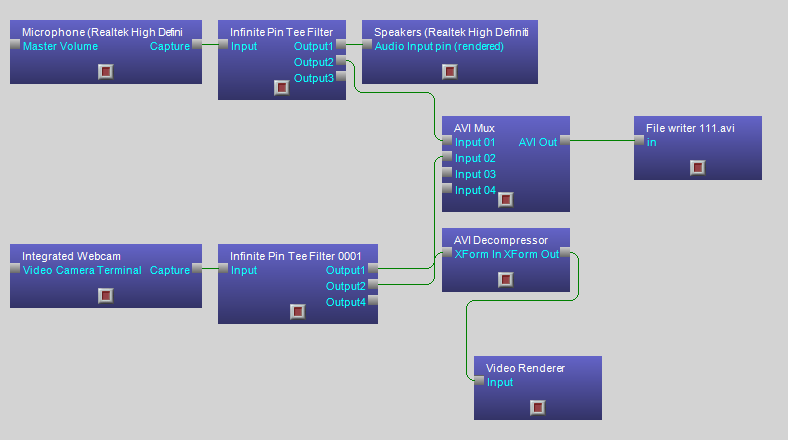
or link (just in case the img tag above won't work)
http://www2.picturepush.com/photo/a/8030745/img/8030745.png
This is major problem for me and I tried anything I can think of, please any
thought would help me.
Thanks
Eran
small update, I tried using the WM ASF Writer filter instead of the AVI Mux +
file writer and the audio is synced and starts normally BUT the video is
frozen and starts only after 3 seconds (the rest of the video is fine).
also i forgot to mention that when using AVI Mux thr last few seconds are
frozen (depends on the delay that exist between audio and video)
I hope you have any advice for me,
Eran.
Hi,
Another update, I created a SampleGrabber that just prints the audio and video
timestamps and from what I can see there is a constant 500 milliseconds
difference...
The thing is, I don't really know what to do with this information, does this
help me in any way ?
Thanks
Eran.
Sounds like some type of problem with the graph clocks. You might take a look
at http://msdn.microsoft.com/en-
us/library/dd390645%28v=vs.85%29.aspx. You might also take a look at
http://msdn.microsoft.com/en-
us/library/dd377506%28v=vs.85%29.aspx.
Hi snarfle,
Thanks for the response and links!
I tried adding adding the following:
and now it seems like the timestamps are closer together but the video looks
the same, it seems like there is not clock in the graph so I tried setting the
clock manually using the following code:
where capFilter is the audio capture filter or the video capture filter (tried
both), for both filters I got an InvalidCastException Exception.
Is there another filter I should try this with ?
or is there any other way to get the IReferenceClock from the filters ?
or maybe my filters just don't implement this interface ?
as you can see i'm quite baffled :/
Thanks
Eran.
You say "it seems like there is not clock in the graph". Why do you think
that? My guess would have been that there are too many clocks in the graph.
You can create a clock like this:
IReferenceClock systemClock = (IReferenceClock) new SystemClock();
Snarfle I really appreciate your help!
I created the system clock and set it has the SyncSource but still the same
result...
This is the code I use:
If there are too many clocks in the graph will it help if I use one of the
existing clocks ? how do I find them ?
just casting the capture filters doesn't work :/
Hi,
Any other idea maybe ?
My last test was to save two separate files one for audio and one for video
and than I tried merging them using VirtualDub, it seems there is a constant
gap of 500ms, when I delay the audio for 500ms it is synced.
How can I do this in the graph ? I tried using the SampleGrabber to change the
time (SetTime) but it doesn't have any affect .
Thanks,
Eran.
How are you modifying the sample time? Presumably you are using the SampleCB
and modifying IMediaSample? Which properties are you setting?
this is part of the code I have in the SampleCB:
delay is -500
Did you try SetMediaTime?
I did try SetMediaTime but I didn't understand how to use it, what I tried to
do is multiply -500 by pSample.GetSize() and use the result in SetMediaTime,
is this correct ?
GetSize? Say what? multiply -500?
Why wouldn't you use GetMediaTime() like you do with SetTime (above)?
Well from what I understood (from your reaction I guess I was wrong :) )
MediaTime is not in ms but in ms * rate of stream, so I tried to use GetSize
(which is the only thing i found that looks like it returns the rate)
i will try to use it just like SetTime...
Tried with SetMediaTime but the 500ms gap is still there.
this is the full code of my SampleCB method:
Hi,
So nothing worked, I also tried using IAMBufferNegotiation to change the
buffer size but it still doesn't work...
I found something else, when reading here http://msdn.microsoft.com/en-
us/library/dd407208(v=vs.85).aspx it states that the AviMux assumes the
audio and video arrive at the appropriate time so there is no adjustment done
in the mux, I tried again and what I realized is that the problem I saw before
when working with WMAsfWriter only appeared in VLC player (there's a known
issue with wmv files...).
to make a long story short when I use the WMAsfWriter the audio and video are
in-sync, now I need your help with the WMAsfWriter profiles...
I created a custom profile (prx file) and i have the following code:
My problem is that now when i try to connect between the video source filter
to the asfWriter I get an error "No combination of intermediate filters could
be found to make the connection", I guess this as something to do with the
MediaType, but I don't know what to change in the profile...
do you know maybe about an existing profile that will work with 1080p ?
Thanks for all your help,
Eran.
I finally gave up on Avi Mux (had to use it just for ffdshow encoder for
MPEG4) and now use Microsoft MPEG2 Encoder which works great.
full summary is here - http://stackoverflow.com/questions/10229176/audio-
sync-problems-using-directshow-net-tried-
everything
snarfle thanks for your help and patience, it's really appreciated !!
I realize you already moved on but thought I'd mention the 500mSec offset in
the audio is the default buffer delay in the audio capture filter. I ran into
the exact same issue just recently and I successfully used
IAMBufferNegotiation to modify the buffer size and thus the audio delay.
Here is the link I used to modify the delay:
http://sid6581.wordpress.com/2006/10/09/minimizing-audio-capture-latency-in-
directshow/
Hey mons00n1
thanks for the reply, I actually tried the same thing (even the same link :) )
but it did not help.
the final file was still not in sync...
are you using the avi mux with a different sound source and it works fine ?
are you using ffdshow as well ?