Audience

Everyone who write text without coding especially remote workers

About PimNote

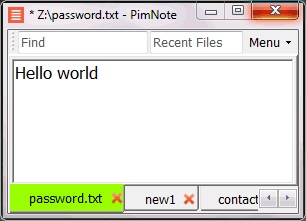
PimNote is a simple text editor for faster document access. It also combines the useful and lacking features of all other text editors.

Designed for knowledge management. One-click access to the recent file list helps you write a new idea to the related file quickly before forgetting it. The unlimited and searchable recent file list helps you easily reach an old file that was opened a long time ago. The one-click find history list and search help you type less.

Designed for remote working. No freezing from a remote file monitoring/opening/writing when disconnected. Files are cached for offline use by just closing the application without closing the tabs. Auto reconnect the network drive while opening the file. Repeated file notifications are informed politely on the top bar instead of a pop-up dialog box that requires frequent actions and tends to be mispressed.

Pricing

Free Version:
Free Version available.

Integrations

Ratings/Reviews

Overall 0.0 / 5
ease 0.0 / 5
features 0.0 / 5
design 0.0 / 5
support 0.0 / 5

This software hasn't been reviewed yet. Be the first to provide a review:

Review this Software

Company Information

Pimtel
Founded: 2018
www.pimtel.com/pimnote/

Videos and Screen Captures

PimNote Screenshot 1
Other Useful Business Software
MyQ Print Management Software Icon
MyQ Print Management Software

SAVE TIME WITH PERSONALIZED PRINT SOLUTIONS

Boost your digital or traditional workplace with MyQ’s secure print and scan solutions that respect your time and help you focus on what you do best.
Learn More

Product Details

Platforms Supported
Windows
Training
Documentation
In Person
Support
Online

PimNote Frequently Asked Questions

Q: What kinds of users and organization types does PimNote work with?
Q: What languages does PimNote support in their product?
Q: What type of training does PimNote provide?

PimNote Product Features

Text Editors

Syntax Highlighting
Formatting / Table Editing
Code Folding
WYSIWYG
Column Editing
Multi-Monitor Editing
Auto-Complete
Keyboard Shortcuts
Debugging
API
Customizable Themes