
Audience
Cisdem PDF Compressor is perfect for anyone who needs to make large PDF files smaller.
About Cisdem PDF Compressor
Tired of seeing "file too large" errors when sending important documents? Cisdem PDF Compressor makes PDF files smaller quickly and easily, while keeping everything looking sharp and clear.
Main Benefits of Using Cisdem PDF Compressor
🔹 Smart Shrinking File Size: It makes files smaller but keeps text, photos, and layouts looking good
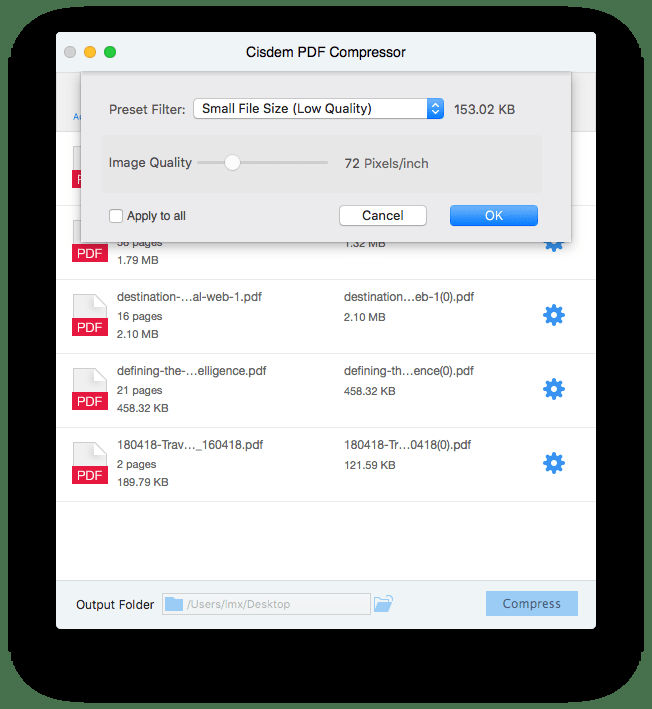
🔹 4 Simple Choices: Pick how much to compress (low, medium, high, custom)
🔹 Work Faster: Reduce file size of many PDFs at the same time
Pricing
$19.99 for 1 PC/Mac
$27.99 for 1 PC/Mac
$49.99 for 1 PC/Mac
Annual Plan:
$39.99 for 1 PC/Mac
$55.99 for 1 PC/Mac
$99.99 for 1 PC/Mac
Business Plan:
$54.99 for 1 PC/Mac
$76.99 for 1 PC/Mac
$137.99 for 1 PC/Mac
Integrations
Company Information
Videos and Screen Captures

batch compress



Product Details
Cisdem PDF Compressor Frequently Asked Questions
Cisdem PDF Compressor Product Features
Cisdem PDF Compressor Verified User Reviews
Write a Review-
Probability You Would Recommend?1 2 3 4 5 6 7 8 9 10
"Compresses PDF files with high quality" Posted 2025-09-24
Pros: In my daily life, I send a lot of PDF files via email and other social media apps. Sometimes the files are too large to send quickly. Thanks to PDF Compressor, the PDF files become smaller, and the quality of images and text isn't significantly affected.
This app offers four compression levels: Small File Size, Medium File Size, Large File Size, and Custom. It can compress multiple PDF files at once.Cons: The app is only compatible with Mac and Windows; there is no online tool or version for Android and iOS.
Only supports one language – English.
The app compressed a 30.09 MB PDF file to 3.98 MB using the "Small File Size" compression level, and the color of the images in the file eventually becomes black and white.Overall: Despite the app's weaknesses, it still does a good job of compressing PDF files. I recommend selecting the "Small File Size" compression level if compressed images don't have a significant impact on reading. I prefer using the "Custom" setting, although it requires several adjustments to achieve the desired compression level.
Read More...
- Previous
- You're on page 1
- Next

