
Audience
End users/Organizations that need a video editing tool
About BeeCut
BeeCut Video Editor aims to provide its user with a straightforward and accessible entry into the world of video editing. With BeeCut, you can not only trim, cut and re-order videos but create picture-in-picture video, cut out video, convert speech to text and more. Compared with its competitors, it has a much simpler learning curve, making it a good choice for beginners.
Other Popular Alternatives & Related Software
Camtasia
The Camtasia Product Suite is a powerful AI-powered ecosystem for video creation and screen recording.
The Camtasia Suite offers a range of plans designed to meet your video creation needs, making it easy to produce professional-looking videos quickly—even if you’ve never made a video before.
Our AI-powered features, including Camtasia Rev, script generation, text-to-speech, translations, and avatar videos, streamline the video creation process. Whether you choose our Free, Essentials, Plus, or Pro plan, Camtasia provides the tools and features you need to tell your story.
Within the suite, the Camtasia Editor is easy enough for beginners yet powerful and versatile enough to be your video editing solution for life. Explore our plans and find the perfect fit for your video creation journey.
Learn more
iMovie
With iMovie for iOS and macOS, you can enjoy your videos like never before. It’s easy to browse your clips and create Hollywood-style trailers and stunning 4K-resolution movies. You can even start editing on iPhone or iPad, then finish on your Mac. Whether you’re using a Mac or an iOS device, it’s never been easier to make it in the movies. Just choose your clips, then add titles, music, and effects. iMovie even supports 4K video for stunning cinema-quality films. And that, ladies and gentlemen, is a wrap. Select from dozens of styles to add beautifully animated titles and credits to your movies. On a Mac, you can easily customize the font, size, formatting, and color of the text. Make action shots more exciting by slowing them down. Let viewers fly through scenes by speeding them up. Or add a broadcast feel to your school report with picture-in-picture and split-screen effects.
Learn more
Movavi Video Editor
Movavi Video Editor is built mostly for beginners, but it gives you more than the kind of editor you outgrow after a weekend. The interface is easy to read, the timeline is intuitive, and the whole program makes sense quickly, which matters when you want to start editing instead of spending an hour figuring out where everything is.
It also has enough depth to feel more capable than a bare-bones editor. Movavi Video Editor includes a large built-in library of templates, presets, filters, and stickers, so it is easy to put together something that looks more thought-out without assembling every detail from scratch. The software also comes with AI tools such as auto subtitles with 30+ styles and SRT export, motion tracking, background removal, and noise removal. Those features give beginners room to try more ambitious edits early on, while the overall workflow still stays clear and manageable.
Learn more
Picsart Enterprise
AI-Powered Image & Video Editing for Seamless Integration.
Enhance your visual content workflows with Picsart Creative APIs, a robust suite of AI-driven tools for developers, product owners, and entrepreneurs. Easily integrate advanced image and video processing capabilities into your projects.
What We Offer:
Programmable Image APIs: AI-powered background removal, upscaling, enhancements, filters, and effects.
GenAI APIs: Text-to-Image generation, Avatar creation, inpainting, and outpainting.
Programmable Video APIs: Edit, upscale, and optimize videos with AI.
Format Conversions: Seamlessly convert images for optimal performance.
Specialized Tools: AI effects, pattern generation, and image compression.
Accessible to Everyone:
Integrate via API or automation platforms like Zapier, Make.com, and more. Use plugins for Figma, Sketch, GIMP, and CLI tools—no coding required.
Why Picsart?
Easy setup, extensive documentation, and continuous feature updates.
Learn more
Pricing
Starting Price:
$0.00
Pricing Details:
Monthly Plan: $29.95/month
Yearly Plan: $39.95/year
Lifetime Plan: $59.95
Family Lifetime: $209.9/5 users
Yearly Plan: $39.95/year
Lifetime Plan: $59.95
Family Lifetime: $209.9/5 users
Free Version:
Free Version available.
Integrations
No integrations listed.
Company Information
BeeCut
Founded: 2010
China
beecut.com
Videos and Screen Captures
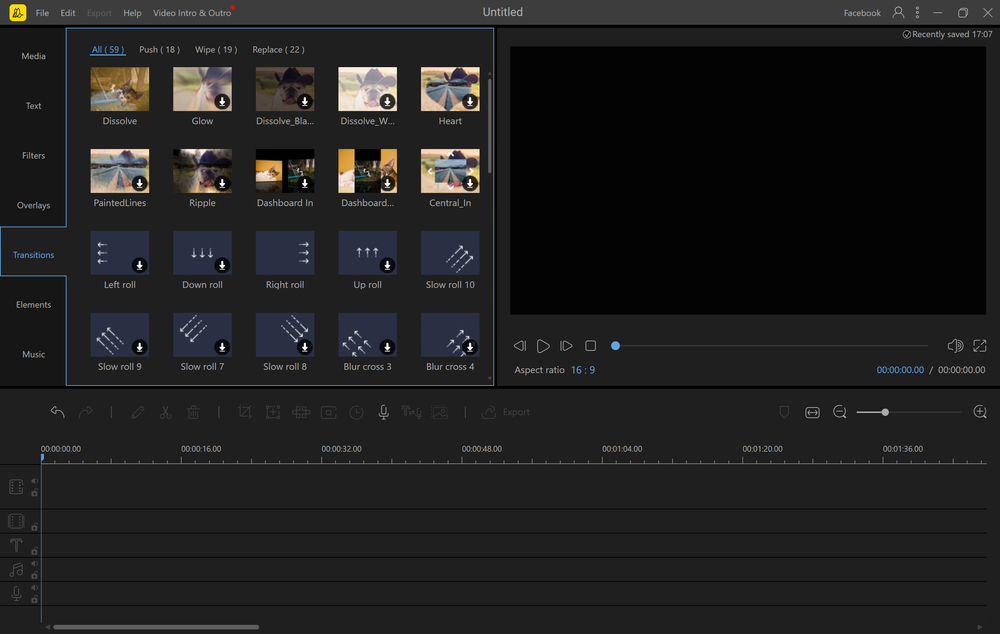
Transition Library


Other Useful Business Software
Ship Agents Faster
Gemini Enterprise Agent Platform lets you rapidly build, scale, govern and optimize production-ready agents grounded in your organization's data. The platform enables developers to build custom or pre-built agents for virtually any use case. New customers get $300 in free credits.
Product Details
Platforms Supported
Cloud
Windows
Mac
iPhone
iPad
Android
Training
Documentation
Support
Phone Support
24/7 Live Support
Online
BeeCut Frequently Asked Questions
BeeCut Product Features
Video Editing
Audio Tools
Supported
Brand Overlay
Supported
Media Library
Supported
Speed Adjustment
Supported
Split / Merge
Supported
Supports HD Resolution
Supported
Text Overlay
Supported
Video Capture
Supported
3D Video Editing
Not Supported
Collaboration
Not Supported
Social Sharing
Not Supported
Video Stabilization
Not Supported
