|
|
dbForge SQL CompleteDevart
|
|||||
| SQL Server | dbForge SQL Complete | |||||
|---|---|---|---|---|---|---|
Related Products
|
||||||
SQL Server:
About
Intelligence and security are built into Microsoft SQL Server 2019. You get extras without extra cost, along with best-in-class performance and flexibility for your on-premises needs. Take advantage of the efficiency and agility of the cloud by easily migrating to the cloud without changing code. Unlock insights and make predictions faster with Azure. Develop using the technology of your choice, including open source, backed by Microsoft's innovations. Easily integrate data into your apps and use a rich set of cognitive services to build human-like intelligence across any scale of data. AI is native to the data platform—you can unlock insights faster from all your data, on-premises and in the cloud. Combine your unique enterprise data and the world's data to build an intelligence-driven organization. Work with a flexible data platform that gives you a consistent experience across platforms and gets your innovations to market faster—you can build your apps and then deploy anywhere.
|
dbForge SQL Complete:
About
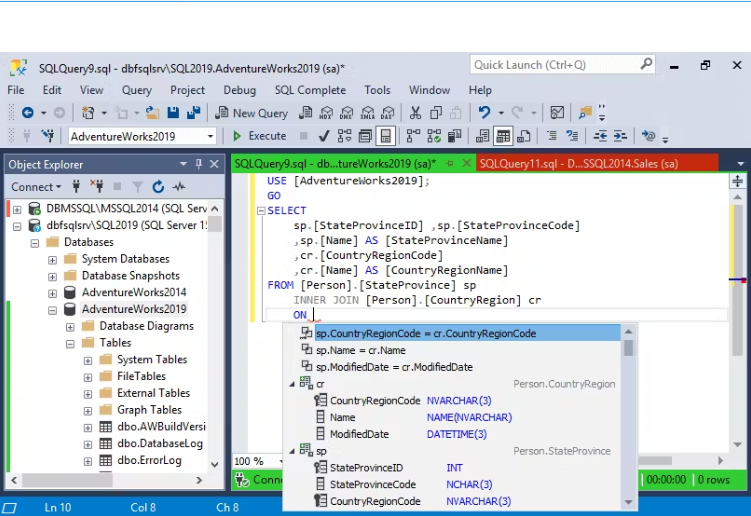
dbForge SQL Complete is a powerful coding assistance tool available as an add-in for SQL Server Management Studio (SSMS) and Visual Studio (VS). It offers numerous features to enhance code quality and accelerate code creation within the standard interface.
Key Features:
- Intelligent SQL completion and suggestion
- T-SQL formatting and code standardizing
- Code Refactoring * Productivity Extension
- Support for SSMS 21.0 Preview 7
dbForge SQL Complete greatly reduces human typing errors. Its integration with SSMS enhances coding capabilities, providing users with a robust toolset.
|
|||||
SQL Server:
Platforms Supported
Windows
Supported
Mac
Not Supported
Linux
Not Supported
Cloud
Not Supported
On-Premises
Not Supported
iPhone
Not Supported
iPad
Not Supported
Android
Not Supported
Chromebook
Not Supported
|
dbForge SQL Complete:
Platforms Supported
Windows
Supported
Mac
Not Supported
Linux
Not Supported
Cloud
Not Supported
On-Premises
Not Supported
iPhone
Not Supported
iPad
Not Supported
Android
Not Supported
Chromebook
Not Supported
|
|||||
SQL Server:
Audience
Any business and organization seeking a solution to manage their cloud operations
|
dbForge SQL Complete:
Audience
Database developers and administrators
|
|||||
SQL Server:
Support
Phone Support
Not Supported
24/7 Live Support
Supported
Online
Supported
|
dbForge SQL Complete:
Support
Phone Support
Supported
24/7 Live Support
Not Supported
Online
Supported
|
|||||
SQL Server:
API
Offers API
Not Supported
|
dbForge SQL Complete:
API
Offers API
Not Supported
|
|||||
SQL Server:
Screenshots and Videos |
dbForge SQL Complete:
Screenshots and Videos |
|||||
SQL Server:
Pricing
Free
Free Version
Supported
Free Trial
Not Supported
|
dbForge SQL Complete:
Pricing
$129.95
Free Version
Supported
Free Trial
Supported
|
|||||
SQL Server:
Reviews/
|
dbForge SQL Complete:
Reviews/
|
|||||
SQL Server:
Pros & Cons from Real UsersPros
Cons
|
||||||
SQL Server:
Training
Documentation
Supported
Webinars
Not Supported
Live Online
Not Supported
In Person
Supported
|
dbForge SQL Complete:
Training
Documentation
Supported
Webinars
Not Supported
Live Online
Supported
In Person
Not Supported
|
|||||
SQL Server:
Company InformationMicrosoft
Founded: 1975
United States
www.microsoft.com/en-us/sql-server/
|
dbForge SQL Complete:
Company InformationDevart
Founded: 1997
United States of America
www.devart.com
|
|||||
SQL Server:
Alternatives |
dbForge SQL Complete:
Alternatives |
|||||
|
SQL Server:
|
dbForge SQL Complete:
|
|||||
|
SQL Server:
|
dbForge SQL Complete:
|
|||||
|
SQL Server:
|
dbForge SQL Complete:
|
|||||
|
SQL Server:
|
dbForge SQL Complete: | |||||
SQL Server:
Categories |
dbForge SQL Complete:
Categories |
|||||
SQL Server:
Database Features
Backup and Recovery
Supported
Creation / Development
Supported
Data Migration
Not Supported
Data Replication
Not Supported
Data Search
Not Supported
Data Security
Supported
Database Conversion
Not Supported
Mobile Access
Supported
Monitoring
Not Supported
NOSQL
Supported
Performance Analysis
Not Supported
Queries
Not Supported
Relational Interface
Not Supported
Virtualization
Not Supported
Business Intelligence Features
Ad Hoc Reports
Supported
Benchmarking
Supported
Budgeting & Forecasting
Supported
Dashboard
Not Supported
Data Analysis
Supported
Key Performance Indicators
Not Supported
Natural Language Generation (NLG)
Not Supported
Performance Metrics
Supported
Predictive Analytics
Not Supported
Profitability Analysis
Not Supported
Strategic Planning
Not Supported
Trend / Problem Indicators
Not Supported
Visual Analytics
Not Supported
Relational Database Features
ACID Compliance
Supported
Data Failure Recovery
Supported
Multi-Platform
Supported
Referential Integrity
Supported
SQL DDL Support
Supported
SQL DML Support
Supported
System Catalog
Supported
Unicode Support
Supported
SQL Server Features
CPU Monitoring
Supported
Credential Management
Supported
Database Servers
Supported
Deployment Testing
Supported
Docker Compatible Containers
Supported
Event Logs
Supported
History Tracking
Supported
Patch Management
Supported
Scheduling
Supported
Supports Database Clones
Supported
User Activity Monitoring
Supported
Virtual Machine Monitoring
Supported
|
||||||
SQL Server:
Integrations
SQL
Supported
SQL Server Management Studio (SSMS)
Supported
Aqua Data Studio
Supported
Calibration Control
Supported
Cisco HyperFlex
Supported
DataBlend
Supported
Dolphin Imaging Plus
Supported
Gravity Forms
Supported
GrowthBook
Supported
Metaplane
Supported
|
dbForge SQL Complete:
Integrations
SQL
Supported
SQL Server Management Studio (SSMS)
Supported
Aqua Data Studio
Not Supported
Calibration Control
Not Supported
Cisco HyperFlex
Not Supported
DataBlend
Not Supported
Dolphin Imaging Plus
Not Supported
Gravity Forms
Not Supported
GrowthBook
Not Supported
Metaplane
Not Supported
|
|||||
|
SQL Server:
|
dbForge SQL Complete:
|