R-Drive ImageR-Tools Technology
|
YXFileousaa
|
|||||
Related Products
|
||||||
About
R-Drive Image is a potent utility providing disk image files creation for backup or duplication purposes. A disk image file contains the exact, byte-by-byte copy of a hard drive, partition or logical disk and can be created with various compression levels on the fly without stopping Windows OS and therefore without interrupting your business. These drive image files can then be stored in a variety of places, including various removable media such as CD-R(W)/DVD, Iomega Zip or Jazz disks, etc. Using R-Drive Image, you can completely and rapidly restore your system after heavy data loss caused by an operating system crash, virus attack or hardware failure. R-Drive Image is one of the best backup and disaster recovery solutions to prevent losing your data after a fatal system failure. Simple wizard interface. Almost all actions can be specified by several mouse clicks, no in-depth computer management skills are required.
|
About
Your computer desktop is cluttered and confused, and the files or applications you want to find are always out of reach?
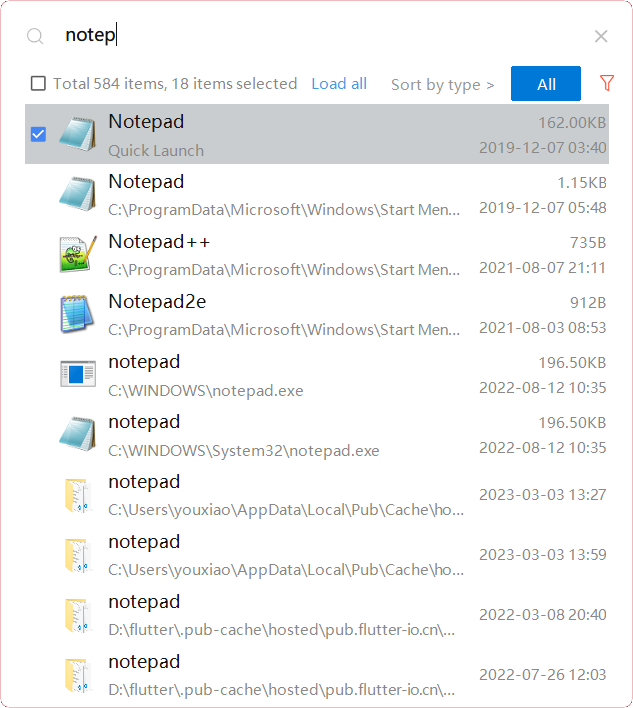
With YXFile you can tagging file, search file, launch apps.
Tag Any File:
YXFile can tag any file type on any file system: the tagging is stored in a database. YXFile won't mess up with your file names or leave hidden files on your disk. Move or rename a file under the same disk partition, its tags will not be lost
Search everything:
Search files and folders by name. as well as file tags and launch items.
Launch Apps:
One of the most powerful and favorite benefits of YXFile users is the Launch App feature. You can type the name of the program or application you want to open, or use a shortcode, click return, and YXFile opens the program.
|
|||||
Platforms Supported
Windows
Supported
Mac
Not Supported
Linux
Not Supported
Cloud
Not Supported
On-Premises
Not Supported
iPhone
Not Supported
iPad
Not Supported
Android
Not Supported
Chromebook
Not Supported
|
Platforms Supported
Windows
Supported
Mac
Not Supported
Linux
Not Supported
Cloud
Not Supported
On-Premises
Not Supported
iPhone
Not Supported
iPad
Not Supported
Android
Not Supported
Chromebook
Not Supported
|
|||||
Audience
Any user searching for a drive image and backup solution designed for Windows
|
Audience
Individual users who want to improve the efficiency of their computer use
|
|||||
Support
Phone Support
Supported
24/7 Live Support
Not Supported
Online
Supported
|
Support
Phone Support
Supported
24/7 Live Support
Not Supported
Online
Not Supported
|
|||||
API
Offers API
Not Supported
|
API
Offers API
Not Supported
|
|||||
Screenshots and Videos |
Screenshots and Videos |
|||||
Pricing
$44.95 one-time payment
Free Version
Not Supported
Free Trial
Supported
|
Pricing
$39/user
One-time payment for lifetime access to Yfile
Free Version
Not Supported
Free Trial
Supported
|
|||||
Reviews/
|
Reviews/
|
|||||
Pros & Cons from Real UsersPros
Cons
|
||||||
Training
Documentation
Supported
Webinars
Not Supported
Live Online
Not Supported
In Person
Supported
|
Training
Documentation
Supported
Webinars
Not Supported
Live Online
Not Supported
In Person
Not Supported
|
|||||
Company InformationR-Tools Technology
Canada
www.drive-image.com
|
Company Informationousaa
Founded: 2016
China
yxfile.cc/
|
|||||
Alternatives |
Alternatives |
|||||
|
|
||||||
|
|
||||||
|
|
|
|||||
|
|
|
|||||
Categories |
Categories |
|||||
Disk Imaging Features
Backup Scheduling
Supported
Bare-Metal Restore
Not Supported
Compression
Supported
Differential Backup
Not Supported
Disk Cloning
Not Supported
Encryption
Not Supported
Image Deployment
Not Supported
Incremental Backup
Not Supported
Web Access / Restoration
Not Supported
|
||||||
Integrations
No info available.
|
Integrations
No info available.
|
|||||
|
|
|